
Small server rooms, home studios, and crowded utility corners all need the same thing, a rack that keeps 19-inch gear organized without stealing more wall space than necessary. The eight picks below cover open-frame builds, enclosed cabinets, and a few middle-ground designs, so you can match airflow, security, and depth to your setup. That matters fast once patch cables, switches, and AV gear start stacking up like a drawer that never quite closes. You’ll see which models suit tight walls, heavier loads, and cleaner equipment storage.
Quick Look At The Shortlist


Tecmojo 6U Wall Mount Server Cabinet
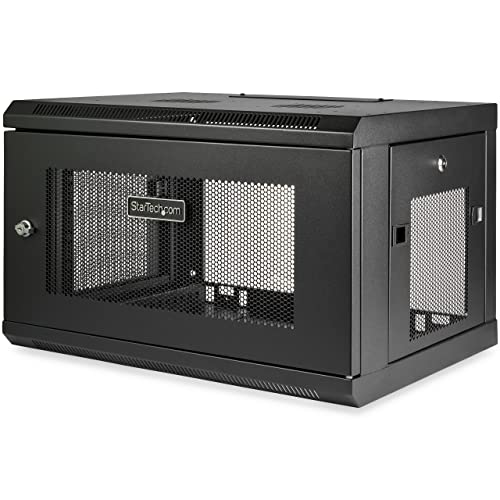
StarTech 6U Wall-Mount Cabinet RK616WALM
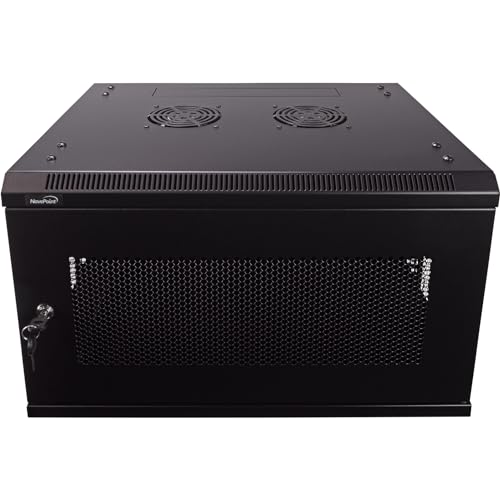
NavePoint 6U Server Rack 17.7 Deep

VEVOR 6U Wall Mount Network Server Cabinet

Tecmojo 6U Wall Mount Server Rack

RIVECO 6U Wall Mount Rack for Network

Tecmojo 6U Fixed Wall Mount Network Rack
More Details On Our Top Picks
Open-frame racks like this suit setups that need fast access and clean cable routing more than they need a locked enclosure. The 1.5 mm cold-rolled SPCC steel body gives it a firmer feel than lighter utility frames, and the 16-inch depth keeps it in reach for a wall-mounted network nook. At 200 pounds of stated support, it has enough headroom for a compact stack of gear without feeling overbuilt.
In a garage office, small AV closet, or studio corner, that open layout can make swaps and troubleshooting less annoying. The trade-off is obvious, though, since dust and exposed connectors stay visible, so you’ll want a tidy cable plan from day one.
Strong Points
- Steel construction lends a sturdy, no-nonsense feel.
- 16-inch depth suits shallower wall spaces.
- Open frame keeps cables easy to reach.
- 200-pound support gives useful load headroom.
Things To Consider
- Open sides leave gear exposed to dust.
- No enclosure means less visual concealment.
- Wall mounting still calls for careful anchoring.
Feature Snapshot
Who It Suits Best
You’ll get the most from this rack in a home lab, AV closet, or light-duty office network setup that values openness over concealment.
A Better Fit Elsewhere
StarTech 6U Wall-Mount Cabinet RK616WALM suits you better when you want an enclosed layout with a more structured, cabinet-style feel.
This cabinet leans toward a cleaner, more finished look than the open NavePoint rack above. The locking glass door and side panels matter most in spaces where you want to keep fingers off the gear and the front of the setup visually contained. The 450 mm depth gives you more breathing room than shallower frames, which helps when patch cords and accessories start multiplying.
The included cooling fan and vented approach make sense for active network gear, especially in a closet that doesn’t get much air movement. The honest trade-off is that enclosed cabinets usually take a little more care during installation and cable routing, so this fits a steadier setup better than a constantly changing one.
Highlights
- Locking door adds a more contained setup.
- Glass front keeps gear visible without exposure.
- 450 mm depth helps with cable clearance.
- Cooling fan supports air movement inside the cabinet.
- Side panels help the rack look neater in shared rooms.
Small Caveats
- Enclosed builds usually take longer to organize neatly.
- Glass and hardware call for a little more cleaning.
- Heavier cabinet styling can feel bulky in small rooms.
Core Details
Who Should Grab It
You’ll appreciate this most in an office, media room, or shared utility space where appearance and access control both matter.
Swap It Out When
NavePoint 6U Wall Mount Rack suits you better when you want a simpler open-frame build for faster gear changes.
StarTech takes a more enclosed, cabinet-like route than the first two picks, and that usually suits a tidier IT corner. The assembled format saves you from a more complicated build-out, while the SPCC steel body and 15-inch max depth keep the footprint controlled. That depth is worth paying attention to, because it suits compact equipment stacks more comfortably than bulky hardware.
The included 1U shelf adds a practical touch for small accessories or devices that do not sit cleanly on rails alone. In a school office, small business closet, or studio rack wall, that kind of ready-to-use structure helps you get to a finished setup sooner, though the enclosed style still asks for more thoughtful cable management than an open frame.
Reasons To Buy
- Assembled format saves setup time.
- Enclosed cabinet layout keeps gear visually contained.
- 15-inch maximum depth suits smaller equipment stacks.
- Included shelf adds flexibility for accessories.
- SPCC steel gives the cabinet a solid feel.
Areas To Watch
- Shallower depth limits larger devices.
- Enclosed layout needs more cable planning.
- Cabinet style takes a bit more wall presence.
Technical Sheet
Built With In Mind
You’ll get the most from this cabinet in a small business closet or controlled office setup where a cleaner, preassembled enclosure saves effort.
Look Elsewhere When
RIVECO 6U Wall Mount Rack for Network fits better for a more open layout and heavier-looking, less enclosed mounting needs.
Compared with the earlier NavePoint open-frame pick, this version moves into a full cabinet with a locking perforated door and removable side panels. That perforation helps air move through the front, which matters in a gear closet that runs warm, while the two fans push it further toward a more managed install. The 17.7-inch depth gives a little extra room over the 16-inch model, so cable bends and accessory placement feel less cramped.
The trade-off is predictably the same one that comes with enclosed gear storage, since you gain a cleaner front but lose some of the instant reach of an open frame. For a busier network wall, though, that balance often feels worth it because the cabinet keeps the setup looking intentional instead of exposed.
Bright Spots
- Perforated front helps support airflow.
- Two fans add more cooling support.
- Removable side panels make access easier during setup.
- 17.7-inch depth gives a bit more working room.
- Locking front door keeps the gear contained.
Points To Note
- Fans and panels mean more parts to keep track of.
- Enclosed cabinets need tidier cable work.
- Heavier enclosure style is less minimal on the wall.
Details At A Glance
Right Fit For
You’ll appreciate this rack in a home network corner or office cabinet where airflow and a neater front both matter.
Where A Sibling Pick Shines
Tecmojo 6U Wall Mount Server Rack suits you better when you want a simpler open-frame layout with more direct access.
VEVOR goes shallower than the enclosed NavePoint and Tecmojo cabinets above, so it fits a tighter wall area more comfortably. The locking glass door and side panels give you a more finished enclosure, while the stated 200-pound ground-mounted load figure suggests it’s built for a meaningful stack of gear rather than a bare minimum install. That said, the 14.8-inch depth makes it a tighter fit for bulkier equipment.
For a hallway utility niche or compact office corner, that smaller depth can be the whole point, especially when wall space is already spoken for. The honest read is that you’ll want to measure your devices carefully before committing, because an enclosure this compact rewards planning more than improvisation.
Best Bits
- 14.8-inch depth works well in tight spaces.
- Locking glass door keeps the look tidy.
- Side panels help close off the cabinet.
- 200-pound stated capacity offers useful load confidence.
Room For Improvement
- Shallower depth limits larger gear choices.
- More compact enclosures need careful measuring.
- Glass and panels add cleaning chores.
Core Details
Whose Shelf It Belongs On
You’ll like this rack most in a compact wall area where cabinet styling matters but depth has to stay controlled.
Another Choice May Suit
StarTech 6U Wall-Mount Cabinet RK616WALM is the smarter fit for you when you want a more traditional cabinet setup with included assembly and shelf support.
This Tecmojo model stays open and flexible, but the mounting detail is what makes it stand out. The 16-inch spacing between mounting holes and the choice between square-hole or tapped-hole installation give you more room to match different server or AV arrangements. For a mixed equipment wall, that flexibility can save some hassle during setup.
It also runs 18 inches deep, which puts it a touch deeper than the NavePoint open-frame rack at the start of the list. That extra depth can help with cleaner cable bends, though the open format still leaves gear visible, so it suits utility spaces and media rooms more than polished public areas.
Standout Traits
- Flexible hole setup helps with compatibility.
- 18-inch depth gives extra working room.
- Open frame keeps hardware easy to reach.
- Useful for mixed computer and AV gear.
Softer Spots
- Open construction leaves equipment exposed.
- More flexible mounting still means careful planning.
- Less visual polish than enclosed cabinets.
Feature Rundown
Made For
You’ll find this useful in a media room, lab bench wall, or mixed AV area where mounting flexibility matters as much as depth.
Reach For A Different Pick When
VEVOR 6U Wall Mount Network Server Cabinet suits you better when you want an enclosed cabinet instead of an open frame.
RIVECO is the most straightforward strength play in the group, with reinforced load support and both vertical and horizontal mounting support. That makes it a useful fit for studios and IT corners where the rack position needs to adapt to the room rather than forcing the room to adapt to the rack. The 19-inch equipment fit keeps it aligned with standard gear.
It leans less toward the enclosed cabinet feel of the Tecmojo and VEVOR picks, so the payoff is flexibility rather than concealment. You may find that trade-off attractive in a workshop or production space, where access and placement often matter more than a polished front panel.
Upsides
- Supports vertical or horizontal mounting.
- Reinforced load focus suits heavier-looking installs.
- Works with standard 19-inch equipment.
- Useful in rooms with awkward wall layouts.
Worth Noting
- Open style leaves gear visible.
- Adaptable mounting still asks for careful planning.
- Less enclosure means less protection from dust.
Feature Card
Perfect Match For
You’ll like this most for studio walls, workshops, or small IT setups that need adaptable mounting more than enclosure styling.
Skip It When
Tecmojo 6U Wall Mount Server Cabinet suits you better if you want locking sides and a more enclosed look.
This fixed open-frame rack keeps things simple, and that simplicity is the point. With 15.8-inch depth, it stays close to the wall while still offering enough room for common server, AV, IT, communication, and patch-panel gear. In a wiring closet, that usually translates into less fuss and easier access during routine changes.
Compared with the more feature-heavy cabinets above, this one asks less of your space and your installation time. The trade-off is a familiar one, since open frames put everything on view, but for a patch-panel wall or serviceable network corner, that can be a practical choice rather than a drawback.
Best Bits
- Shallow depth helps in compact wall spaces.
- Open frame makes access straightforward.
- Fits several gear types, including patch panels.
- Good choice for easy maintenance access.
Minor Gripes
- No enclosure means full visibility of equipment.
- Open builds need a bit more dust awareness.
- Best for functional spaces rather than showcase rooms.
Quick Facts
The Right Fit
You’ll be happiest with this rack in a serviceable utility space, wiring closet, or patch-panel area where speed and simplicity matter.
Where Shoppers Go Wrong
NavePoint 6U Server Rack 17.7 Deep makes more sense when you want an enclosed cabinet with fans and side panels instead of a bare frame.
How To Choose The Right 6u Data Racks
Start With Access, Airflow, And Security
Open-frame racks make sense for network closets that need fast hands-on access. Enclosed cabinets suit rooms where you want to reduce visual clutter, protect connectors, and keep front panels covered. The trade-off is simple: easier access usually means more exposure, while more enclosure usually means more planning.
Fans, perforated doors, and side panels matter most in warm spaces with active switches, routers, or AV gear. A cabinet with airflow features can be a smarter long-term fit than a bare frame in a sealed utility nook. That extra structure can feel like a small fortress for your gear, but only when the room layout supports it.
Depth Is The Detail That Decides Fit
Six rack units, or 6U, tells you the vertical capacity, but depth decides whether the hardware actually fits well. Shallower options around 15 to 16 inches suit compact installs, while deeper models give more room for cable bends and larger devices. You’ll want that extra depth in a real equipment closet, not just on paper.
Measure the gear, the cable clearance, and the wall space before settling on a model. That matters especially with enclosed cabinets, where the door and side panels can make a tight fit feel tighter. The right depth keeps installation calm instead of awkward.
Think About Load And Mounting Style
Load support is more than a spec line, it tells you how much gear the rack is built to carry without feeling flimsy. Open frames like the NavePoint and Tecmojo options suit lighter, more accessible setups, while reinforced or enclosed builds suit heavier stacks and tidier rooms. For home labs and small offices, that difference often decides whether the rack feels temporary or settled.
Mounting style matters too, especially with wall studs, hole spacing, and whether you need vertical or horizontal placement. RIVECO stands out for that kind of flexibility, while fixed wall racks simplify the install for standard rooms. Match the rack to the wall first, then the gear.
Choose For The Room You Actually Have
A studio wall, basement office, and shared utility closet each ask for something different. Open frames work well where you service gear often, while cabinet-style units make more sense in visible spaces. You’ll usually be happier choosing the rack that matches the room’s daily traffic, not just the gear list.
That also affects maintenance. Enclosed cabinets need more attention during cleaning and cable changes, while open racks need more dust awareness and a tidier layout. The best fit is the one you can live with after the novelty wears off.
Things Worth Knowing First
Mistakes Worth Dodging
One common slip is buying depth too quickly and forgetting to measure the actual devices. Another is choosing an open frame for a room where exposed cables will bother you every week. In both cases, the rack can be fine, but the fit ends up wrong.
Mounting details deserve the same attention. Hole spacing, wall framing, and door swing affect how the install feels once the box arrives. A little measuring upfront saves a lot of rearranging later.
The Upgrade Payoff
Higher-tier racks usually cost more because they add cabinet doors, side panels, fans, shelves, better steel, or more flexible mounting hardware. Those parts make sense in shared offices, media rooms, and busier network spaces where appearance and access control matter. You’re paying for structure, not just extra metal.
The upgrade is worth it when your setup will stay in place for a long time or carry a more demanding mix of equipment. For a temporary bench or a simple patch-panel wall, a basic open frame can be enough. For a polished permanent install, the extra hardware earns its keep.
Frequently Asked Questions
What does 6U mean in a rack?
6U means the rack has six rack units of vertical space. That gives you enough room for a compact stack of network, AV, or IT gear.
Should you choose an open frame or an enclosed cabinet?
Open frames make access and cable changes easier. Enclosed cabinets suit you better when you want a cleaner front and more coverage around the gear.
How deep should a 6u rack be?
Depth depends on the devices you plan to mount, but 15 to 18 inches is a common range in this roundup. Deeper models give you more breathing room for cables and connectors.
Can a 6u rack handle heavier gear?
Some can, but the stated load support varies by model. Always match the rack’s support rating to the weight and layout of your equipment stack.
What should you measure before mounting one?
Measure wall space, device depth, and cable clearance first. You’ll also want to account for door swing and any room needed for hands-on access.
Closing Thoughts
The right 6u Data Racks come down to how you use the space more than how much gear you own. Open frames make sense for fast access and simple installs, while enclosed cabinets fit better in rooms where you want a tidier look and a little more protection around the equipment. Once you match depth, mounting style, and airflow to the room, the choice gets much easier. Pick the layout that makes your setup easier to live with, not just easier to list on paper.
