
You’re probably here because a small part can make a build feel complete, or a missing piece can stall the whole job. These picks focus on practical, lower-friction options for home builders, repair jobs, tidy cable-and-screw kits, and a few simple upgrade parts that fit real desk setups. You’ll see where a power supply makes sense, where a screw kit saves time, and where lighting or switch replacements are worth the extra attention.
The Shortlist At A Glance
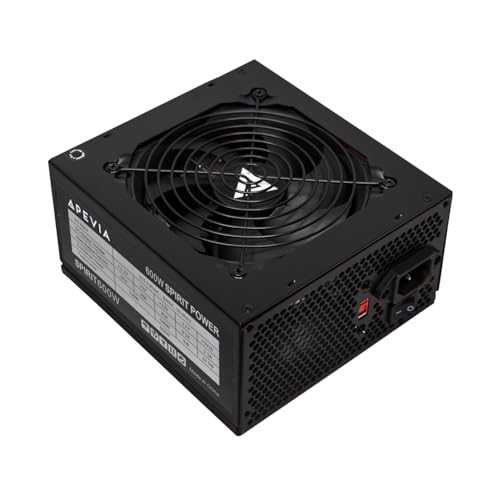
Apevia SPIRIT600W Spirit 600W ATX Power Supply
APEVIA VENUS450W Venus 450W ATX Power Supply

502PCS Computer Screws Assortment Kit

Apevia ATX-SP700 Spirit 700W ATX Power Supply

23Sizes PCIe NVMe M.2 Screws Standoff Nut Kit

AsiaHorse ARGB Light Strip for Motherboard

M.2 Screws, Motherboard Screw for Asus Gigabyte Asrock MSI Motherboards

BlingKingdom 10 PCS Mechanical Keyboard Switches
A 600W supply like this fits the kind of desktop build that needs steady overhead without feeling oversized. The 120mm auto thermal fan matters because it aims to react to heat instead of running the same way all the time, and that usually keeps a case less distracting in a home office.
Compared with the 450W Apevia Venus below, this one gives you more breathing room for a fuller parts list. The trade-off is simple, it makes the most sense in a midrange tower rather than a very compact or ultra-low-power setup.
Strong Points
- 600W capacity gives you useful headroom for a typical starter or midrange desktop.
- The 120mm fan format usually helps keep airflow sensible inside a standard tower case.
- Single 12V output support suits common internal PC layouts.
- Quiet-operation focus is handy in a bedroom desk or shared room.
Small Caveats
- More power than a very basic office machine needs.
- Works best in a normal ATX case, not a tiny build.
- Long-term care still means keeping dust out of the fan area.
Feature Snapshot
Who Should Grab It
You’re the best match for this model if you’re piecing together a straightforward ATX desktop and want some extra electrical headroom without chasing a fancy platform.
Where A Sibling Pick Shines
APEVIA VENUS450W Venus 450W ATX Power Supply suits leaner office builds or lighter duty systems where a smaller power budget keeps the whole setup simpler.
The VENUS450W is the quieter, lighter-duty sibling in this group, and that makes sense for office towers or low-drama home machines. Manual input voltage switching between 115V and 230V gives you a bit of flexibility on the setup side, though it also asks for more attention during installation than an automatic-voltage unit.
Compared with the 600W SPIRIT model above, you give up some headroom, but you also avoid paying for power you may never use. For most simple desktops, that trade feels reasonable, especially when the goal is keeping the build tidy and uncomplicated.
What We Like
- 450W output is enough for lighter desktop work.
- Manual 115V and 230V input support adds setup flexibility.
- 120mm fan design suits common ATX case airflow.
- Quiet-operation focus helps in a shared room or work nook.
Worth Noting
- You need to match the input voltage correctly during setup.
- Less headroom than the 600W Apevia SPIRIT600W.
- Best suited to straightforward builds rather than power-hungry parts lists.
Core Details
Whose Shelf It Belongs On
You’ll get the most from this pick in a basic home office or a simple school-and-web machine where wattage needs stay modest.
Look Elsewhere When
Apevia ATX-SP700 Spirit 700W ATX Power Supply fits better for builders who know they’ll add more drives, fans, or a heavier graphics card later.
Hardware kits like this are the quiet savers in a repair drawer, because you don’t notice them until a missing screw stops a job. A 502-piece assortment makes sense for anyone who keeps a desktop open on the bench, swaps drives, or repairs old cases that never seem to use the same fastener twice.
Compared with the power supplies in the list, this one solves a smaller problem but does it in a broader way. The trade-off is that a mixed kit can feel a little messy to sort, so it rewards a small parts organizer more than a random desk drawer.
Upsides
- Large piece count helps cover many common repair moments.
- Useful for cases, drives, fans, and motherboard hardware.
- Good fit for a bench drawer or home repair kit.
- Helps reduce downtime when one tiny fastener goes missing.
Areas To Watch
- Sorting the parts takes a little patience.
- Small pieces are easier to misplace without labeled storage.
- Best for repair work, not a visible upgrade.
Quick Facts
Made For
You’re in the sweet spot here if you build, repair, or cannibalize desktop parts often enough that a missing screw is a real inconvenience.
Swap It Out When
ZITEXUN 23Sizes PCIe NVMe M.2 Screws Standoff Nut Kit is a tighter fit for anyone who mainly needs a focused set for SSD mounting rather than a broad mixed assortment.
The 700W SPIRIT is the most headroom-friendly power option in this list, so it belongs in builds that need room to grow. That extra cushion matters more once you add several drives, extra fans, or a more demanding GPU, and it helps the whole system feel less strained.
Compared with the 600W model above, the appeal here is simple, you’re paying for a bit more margin. The honest read is that small office rigs won’t need it, but a fuller ATX tower will appreciate the reserve.
Reasons To Buy
- 700W rating gives generous space for expansion.
- 120mm fan and thermal control suit everyday desktop use.
- Single 12V output design fits common PC power layouts.
- Quiet-operation focus works well in a shared workspace.
Points To Note
- More capacity than many simple builds require.
- Best value shows up only in fuller systems.
- Like any internal PSU, dust control still matters over time.
Details At A Glance
The Right Fit
You’ll appreciate this one most in a build that’s meant to stay useful for a few part changes, not just a bare-bones start.
A Better Fit Elsewhere
Apevia SPIRIT600W Spirit 600W ATX Power Supply is the calmer match for simpler builds that don’t need the extra wattage reserve.
Some parts kits are broad, and this one is more focused, which is exactly why it belongs on a shortlist like this. For M.2 storage installs, a dedicated standoff-and-screw kit keeps you from rummaging through a mixed bag of case hardware that may not fit the board.
The brass, galvanized steel, and nickel-plated steel materials matter because they’re chosen for practical wear resistance, not decoration. Compared with the 502-piece set above, this one is less general, but it should feel easier to keep organized in a small tool box.
Best Bits
- Focused layout suits SSD mounting jobs.
- Material mix is aimed at resisting corrosion.
- Handy for repeated install and removal cycles.
- Smaller kit size keeps storage simple.
Minor Gripes
- Too specialized for broad repair work.
- Sorting still matters, especially for tiny parts.
- Works best when your storage tray stays labeled.
Core Details
Best Suited To
You’ll like this most if you already know your way around motherboard storage installs and want a compact, purpose-built kit.
Consider Something Else When
Bemaka 502PCS Computer Screws Assortment Kit works better for general repair drawers where you need a wider mix of fasteners on hand.
This strip is for the builder who wants the case to look finished, not just functional. The 28 independent addressable RGB zones give you finer lighting control than a plain single-color strip, and the 5V 3-pin motherboard connection points it toward compatible Aura Sync-style setups.
Compared with the screw kits, this is the most cosmetic pick in the roundup, so the payoff is visual rather than structural. The catch is compatibility, because a lighting strip like this only feels easy once the board header and case layout line up cleanly.
Highlights
- 28 addressable lighting zones allow more detailed effects.
- 5V 3-pin connection supports compatible motherboard lighting headers.
- Can clean up the look of a windowed case.
- Useful for showcase builds and desk setups.
Room For Improvement
- Needs the right motherboard header for proper use.
- Visual parts add cables that must be routed neatly.
- Less useful if you only want plain system function.
Feature Rundown
Who Will Love This
You’re the right match if your build uses a windowed case and you care about the visual finish as much as the hardware inside.
Another Choice May Suit
Apevia ATX-SP700 Spirit 700W ATX Power Supply makes more sense when internal power capacity matters far more than case lighting.
This kit stands out for cross-brand motherboard compatibility, which is useful in shops or home setups where the board lineup changes often. The listed 13 screw types also make it feel broader than a very narrow M.2-only box, so you get more room for small repair surprises.
Compared with the 23Sizes kit, this one is less specialized and more adaptable across Asus, Gigabyte, Asrock, MSI, and Lenovo hardware mentions in the source data. The trade-off is that broader coverage can mean a bit more sorting, though that’s a fair exchange in a mixed repair drawer.
Standout Traits
- Thirteen screw types cover many small repair jobs.
- Motherboard brand coverage is broad enough for mixed systems.
- Useful for HDD, SSD, fan, PSU, and case hardware.
- Good for a bench kit that sees frequent use.
Honest Caveats
- More variety means more sorting.
- Small parts need a labeled container to stay organized.
- Less targeted than a dedicated SSD mounting set.
Feature Card
Built With In Mind
You’ll appreciate this most if you repair different desktop brands and want a parts drawer that covers more than one platform.
Reach For A Different Pick When
23Sizes PCIe NVMe M.2 Screws Standoff Nut Kit is the cleaner choice for people who mainly need hardware for SSD mounting only.
These blue clicky switches suit you best when you want a more tactile typing feel and a sharper audible click from a mechanical board. The transparent housing also makes sense for backlit keyboards, so the switch does more than one job, it shapes both feel and appearance.
Compared with the case hardware above, this is the most hands-on upgrade in the list because keyboard swaps ask for a bit more care during installation. The stated 4 mm total travel and 2.2 mm working travel tell you it’s built for a familiar Blue-style feel, and the 3-pin layout keeps it aimed at compatible boards rather than every keyboard under the sun.
Positives
- Clicky blue feel suits typists who like clear feedback.
- Transparent housing works well with keyboard lighting.
- Plastic shell, copper gasket, spring, and POM stem make up a fairly complete switch build.
- Stated keystroke lifespan adds confidence for frequent use.
Softer Spots
- Click sound is not a quiet-office match.
- Pins may need gentle straightening after shipping.
- Only 10 switches, so large keyboard projects need multiple packs.
Technical Sheet
Perfect Match For
You’re the right fit if you enjoy clicky mechanical boards and want a small pack for repair or switch tuning work.
Where Shoppers Go Wrong
AsiaHorse ARGB Light Strip for Motherboard is the better route for a visual PC upgrade, not a keyboard feel upgrade.
How To Choose The Right Affordable Pc Parts
Match The Part To The Job
Power supplies, screw kits, lighting strips, and keyboard switches solve very different problems, so the first step is matching the part to the actual task. A 700W unit belongs in a fuller tower, while a screw assortment belongs in a repair drawer, not the main build box.
That sounds obvious, yet a lot of setup trouble comes from buying the right category with the wrong scale. Small office PCs usually do fine with lower wattage, while hobby builds with extra drives or fans need more room in the power budget.
Check Compatibility Before Anything Else
Compatibility is where affordable parts either feel easy or turn into a headache. Look for ATX fit on power supplies, 5V 3-pin headers for ARGB strips, 3-pin support for the keyboard switches, and the exact screw type your board or case uses.
Motherboard brands matter less than the mounting format, but the board still matters when you’re dealing with M.2 standoffs or lighting headers. A quick parts list check saves more time than any pretty listing ever will.
Look Past The Main Spec
Watts, piece counts, and switch type get the spotlight, but the smaller details often decide long-term comfort. Auto thermal fan control, manual voltage selection, or corrosion-resistant screw materials all affect how the part behaves after installation.
In plain terms, you want the feature that lowers friction after the box is opened. That may mean cleaner airflow in a desk tower, fewer loose fasteners during repairs, or a keyboard switch that feels right for long typing sessions.
Spend Where It Shows Up Daily
Higher-tier versions usually cost more because they add headroom, broader compatibility, or better materials. A stronger PSU can leave more room for future parts, and a more focused screw kit can reduce the odds of a stuck repair at 10 p.m.
The upgrade makes sense when the part is something you touch often, or when failure would interrupt the whole setup. For occasional repairs, a basic kit is enough; for a daily gaming board or a build you plan to expand, a better component pays for itself in convenience.
Before You Choose One
Common Shopping Slip Ups
One frequent mistake is treating every screw kit like a general-purpose fix-all. A focused M.2 set is useful, but it won’t replace a mixed hardware assortment for case and fan jobs.
Another miss is buying power capacity without checking the rest of the build. A 700W supply only makes sense when the system can actually use that headroom.
The Upgrade Payoff
Extra cost usually goes into stronger material choices, better fit breadth, or more control over how the part behaves. That’s why a nicer screw kit or a more capable PSU often feels easier to live with than the plainest option.
You also pay for convenience, and that’s easy to overlook. Fewer compatibility headaches, cleaner cable routing, and less time hunting for the right standoff can matter more than a flashy spec line.
Frequently Asked Questions
Do Affordable Pc Parts Usually Work For New Builds?
Yes, many of them fit first-time desktop builds just fine when the specs match your parts list. The key is staying disciplined about case size, connector type, and power needs.
How Do You Choose The Right Power Supply Wattage?
Start with the system’s actual demand, then leave some room for future upgrades. A simple office PC needs less than a tower that may gain extra drives or a heavier graphics card later.
Why Do Some Screw Kits Look So Similar?
They often overlap in the basics, but the real difference sits in part count, material mix, and the hardware types included. One kit may be better for broad repairs, while another is tighter for M.2 mounting.
Are RGB Light Strips Hard To Fit?
They’re straightforward only when the motherboard header and cable path line up well. A clean install matters because the lighting should add polish, not clutter.
Do Clicky Keyboard Switches Suit Every Desk?
No, the sharper sound and tactile bump are a taste issue, and quiet workspaces usually need something softer. They make more sense for gaming rooms or personal desks where feedback matters more than silence.
Closing Thoughts
You don’t need a giant parts list to make a PC feel complete, you need the right pieces for the job in front of you. That means choosing wattage with some patience, keeping screw kits organized, and treating extras like ARGB strips as finishing touches rather than essentials. A smart affordable build often comes down to small decisions that prevent bigger annoyances later. Pick for your actual setup, and the whole desk feels easier to live with.
