
Air mouse remotes make sense when a regular remote feels too slow for typing, pointer control, or bouncing between apps on a TV box, projector, or mini PC. You also get a cleaner setup for couch browsing, slide control, and quick searches on devices that live in a tight media corner. The better models combine motion control, keyboard shortcuts, and a layout that doesn’t fight your hand.
The Shortlist At A Glance

Rock&Rown MX3 Pro 2.4G Android Box Remote

BL Air Mouse Remote Control Voice Remote

MX3 Pro Mini Keyboard Backlight Fly Remote Mouse
EASYTONE Air Mouse Remote Control 2.4 GHz
Air Mouse Remote MX3 Pro 2.4G Wireless Mini Keyboard

A61 Air Mouse Remote with Infrared Learning

Rechargeable Air Mouse for PC iOS Android with Touchpad
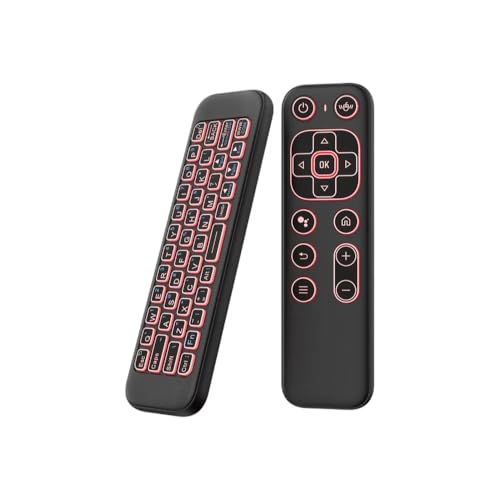
Mini Air Mouse Remote Keyboard with 7-Color Backlight
More Details On Our Top Picks
The Rock&Rown MX3 Pro sits in the useful middle ground between a pointer remote and a tiny keyboard, which is exactly what many Android TV box setups need. In a living room, that combo helps with search fields, app names, and the kind of cursor nudging that a basic button remote handles poorly.
You may find the hybrid layout handy on a projector cart or a cramped media shelf, since it cuts down on extra accessories. Compared with the BL and EASYTONE options later in this list, this one leans more toward a straightforward all-purpose setup than voice-heavy extras.
Strong Points
- Mini keyboard support makes text entry less clumsy than pointer-only remotes.
- Works across Android TV boxes, projectors, HTPC setups, Xbox, and Raspberry Pi use cases.
- Combination control suits couch browsing and short search tasks.
- The format helps reduce desk clutter in a small media area.
Things To Consider
- Feature breadth can feel busy until you learn the button layout.
- The compact body may not suit very large hands.
- Text-heavy use still feels slower than a full keyboard.
Core Details
Who It Suits Best
Home media users who want one compact controller for both navigation and typing will get the most out of this layout.
Where A Sibling Pick Shines
The BL Air Mouse Remote Control suits you better when voice input matters more than keyboard-style typing.
BL leans harder into voice support than the Rock&Rown MX3 Pro, and that makes sense for people who search a lot on a smart TV or Android box. The 6-axis gyroscope, meaning motion sensing across six directions, helps the pointer respond more naturally than a fixed button pad.
The trade-off shows up in the voice side, since the listing notes that voice search works inside supported search boxes and apps rather than everywhere. For a streaming room or a laptop connected to the TV, that limitation is manageable, just worth keeping in mind.
Positives
- Voice input can speed up searches and short commands.
- Gyroscope control helps with cursor movement on screen.
- 2.4G RF connection keeps the setup tidy with a USB receiver.
- Fits PC, smart TV, Android TV box, HTPC, laptop, and projector use.
- The motion-based pointer feels better suited to media navigation than pure number-pad remotes.
Softer Spots
- Voice search has app-level limits, so it won’t suit every workflow.
- Some setup steps may be needed before voice features behave the way you expect.
- The extra functions add learning time for first-time users.
Feature Snapshot
Who Will Love This
Streaming-heavy households and casual home theater setups will appreciate the mix of voice and motion control.
Skip It When
The Rock&Rown MX3 Pro is the cleaner match for you if you care more about direct mini-keyboard entry than speech features.
Backlit keys set this Guiheng model apart from the more basic MX3-style remotes above, and that matters in a dim living room. The tiny wireless keyboard design also fits quick searches on an Android TV box or mini PC without asking for much space.
In a shared family room, the lighting can keep you from hunting for keys at night, though the battery is not included. That small omission means you’ll want to plan the first setup before it becomes your main controller.
Highlights
- Backlit keys help during evening use or low-light movie sessions.
- Mini keyboard format makes text entry less awkward than remote-only control.
- Works across Android TV, HTPC, IPTV, networked set-top boxes, and mini PCs.
- Small body stores easily beside a media box or in a drawer.
Areas To Watch
- Battery not included, so there is one more setup step before use.
- The compact layout can feel tight for users with larger hands.
- Backlighting helps in the dark, but it won’t replace a full-size keyboard.
At A Glance
Best Suited To
You get the most from this one in a low-light media room where quick typing and key visibility matter.
A Better Fit Elsewhere
The A61 Air Mouse Remote suits you better if you want voice input and Bluetooth in the same handheld.
EASYTONE takes a broader approach than the earlier voice-focused BL remote, mixing air mouse control, voice input, and IR learning in one body. The 17-key layout points to everyday navigation duties, from volume changes to page up and page down, which is useful on a TV or projector setup.
For most living rooms, that balance feels sensible rather than flashy. The built-in microphone adds voice entry, though the app limitation mentioned in the listing still applies, so it suits search-heavy use more than full-system speech control.
What We Like
- Three control modes cover pointer use, speech input, and IR learning.
- 17 keys keep common commands close at hand.
- USB receiver setup stays simple for home theater gear.
- Supports PC, Android TV box, laptop, projector, Windows, Android, and Mac OS use.
Room For Improvement
- Voice input is still tied to supported search boxes or apps.
- The many modes can feel like more than you need for a basic TV.
- Button familiarity takes a little time, especially with mixed home devices.
Details At A Glance
Whose Shelf It Belongs On
You should look at this one for a mixed-use entertainment room where one remote has to do several jobs.
Swap It Out When
The Guiheng MX3 Pro Mini Keyboard Backlight Fly Remote Mouse is the better fit for you if backlit keys matter more than voice features.
KUNSI keeps the formula lean here: 2.4G wireless connection and a motion-based cursor are the two headline ideas, and that simplicity helps in a TV box setup. Compared with the EASYTONE model, it leaves out the voice layer and focuses on getting you straight to browsing and pointing.
That stripped-back approach suits households that want fewer modes to learn. The lack of driver setup is useful, especially on a mini PC or projector where you want the remote working with less fuss.
Upsides
- Plug-and-play connection keeps setup short.
- 6-axis motion sensing supports on-screen pointer movement.
- Universal remote framing fits Android TV box, smart TV, projector, and Raspberry Pi use.
- Fewer extra modes can make daily use feel more straightforward.
Small Caveats
- Less feature density than voice-heavy or backlit options.
- Motion control still depends on getting used to hand movement.
- Typing-heavy use cases may call for a larger keyboard.
Core Details
Made For
You will like this most in a simple media setup where quick pairing matters more than extra features.
Look Elsewhere When
The A61 Air Mouse Remote is the stronger match if you want backlighting and Bluetooth in one handset.
The A61 feels like the most feature-packed of the bunch so far, because it adds Bluetooth, backlighting, voice, and a dual-sided mini keyboard around the usual motion control. That mix suits a home theater where you want fewer separate devices on the coffee table.
One thing worth considering is the IR learning note, which is limited to the power button. That keeps the learning side narrow, yet the rest of the spec sheet still gives you a strong fit for smart TV and HTPC use.
Reasons To Buy
- Backlit keys help after dark.
- Bluetooth plus 2.4G support broadens pairing options.
- Voice input can speed up search tasks in supported apps.
- Dual-sided mini keyboard adds flexibility for text entry.
- Gyroscope control helps with pointer movement on large screens.
Worth Noting
- IR learning is limited to the power button only.
- The richer feature set can take longer to learn.
- Backlit, voice, and Bluetooth all add complexity you may not need for a basic TV.
Feature Rundown
The Right Fit
You should reach for this one in a living room where one handheld needs to cover several jobs without adding more clutter.
Another Choice May Suit
The EASYTONE Air Mouse Remote Control 2.4 GHz is the easier call if you want a simpler control set with voice and IR learning but less complexity.
ZOZVO takes the category in a different direction, because the touchpad and presenter angle make it useful beyond the TV. For slide decks, camera control, or quick navigation on a laptop, the layout reads more like a travel tool than a living-room-only remote.
The Bluetooth and 2.4G support broaden where you can use it, and rechargeable power avoids the constant search for spare cells. The honest read is that this is less about couch comfort and more about mixed-device convenience.
Best Bits
- Touchpad control helps with laptop-style navigation.
- Presenter function suits slides and meeting rooms.
- Rechargeable design reduces battery swaps.
- Bluetooth and 2.4G support widen compatibility across devices.
- Works with PC, iOS, Android, and common app-based tasks.
Minor Gripes
- Touchpad layouts can take a little getting used to.
- Presenter-first design feels less couch-friendly than pure TV remotes.
- Broader device support also means more settings to learn.
Feature Card
Who Should Grab It
You will appreciate this most when your remote has to move between meetings, travel bags, and casual device control.
Where Shoppers Go Wrong
The iPazzPort mini keyboard model is the easier fit if your main job is couch browsing on a TV box rather than presentation work.
iPazzPort keeps things compact, but the 7-color backlight gives it a more finished feel than several of the plain black mini remotes here. In a dim room, that kind of visibility can matter more than people expect, especially on a projector or smart TV across the couch.
Compared with the ZOZVO presenter-focused remote, this one is more clearly built for living-room navigation. Rechargeable power and dual-mode control help it stay practical, though the smaller size means it still favors short typing bursts over longer sessions.
Bright Spots
- Backlight with seven color options improves nighttime visibility.
- Rechargeable design cuts down on battery swapping.
- Dual-mode control adds flexibility for TV box and projector use.
- Compact size stores easily and suits couch-side handling.
Honest Caveats
- Small body can feel cramped during longer typing stretches.
- Backlighting helps visibility, but it doesn’t change the limits of a mini keyboard layout.
- Best results come from short navigation tasks rather than heavy text entry.
Core Details
Built With In Mind
This one suits you best when you want a small, light controller for evening TV use and don’t mind a compact key layout.
Reach For A Different Pick When
The Rechargeable Air Mouse for PC iOS Android with Touchpad is the better match if you need touchpad control and presentation features first.
How To Choose The Right Air Mouse Remotes
Connection Type And Everyday Use
The first thing to sort out is how the remote talks to your device. Most of the picks here use 2.4G wireless, which usually means a USB receiver and a simple pairing path, while the A61 and the ZOZVO add Bluetooth for more device flexibility.
That difference matters in a home theater, a mini PC desk, or a travel bag. A receiver-based remote often feels more straightforward, but Bluetooth can help when you move between a TV box, laptop, or tablet-style setup.
Motion Control, Voice, And Typing
Gyroscope control, meaning hand-driven pointer movement, is the feature that makes these remotes feel like air mice instead of basic clickers. It helps with scrolling through menus, while a mini keyboard or touchpad makes search fields and logins less annoying.
Voice input sounds convenient, and it is, but the app support can be narrower than people expect. A remote with both voice and keyboard support usually gives you a safer middle path for daily use, especially on streaming boxes that still ask for a lot of typed text.
Layout, Backlighting, And Comfort
Compact remotes save space, yet small bodies can feel cramped during long sessions. Backlit keys matter more than they first appear, especially in dark rooms where you do not want to turn on a lamp just to find the home button.
That is where your use pattern should guide the choice. Short browsing sessions, projector control, and couch search tasks favor compact designs, while heavier typing or frequent slide control usually points you toward the ZOZVO touchpad model or one of the fuller mini-keyboard options.
Things Worth Knowing First
Mistakes Worth Dodging
One common slip is choosing a remote for its feature list instead of its actual job. A voice-heavy model looks appealing, yet it can feel awkward if your apps do not support speech entry the way you expect.
Another trap is overlooking keyboard size and key spacing. Tiny layouts work well for quick searches, but they can slow you down during longer logins or repeated text entry.
The Upgrade Payoff
More expensive models usually earn their higher placement with extra input modes, backlighting, dual wireless support, or a richer layout. Those parts raise the cost because they improve convenience across more devices, not because the core job changes.
Spending up makes sense when you split time between a TV box, a laptop, and a presentation setup. For a single living-room screen, a simpler remote often gives you the cleaner value and fewer buttons to memorize.
Closing Thoughts
You have a strong set of choices here, whether you want a simple TV box remote, a voice-capable model, or a more travel-friendly touchpad controller. The best fit comes down to how often you type, whether you need backlighting, and how many devices you want to cover with one handheld. Start with your main room or main device, and the right pick becomes pretty clear.
