
Airflow Matx Cases make more sense when your parts run warm, your desk space feels tight, or you want a cleaner build without giving up cooling headroom. You’ll see a mix here, from panoramic glass showpieces to compact mesh towers and wood-accented cases that look calmer on a desk. The right choice depends on how many fans you want, how much radiator room you need, and whether front-panel ports like USB-C matter to you. This roundup keeps the focus on real fit, not just flashy looks.
Quick Look At The Shortlist

MONTECH XR Panoramic High Airflow ATX PC Case

DARKROCK EC2 ATX Mid Tower Gaming PC Case
ASUS Prime AP201 Micro ATX PC Case
TGDGAMER MATX Micro ATX Case 80mm Fan Black

TGDGAMER MATX Micro ATX Case 80mm Fan White

Thermaltake View 170 TG ARGB Black Micro-ATX Case

Okinos Genuine Walnut Wood Micro ATX Case Cypress 3 Wood

MOROVOL MATX PC Case 270° Panoramic Tempered Glass Panel
More Details On Our Top Picks
The XR fits the person who wants a showcase case without giving up cooling room. With support for a 420mm graphics card, a 360mm radiator, and room for up to nine fans, it gives you plenty of breathing space for a warm-running gaming setup.
The dual tempered glass panels make the interior easy to show off, while the USB-C front port and magnetic dust filters add everyday convenience. The trade-off is size, because a roomy chassis like this will feel less nimble than the smaller ASUS Prime AP201.
What We Like
- Three included ARGB PWM fans give you a useful starting point for airflow and lighting.
- 420mm graphics card support leaves generous room for larger modern cards.
- 360mm radiator support helps you plan a liquid-cooling layout with more flexibility.
- Dual tempered glass panels give your build a clean, open look from more than one angle.
- Magnetic dust filters make routine cleaning less annoying for a desk that gathers lint fast.
Points To Note
- The larger footprint will take more desk or floor space than the slim TGDGAMER cases.
- Glass panels reward neat cable routing, so a tidy build matters here more than on mesh-first towers.
- Up to nine fans sounds flexible, but it also means you need a cooling plan, not just extra hardware.
Feature Rundown
Who It Suits Best
Desk builders who want a large, polished ATX showcase with real cooling room will get the most from this one.
A Better Fit Elsewhere
The ASUS Prime AP201 suits compact-build fans who want strong airflow in a smaller shell.
The EC2 lands in the middle of the pack in a useful way, because it gives you modern GPU support, a tempered-glass side panel, and Type-C readiness without pushing into oversized territory. For a first gaming tower or a straightforward upgrade, that balance matters more than flashy extras.
Only one fan comes pre-installed, so the case expects you to shape the rest of the airflow yourself. Compared with the MONTECH XR, it asks for a little more planning, but it also stays less elaborate for a cleaner, simpler build path.
Highlights
- Type-C readiness fits newer peripherals and front-panel cable habits.
- Support for current 50 Series graphics cards gives the case useful forward compatibility.
- Room for up to eight 120mm fans supports a custom cooling setup.
- 360mm radiator support opens the door to larger cooling hardware.
- Tempered glass on the side keeps the look tidy without going overboard.
Areas To Watch
- One pre-installed fan means you may need to budget for more cooling hardware.
- The glass side panel looks clean, but it also shows cable mess quickly.
- Airflow potential depends heavily on how you populate the remaining fan mounts.
Core Details
Right Fit For
Gamers who want an ATX mid-tower with modern port support and plenty of upgrade room will feel at home here.
Another Choice May Suit
The Thermaltake View 170 TG ARGB Black Micro-ATX Case suits you better when front-and-side glass plus bundled ARGB fans matter more than simple utility.
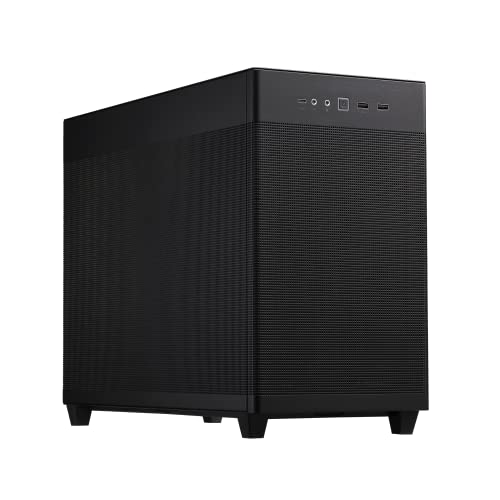
The AP201 is the kind of case you notice when desk space is tight but your parts still need room to breathe. Its mesh panel, tool-free side panels, and SFF-ready compact design make it a practical fit for a smaller room where a full tower would feel heavy.
It still leaves room for a 360mm radiator, a graphics card up to 338mm, and an ATX power supply, which is a nice mix for a case this size. Compared with the DARKROCK EC2, it feels more compact and more storage-conscious, though the smaller shell makes cable planning matter a little more.
Reasons To Buy
- The mesh panel helps cooling make sense in a compact layout.
- Tool-free side panels simplify access for upgrades and routine cleaning.
- Support for a 360mm radiator is unusually generous for the size class.
- 338mm graphics card room leaves space for a serious gaming build.
- ATX PSU compatibility broadens part choice for a small-format case.
Softer Spots
- A compact shell can feel less forgiving during cable routing.
- The included fan count is modest, so fan planning still matters.
- Tool-free access is handy, but the tighter interior can still feel crowded during assembly.
Technical Sheet
Made For
Small-room PC builders who still want a serious graphics card and liquid-cooling room will get the most from this case.
A Better Fit Elsewhere
The MONTECH XR Panoramic High Airflow ATX PC Case suits you better when a larger showcase layout and more fan mounts matter more than compact size.
This slim TGDGAMER case fits the person building a modest desktop or office machine that still needs sensible airflow. The included 80mm fan and USB 3.0 front port keep the package straightforward, and the black chassis stays visually quiet on a busy desk.
Compatibility with mini-ITX and ATX power supplies is useful for mixed-part builds, though the narrow profile means you should expect less interior breathing room than the ASUS Prime AP201. For many simple setups, that smaller footprint is exactly the point.
Best Bits
- Slim dimensions help it disappear on a desk or under a workstation.
- USB 3.0 front access is useful for everyday peripherals.
- Mini-ITX and ATX power support widen part matching options.
- The included fan gives you a basic cooling start point.
Minor Gripes
- An 80mm fan usually means modest airflow rather than a roomy cooling layout.
- The slim shell may feel cramped for larger cables or bulky components.
- Cleaning access may take more care than on broader mesh cases.
Details At A Glance
Whose Shelf It Belongs On
Minimalist builders and office users who want a slim case with basic cooling and easy front access will appreciate it most.
Where A Sibling Pick Shines
The TGDGAMER MATX Micro ATX Case 80mm Fan White suits you better when the same compact layout needs a brighter finish.
The white version keeps the same slim, cooling-first layout as the black TGDGAMER case, but the lighter finish changes the whole feel of the setup. For a clean office corner or a white-themed desk, that matters as much as the airflow story.
You still get the 80mm fan, USB 3.0 front port, and support for mini-ITX and ATX power, so the practical side stays familiar. The trade-off remains the same too, because a slim case like this asks you to stay disciplined about component size and cable length.
Upsides
- The white chassis can blend nicely with light-colored desks and accessories.
- Slim dimensions help conserve floor space or shelf room.
- USB 3.0 keeps everyday plug-ins close at hand.
- Compatibility with mini-ITX and ATX power supports flexible part choices.
Small Caveats
- Space stays tight, so larger builds may feel awkward.
- The single 80mm fan keeps this in the simple-cooling lane.
- White surfaces can show dust more readily, so upkeep may matter more on a bright desk.
Feature Snapshot
The Right Fit
Style-conscious desktop builders who want a light finish without abandoning a compact form factor will get the most from it.
Another Choice May Suit
The MOROVOL MATX PC Case 270° Panoramic Tempered Glass Panel suits you better when a wider glass view matters more than a slim profile.
The View 170 leans into presentation without ignoring cooling basics. Three included ARGB fans, front and side tempered glass, and support for a 280mm radiator make it feel ready for a showcase build right away.
That extra visual polish comes with a more curated look than the simpler DARKROCK EC2 or the mesh-heavy AP201. The honest read is that it suits people who like their PC to feel like part of the room, not just a box under the desk.
Standout Traits
- Three included ARGB fans save you from building lighting around an empty shell.
- Front and side tempered glass create a broad viewing angle for your hardware.
- 280mm radiator support gives you useful cooling flexibility for a micro-ATX case.
- The black finish keeps the glass-and-light look grounded.
Room For Improvement
- Glass-forward designs ask for tidy cable work and regular dusting.
- ARGB lighting adds visual appeal, but it also adds another layer to manage.
- The case leans more toward presentation than plain utility.
Core Details
Built With In Mind
Showcase-focused builders who still want practical cooling room will find this case especially appealing.
Where A Sibling Pick Shines
The MONTECH XR Panoramic High Airflow ATX PC Case suits you better when you want more fan capacity and a larger ATX frame.
The Okinos stands out because it mixes real walnut wood with a micro-ATX case, which gives a desk build a warmer, furniture-like feel. Four pre-installed 120mm fans and a tempered glass side panel keep the practical side strong, so the style is not just decoration.
That combination suits living rooms, studio corners, or any space where a plain black tower would feel too industrial. Compared with the Thermaltake View 170, it looks calmer and more natural, though the non-PWM fans mean you give up some control over fan behavior.
Strong Points
- Real walnut wood gives the case a distinctive, furniture-like look.
- Four included 120mm fans provide a strong out-of-box airflow base.
- Type-C support keeps the front panel more current for modern devices.
- Tempered glass side styling lets the interior remain visible.
- The black frame helps the wood accent feel intentional rather than busy.
Worth Noting
- The 3-pin non-PWM fan setup offers less precise fan-speed control.
- Wood finishes reward gentler handling during cleaning and moving.
- The visual identity is strong, so it suits some spaces better than others.
Feature Card
Best Suited To
You’ll appreciate this most in a visible workspace or living area where case design matters as much as airflow.
Look Elsewhere When
The ASUS Prime AP201 suits you better when you want compact versatility without the wood accent and with a more utilitarian feel.
The MOROVOL brings the wide-glass look into a more approachable package, which is why it fits value-minded showcase builds so well. Three pre-installed fans and USB 3.0 front access keep the basics covered, and the 270° panoramic panel gives the interior a broad display angle.
It feels like a middle path between the sharper presentation of the Thermaltake View 170 and the simpler utility of the DARKROCK EC2. For a gaming desk where looks matter but you still want a usable build path, that balance is easy to like.
Positives
- The 270° glass layout gives your components an open, display-friendly view.
- Three included fans help you start with a decent airflow base.
- USB 3.0 keeps front access practical for daily use.
- The black finish makes RGB parts stand out cleanly.
Areas To Watch
- Panoramic glass designs need more attention to cable neatness.
- Glass panels can show dust and fingerprints faster than mesh.
- The case favors presentation, so airflow planning still matters.
Core Details
Who Should Grab It
Style-focused Micro-ATX builders who want a wide glass view without moving into a high-cost showcase shell will feel right at home.
Swap It Out When
The TGDGAMER MATX Micro ATX Case 80mm Fan Black suits you better when a slim desk footprint matters more than a panoramic look.
How To Choose The Right Airflow Matx Cases
Match Case Size To Your Room
Start with the space around your desk, not just the parts list. An ATX tower like the MONTECH XR gives you more cooling room, while a compact pick such as the ASUS Prime AP201 fits tighter rooms and smaller work surfaces.
The size choice also affects daily handling. Larger cases are easier to build in, but they ask for more floor or shelf space, while slim cases are simpler to place and harder to work inside.
Read Fan And Radiator Support Together
Fan support tells you how much airflow the shell can accept, and radiator support tells you how much liquid-cooling hardware it can house. The Thermaltake View 170’s 280mm radiator support and the DARKROCK EC2’s 360mm support point to different cooling plans, so the numbers matter.
Don’t just count included fans and stop there. A case with one fan can still become a solid setup, but you’ll need to think about intake, exhaust, and cable routing as a full system.
Think About Front I/O And Build Feel
Front I/O means the ports and buttons on the case’s front or top edge, usually the everyday connection point for a headset or USB device. USB-C and USB 3.0 matter more than they sound like, especially on a desk used for work and gaming.
Finish also changes how the case lives in the room. Tempered glass shows off hardware, mesh helps airflow-focused builds feel calmer, and wood accents like the Okinos make a rig feel more like part of the furniture.
What To Weigh Before You Commit
Mistakes Worth Dodging
One common miss is choosing a case for looks alone, then discovering the interior is too tight for the GPU or cooler you already own. Another is buying a glass-heavy shell without planning fan placement, which can leave the build warm and visually cluttered.
Check the parts you already have against the case dimensions before anything else. That step saves you more frustration than any stylish front panel ever can.
Where The Extra Money Goes
Higher-tier cases usually spend more on materials, included fans, better panel finishes, and easier access for assembly. You can see that in the Thermaltake View 170’s bundled ARGB fans and dual glass panels, or in the Okinos case with genuine walnut trim.
That extra cost makes sense when the PC sits in a visible room or when you want to reduce the number of parts you need to add later. For a hidden office machine, a simpler shell often makes more sense.
Frequently Asked Questions
What makes a Micro-ATX case different from an ATX case?
Micro-ATX cases are usually smaller and easier to place on a desk or shelf. ATX cases tend to offer more room for cooling hardware and cable handling.
Do glass panels hurt airflow?
Glass panels can limit natural side ventilation, so fan layout matters more. Good front intake and top or rear exhaust usually matter more than panel material alone.
Why do some cases include PWM fans?
PWM means pulse-width modulation, which lets the motherboard adjust fan speed more precisely. That helps you balance noise and cooling more smoothly than a basic fixed-speed fan.
Is Type-C worth looking for on a case?
Type-C is useful when you use newer drives, phones, or accessories that rely on that connector. It’s a convenience feature first, not a requirement for every build.
Which case style is easiest to keep tidy?
Mesh cases and roomier ATX towers are usually more forgiving during cable routing. Compact glass cases can look great, but they reward neat planning and a lighter cable load.
Closing Thoughts
The best Airflow Matx Cases in this group come down to how you live with your PC, not just how it looks on day one. The MONTECH XR and Thermaltake View 170 suit showpiece builds, the ASUS Prime AP201 makes compact power feel sensible, and the TGDGAMER options keep the footprint modest. For a warmer, more personal setup, the Okinos brings a rare wood accent that changes the whole mood. Choose the one that fits your desk, your parts, and the amount of building room you want, and the rest tends to fall into place.
