
Airflow-minded PC cases make a real difference when you’re building a compact rig, especially in a room that already runs warm or on a desk that doesn’t leave much breathing space. The right case keeps cables manageable, gives your graphics card room to breathe, and makes upgrades less annoying later. You’ll see a mix here, from glass-heavy showpieces to mesh-first workhorses, so your choice can match your space and your parts instead of forcing a compromise.
Some picks lean toward easy access and strong fan support, while others focus on style, portability, or a cleaner footprint. That mix matters because a micro-ATX build for daily gaming, a small home office, or a travel-ready setup does not need the same shell. The list below keeps the differences clear so you can match the case to the way you actually use your PC.
Quick Look At The Shortlist

DARKROCK EC2 ATX Mid Tower Gaming Computer PC Case
MONTECH AIR 100 ARGB High Airflow Micro-ATX PC Case
ASUS Prime AP201 Micro ATX PC Case

Thermaltake View 170 TG ARGB Black Micro-ATX Case

Okinos Genuine Walnut Wood Micro ATX Case

Trunab Computer Desktop Tower Carry Case for ATX/M-ATX
LIAN LI High Airflow Micro ATX PC Case LANCOOL 205M MESH
MONTECH X5M High Airflow Micro-ATX Mid-Tower PC Case
More Details On Our Top Picks
The DARKROCK EC2 leans bigger than the rest of this list, and that extra space helps if you’re building around a full-size gaming card and a 360mm radiator. The tempered glass side panel gives the setup a cleaner showroom look, though the trade-off is that you’re depending more on internal airflow planning than on hidden cable clutter. The included fan is a modest start, not a full cooling package.
That said, the support for up to eight 120mm fans makes it easier to grow the cooling layout over time, and the Type-C front connection adds a modern touch for day-to-day use. For someone who wants a roomy tower without moving into a giant chassis, it lands in a sensible middle ground. The honest read is that it favors expansion more than compactness.
Strong Points
- Supports large graphics cards, so you have more room for a serious gaming build.
- Fits a 360mm radiator, which matters for higher-heat processors and custom cooling plans.
- Up to eight 120mm fans gives you plenty of headroom for future airflow changes.
- The tempered glass panel suits a desk setup where visibility matters.
- Type-C support is handy for newer peripherals and external storage.
Points To Note
- Only one fan comes pre-installed, so you may want to budget for more cooling parts.
- The glass side panel shows cables and dust more easily than a solid-steel side.
- Its larger footprint makes it less attractive for very tight desks.
Feature Snapshot
Who It Suits Best
Gamers and upgrade-focused builders who want a roomy ATX tower with plenty of cooling headroom will get the most from this case.
Where A Sibling Pick Shines
MONTECH AIR 100 ARGB fits better for micro-ATX shoppers who want a smaller case with more cooling already included.
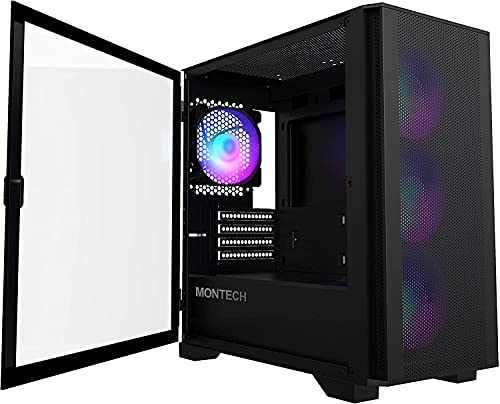
The AIR 100 ARGB makes a strong case for a micro-ATX build that needs airflow without giving up the visual extras. Four included ARGB fans, a mesh front, and a swivel tempered glass panel give it more out-of-box polish than the DARKROCK, which asks you to build up cooling yourself. That mix makes it useful for a gaming desk where looks and thermals both matter.
You also get dust filters, an ARGB controller, and support for a 330mm graphics card and a 280mm radiator. The real trade-off is that the style elements add a little complexity compared with a plain mesh box, so cable management deserves some attention. For most living-room or bedroom setups, though, it strikes a useful balance.
Upsides
- Four included ARGB fans reduce the need for extra cooling purchases.
- Mesh front intake helps air move through the case more freely.
- Swivel tempered glass gives you a cleaner look and easier access.
- Dust filters help keep routine cleanup more manageable.
- 330mm graphics card support covers many mainstream gaming cards.
Worth Noting
- ARGB lighting adds cable and controller planning compared with simpler cases.
- The glass side panel can show smudges quickly in daily use.
- It still asks for tidy cable routing to keep the airflow path open.
Core Details
Who Should Grab It
Micro-ATX gaming setups that want airflow, lighting, and a complete front-panel package fit this case best.
Another Choice May Suit
ASUS Prime AP201 is a better match for shoppers who want a smaller, cleaner shell with a more stripped-back look.
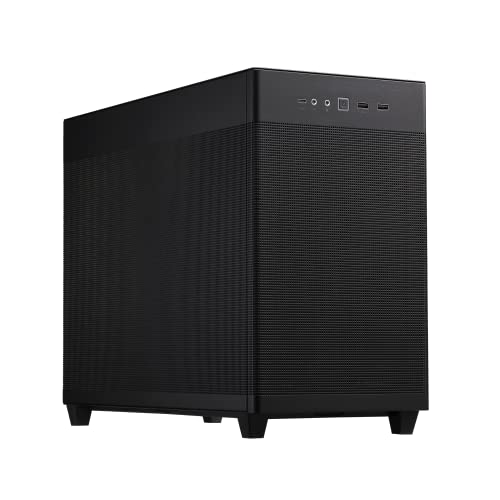
The AP201 is the neat, restrained pick in this group, and that’s exactly why it stands out. A mesh panel, tool-free side panels, and an included fan keep daily access simple, while the compact shape fits a small desk far better than the DARKROCK’s larger tower. The SFF-ready design, or small-form-factor design, is for people who want less bulk without giving up decent internal compatibility.
It still supports a 360mm radiator, an ATX power supply, and graphics cards up to 338mm, so compact doesn’t mean cramped. That said, the open mesh style asks you to stay on top of dust and cable tidiness. For a clean office corner or a minimalist gaming setup, that’s usually a fair trade.
Best Bits
- Compact footprint fits comfortably on tighter desks or shelves.
- Tool-free side panels make routine access less fiddly.
- Mesh construction helps the case breathe without extra add-ons.
- ATX PSU compatibility gives you more power-supply flexibility.
- 338mm graphics card support leaves room for many strong gaming cards.
Room For Improvement
- The compact shell leaves less room for messy cabling.
- Mesh surfaces can collect dust faster than closed panels.
- Only one fan is included, so airflow planning still matters.
Technical Sheet
Best Suited To
Space-conscious builders who still want strong part compatibility and easy access will appreciate this case most.
Look Elsewhere When
MONTECH X5M is the better call for anyone who wants more built-in fan support and a broader expansion ceiling.
The View 170 TG ARGB is for people who want the case itself to be part of the setup, not just the shell around it. Front and side tempered glass make the internals visible from more angles, and the three included 120mm ARGB fans help the look feel finished out of the box. Compared with the AP201, it gives up some restraint in exchange for a much louder visual presence.
Its 280mm radiator support keeps cooling options respectable, though the case is more showpiece than airflow-first tank. That matters in a hotter room, where you’ll want to keep the fan layout organized and the dust under control. The three-year warranty note adds a bit of reassurance, which is nice on a glass-forward design.
Reasons To Buy
- Dual tempered glass panels give the build a strong display angle.
- Three included ARGB fans create a finished look right away.
- 280mm radiator support covers common liquid-cooling plans.
- Black finish keeps the styling straightforward and easy to match.
Minor Gripes
- Glass panels show dust and fingerprints more quickly than matte steel.
- The visual focus can make internal cable routing feel more exposed.
- Airflow is good, but it’s not as open as the mesh-first picks here.
At A Glance
Whose Shelf It Belongs On
Style-focused micro-ATX builds that need visible lighting and a polished presentation belong here.
Swap It Out When
LIAN LI LANCOOL 205M MESH suits people who care more about open front intake and larger 140mm fans.
The Okinos case takes a softer design route, and the genuine walnut wood front gives it a warmer desk presence than the black-glass crowd around it. Four pre-installed 120mm fans provide a solid starting point, so you’re not staring at a bare shell before the first boot. It’s a nice fit for a workspace where the PC sits in plain sight, almost like a small piece of furniture.
The Type-C port keeps it current, while the tempered glass side lets the internal layout stay visible. The trade-off is that the 3-pin non-PWM fans are simpler than the more adjustable fan setups on some other picks, so noise tuning is less flexible. For a clean home office or style-conscious gaming desk, that’s an acceptable compromise.
Positives
- Genuine walnut wood adds a warmer, more distinctive look.
- Four pre-installed fans reduce setup work for a new build.
- Type-C support keeps the front panel useful for modern gear.
- Tempered glass side panel shows off the components neatly.
- Works well on a desk where appearance matters as much as function.
Softer Spots
- 3-pin non-PWM fans offer less fine-grained speed control.
- Wood finish may not suit every room or hardware theme.
- Glass and wood together call for a little more careful cleaning.
Details At A Glance
Made For
Design-conscious builders who want a micro-ATX case with a warmer material mix and ready-to-go airflow will appreciate this one.
Where Shoppers Go Wrong
MONTECH AIR 100 ARGB fits better for anyone who wants lighting, mesh intake, and more conventional gaming styling.
The Trunab bag steps away from the desktop-case crowd and solves a different problem, moving a tower safely from place to place. Padded protection and backpack-style carry make more sense than a rigid shell for LAN parties, dorm moves, or office swaps, especially when you’re also carrying a keyboard, mouse, cables, and earphones. It’s the practical choice when portability matters more than airflow.
The catch is obvious: this is a bag only, not a housing for cooling or hardware mounting. That means it pairs with a case rather than replacing one, so the value depends on how often you transport a full desktop. For a traveling technician or a frequent mover, that’s still a useful piece of kit.
Highlights
- Designed for ATX and M-ATX towers, so compatibility is broad.
- Fits peripherals like a keyboard, mouse, cables, and earphones.
- Padded construction helps reduce bumps during transport.
- Backpack carry is easier than wrestling a bare tower.
Areas To Watch
- It’s a carry solution, not a PC case.
- Bag storage needs to stay dry and clean over time.
- Best suited to transport use, not daily desktop placement.
Feature Rundown
Who Will Love This
Frequent movers, event setups, and anyone carrying a desktop between locations will get the most value here.
A Better Fit Elsewhere
ASUS Prime AP201 is a better match for anyone who wants a true micro-ATX chassis for a desk build.
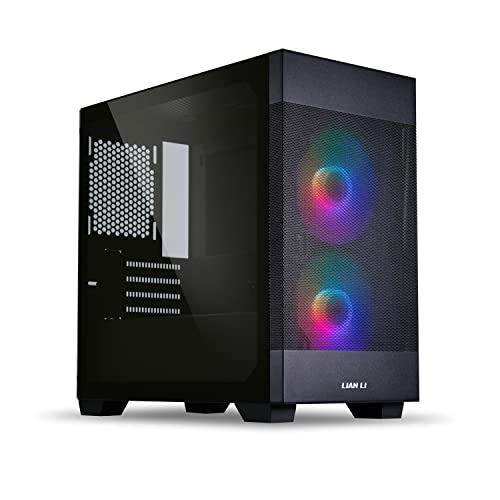
The LANCOOL 205M MESH is built around airflow first, and the two pre-installed 140mm ARGB PWM fans make that clear immediately. Bigger fans often move air with less effort than smaller ones, which is useful for a gaming system that runs a little warm under load. Compared with the Thermaltake View 170 TG ARGB, this one feels more practical and less display-driven.
The mesh front panel helps the case breathe, while the tempered glass side keeps the build looking sharp. You also get the usual maintenance trade-off with mesh, since dust attention becomes part of the routine. For a hot-running graphics card or a room with modest ventilation, that’s a smart compromise.
Upsides
- Two 140mm ARGB PWM fans give you strong starting airflow.
- Mesh front panel helps keep intake less restricted.
- Temper glass side panel balances function with a clean look.
- PWM fan control makes speed tuning more useful for day-to-day use.
Small Caveats
- Mesh faces need regular dusting to stay tidy.
- The styling is still gaming-oriented, so it won’t suit every office.
- Mid-tower sizing takes a little more desk room than compact micro-ATX shells.
Core Details
Right Fit For
Hardware-heavy gaming builds that need high intake and easier fan tuning fit this case well.
Skip It When
ASUS Prime AP201 makes more sense for shoppers who want a smaller, less aggressive-looking enclosure.
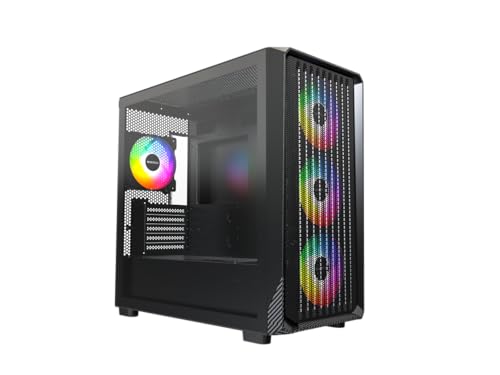
The X5M is the broadest fit in this roundup, and its size helps explain why. You get support for a 405mm graphics card, a 360mm radiator, up to nine fans, a mesh panel, tempered glass, USB-C, and four ARGB fans already installed. That’s a lot of room to build into, especially compared with the tighter AP201 or the more style-heavy View 170.
Dust filters round out the package, which matters in a real home setup where cleaning has to stay manageable. The trade-off is simple: the case gives you a lot of space to work with, so it also takes up more room than the smallest options here. For upgrade-minded builders, that extra breathing room is often worth it.
Bright Spots
- 405mm graphics card support leaves room for very long cards.
- 360mm radiator support is useful for stronger cooling plans.
- Up to nine fans gives you broad airflow expansion room.
- USB-C adds a useful modern front-panel connection.
- Four ARGB fans and dust filters make the starter package practical.
Honest Caveats
- Its broader frame takes more desk or floor space.
- More fans mean more cables to route neatly.
- Mesh and filters still need routine cleaning to stay effective.
Feature Card
The Right Fit
Builders who want broad compatibility and room to expand without moving into a huge tower will appreciate this case most.
Another Choice May Suit
MONTECH AIR 100 ARGB makes more sense for smaller micro-ATX desks where a narrower footprint matters more than expansion headroom.
How To Choose The Right Airflow Micro-Atx Cases
Start With The Parts You Already Own
Case choice begins with your graphics card, cooler, and power supply, not with the case photo. A long card and a 360mm radiator push you toward roomier shells like the DARKROCK EC2 or MONTECH X5M, while a simpler compact build fits the ASUS Prime AP201 more naturally.
Fan count matters too, but only in relation to the hardware that will live inside the case. A hotter gaming rig benefits from mesh fronts, larger fan mounts, and cleaner intake paths, while an office PC can get by with less aggressive cooling. The right match keeps you from paying for space you won’t use.
Decide How Much Visibility You Want
Tempered glass, ARGB lighting, and visible cable runs give a PC more personality, yet they also make dust and clutter easier to notice. The Thermaltake View 170 TG ARGB and Okinos Genuine Walnut Wood Micro ATX Case lean into that exposed look, while the AP201 keeps things more restrained.
That choice is not just visual, it shapes maintenance. Glass and open mesh ask for more wipe-downs, while closed or simpler layouts feel easier to keep tidy. For a desk that doubles as a living space, cleaner lines often age better.
Balance Airflow Against Daily Noise
Airflow-first cases tend to use mesh and multiple fans, which helps heat leave the system faster. The LIAN LI LANCOOL 205M MESH and MONTECH AIR 100 ARGB are good examples, though more airflow can also mean more audible fan presence in a quiet room.
PWM, or pulse-width modulation, gives fans finer speed control, so it helps a build stay calmer during light use. That kind of detail matters for dorm rooms, bedrooms, and shared workspaces, where a constant hum gets old quickly. Good airflow should feel helpful, not loud for the sake of looking serious.
Think About Space On The Desk Or Floor
Micro-ATX cases save room, but not every model saves it equally. Some, like the MONTECH X5M, stretch wider to allow more fans and longer cards, while compact options like the AP201 stay easier to place beside a monitor or under a shelf.
Measure the spot first, then think about cable access, side-panel clearance, and front-port reach. That small bit of planning saves a lot of irritation during the first build and every upgrade after that.
A Quick Reality Check Before You Choose
Hidden Buying Traps
One common mistake is assuming a micro-ATX label means a small case with easy fit for everything. The actual interior layout matters more, especially for large GPUs, front radiators, and thick fans.
Another easy slip is ignoring how the front panel breathes. Solid panels look tidy, but mesh or well-vented fronts usually make more sense for hotter hardware.
Where The Extra Money Goes
Higher-tier cases usually spend on included fans, stronger panel materials, better cable access, and more generous component support. That shows up in daily use as less setup hassle and a smoother upgrade path.
The upgrade is worth it when your PC will run demanding games, sit in a warm room, or stay in service for years through several part swaps. For a simple office machine, a stripped-back shell often makes more sense.
Frequently Asked Questions
What makes an airflow micro-ATX case different from a regular case?
It gives more attention to intake and exhaust paths, usually with mesh or vented panels. That setup helps warm hardware breathe more easily during long sessions.
Do you need many fans for a micro-ATX build?
Not always, but a hot graphics card and a stronger processor benefit from a better fan layout. The case needs enough mounting room to support the parts you already plan to use.
Is tempered glass a good idea for airflow-focused builds?
Glass looks clean and shows the hardware, but it doesn’t help air move the way a mesh front does. A mixed design can still work well, as long as the front intake stays open.
How much GPU length should you look for?
Choose a case that comfortably clears the graphics card you own or plan to buy. Extra room helps with cable bends and front-fan spacing.
What matters more, radiator support or fan capacity?
It depends on your cooling plan and the heat your parts produce. A radiator helps liquid cooling, while fan count gives you more control over general airflow.
Final Thoughts
The right airflow micro-ATX case should make your build easier to live with, not just easier to admire. For a compact desk, the ASUS Prime AP201 keeps things tidy without feeling cramped, while the MONTECH X5M gives you more room to grow. Style-first builds can lean toward the Thermaltake View 170 TG ARGB or Okinos walnut case, and hotter gaming rigs will appreciate the LIAN LI LANCOOL 205M MESH or MONTECH AIR 100 ARGB. Pick the shell that matches your parts and your room, then let the rest of the build follow naturally.
