
All-white builds look tidy on a desk, but the right case still has to handle airflow, cable routing, glass panels, and the size of your parts. That matters whether you’re putting together a first gaming rig, upgrading a quiet office tower, or chasing a cleaner look for a battle station that sits in plain sight.
The shortlist below leans on fit, cooling layout, and day-to-day practicality. Some picks are focused on display, some on easier assembly, and one is a sleeve rather than a tower, so you can match the choice to the way you actually use your setup.
Quick Look At The Shortlist
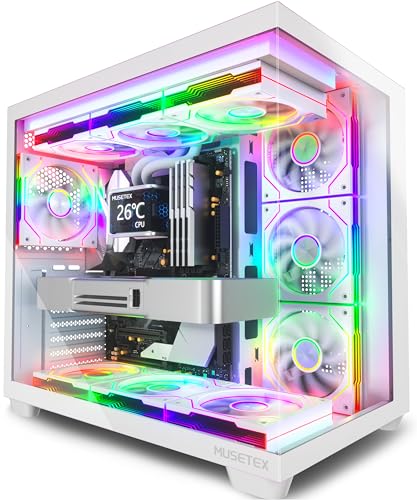
MUSETEX Y6 PC Case 7 Infinity Mirror Fans

Zalman i3 Neo ATX Mid-Tower RGB Case

ARVOK Laptop Sleeve Case Waterproof Notebook Cover

Lian Li V100-ATX Mid-Tower PC Case White V100RW

CORSAIR 3500X RS ARGB Panoramic Mid-Tower PC Case

KEDIERS Gaming PC Case Dual Chamber ATX Chassis

Lian Li O11 Vision Compact ATX Mid Tower Case O11VPW

Geometric Future M5 Tempered Glass Mid Tower GEO-M5F-BY
More Details On Our Top Picks
MUSETEX leans hard into the showpiece side of an all-white build, with seven pre-installed PWM ARGB fans, a 270-degree tempered-glass view, and a Type-C front connection that helps a modern desk setup feel less dated. PWM means the fans can adjust speed more intelligently, which matters for keeping noise and cooling in better balance during long gaming sessions.
You may find the glass-heavy look especially useful in a room where the case sits in open view, because the infinity mirror style makes the lighting part of the design rather than an afterthought. The trade-off is simple, the more glass and lighting you have, the more you’ll care about cable cleanup and dust upkeep, so this suits someone who likes a tidy build and doesn’t mind a bit of maintenance.
Strong Points
- Seven included fans reduce the need for immediate add-ons.
- The 270-degree tempered glass gives your hardware a broad view from the desk side.
- Type-C on the front helps newer accessories feel at home.
- PWM fan control gives you a more flexible cooling curve for gaming or daily work.
- The white finish pairs well with pale-themed desks and RGB-heavy parts.
Things To Consider
- So much glass means fingerprints and dust are easy to notice.
- The bright lighting style can feel busy in a very understated office.
- Cable routing needs a careful hand to keep the open view clean.
Feature Rundown
Who It Suits Best
Game-focused builders who want a bright, display-ready tower with little need for extra fan shopping.
A Better Fit Elsewhere
Zalman i3 Neo ATX Mid-Tower RGB Gaming PC Desktop Computer Case, White suits you better when airflow mesh and a swing-door side panel matter more than the full showpiece look.
This Zalman case feels like the practical middle ground after MUSETEX’s more dramatic glass-and-light show. Four fixed RGB fans, a mesh front, and a swing-door tempered-glass side panel give you visibility and airflow without leaning too hard into spectacle.
The 360mm AIO support matters for builders planning a larger liquid cooler, while the 355mm GPU clearance helps modern graphics cards fit more comfortably. In most desk setups, that mix makes it easier to build a clean, cooled rig without needing to overthink the shell, though the fixed-fan setup gives you less fine-tuning than a more modular chassis.
What We Like
- Mesh intake helps the case breathe better in everyday use.
- Four included RGB fans give you a ready-made starting point.
- The swing-door glass panel makes access less awkward than a fixed side panel.
- 360mm radiator support gives liquid-cooling builds more room to scale.
- 355mm GPU clearance suits many current graphics cards.
Minor Gripes
- Fixed fans mean less room to personalize the cooling layout.
- RGB styling may feel louder visually than a plain office tower.
- Mesh fronts can ask for regular dusting to stay looking sharp.
Core Details
Right Fit For
Builders who want a white mid-tower with sensible airflow, a glass side, and fewer assembly surprises.
Where A Sibling Pick Shines
Lian Li V100-ATX Mid-Tower PC Case White V100RW suits you better when you want a more decorative front with an integrated display platform.
ARVOK isn’t a desktop tower at all, and that makes it useful in a shortlist like this because plenty of white-themed setups start with a laptop on the move. The sleeve format keeps the focus on portability, and the waterproof outer shell is the kind of detail that matters on a commute, in a backpack, or during a hurried campus walk.
The honest read is that this is for carrying, not for desk building, so it serves a different role than the other seven picks. That trade-off is fine for someone who wants a slim notebook cover rather than a bulky case, though you’ll want to confirm fit for your exact MacBook size before committing.
Positives
- Lightweight sleeve style slips easily into another bag.
- The waterproof exterior is useful in everyday travel.
- Simple carry format keeps the focus on protection and portability.
Softer Spots
- It protects a laptop, not desktop hardware.
- Fit depends on the MacBook size you own.
- There’s little room for chargers or extra accessories.
Details At A Glance
Who Will Love This
Students, commuters, and hybrid workers who want a slim sleeve for a MacBook rather than a desktop enclosure.
Another Choice May Suit
CORSAIR 3500X RS ARGB Panoramic Mid-Tower PC Case works better for a home builder putting together a full white desktop setup.
Lian Li takes a more curated approach here, and that shows in the included LED strip and display platform. Compared with the MUSETEX Y6, this one feels a little less fan-heavy and a little more focused on presentation, which can suit a desk that doubles as a showcase.
The four 120mm ARGB PWM fans cover the cooling basics, while the tempered-glass panel keeps the interior visible without turning the whole case into a light box. You may like this balance most in a living-room gaming corner or a clean office setup, though the feature set asks you to be comfortable with a more deliberate, display-first build.
Highlights
- The LED strip adds a clear visual accent without extra accessory hunting.
- Four 120mm ARGB PWM fans give you a solid starting cooling setup.
- The display platform gives the interior a custom-build feel.
- Tempered glass helps the white finish stay central in the look.
Areas To Watch
- The presentation-first design may not suit a very plain workspace.
- Fingerprints on glass call for regular wiping.
- Less fan count than MUSETEX means a different cooling personality, not necessarily a weaker one.
Feature Card
Built With In Mind
Builders who want a clean white tower with a display angle and enough included cooling to keep the parts list simpler.
Reach For A Different Pick When
Zalman i3 Neo ATX Mid-Tower RGB Gaming PC Desktop Computer Case, White suits you better when airflow mesh and a swing-door side panel matter more than display accents.
This CORSAIR case reads like a more polished path for a white build that still wants breathing room. The panoramic layout gives you a wide interior view, and the spacious shell is the kind of thing you notice most once cables, coolers, and a long graphics card all need to live together neatly.
GPU anti-sag support matters because heavier cards can strain their slot over time, so the feature is practical rather than decorative. Reverse connection motherboard compatibility also gives this case a modern assembly angle, though the more advanced layout will feel most useful to builders who already know where they want the cables and cooling to go.
Upsides
- Three included fans give you a usable cooling starting point.
- The panoramic style shows off a build without looking cramped.
- Spacious interior helps with cable routing and larger parts.
- GPU anti-sag support adds a practical structural benefit.
- Reverse connection compatibility suits cleaner-looking motherboard layouts.
Worth Noting
- The roomy layout is better used with a planned parts list, not an impulse build.
- Large glass surfaces can need frequent wiping to stay crisp.
- Advanced layout features may be more than a first-time builder needs.
Quick Facts
Whose Shelf It Belongs On
Experienced builders who want a premium-leaning white chassis with room for large parts and a tidier-looking layout.
Skip It When
Zalman i3 Neo ATX Mid-Tower RGB Gaming PC Desktop Computer Case, White is the better call for a simpler, more straightforward mid-tower build.
KEDIERS goes bigger on the cooling story than most of the list, with eight PWM ARGB fans and a dual-chamber layout that splits component space more deliberately. A dual chamber places power and cable clutter in a separate section, which can make the main display area feel cleaner in a custom build.
The 420mm radiator support is a strong clue that this case is built for substantial cooling gear, and the panoramic glass panels reinforce that showpiece angle. The honest trade-off is size and complexity, so this fits best in a roomy desk area where you care more about a dense, organized build than about keeping the footprint small.
Best Bits
- Eight included fans give you a very full cooling base.
- The dual-chamber layout helps keep cable-heavy parts out of sight.
- Panoramic glass makes the finished build easy to show off.
- 420mm radiator support gives liquid-cooling plans real headroom.
- The Snow White finish keeps the design on theme.
Points To Note
- The case can feel large on a compact desk.
- Dual-chamber layouts ask for more planning during assembly.
- More glass means more surface cleaning over time.
Core Details
The Right Fit
Enthusiasts building a large, high-airflow white rig with a strong focus on cable separation and visual impact.
Swap It Out When
Lian Li O11 Vision Compact ATX Mid Tower Case O11VPW suits you better for a cleaner, more restrained back-connect setup.
Lian Li’s O11 Vision Compact leans into clean structure rather than sheer fan count, and that makes it stand apart from the louder KEDIERS option. Steel and tempered glass give the frame a more restrained feel, while back-connect support points toward a tidier cable path for compatible boards.
Back-connect hardware places connectors toward the rear of the motherboard, which can reduce the visible cable clutter in the main chamber. That’s a strong fit for someone who likes a neat showcase build, though the case makes the most sense when your motherboard and part list already match that layout.
Reasons To Buy
- Back-connect support helps create a cleaner interior view.
- Tempered glass keeps the showcase look polished.
- Steel construction gives the shell a more grounded feel.
- The compact label matters for a showcase case that still aims to stay manageable.
Room For Improvement
- Back-connect support only helps when your motherboard matches.
- Glass panels will show smudges easily.
- The cleaner look can take more planning during assembly than a basic tower.
Feature Snapshot
Perfect Match For
Careful builders who want a white mid-tower with a restrained showcase feel and support for cleaner cable routing.
Look Elsewhere When
MUSETEX Y6 PC Case 7 Infinity Mirror Fans suits you better when you want a brighter fan-heavy display right away.
Geometric Future closes the list with the most technically dense shell here, and that suits a more serious custom build. The 1.2mm steel frame is thicker than what you usually see in lighter cases, so the chassis feels aimed at builders who care about structure as much as style.
Type-C, toolless panels, support for 420mm or 360mm radiators, and five pre-installed 140mm ARGB PWM fans create a very complete package. The trade-off is that this much hardware support makes more sense for a large, carefully planned rig than for a casual starter build.
What We Like
- Five included 140mm fans give the case a strong cooling base.
- Toolless panels make routine access less fiddly.
- 420mm and 360mm radiator support gives large cooling builds room to grow.
- The 1.2mm steel frame feels more substantial on paper than thinner shells.
- Type-C keeps the front panel current for modern accessories.
Small Caveats
- The feature set is more than some simpler builds will need.
- Heavier glass and steel can make repositioning the case less casual.
- The black-and-yellow variant sits outside a pure white theme, so it suits mixed-color setups better.
Spec Overview
Who Should Grab It
Experienced builders planning a larger, carefully organized rig with serious cooling and a sturdier frame.
Where Another Pick Fits Better
CORSAIR 3500X RS ARGB Panoramic Mid-Tower PC Case is the easier fit for a white showcase build that feels slightly less technical.
How To Choose The Right All White Computer Cases
Size, Layout, And Part Clearance
Start with motherboard size, graphics card length, and radiator fit, because a beautiful shell is useless when the parts don’t line up. ATX mid towers suit most mainstream desktops, while E-ATX-friendly cases make more sense for larger boards and denser builds. A roomy layout also gives you a better shot at cleaner cable routing, which matters just as much in a white case where every dark wire stands out.
Front-panel ports deserve a glance too, especially Type-C for newer drives, docks, and peripherals. The right layout also depends on the room around your desk, since a panoramic case can feel great on an open stand but awkward in a tight nook. That’s where the compact Lian Li O11 Vision and the broader KEDIERS dual-chamber model start serving very different needs.
Cooling Style Versus Visual Style
Some cases lean on included fans, others lean on mesh front panels, and some try to do both. PWM fans, or pulse-width modulation fans, can adjust speed more flexibly than basic fixed-speed units, so they’re a stronger fit for someone who wants a calmer desktop at idle and better airflow under load. Mesh helps fresh air enter more easily, while glass pushes the look toward display-first styling.
You’ll usually choose between a cleaner showcase and a more breathable front, not a magic case that does both perfectly. MUSETEX and Lian Li V100 focus on the show, while the Zalman i3 Neo gives you a more airflow-minded mix. That trade-off matters most in warmer rooms or builds with hotter graphics cards.
Assembly Ease And Long-Term Care
Toolless panels, swing-door side access, and back-connect support all reduce frustration during upgrades. These details matter most when you plan to swap parts often, clean dust filters, or tidy cables after the first build night. A case that looks simple on the shelf can feel very different once your hands are inside it.
White finishes also reward regular upkeep. Glass shows fingerprints, mesh gathers dust, and open interiors expose sloppy cable work fast, so the friendliest case is usually the one you can keep neat without too much effort. For a first build, that’s often more important than one extra lighting feature.
Things Worth Knowing First
Common Shopping Slip Ups
One of the easiest mistakes is chasing the white finish and forgetting the dimensions. A long graphics card, tall cooler, or oversized radiator can turn a pretty case into a cramped one very quickly.
Another miss is buying a display-heavy shell for a setup that lives under a desk with the side panel hidden. In that situation, airflow, accessibility, and cable management matter more than a panoramic view.
What The Higher Tier Buys
Higher-tier cases usually spend the money on thicker steel, more careful panel design, better cooling support, and cleaner internal layout options. Those parts are easy to overlook until you’re trying to fit a large radiator, route a dense cable bundle, or support a heavy GPU.
That upgrade makes sense for custom builders, upgrade-heavy setups, and anyone who wants the chassis to feel like part of the system rather than just a box around it. For a simpler home PC, a mid-range case like the Zalman i3 Neo is often enough.
Frequently Asked Questions
Do all-white computer cases need extra fans?
Not always, because several models here already include multiple fans. Extra fans matter more when your parts run warm or the front panel is mostly glass.
Is tempered glass hard to maintain?
It usually just needs regular wiping, because fingerprints show quickly on light finishes. The effort is small, but the look changes fast when dust builds up.
Which size works best for a first build?
An ATX mid tower is usually the easiest place to start. It gives you enough room for standard parts without jumping into a large, tricky enclosure.
What matters more, airflow or appearance?
Airflow should come first when your hardware runs warm or you keep the PC in a closed spot. Appearance matters more once the cooling basics are already covered.
Are panoramic cases harder to assemble?
Sometimes they are, because there’s less room to hide messy cable work. They reward careful planning, so the finished build looks cleaner from the outside.
Closing Thoughts
Your best all-white computer case comes down to the kind of build you want to see every day. MUSETEX and Lian Li V100 are strong display pieces, Zalman keeps things practical, and CORSAIR, KEDIERS, and Geometric Future lean into more advanced layouts. For a laptop sleeve, ARVOK fills a different job entirely, which is useful if your setup travels. Choose the case that matches your parts list and your upkeep habits, and the white theme will feel calm instead of fussy.
