
Aluminum computer cases cover a lot of ground, from quiet tower builds to carry-friendly shells and slim living-room PC enclosures. You’re probably here because you want a case that fits your parts, your space, and the way you actually use the machine, not just one that looks good in a thumbnail. The right choice can make cable routing easier, cooling less stressful, and transport far less awkward. That’s the thread running through this shortlist.
The Shortlist At A Glance

HYXN H2 (2026) ATX PC Case

Alpine Swiss Executive Aluminum Briefcase

Fractal Design Define 7 XL Black Solid Brushed Aluminum/Steel E-ATX Silent Modular Full Tower Computer Case
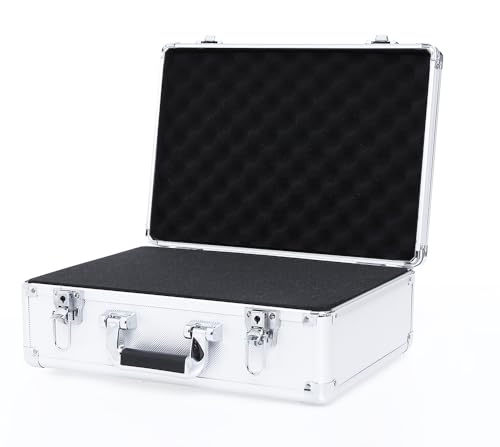
AxiGear Aluminum Hard Case with DIY Customizable Foam Insert

Trunab Computer Desktop Tower Carry Case

SilverStone Technology GD09 HTPC Computer Case
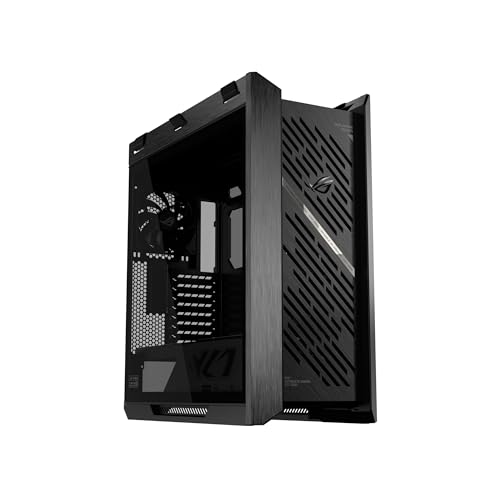
ASUS ROG Strix Helios II EATX Gaming PC Case
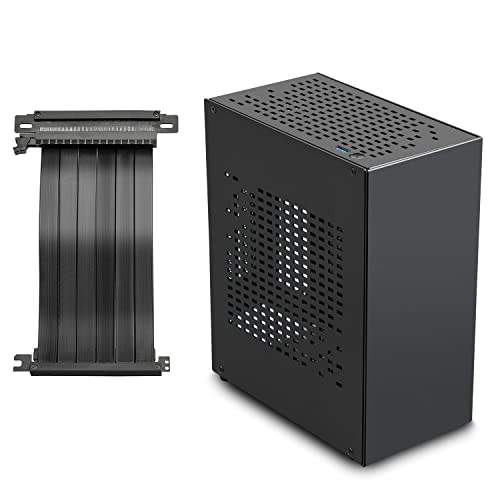
JOYJOM Aluminum Mini ITX Case
More Details On Our Top Picks
The HYXN H2 leans hard into airflow, with eight pre-installed fans and a dual-chamber layout that separates the main build area from the cable and power side. That kind of layout matters in a warm room or a gaming setup that stays under load for long stretches, because airflow paths stay cleaner and the inside looks less crowded.
You also get Type-C 3.2 support and room for a 420mm radiator, which points this case toward builders who want cooling headroom without jumping to a giant enclosure. The trade-off is plain: a case like this is less about discreet simplicity and more about volume, so compact desks may feel the footprint quickly.
Strong Points
- Eight included fans give you a strong starting point for airflow-heavy builds.
- Dual-chamber separation makes cable routing easier and keeps the main compartment cleaner.
- 420mm radiator support gives you room for large liquid-cooling hardware.
- Type-C 3.2 on the front panel suits newer peripherals and fast external storage.
Things To Consider
- The size makes it a better fit for spacious desks or floor placement.
- All those fans can add upkeep, since dust management becomes part of normal ownership.
- Showcase styling takes priority here, so minimalists may prefer a plainer tower.
Feature Rundown
Who It Suits Best
Builders who want strong cooling straight away and have room for a larger mid-tower will get the most from this case.
Where A Sibling Pick Shines
SilverStone Technology GD09 HTPC Computer Case suits living-room media setups far better, since its low-profile layout fits entertainment furniture more naturally.
This briefcase sits in a different lane from the tower cases, but it still belongs on a list like this because aluminum here means hard-shell travel structure, not desktop cooling. The combo-lock closure and padded interior make sense for office days, client meetings, and trips where you want your laptop to ride in something more polished than a soft sleeve.
Compared with the HYXN H2, this is about controlled carry rather than system airflow, and that shift matters more than people expect. The hard shell should hold shape well in daily use, while the padded layout adds a little peace of mind for a laptop, but the trade-off is bulk and less forgiving storage space in a crowded tote or car seat.
What We Like
- Hard-shell construction brings a more rigid travel feel than a soft briefcase.
- Padding inside helps cushion a laptop during everyday commuting.
- Combo-lock closure suits work settings where you want a more secure latch style.
- The executive look fits client-facing environments without feeling overly flashy.
Minor Gripes
- It’s built for carrying, not for stuffing with extra bulk.
- The rigid shell can feel less flexible than fabric cases in tight storage spaces.
- Surface marks tend to matter more on a polished metal finish, so careful handling helps it stay presentable.
Details At A Glance
Made For
You’ll get the most out of this briefcase as a professional carry piece for a laptop, paperwork, and short business trips.
A Better Fit Elsewhere
Trunab Computer Desktop Tower Carry Case suits LAN-event travelers more closely, since it’s shaped for moving an entire desktop setup instead of just a laptop.
The Define 7 XL is the sort of case that rewards a careful builder, especially one working on an E-ATX system with lots of storage or expansion hardware. Its brushed aluminum and steel mix gives it a more restrained feel than the ASUS ROG Strix Helios II, and that quieter styling often suits office desks or studio corners better.
The modular structure is the real draw here, because it lets you shape the interior around your parts instead of fighting the chassis. The honest trade-off is size, since XL cases ask for space under the desk or beside it, but that extra room tends to pay off in cleaner routing and easier upgrades later.
Upsides
- XL sizing leaves room for larger boards and expansion-friendly builds.
- The modular interior helps you organize drives, cables, and airflow paths.
- Brushed aluminum adds a cleaner, more mature look than many gaming-first cases.
- Steel structure should suit long-term desktop use where rigidity matters.
- The quiet-oriented design fits study rooms and workspaces better than flashy showpieces.
Areas To Watch
- Its footprint asks for a serious amount of desk or floor space.
- XL cases can feel heavy to move once fully built.
- The restrained look may feel plain beside more aggressive gaming towers.
Core Details
Who Should Grab It
Builders planning a large, quiet workstation or storage-heavy PC will appreciate the room and layout flexibility here.
Skip It When
JOYJOM Aluminum Mini ITX Case makes more sense for compact setups that need a small footprint above all else.
This AxiGear case is built around fit, not flex, and that makes the foam layout the headline feature. The two-layer Pick N’Pluck setup lets you shape the inside around cameras, measuring gear, tools, or sensitive accessories, which is handy in a work van, a studio shelf, or a packed trunk.
Compared with the briefcase-style Alpine Swiss model, this one is less about office polish and more about object security in transit. The aluminum frame and laminated panels should give it a rigid feel, but the non-waterproof note matters, so you’ll want to think of it as protective shell storage rather than all-weather transport.
Reasons To Buy
- Custom foam gives you control over how gear sits inside the case.
- The rigid aluminum frame supports gear that benefits from a firmer shell.
- Two foam layers plus a base layer create more shaping flexibility.
- Its size works well for test instruments, cameras, and similar equipment.
Small Caveats
- It’s not meant for wet conditions, so dry storage matters.
- The rigid shell gives you protection, but it also adds weight for carry-around use.
- Foam customization takes a little patience during setup.
Feature Snapshot
Whose Shelf It Belongs On
You’ll appreciate this case most as a storage and transport box for gear that needs a fixed, custom pocket.
Swap It Out When
Alpine Swiss Executive Aluminum Briefcase fits better for workday laptop carry, since it’s built around professional hand transport instead of custom gear storage.
The Trunab carry case takes a very practical angle on desktop transport, especially for people moving an ATX or M-ATX tower between home, events, or storage. The backpack format is the interesting part here, because it changes how you carry weight across parking lots, stairwells, or a long walk into a venue.
Unlike the hard-shell cases in this roundup, this one is about padded portability rather than rigid enclosure. That makes it easier to live with day to day, though you may find the soft structure less confidence-inspiring for rough handling than the aluminum briefcase or the AxiGear hard case.
Best Bits
- Backpack carry leaves your hands open while moving a desktop tower.
- ATX and M-ATX support covers common desktop builds.
- Extra storage for keyboard, mouse, cables, and earphones reduces the number of bags you need.
- Padded construction helps the case feel less harsh in daily transport.
Worth Noting
- Soft-sided transport usually asks for more care than a rigid shell.
- The bag-only format means you’re working with a carry solution, not a structural case.
- Load distribution matters, so packing it neatly will make daily use feel better.
Feature Card
The Right Fit
This suits desktop users who travel with their tower often and want a more portable way to move a full setup.
Consider Something Else When
Alpine Swiss Executive Aluminum Briefcase is the better call for laptop-only carry and a more office-centered profile.
The GD09 is clearly aimed at a living-room or media-center setup, where low profile matters as much as component fit. Its faux aluminum design gives it a cleaner front-room look than a standard gaming tower, and that visual restraint helps it blend beside audio gear or a TV stand.
ATX and Micro-ATX support keeps it useful for common desktop builds, but the shape is what really defines it. A case like this is best for people who want a PC that behaves more like part of the entertainment furniture, and the trade-off is less visual drama than the larger showcase cases in this roundup.
Highlights
- HTPC form keeps the system low and living-room friendly.
- ATX and Micro-ATX support gives you flexibility with common board sizes.
- The faux aluminum look suits entertainment centers and media shelves.
- It’s a calmer visual match than aggressive gaming towers.
Points To Note
- The low-profile shape can limit how you think about internal layout.
- It’s less suited to flashy showcase builds than the Helios II or HYXN H2.
- Front-room placement means dusting the exterior will be part of normal upkeep.
Technical Sheet
Built With In Mind
You’re looking at a strong match for a TV-connected PC or a media box that sits in plain view.
Another Choice May Suit
Fractal Design Define 7 XL Black works better for users who want more expansion room and a taller, modular chassis.
The Helios II is the showpiece in this group, and the aluminum front panel with its diamond-grille look makes that obvious from the start. Dual tempered-glass side panels push it even further into showcase territory, so this is the case for a build that’s meant to be seen as much as used.
Support for graphics cards up to 450mm and radiators up to 420mm gives it the scale needed for large modern hardware, while the graphics card braces help with heavier parts. The trade-off is that this much visual presence can dominate a desk, so it suits a centerpiece build better than a hidden workstation.
Plus Points
- Aluminum front panel gives the case a premium visual anchor.
- Dual glass side panels make it easy to show off internal hardware.
- 450mm graphics card support opens the door to very large GPUs.
- 420mm radiator support gives cooling room for advanced builds.
- Graphics card braces add practical support for heavier cards.
Room For Improvement
- The showcase style takes a lot of visual space on a desk.
- Glass panels ask for more frequent cleaning to keep fingerprints down.
- It makes the most sense where aesthetics are part of the build plan.
Core Details
Perfect Match For
This suits showcase builders who want a large EATX enclosure with a visual focus and room for oversized hardware.
Look Elsewhere When
SilverStone Technology GD09 HTPC Computer Case fits a low-profile living-room setup better than this high-visibility tower.
The JOYJOM Mini ITX case is for spaces where every inch matters, and that’s the whole point. The PCIe 3.0 riser helps move the graphics card into a small-form-factor layout, which makes this kind of build more practical for compact desks, TV stands, or dorm rooms.
Compared with the big HYXN and ASUS towers, this one asks you to think small from the start, and that keeps the setup neat. The trade-off is obvious: mini ITX systems can be more demanding to plan, so this is a better match for a focused builder than for someone who wants room to change parts often.
Positives
- Mini ITX sizing keeps the footprint small on a crowded desk.
- The PCIe 3.0 riser helps with compact internal layout choices.
- Aluminum construction suits a light, tidy small-form-factor build.
- It works well for places where a full tower would feel out of place.
Honest Caveats
- Mini ITX builds usually ask for more planning than larger cases.
- The smaller interior gives you less room for growth later.
- Access and cable routing can feel tighter than in a mid-tower or full tower.
Feature Rundown
Whose Shelf It Belongs On
You’ll like this most as a compact PC shell for a space-saving gaming or desktop setup.
Reach For A Different Pick When
Fractal Design Define 7 XL Black is the better route for large, flexible builds that need more internal room.
How To Choose The Right Aluminum Computer Cases
Start With The Shape Of Your Build
Aluminum computer cases are not a single category, because a Mini ITX shell, a mid-tower, and an HTPC enclosure solve very different problems. Mini ITX models such as the JOYJOM case reward compact planning, while full towers like the Fractal Design Define 7 XL give you room for large boards, storage, and cleaner cable paths. The right shape usually matters more than the finish, since a beautiful case that mismatches your hardware turns into a daily annoyance.
Match Cooling To Your Room, Not The Box
Airflow becomes a bigger issue in warm rooms, heavy gaming sessions, and all-day workstation use. A case like the HYXN H2, with eight included fans and space for a 420mm radiator, is built for people who want strong thermal headroom from day one, while the SilverStone GD09 keeps a lower profile for media-center use where raw cooling load is often lighter. The trade-off is noise and upkeep, because more cooling hardware usually means more dusting and more parts to manage.
Think About Carrying, Cleaning, And Access
Aluminum appeals partly because it feels solid, but the day-to-day experience depends on how the case opens, moves, and stores. The Alpine Swiss briefcase and Trunab backpack are for very different kinds of travel, one polished and office-ready, the other shaped for moving a full desktop setup. Smooth outer panels and glass side windows also need more wiping than plain matte surfaces, so a showpiece build asks for a little more attention.
Buy For Your Actual Use Pattern
The best case for a desk-bound creator is rarely the best case for a LAN traveler or a living-room PC. Heavy hardware, frequent upgrades, and visible cable runs all point toward larger, more modular models, while small spaces and short commutes point toward lighter, tighter designs. That’s why spec matching matters here: it keeps you from paying for space or style you won’t use.
A Quick Reality Check
Wrong Turns To Avoid
A common mistake is choosing by looks alone and then discovering the motherboard or cooler simply doesn’t fit well. Another is ignoring how much space the case needs around it, especially with tall full towers and front-panel fan arrays. You also want to think about maintenance, because glass panels, chrome finishes, and dense fan setups all ask for more regular cleaning than plain, closed designs.
The Upgrade Payoff
Higher-tier cases tend to cost more because they use larger panels, stronger hardware support, more modular layouts, and more polished exterior work. That extra spend makes sense for builders with expensive components, visible showcase setups, or frequent part changes, where easier access and better fit save time later. For simple office systems or a compact living-room machine, a calmer mid-range case often covers the need without excess.
Frequently Asked Questions
What makes aluminum a useful case material?
Aluminum usually keeps the case feeling rigid without turning it into a plain plastic box. It also tends to suit cleaner styling, which matters in a home office or a visible entertainment setup.
Which size case works for most gaming builds?
ATX mid-tower cases cover a lot of common gaming parts and usually leave enough room for standard cooling. Full towers make more sense once you start adding oversized boards, very large radiators, or lots of storage.
Is a Mini ITX case hard to build in?
Mini ITX cases demand tighter planning, especially for cables and cooling clearance. They reward careful part selection, so they suit a focused builder more than a casual first-time project.
Do hard-shell aluminum briefcases help for laptop travel?
A rigid shell can make a laptop carry setup feel more structured and less floppy than a soft bag. Padded interiors matter just as much, because the shell and the padding work together.
Which case style works best for a TV area?
A low-profile HTPC case usually blends into a media console better than a tall tower. The SilverStone GD09 is the kind of shape that feels at home beside a television stand.
Closing Thoughts
You’ve got plenty of direction now, because this category only makes sense once you match the case to the job. Go tall and modular for a big workstation, stay compact for a small desk, or choose a carry case when the whole point is transport. The cleanest choice is the one that fits your room, your hardware, and the way you use the machine every week, not just the way it looks on day one.
