
Aluminum keyboard kits draw you in for two reasons, the case feel and the way each layout changes daily typing. A full-size board suits spreadsheets and long workdays, while a 65% or 75% kit saves desk space without giving up the custom build experience. You also get choices that shape sound, travel, and connection style, which matters a lot once the board becomes part of your routine. The picks below focus on kits that make sense for gaming, office use, and hobby builds without pretending every setup solves the same problem.
Quick Look At The Shortlist

Keychron K10 HE Full-Size Hall Effect Keyboard

YUNZII AL80 75% Wireless Aluminum Mechanical Keyboard

BOYI GMK67 Barebones Keyboard Kit

LEOBOG Hi75C Upgraded Wired Mechanical Keyboard Kit
LEOBOG Hi75C Upgraded Wired Mechanical Keyboard Kit

Glorious Gaming GMMK 3 Barebones Custom Gaming Keyboard Kit

EPOMAKER Galaxy65 Wireless QMK/VIA Mechanical Keyboard
GMK87 Keyboard Barebones Kit
More Details On Our Top Picks
Full-size keyboards like the Keychron K10 HE keep the number pad in play, which matters for data entry, finance work, and anyone who prefers a wider layout. The hall-effect switches use magnetic sensing rather than a standard contact point, so the adjustable actuation and rapid-trigger behavior lean toward fast, fine-grained key response. The trade-off is that this is a more specialized board than a simple starter kit, so it makes the most sense for gaming-focused setups or careful custom tuning.
Wireless support through 2.4 GHz and Bluetooth gives you flexibility at a desk with multiple devices, while USB-C keeps wired use straightforward. PBT keycaps, or thick molded plastic caps, usually hold up better than thin glossy ones, and the aluminum plus wood frame gives the board a more finished desk presence than the all-metal look in some of the other picks. That polished feel comes with a more premium setup mindset, so it suits you best when you care about typing feel as much as layout.
Strong Points
- Full-size layout suits number-heavy work and game bindings.
- Hall-effect sensing supports highly responsive key travel.
- Three connection paths make desk switching easier.
- PBT keycaps are a strong fit for daily use.
- Aluminum and wood framing gives the board a distinct desk look.
Things To Consider
- The full-size footprint takes more desk space than the 75% and 65% picks here.
- Hall-effect features may feel unnecessary for simple office typing.
- The extra tuning depth can ask for more setup time than a barebones kit.
Core Details
Who It Suits Best
You get the most from this board if you want a full-size custom keyboard for gaming, number entry, and a more tactile desktop setup.
Where A Sibling Pick Shines
BOYI GMK67 Barebones Keyboard Kit fits you better when you want a smaller DIY board with less desk demand and simpler customization.
The AL80 packs a lot into a 75% footprint, which means you keep the arrow cluster and function row while trimming the unused bulk of a full-size board. Its smart LCD display and knob make quick adjustments feel more direct, especially in a busy workspace where you keep bouncing between volume, lighting, and system shortcuts. The gasket structure softens the internal mounting point, so the board aims for a more cushioned feel than a rigid slab-style chassis.
QMK and VIA support matter here because they open deeper remapping and layer control, a nice fit for someone who likes shaping the board around work and play. Compared with the Keychron K10 HE, this YUNZII is less about specialized switch behavior and more about onboard control and layout efficiency. The silver finish with Cocoa Cream accents also reads more subdued than flashier RGB-first kits, which is useful in shared office spaces.
What We Like
- 75% layout keeps core keys without the full-size bulk.
- LCD display and knob streamline everyday adjustments.
- QMK and VIA support suit deeper remapping needs.
- Gasket mounting can soften the typing feel.
- Wireless and USB-C options make desk switching easier.
Room For Improvement
- The extra display adds another surface to keep clean.
- Advanced firmware support can feel more involved than plug-and-play boards.
- 75% layouts still ask you to adapt if you rely on a numpad every day.
Feature Rundown
Who Will Love This
You suit this board best if you want a compact wireless aluminum keyboard with display-driven convenience and serious remapping control.
Another Choice May Suit
Keychron K10 HE Full-Size Hall Effect Keyboard Wireless fits you better when you need a numpad and care more about rapid-trigger style response than on-board extras.
The GMK67 is the kind of barebones kit that invites you to build around it piece by piece, which is exactly the appeal for many first-time custom keyboard hobbyists. Tri-mode connectivity means Bluetooth 5.0, 2.4 GHz, and wired Type-C use, so it can move from desk to laptop bag without much fuss. The 4000 mAh battery gives it a more self-contained profile than the wired-only Hi75C options below, though that also means battery management becomes part of ownership.
Its gasket-mounted structure and hot-swap PCB make it friendlier to layout experiments, and the knob adds one more tactile control point. Compared with the YUNZII AL80, this BOYI kit feels less feature-showy and more like a straightforward DIY foundation. For most desks, that keeps the learning curve sensible and the spending focused on parts you actually choose yourself.
Best Bits
- Hot-swap design makes switch changes much easier.
- Tri-mode connectivity adds useful placement flexibility.
- 4000 mAh battery supports a more portable setup.
- VIA support helps you customize layers and shortcuts.
- Gasket mounting offers a softer internal feel than rigid cases.
Points To Note
- Barebones format means keycaps and switches still need separate planning.
- The smaller 65% layout leaves out some keys people rely on at work.
- Battery-powered use adds another thing to monitor over time.
Quick Facts
The Right Fit
You fit this kit well if you want a compact DIY aluminum keyboard base and prefer choosing your own switches and caps from the start.
Look Elsewhere When
EPOMAKER Galaxy65 Wireless QMK/VIA Mechanical Keyboard suits you better when you want a pre-lubed wireless custom board with a more complete out-of-box path.
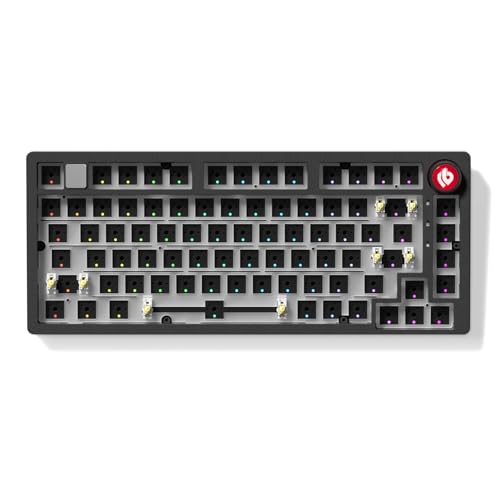
LEOBOG positions this Hi75C as a refined step up from the earlier Hi75, and that matters most to you when you care about fit and feel rather than just getting a metal case on the desk. The upgraded PCB and adjusted gasket mount aim to improve stability, typing feel, and sound behavior, which can make a wired board feel more settled during long work sessions. Since it stays wired, you avoid battery concerns and keep the setup simpler than the wireless boards above.
The aluminum alloy 75% shell keeps the footprint manageable while still leaving enough room for navigation keys and function access. Compared with the BOYI GMK67, this one gives you a more fixed desk experience and less wireless flexibility, but that trade-off often suits a permanent workstation better. The volume knob and RGB backlighting round out the convenience side without pushing the design into clutter.
Upsides
- Upgraded PCB supports a more polished custom build.
- Wired-only use removes battery upkeep from the equation.
- 75% layout stays practical for work and gaming.
- Volume knob adds quick adjustment convenience.
- Gasket mount design targets a softer, steadier feel.
Minor Gripes
- Wired use limits where you place the board.
- Barebones format still means separate switch and keycap planning.
- RGB and knob extras matter less for minimalist setups.
Details At A Glance
Best Suited To
You suit this board if your keyboard stays on one desk and you want a metal 75% kit with a more settled wired feel.
Where A Sibling Pick Shines
Glorious Gaming GMMK 3 Barebones Custom Gaming Keyboard Kit fits you better when you want a more modular platform with broader tuning appeal.
This listing mirrors the same Hi75C platform, so the main question is how you plan to set up the rest of the build around it. The 75% aluminum alloy format stays compact enough for most desks, yet it still leaves room for navigation keys and a knob, which makes daily use feel less cramped than a 65% kit. The refined PCB and gasket mount approach still point toward a steadier typing experience, especially in a home office where the keyboard stays put.
Because the listing details match the other Hi75C entry, this version mostly appeals to shoppers who are comparing availability or wanting the same chassis path from a separate product page. That makes it a practical comparison point rather than a different shape of product. Compared with the Glorious GMMK 3, it feels narrower in scope, but also simpler to understand at a glance.
Highlights
- 75% layout keeps daily-use keys within reach.
- Aluminum alloy case gives the board more presence.
- Knob support helps with volume control and navigation.
- Gasket mount aims for a softer internal feel.
- Wired setup keeps charging out of the routine.
Worth Noting
- This listing overlaps closely with the other Hi75C entry.
- Barebones format still asks you to source parts separately.
- Wired use fits desk setups better than travel.
Feature Card
Whose Shelf It Belongs On
You fit this board best if you want the same Hi75C platform and are comparing separate listings before building around it.
Skip It When
YUNZII AL80 75% Wireless Aluminum Mechanical Keyboard makes more sense when you want wireless use and an LCD-centered control experience.
The GMMK 3 leans hard into modular tuning, which is why you see so much attention given to the gasket system, sound-dampening foam, and aluminum switch plate. Gasket mounting uses flexible points between the plate and case, and that usually means a softer typing feel than a rigid shell. For a desk that doubles as a gaming station and a tinkering bench, that flexibility is a big part of the appeal.
It stays in the 75% lane, so you still get a compact footprint without losing the function-row zone many people want for shortcuts. Compared with the LEOBOG Hi75C, this one gives you a broader modular path rather than a tighter fixed recipe. The honest read is that it suits hobbyists who enjoy incremental changes, not someone who wants a simple plug-in-and-forget board.
Reasons To Buy
- Modular gasket system supports more tuning options.
- Sound-dampening foam helps shape a quieter desk presence.
- Aluminum switch plate adds a more solid internal structure.
- 75% layout keeps the board practical for daily shortcuts.
- Knob support adds a useful tactile control.
- Hot-swap support keeps switch changes manageable.
Small Caveats
- The broader modular path asks for more setup patience.
- Barebones format means finishing the build yourself.
- Custom parts planning can stretch the ownership process.
Core Details
Built With In Mind
You fit this keyboard if you like tuning, swapping, and refining a 75% gaming board over time.
Reach For A Different Pick When
LEOBOG Hi75C Upgraded Wired Mechanical Keyboard Kit suits you better when you want a more straightforward wired aluminum build with less modular experimentation.
The Galaxy65 lands in a sweet spot for people who want wireless convenience without giving up a metal custom-board feel. Ball-catch construction points to an easier open-and-close process during maintenance, and anodized aluminum gives the shell a clean, durable finish that tends to suit daily desk use. Pre-lubed hot-swap switches also shorten the path from unboxed kit to usable board, which helps more than flashy extras do.
QMK and VIA give you deep remapping, while Bluetooth, 2.4 GHz, and Type-C cover most desk and laptop pairings. Compared with the BOYI GMK67, this EPOMAKER feels a touch more polished out of the gate because of the pre-lubed switch mention and ball-catch case design. For many mixed work-and-play desks, that combination lands in the practical middle rather than the extreme custom end.
Plus Points
- Wireless and wired modes cover common desk setups.
- Pre-lubed hot-swap switches reduce early build friction.
- QMK and VIA support deep customization.
- Ball-catch case design can simplify opening the board.
- Anodized aluminum finish suits everyday desktop use.
Areas To Watch
- Customization tools can take time to learn well.
- 65% size leaves out some keys you may want nearby.
- Wireless convenience still means keeping track of charging needs.
Technical Sheet
Perfect Match For
You suit this keyboard if you want a compact aluminum custom board that balances wireless convenience with deeper software control.
Swap It Out When
Keychron K10 HE Full-Size Hall Effect Keyboard Wireless works better when you need a numpad and want more specialized switch behavior.
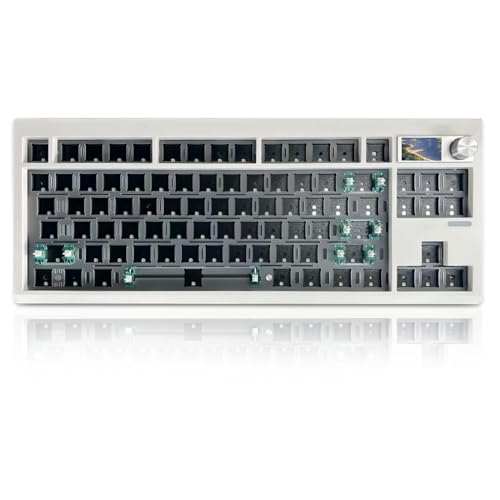
The GMK87 is built for people who want a more utility-first custom keyboard, because the 87-key layout keeps a useful row of keys without going all the way to full-size. The triple-mode connection set, hot-swap PCB, and VIA programmability make it feel adaptable rather than locked in, which is handy for mixed home and office use. A TFT screen adds another layer of information and control, so the board feels more interactive than the simpler barebones entries above.
Compared with the BOYI GMK67, this ZMX option keeps more keys on hand and adds a screen, so it suits you better when your desk work asks for extra function access. The gasket mount also softens the internal feel, which matters more once a keyboard becomes part of your daily rhythm. In a cluttered desk setup, that blend of size and function often feels easier to live with than a feature-stacked but cramped board.
Standout Traits
- 87-key layout keeps more utility keys in reach.
- Triple-mode connectivity covers wireless and wired use.
- VIA support adds meaningful remapping flexibility.
- TFT screen gives the board a useful control hub.
- Hot-swap PCB helps simplify switch changes.
Honest Caveats
- The screen adds another component to keep clean.
- 87 keys still take more room than a 65% board.
- Barebones setup means finishing the build yourself.
Feature Snapshot
Who Should Grab It
You fit this board if you want a more capable 87-key DIY base with a screen, wireless modes, and room for day-to-day work.
Where Another Pick Suits Better
BOYI GMK67 Barebones Keyboard Kit suits you better when you want a smaller 65% base and a simpler path into custom building.
How To Choose The Right Aluminum Keyboard Kits
Start With Layout, Not Flash
The first choice is size. A full-size board like the Keychron K10 HE suits number-heavy work, while 75% and 65% layouts trim the footprint for smaller desks and neater mouse placement.
Layout changes daily comfort more than RGB ever will. A compact kit can feel clean and quick on a narrow desk, but a numpad still matters for spreadsheets, accounting, and shortcut-heavy workflows.
Match The Build To Your Tuning Style
Barebones kits ask you to add switches and keycaps, which gives you more control and more work. That route suits hobbyists who enjoy picking each part, while pre-lubed or more complete builds fit people who want a faster path to use.
Gasket mounting, hot-swap sockets, and modular plate systems all change how the board feels in use. Gasket mount usually softens the typing response, and hot-swap support makes switch changes less involved, though both can add setup decisions.
Think About Connection And Daily Use
Wireless kits help on clean desks and multi-device setups, especially around laptops and home offices. Tri-mode boards, meaning Bluetooth, 2.4 GHz, and USB-C, offer the widest flexibility, but wired-only boards avoid charging and battery tracking.
That trade-off matters in real life. A desk-bound setup may be happier with a wired aluminum kit, while a mixed-use workspace usually benefits from wireless freedom and quick pairing.
Look For The Features You Will Actually Use
Knobs, LCD panels, and TFT screens can be useful, but only when you reach for them often. A knob makes volume changes easy, while a screen adds status or control value, though both can also create more surfaces to clean.
QMK and VIA support are worth attention if you like remapping keys or building layers for work and play. For most people, those tools matter more than a flashy finish once the board becomes part of the day.
What To Weigh Before You Click
Hidden Buying Traps
A common misstep is choosing a layout that looks compact but drops keys you use every day. Another is overlooking the fact that barebones kits still need switches and keycaps, so the total build plan is larger than the case alone.
It also helps to notice whether the board is wired, wireless, or both. A wireless model looks flexible on paper, but a desk that never moves may be easier to live with using a simple wired aluminum kit.
What The Upgrade Payoff
Higher-tier kits usually spend more on mounting systems, case finishing, switch support, and customization software. That extra spend often buys a steadier case feel, softer acoustics, and a build that feels more intentional on the desk.
The upgrade makes the most sense for hobbyists, heavy typists, and anyone who wants the keyboard to feel tuned rather than generic. More features only help, though, when you actually plan to use them.
Frequently Asked Questions
Are aluminum keyboard kits good for everyday typing?
Yes, especially when you want a sturdier-feeling case and a more substantial desktop presence. A 75% or full-size layout usually works best for office routines.
What does hot swap mean?
Hot swap means you can change switches without soldering them in place. That makes later changes much easier for hobby builds.
Why do some kits include a knob?
A knob gives you a quick physical control for things like volume or other mapped functions. It suits you well when you want one-handed adjustments without menu diving.
Is wireless worth it on a custom keyboard?
Wireless helps most on tidy desks or setups that move between devices. Wired boards stay simpler because you never need to think about charging.
What layout should you choose first?
Choose the layout that matches your daily tasks, not just the size of the case. Full-size suits number work, while 65% and 75% fit smaller desks and lighter carry needs.
Closing Thoughts
The right aluminum keyboard kit depends on how you work, how much desk space you have, and how deep you want to go with customization. Keychron K10 HE stands out for full-size users, while the YUNZII AL80 and EPOMAKER Galaxy65 balance compact sizing with richer feature sets. Barebones options like the BOYI GMK67 and GMK87 reward hands-on builders, and the Glorious GMMK 3 fits people who like to keep tuning over time. Choose the layout and feature mix that fits your routine, and the board will feel at home far faster.
