
Aluminum Pc Cases make sense when you want a build that feels clean, sturdy, and easier to live with day after day. Some suit quiet home towers, others fit a compact gaming setup, and a few are built for moving a whole system without turning setup into a headache. The right choice depends on size, airflow, cable routing, and how much hardware you plan to pack inside.
That’s why this roundup focuses on real use, not just looks. You’ll see full towers, mini-ITX options, airflow-heavy frames, and travel-friendly carry cases, so you can match the case to your desk, your commute, or your workstation.
Quick Look At The Shortlist

Fractal Design Define 7 XL Black Solid Brushed Aluminum/Steel E-ATX Silent Modular Full Tower Computer Case
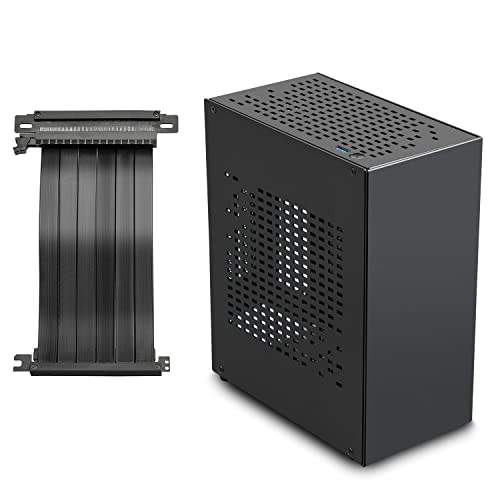
JOYJOM Aluminum Mini ITX Case with PCIe 3.0 Riser
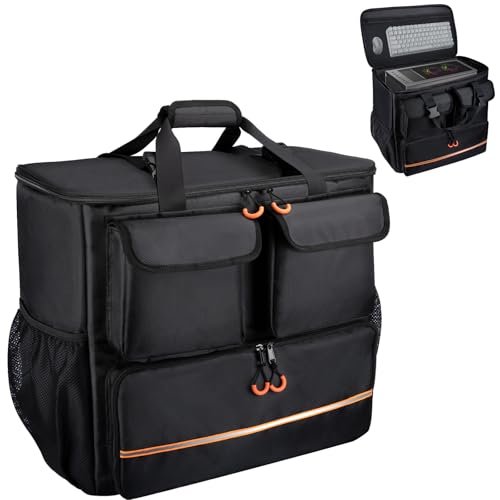
Wigojoy Computer Desktop Mid Tower Large Carrying Case
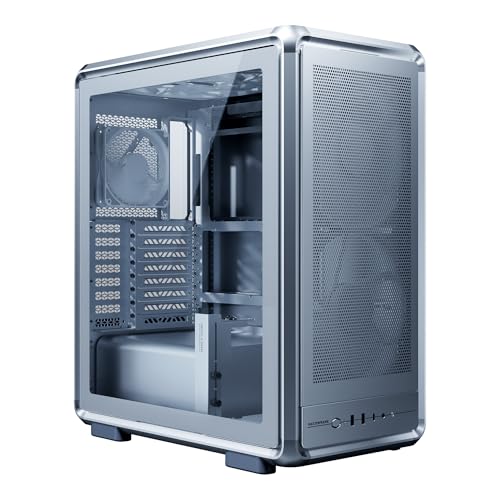
Cooler Master MasterFrame 500 Mesh ATX Case Silver
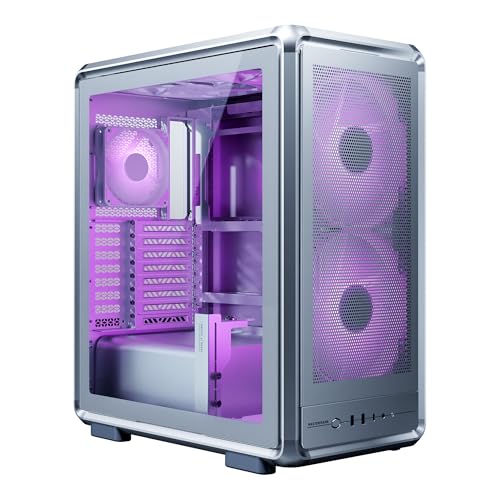
Cooler Master MasterFrame 500 Mesh ARGB ATX Case

JONSBO BO400 ATX Mid Tower PC Case

Lian Li A4-H2OX5 Mini-ITX Case Black

Lian Li A4-H2OA5 Mini-ITX Case Silver
More Details On Our Top Picks
The Define 7 XL leans into quiet, structured builds, and that brushed aluminum and steel shell gives it a more restrained feel than flashier towers. In a home office or a shared room, that matters more than it sounds, especially once storage drives, long graphics cards, and a large motherboard start piling in.
The trade-off is size, because this is built for space, not a tiny desk nook. You benefit most when you want room for cable routing, upgrade headroom, and a calmer-looking tower that can sit beside the desk without shouting for attention.
Strong Points
- Full-tower layout gives you room for large parts and easier cable management.
- Silent-focused design suits a bedroom, studio, or office where fan noise stands out.
- Modular structure helps you tailor the interior around drives, radiators, and expansion.
- Brushed aluminum accents add a cleaner, more restrained look than plain steel boxes.
- Good match for long-term systems, since extra interior space can reduce build frustration.
Things To Consider
- The footprint is large, so small desks and cramped corners will feel tight quickly.
- Cleaning dust filters and interior panels takes more time simply because there is more case to cover.
- Most casual builds will not need this much room, so the extra volume can feel excessive.
Core Details
Who It Suits Best
Desktop builders planning a quiet, long-life workstation or a large gaming rig will get the most from this one.
Where A Sibling Pick Shines
Cooler Master MasterFrame 500 Mesh ATX Case Silver suits you better when airflow matters more than silent-panel design.
This JOYJOM case speaks to small-desk builds and minimalist gaming rigs, with a layout built around Mini ITX hardware and a PCIe 3.0 riser. A riser is the cable or adapter that lets the graphics card sit in a different position from the motherboard, which is how compact cases save space without dropping the card entirely.
Compared with the Fractal full tower, the trade-off is obvious: you gain a much smaller footprint, but you give up roomy expansion. For apartment setups, travel-friendly systems, or anyone trying to keep the desk clear, that compact shape is the main attraction.
What We Like
- Mini ITX support keeps the whole build physically small and easier to place.
- PCIe 3.0 riser opens up a compact internal arrangement for the graphics card.
- Aluminum construction gives the shell a cleaner, lighter feel than many steel-only cases.
- Good fit for space-conscious gaming setups where desk real estate matters.
Room For Improvement
- The compact format leaves less room for extra drives or future expansion.
- Working inside a small chassis usually takes more patience during cable routing and part swaps.
- PCIe 3.0 is a solid standard, yet it is older than the newer link options used in some compact cases.
Feature Snapshot
Made For
Compact builders who want a neat Mini ITX gaming setup will get the clearest payoff here.
Another Choice May Suit
Lian Li A4-H2OX5 Mini-ITX Case Black fits you better when you want a more premium sandwich-style layout in the same small-footprint class.
Not every aluminum-adjacent case here is meant to stay on a desk, and this Wigojoy pick is clearly aimed at transport. It’s built for moving a mid-tower system, with room for a keyboard and mouse, so LAN parties, studio relocations, and seasonal moves feel more manageable.
Compared with JOYJOM’s tiny Mini ITX shell, this one gives up compactness for portability around a much larger desktop setup. The honest read is that it matters most for people who carry a full rig often, not for anyone who only shifts a PC once a year.
Highlights
- Large carrying format suits a full desktop system rather than just small accessories.
- Compatible with ATX and M-ATX mainframe chassis, which widens the range of rigs it can hold.
- Space for keyboard and mouse makes transport simpler for events and temporary workspaces.
- Useful for frequent movers who want a single bag-style solution for the whole setup.
Points To Note
- Carrying a full system is still bulkier than moving a normal laptop-style bag.
- Regular cleaning matters, especially after trips where dust and loose debris collect inside the case.
- The bag format suits transport more than long-term desktop use.
Details At A Glance
Best Suited To
Frequent movers, LAN event goers, and home-office users who relocate their desktop often will appreciate it most.
Look Elsewhere When
Fractal Design Define 7 XL Black Solid Brushed Aluminum/Steel E-ATX Silent Modular Full Tower Computer Case makes more sense for a stationary system with plenty of internal hardware.
The MasterFrame 500 Mesh goes after airflow first, which is exactly what many hot-running workstations and gaming systems need. Dual 200mm PWM fans help move a lot of air at lower speeds, and PWM means the fan speed can adjust automatically, so the cooling profile feels more controlled than a basic fixed-speed setup.
Compared with the Fractal Define 7 XL, this Cooler Master takes a less hushed, more open approach. That makes it a stronger fit for builds where the hardware runs warm, the graphics card is long, or the case sits in a room where airflow matters more than silence.
Upsides
- Mesh front and airflow-heavy layout help keep warm components from feeling boxed in.
- Supports ATX motherboards, which fits a broad range of mainstream builds.
- 390mm graphics card support gives you room for larger modern cards.
- 360mm AIO support suits high-output cooling setups and custom planning.
- Dual 200mm PWM fans can move air efficiently in a roomy chassis.
Areas To Watch
- Open mesh layouts usually let more dust work its way inside, so upkeep matters.
- The size and feature set make it better for dedicated systems than simple starter builds.
- Silver aluminum styling is clean, but it’s not the quietest visual choice for every desk.
Technical Sheet
Whose Shelf It Belongs On
PC builders who care more about cool-running hardware than a closed, quiet shell will get the strongest match here.
Swap It Out When
Fractal Design Define 7 XL Black Solid Brushed Aluminum/Steel E-ATX Silent Modular Full Tower Computer Case fits better for a quieter room and a more enclosed look.
This ARGB version keeps the same airflow-first foundation as the silver MasterFrame 500, then adds addressable lighting for a more showy desktop build. Addressable lighting means individual LEDs can be controlled in groups or patterns, so the effect usually feels more layered than simple fixed-color glow.
That makes it a better fit for showcase rigs, especially in rooms where the tower is visible from across the space. The trade-off is that more visual hardware usually means more setup attention, so you’ll want to be comfortable with cable management and a little extra coordination.
Bright Spots
- ARGB fans add visual personality for display-oriented gaming builds.
- Mesh structure keeps the airflow-first layout intact rather than trading it away for looks.
- 390mm graphics card support still gives the build room for large hardware.
- 360mm AIO support helps you plan a serious cooling setup.
- ATX compatibility keeps it accessible for mainstream desktop parts.
Softer Spots
- Lighting adds another layer of setup, so the build can take more patience.
- Dust care matters with mesh cases, especially in a room with pets or frequent airflow.
- The visual style may feel busy beside a clean, understated office setup.
Feature Card
Who Will Love This
Gamers who want a visible, lighting-forward tower without giving up the practical airflow layout will like this one most.
A Better Fit Elsewhere
Cooler Master MasterFrame 500 Mesh ATX Case Silver fits you better when the same chassis needs to stay more understated and office-friendly.
The BO400 is the sort of case that makes cable routing part of the design, not an afterthought. Back-connect motherboard support moves connectors behind the board tray, which can clean up the main chamber and make a display build look much tidier once everything is assembled.
Its dual-chamber layout also helps separate the main components from the power supply area, which is useful in a showpiece rig or a performance build with a big graphics card. Compared with Cooler Master’s mesh-heavy cases, this one feels more like a presentation piece, and that’s where its appeal really lands.
Reasons To Buy
- Back-connect motherboard support helps the visible side stay cleaner.
- Dual-chamber structure separates key hardware from the power supply side.
- 435mm GPU clearance gives you broad room for large graphics cards.
- Top and front panels can be swapped between glass and mesh, which adds layout flexibility.
- ATX mid-tower sizing keeps it practical for many desktop builds.
Small Caveats
- Dual-chamber cases can take more planning during the first build.
- Swappable panels add flexibility, but they also add another part to store and maintain.
- The display-first approach may feel more elaborate than a simple work PC needs.
Core Details
Right Fit For
Showcase builders and cable-conscious PC enthusiasts will get the most from this layout.
Reach For A Different Pick When
Cooler Master MasterFrame 500 Mesh ARGB ATX Case suits you better if you want airflow and lighting without the dual-chamber setup.
Here’s the compact choice that feels most engineered, not just shrunken down. The A4-H2OX5 uses an SFX layout, meaning it’s designed around a smaller SFX power supply, and that helps keep the overall shape tight while still making room for a triple-slot GPU and 240mm liquid cooler.
Compared with the JOYJOM Mini ITX case, this Lian Li model looks more refined and more purpose-built for a high-end small-form-factor build. The trade-off is plain: the smaller the footprint, the more exact your part selection and cable planning need to be.
Best Bits
- Aluminum exterior gives the case a cleaner premium finish.
- SPCC steel interior adds structure behind the outer shell.
- Triple-slot GPU support broadens your graphics-card options in a compact frame.
- 240mm AIO support is strong for this size class.
- PCIe 5.0 riser keeps the platform current for newer small builds.
Honest Caveats
- Small-form-factor assembly usually takes more planning than a mid-tower build.
- SFX hardware and compact cable runs can make parts selection more specific.
- Interior access is tighter, so routine upgrades take a steadier hand.
Feature Rundown
Perfect Match For
Small-form-factor enthusiasts who want a premium finish and careful hardware packing will feel right at home here.
Where A Sibling Pick Shines
JOYJOM Aluminum Mini ITX Case with PCIe 3.0 Riser fits better for a simpler compact build that does not need the same premium layout.
The silver A4-H2OA5 keeps the same small-footprint hardware logic as the black version, but the finish shifts the feel toward a cleaner, brighter desk presence. That matters more than it sounds in a living room setup or a minimalist workspace, where the case ends up being part of the room, not just the machine.
Compared with the black A4-H2OX5, this one is mostly about visual preference, yet the underlying value stays in the tight Mini-ITX format, PCIe 5.0 riser, and support for a triple-slot GPU. You may find it especially appealing if you want the engineering of a premium compact case without a dark, heavy visual tone.
Positives
- Silver aluminum exterior looks cleaner in bright rooms and light-colored setups.
- SPCC steel interior adds structure behind the exterior shell.
- Triple-slot GPU support gives you flexibility inside a small chassis.
- 240mm AIO support helps compact builds manage heat more comfortably.
- PCIe 5.0 riser keeps the design aligned with newer hardware planning.
Minor Gripes
- Like the black version, the compact interior asks for careful part selection.
- Swapping hardware inside a Mini-ITX case takes patience and tidy cable runs.
- The silver finish is elegant, though it can show fingerprints and dust more readily than darker surfaces.
Core Details
Whose Shelf It Belongs On
Minimalist builders who want a bright, refined compact system will get the most from this one.
Not Your Match When
Cooler Master MasterFrame 500 Mesh ATX Case Silver makes more sense for a larger airflow-first desktop that needs easier access.
How To Choose The Right Aluminum Pc Cases
Match The Case To The Room, Not Just The Parts
Case size shapes the whole build experience. A full tower like the Define 7 XL gives you breathing room for large boards and easier cable routing, while a Mini-ITX shell such as the JOYJOM or Lian Li A4 models keeps the footprint small enough for a compact desk or a living-room shelf.
Think about where the system will actually sit. A quiet office tower, a showcase gaming rig, and a carry case for moving a desktop all solve different problems, even though they sit in the same broad category.
Look Closely At Cooling And Airflow
Mesh panels, large fans, and radiator support matter because they shape temperature control during long sessions. The Cooler Master mesh cases lean open and airy, while the Fractal and Lian Li options take different routes depending on whether you want hush, compactness, or balanced spacing.
Thermal room becomes more important as graphics cards grow longer and power supplies work harder. A case that supports a 360mm radiator or a 240mm AIO can give you a much easier path to stable airflow planning, especially in warm rooms.
Check Compatibility Before You Commit
Motherboard size, GPU length, riser type, and power supply style should all line up with the parts you already own. An E-ATX tower and a Mini-ITX sandwich case solve opposite problems, so the right match depends on whether you value expansion or extreme compactness.
Pay extra attention to hidden details like back-connect motherboard support, dual-chamber layouts, and whether the case needs SFX power. Those features can make cable management cleaner, but they also narrow the part list you can use comfortably.
Balance Look, Access, And Maintenance
Brushed aluminum, silver finishes, and glass-and-mesh panels all change the day-to-day feel of the build. A cleaner exterior can blend into a workspace, but more open designs usually make dust care part of the routine.
That’s the trade-off with a lot of aluminum pc cases: the nicer the presentation, the more deliberate the upkeep tends to be. For most home setups, it’s worth choosing the case that fits your maintenance style as much as your hardware list.
Things Worth Knowing First
Common Shopping Slip Ups
One common mistake is treating every tower as interchangeable. An ATX workstation case, a Mini-ITX compact shell, and a transport bag all solve different jobs, so the label alone doesn’t tell you much.
Another easy miss is overlooking radiator, GPU, or power supply clearance. Those numbers decide whether your parts fit with room to spare or turn the build into a cramped puzzle.
What The Higher Tier Buys
Higher-tier cases usually spend money on better materials, smarter internal layouts, and tighter fit-and-finish. Back-connect support, dual chambers, and premium aluminum exteriors add convenience, but they also push the case toward a more specialized build path.
That upgrade makes sense when you build often, care about presentation, or want the hardware to sit cleaner inside the chassis. For a simple office PC, plain steel can be enough.
Frequently Asked Questions
Are aluminum pc cases better than steel cases?
Aluminum usually feels lighter and more premium in hand, which helps in compact or transport-focused builds. Steel often brings lower cost and solid rigidity, so the better choice depends on your priorities.
Do compact Mini-ITX cases work for gaming?
Yes, compact Mini-ITX cases can handle gaming parts very well when the GPU and cooling support line up. They just ask for more careful part selection and tidier cable routing.
Why do some cases use a riser cable?
A riser cable lets the graphics card sit in a different orientation from the motherboard. That layout saves space in compact designs and can create a cleaner internal look.
What matters most for airflow?
Mesh panels, fan size, and radiator support matter most for airflow. Large, open designs usually move air more easily than tightly closed shells.
Is a full tower worth it for a normal desktop?
A full tower makes sense when you want room for multiple drives, large radiators, or easy future expansion. A smaller case is usually enough for a simpler build that won’t change much.
Closing Thoughts
The right aluminum pc case depends less on style trends and more on how you actually use the machine. A quiet full tower, a compact Mini-ITX shell, a transport bag, or a mesh-heavy workstation frame all make sense in different setups. Match the case to your hardware, your room, and how often you plan to open it up. Do that, and the whole build feels easier from the start.
