
Ambidextrous gaming mice matter most when your hand placement is non-negotiable and your desk routine is long. You may want a symmetrical shell for left-handed use, for fingertip grip control, or for a backup mouse that feels natural either way. This roundup focuses on shape, sensor class, button layout, and connection type, so your choice fits the way you actually game, commute between setups, or work at the same desk after hours.
Quick Look At The Shortlist

Razer Viper Ultralight Ambidextrous Wired Gaming Mouse

Logitech G PRO 2 Lightspeed Ambidextrous Wireless Gaming Mouse White

Logitech G PRO 2 Lightspeed Ambidextrous Wireless Gaming Mouse Black

Acer Dual-Mode 2.4GHz Wireless Wired Computer Gaming Mouse
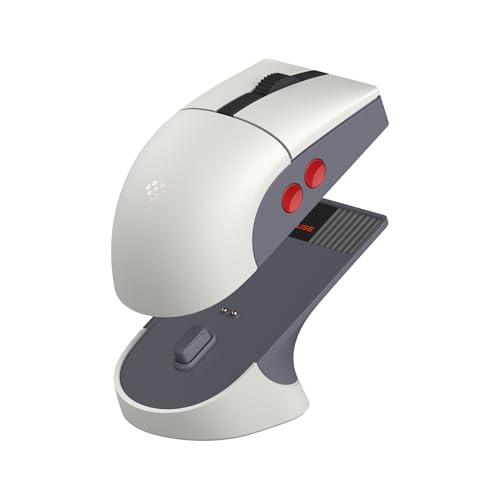
8Bitdo Retro R8 Mouse with Charging Dock N Edition

Lenovo Legion M600 RGB Wireless Gaming Mouse Black

Corsair M75 Wireless RGB Lightweight FPS Gaming Mouse White

Razer Viper 8KHz Ultralight Ambidextrous Wired Gaming Mouse
More Details On Our Top Picks
The first thing you notice here is the 71 g build, which keeps the mouse feeling quick without getting twitchy. The Speedflex cable matters more than it sounds, especially on a cramped desk where cable drag ruins low-slung aim. For left-handed play or a shared setup, the symmetrical body makes it an easy fit.
The 5G optical sensor and second-generation optical switches point this one toward fast, direct input, while the Mercury White finish gives it a clean look beside a muted keyboard. The trade-off is simple, wired convenience with no battery to worry about, but you do live with a cable. That makes it a smart match for esports-style sessions and for anyone who prefers a light shell over extra buttons.
What We Like
- 71 g weight helps quick wrist movement stay easy.
- Ambidextrous shell works cleanly for left- or right-hand use.
- Speedflex cable reduces the tug you often notice on heavier wired mice.
- Optical sensor support keeps movement responsive for fast aim adjustments.
Things To Consider
- Wired use keeps your desk setup a little less tidy than a wireless mouse.
- Lightweight shells can feel too bare for shoppers who want a fuller hand fill.
- The slim cable needs some routing attention near tight edges and monitor arms.
Feature Snapshot
Who It Suits Best
You benefit most from this mouse if you want a light wired ambidextrous shape for fast-paced play and a simple desk setup.
Another Choice May Suit
Corsair M75 Wireless RGB Lightweight FPS Gaming Mouse White suits you better if you want a wireless ambidextrous design with side-button flexibility.
This one leans into symmetry in a more flexible way than the Razer Viper Ultralight, because the side button setup is configurable rather than minimal. That matters for you if you swap grips or use the same mouse across desktop and laptop setups. USB-C charging keeps the routine familiar, and PowerPlay support is a practical plus for desks already built around that ecosystem.
The white shell looks clean, though it will show grime sooner than black finishes in busy daily use. The magnetic side buttons add useful customization without making the body feel cluttered, which suits left-handed users and control-focused players alike. You do give up the simplicity of a stripped-down wired mouse, but the trade-off feels reasonable for wireless convenience.
Strong Points
- Symmetrical shell makes the shape easy to share across hands and grips.
- Customizable magnetic side buttons let you tune the layout for your habits.
- USB-C charging fits common desk and travel charging setups.
- PowerPlay support suits a desk that stays in one place most of the time.
Room For Improvement
- Wireless charging support matters most to users already invested in that setup.
- The white finish can call for more frequent wiping than darker versions.
- Magnetic parts are convenient, but they add one more thing to keep track of.
Core Details
Who Will Love This
You suit this mouse best if you want a wireless ambidextrous shape with configurable side buttons and a clean white finish.
Where A Sibling Pick Shines
Razer Viper Ultralight Ambidextrous Wired Gaming Mouse fits better for you if you prefer a lighter wired feel and do not need charging features.
The black version keeps the same competitive shape, but the darker finish feels a little more understated on a mixed-use desk. The HERO 2 sensor, with its very high DPI ceiling and acceleration tracking, is aimed at precision-heavy play where small movements matter. In practical terms, that helps you stay consistent during long sessions, especially on a roomy pad.
LIGHTSPEED wireless is built for responsive play, so this is the model that makes the most sense for you if cable drag has always bothered your aim. The trade-off is a focus on performance rather than extras, which keeps the shell clean and the control set compact. Compared with the white PRO 2, this one will also hide fingerprints and grime more easily.
Highlights
- HERO 2 sensor support gives you a very high tracking ceiling.
- LIGHTSPEED wireless keeps the desk uncluttered and movement smooth.
- Symmetrical body helps the mouse suit either hand.
- Black finish is easier to keep looking tidy during daily use.
- USB-C charging keeps the cable routine straightforward.
Minor Gripes
- The performance-first layout leaves less room for extra controls.
- Anyone wanting a more relaxed, general-use shape may prefer a fuller mouse.
- Wireless gaming still means you’ll need to stay on top of charging.
Details At A Glance
Perfect Match For
You fit this mouse best if you want a wireless ambidextrous model with a stripped-back competitive focus and a black finish.
Look Elsewhere When
Logitech G PRO 2 Lightspeed Ambidextrous Wireless Gaming Mouse White makes more sense for you if a brighter desk look matters more than a dark shell.
Acer takes a more practical route than the Logitech models above, because you get both 2.4 GHz wireless and wired use in one shell. That flexibility matters for you if one machine lives on a desk and another travels in a bag, since the setup can change without changing the mouse. The 24,000 DPI ceiling and eight programmable buttons also make it easy to move between work and play.
The RGB lighting adds a strong visual layer, with nine modes and 16.8 million color effects for people who want the desk to feel lively. In most setups, the trade-off is that a feature-heavy mouse can feel busier than a stripped competitive shape. Still, for mixed use and a left-or-right-handed grip, it has a sensible balance.
Upsides
- Dual-mode connection gives you wireless convenience and a wired backup.
- Eight programmable buttons support shortcuts for games and everyday desktop work.
- Left- and right-hand use makes the shape broadly flexible.
- High DPI range gives you room to tune sensitivity to your setup.
Softer Spots
- The feature load can feel busier than the simpler Razer Viper Ultralight.
- RGB lighting tends to add visual noise for minimal desk setups.
- Battery care and cable handling both matter, depending on which mode you use most.
Technical Sheet
Built With In Mind
You suit this mouse best if you want an ambidextrous option that moves easily between wired and wireless use on a mixed-purpose desk.
Skip It When
Logitech G PRO 2 Lightspeed Ambidextrous Wireless Gaming Mouse Black fits better for you if you want a more performance-focused wireless shape with less visual flash.
8Bitdo brings a more personality-driven shape to the list, and the charging dock is the part that will matter most in day-to-day use. You keep the mouse in one place, top it up without fuss, and avoid the little friction that often comes with hunting for a cable. Compared with the Acer, this feels more like a desk accessory with gaming parts than a plain utility mouse.
The PAW 3395 sensor, 26K DPI ceiling, and 4K polling rate give it serious performance credentials on paper. Polling rate means how often the mouse reports its position, so a higher number can support a more immediate feel. The trade-off is that the retro look and dock take up more presence on the desk, which suits some setups and not others.
Best Bits
- Charging dock keeps the mouse easy to store between sessions.
- Ambidextrous shape keeps the design useful for either hand.
- PAW 3395 sensor and 26K DPI support a high-performance spec sheet.
- Programmable buttons add useful control for game menus and shortcuts.
Areas To Watch
- The dock takes a little extra desk space compared with simple wireless charging.
- Retro styling may not fit a very minimal setup.
- The control set is practical, but not as expansive as some multi-button options.
Feature Rundown
Who Should Grab It
You suit this mouse best if you want a docked wireless ambidextrous mouse with a retro look and strong gaming hardware.
A Better Fit Elsewhere
Acer Dual-Mode 2.4GHz Wireless Wired Computer Gaming Mouse fits better for you if you want a plainer shape with both wired and wireless use.
The Legion M600 is the kind of mouse that tries to cover a lot of ground without getting too precious about it. A 200-hour battery claim and nine programmable buttons make sense for people who spend long stretches at a desk and want fewer interruptions. Compared with the 8Bitdo, it looks more conventional, which may suit a work-first gaming space.
The 16,000 DPI ceiling is lower than several other models here, but that still leaves plenty of room for common play styles and day-to-day cursor work. The 50-million click durability claim is about long service life, though real ownership still depends on how you treat the mouse and keep the switches clean. For most mixed-use setups, that balance feels practical rather than flashy.
Positives
- 200-hour battery claim suits you if charging every few days sounds annoying.
- Nine programmable buttons help with macros, browser shortcuts, or game commands.
- Ambidextrous shape keeps the fit open to both hands.
- Durability rating supports a long-running desk role.
Points To Note
- The 16,000 DPI cap trails several more performance-focused picks here.
- More buttons can mean more setup time before the mouse feels natural.
- Large battery claims are useful, but actual cadence depends on lighting and usage habits.
Key Specs
Whose Shelf It Belongs On
You fit this mouse best if you want a wireless ambidextrous option for daily desk use, longer sessions, and a fairly conventional shape.
Reach For A Different Pick When
Razer Viper 8KHz Ultralight Ambidextrous Wired Gaming Mouse fits better for you if a lighter wired performance shape matters more than battery life.
Corsair splits the difference between a refined gaming mouse and a control-heavy workspace tool. The swappable side buttons are the detail that stands out, because they let you choose the side layout that feels natural instead of forcing a fixed arrangement. For left-handed users or people who keep changing grip style, that flexibility can be more useful than raw specs alone.
The 26,000 DPI ceiling and iCUE support give you a lot of tuning room, while multi-OS support widens the practical use case. In a home office that also hosts gaming sessions, that combination matters more than it sounds. The white finish looks sharp, though it asks for more upkeep than darker versions, which is a fair trade for a cleaner desk look.
Reasons To Buy
- Swappable side buttons let you choose the side layout that suits you.
- 26,000 DPI offers a wide sensitivity range.
- iCUE compatibility gives you deeper software tuning options.
- Multi-OS support helps the mouse move between different devices.
Small Caveats
- Software depth is helpful, but it adds setup time.
- The white shell can show wear sooner than a darker finish.
- Feature-rich mice often ask more of your initial button setup.
Quick Facts
Best Suited To
You suit this mouse best if you want a wireless ambidextrous FPS shape with button flexibility and software control.
Swap It Out When
Logitech G PRO 2 Lightspeed Ambidextrous Wireless Gaming Mouse Black makes more sense for you if you want a leaner competitive shell with fewer setup extras.
This is the most speed-focused wired pick in the list, and the 8000Hz HyperPolling spec is the detail that separates it from the lighter Viper above. HyperPolling means the mouse reports movement more often, which can matter for competitive play where every tiny motion needs to feel immediate. The 20K optical sensor and eight programmable buttons give it a very complete spec sheet.
You get Chroma RGB lighting as well, so the mouse does not feel stripped down despite the serious performance lean. The trade-off is familiar, a wired setup with more emphasis on speed than on casual comfort extras. For fast aim training or tournament-minded sessions, that focus makes sense.
Positives
- 8000Hz HyperPolling aims for very responsive movement reporting.
- 20K optical sensor gives you high-end tracking hardware.
- Eight programmable buttons add useful control without crowding the shell.
- Ultralight wired format helps fast swipes feel effortless.
- Chroma RGB adds visual customization to a performance-first mouse.
Trade Offs
- Wired use still means cord management on your desk.
- The performance lean may feel too specialized for casual all-day work.
- RGB and extra tuning are nice, but they add setup time.
Feature Card
The Right Fit
You suit this mouse best if you want a wired ambidextrous model built around speed, precise tracking, and serious competitive input.
Where Shoppers Go Wrong
Lenovo Legion M600 RGB Wireless Gaming Mouse Black suits you better if long battery life matters more than the fastest possible wired response.
How To Choose The Right Ambidextrous Gaming Mouses
Shape, Weight, And Hand Feel
A symmetrical shell solves the first problem, but it does not solve the whole comfort question. Weight changes the whole story: the 71 g Razer Viper Ultralight feels quick and loose, while the 8Bitdo Retro R8 Mouse with Charging Dock N Edition carries more desk presence. You usually feel that difference most during long aim-heavy sessions, not in a short spin around the desktop.
Button placement matters just as much as shape. A mouse with swappable or fewer side buttons, like the Corsair M75 Wireless RGB Lightweight FPS Gaming Mouse White or Logitech G PRO 2 Lightspeed Ambidextrous Wireless Gaming Mouse White, suits people who switch hands or play with different grips. More controls help with macros, but extra parts also mean more setup and more chances to press the wrong key at first.
Wired Versus Wireless In Real Use
Wired mice still make sense for people who value zero battery management and a very direct feel. The Razer Viper 8KHz Ultralight Ambidextrous Wired Gaming Mouse and the Razer Viper Ultralight Ambidextrous Wired Gaming Mouse are the cleanest examples here, especially for desks with little room around the mouse pad. The trade-off is obvious, you manage the cord, and that can be annoying on cramped layouts.
Wireless options fit better for mixed-use desks and laptop setups. The Logitech G PRO 2 Lightspeed Ambidextrous Wireless Gaming Mouse Black, Lenovo Legion M600 RGB Wireless Gaming Mouse Black, and Acer Dual-Mode 2.4GHz Wireless Wired Computer Gaming Mouse give you more flexibility, though charging habits become part of ownership. The right choice depends on whether you hate cable drag more than you dislike battery reminders.
Sensor And Polling Claims Explained
DPI, or dots per inch, is a sensitivity measure, and higher numbers let you tune cursor movement more finely. That does not make a mouse automatically better, but it does matter if you jump between a low-sensitivity shooter setup and a higher-sensitivity desktop profile. The Logitech G PRO 2 pair and Corsair M75 sit in the higher range here, while the Lenovo Legion M600 stays more modest.
Polling rate is the other spec worth noticing. The 8Bitdo Retro R8 Mouse with Charging Dock N Edition at 4K and the Razer Viper 8KHz Ultralight Ambidextrous Wired Gaming Mouse at 8000Hz both point to a faster reporting cadence than a basic office mouse. For most people, that only matters once the rest of the setup is already dialed in.
Software, Buttons, And Desk Setup
Software support can be useful, but only when you actually use profiles, macros, or lighting control. Corsair iCUE and the Acer driver-based RGB controls are helpful for tinkerers, while simpler mice make more sense for people who want to plug in and get on with a match. A charging dock, like the one bundled with the 8Bitdo, is also a desk choice as much as a power choice.
Think about the rest of your desk too. A white shell can brighten a setup, but it shows wear sooner, while a black finish hides daily grime more easily. Small details like cable routing, charging method, and button count tend to matter more after the first week than the headline sensor spec.
Things Worth Knowing Before You Choose
Common Shopping Slip Ups
One common mistake is chasing the highest DPI number without looking at grip shape or hand size. A mouse can sound impressive on paper and still feel awkward during a long session, especially on a narrow pad or shared desk. Another slip-up is ignoring whether you want wired simplicity or a wireless routine with charging to manage.
Button layout also gets overlooked. Ambidextrous mice vary a lot, from minimal shells like the Razer Viper Ultralight to more configurable options like the Corsair M75 Wireless RGB Lightweight FPS Gaming Mouse White. The smarter move is to match the control layout to the games you play most and the hand you actually use.
What The Higher Tier Buys
More expensive models usually pay for better sensors, stronger polling rates, more adjustable controls, or premium wireless systems. That extra spend often shows up in finer motion tracking, smoother side-button design, or more flexible software control. It can also show up in small quality touches, such as swappable parts or a charging dock.
The upgrade makes sense when your current mouse already feels like the weak link. For tournament-minded play, the Razer Viper 8KHz Ultralight Ambidextrous Wired Gaming Mouse and Logitech G PRO 2 Lightspeed Ambidextrous Wireless Gaming Mouse Black justify attention because they focus on speed and precision first. For casual desk use, a simpler model often covers the job just fine.
Closing Thoughts
Your best ambidextrous gaming mouse depends on how much you value shape, speed, and connection style. The Razer Viper Ultralight and Razer Viper 8KHz fit wired players who want very light handling, while the Logitech G PRO 2 models lean into wireless control with a cleaner desk feel. For mixed use, the Acer and Lenovo choices keep things practical, and the Corsair or 8Bitdo picks make sense when buttons, design, or docking matter more. You have a strong range here, so the right match is usually the one that disappears in your hand.
