
Ambidextrous mouses make sense when your desk setup changes hands, your workday runs long, or you just want a shape that stays comfortable either way. You also get a cleaner choice path here, because the real differences come down to sensor quality, button layout, connection type, and how much hand-filling contour you want. That matters whether you game after work, travel with a laptop, or keep a spare mouse in the office drawer.
Quick Look At The Shortlist

HP Wired Mouse 100 1600 DPI Ambidextrous

Cherry GENTIX 4K Mice USB Optical 3600 DPI Ambidextrous, Black

Logitech G PRO 2 Lightspeed Ambidextrous Wireless Gaming Mouse Black

Acer Dual-Mode 2.4GHz Wireless Wired Computer Gaming Mouse 24000 DPI

ASUS ROG Strix Evolve Ambidextrous Optical Gaming Mouse 7200 DPI

TECKNET Compact Ambidextrous Wireless Mouse for Laptop Grey
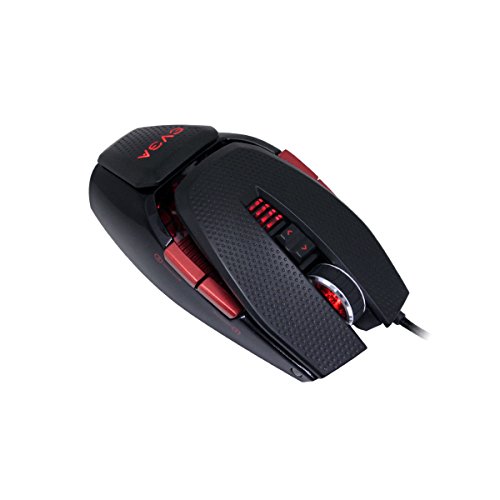
EVGA TORQ X10 901-X1-1103-KR Wired Laser Gaming Mouse 8200 DPI

Logitech M185 Compact Ambidextrous 2.4 GHz Wireless Mouse Swift Grey
More Details On Our Top Picks
HP keeps this one plain and useful, which suits a shared desk or a work laptop that needs a dependable spare. The 1600 DPI optical sensor gives you a moderate sensitivity level, so pointer movement feels steady rather than twitchy.
The wired USB connection is the other clear story here, since you skip pairing and battery management entirely. That makes it a sensible fit for office work, school tasks, and anyone who wants an ambidextrous mouse that behaves the same way every day.
Strong Points
- 1600 DPI keeps cursor movement smooth for office documents, browser tabs, and basic editing.
- USB connection removes setup friction, which helps in a busy office or shared workstation.
- Ambidextrous shape suits left- or right-handed use without a learning curve.
- Three-button layout stays uncomplicated, so accidental presses are less likely during routine work.
- Built-in scrolling gives you the familiar middle-control feel for everyday navigation.
Things To Consider
- The feature set stays basic, so power users may want more buttons or onboard tuning.
- Wired use means cable management matters on crowded desks.
- The simple body does not aim for a sculpted palm fill, so larger hands may notice the compact feel.
Feature Rundown
Who It Suits Best
Office users, students, and anyone who wants a no-drama desktop mouse will get the most from it.
A Better Fit Elsewhere
Cherry GENTIX 4K Mice USB Optical 3600 DPI Ambidextrous, Black suits you better when you want a sharper sensor for more precise pointing.
Cherry moves up a notch in pointer sensitivity, and that matters in spreadsheets, photo selections, and fast desktop work. The 3600 DPI optical sensor gives you more headroom than the HP Wired Mouse 100, while keeping the same ambidextrous comfort story.
That extra sensitivity can feel more responsive on a larger monitor, though some office users may need a minute to settle on the right pointer speed. The black finish keeps the look understated, which helps it blend into a home office instead of shouting for attention.
What We Like
- 3600 DPI gives you a faster response ceiling than the simpler 1600 DPI HP option.
- USB optical design stays predictable for work, browsing, and general navigation.
- Ambidextrous shape supports either hand without a learning curve.
- The plain black finish fits clean desk setups and shared work areas.
- Good match for larger displays where a little extra pointer speed helps.
Minor Gripes
- Higher sensitivity can feel too quick until you tune your pointer settings.
- Wired use keeps it tied to the desk, which some laptop users may not want.
Core Details
Who Will Love This
You will appreciate this most if your workday includes large screens, detailed clicks, or plenty of tab switching.
Another Choice May Suit
Logitech M185 Compact Ambidextrous 2.4 GHz Wireless Mouse Swift Grey fits better for laptop carry, since it cuts the cable entirely.
This is the first true performance step-up in the group, especially for competitive gaming where wireless feel and sensor range matter. Logitech’s HERO 2 sensor reaches up to 44K DPI, and that level of headroom gives you very fine tuning for fast or low-sensitivity play.
The magnetic side buttons are a neat twist, since you can keep the shell cleaner than a busier MMO-style mouse while still getting customization. The trade-off is obvious: this kind of hardware makes most sense for gamers, not for someone who only needs a browser mouse.
Upsides
- HERO 2 sensor offers very high sensitivity headroom for tuned gaming control.
- LIGHTSPEED wireless is built for responsive play, which helps in fast matches.
- USB-C charging fits current desk setups and simplifies cable sharing.
- Magnetic side buttons keep the layout flexible without cluttering the shell.
- PowerPlay support adds a path for a more permanent wireless setup.
- Symmetrical shape works for either hand, which is rare at this level.
Softer Spots
- The gaming focus adds cost and complexity that casual users may never need.
- Support for PowerPlay matters only for users who plan that ecosystem.
- Highly tuned shapes can feel a bit specialized for long office workdays.
Feature Card
Built With In Mind
Serious PC or Mac gamers who want wireless speed with a symmetrical shape are the clearest fit here.
Where A Sibling Pick Shines
TECKNET Compact Ambidextrous Wireless Mouse for Laptop Grey fits better for travel, since it stays smaller and simpler.
Acer leans hard into flexibility, because you get both wireless and wired modes in one shell. That dual-mode setup helps on a desktop where you want one mouse for play and a backup path for charging days or stubborn USB situations.
The 24,000 DPI ceiling and eight programmable buttons place it closer to the gaming side of the shelf than the office side. RGB lighting adds visual personality, though the honest read is that the lighting matters more for desk style than for everyday productivity.
Bright Spots
- Dual-mode connection gives you wireless freedom and a wired fallback.
- 24,000 DPI provides plenty of sensitivity range for gaming adjustment.
- Eight programmable buttons support shortcuts, macros, and game-specific control.
- Ambidextrous layout works for either hand, which expands its usable range.
- RGB lighting offers visual customization for gaming setups.
Areas To Watch
- All those extras can feel unnecessary for plain office work.
- RGB and button mapping add setup steps that casual users may skip.
- Feature-rich mice usually ask for more desk attention and software upkeep.
Details At A Glance
The Right Fit
You should look here if you want one mouse that can shift between gaming, desk use, and wired backup duty.
Swap It Out When
HP Wired Mouse 100 1600 DPI Ambidextrous makes more sense for plain office work, since it keeps the feature set lighter.
ASUS takes a different route from the Logitech G PRO 2, because the focus here is not just speed but also how the shell feels in your hand. The four ergonomic top covers let you shift the shape for left-handed or right-handed use, and that kind of physical tailoring is rare in this group.
The 7200 DPI sensor and Omron switches push it into gaming territory, while the rubber side grips help keep the mouse steady during longer sessions. The trade-off is a more involved setup story, since shape options and RGB features are useful only after you spend a little time getting comfortable.
Reasons To Buy
- Four interchangeable top covers give you more shape flexibility than a fixed shell.
- 7200 DPI offers a solid sensitivity ceiling for gaming and fast pointer movement.
- Omron switches are built for heavy clicking, which matters during long sessions.
- Rubber side grips help keep hold steady in intense play.
- Aura Sync RGB adds a visible customization layer for themed setups.
Room For Improvement
- The shape options are useful, but they also make setup more hands-on.
- Wired design keeps it tethered to the desk.
- Gaming styling may feel busy for plain office use.
Core Details
Whose Shelf It Belongs On
Dedicated PC gamers who care about grip shape as much as sensor speed will get the most value here.
Reach For A Different Pick When
Cherry GENTIX 4K Mice USB Optical 3600 DPI Ambidextrous, Black is the cleaner match for straight office work and lighter desk use.
TECKNET is the carry-everywhere option in this list, and that compact 3.94 by 2.28 by 1.52 inch frame tells the story before you even think about buttons. In a laptop bag, smaller dimensions matter more than flashy extras, especially for commuters and students who want a mouse that slips into the same pocket as a charger.
The quiet 2.4G wireless setup with a USB receiver keeps things easy on the desk, while the three adjustable DPI levels let you tone the pointer up or down. It is not a big-hand comfort mouse, though, so people who like a fuller palm fill may want something more substantial like the ASUS ROG Strix Evolve.
Best Bits
- Very compact size makes it easy to pack with a laptop.
- Wireless receiver setup keeps it simple for quick use.
- Three DPI levels help you adjust pointer feel for work or browsing.
- Small shape suits travel, coffee shop work, and tight desk space.
Small Caveats
- Smaller body may feel cramped for larger hands.
- Compact mice can be easier to misplace in a full bag.
- Travel-friendly design gives up the fuller grip some users prefer.
Technical Sheet
Made For
Frequent travelers and laptop users who value a small footprint over a fuller hand feel will appreciate this most.
Look Elsewhere When
Logitech M185 Compact Ambidextrous 2.4 GHz Wireless Mouse Swift Grey is a better match for anyone who wants a similar travel shape with a more familiar mainstream feel.
EVGA brings a very different feel from the TECKNET, because this one is built for deeper gaming control rather than travel simplicity. The laser sensor, five profiles, and nine buttons make it useful for people who like to switch settings between games or workspaces.
The renewed tag may suit a value-focused setup, though you should treat it like a practical purchase rather than a flashy one. For a home battlestation or a secondary gaming PC, it gives you a lot of control without pushing you toward a simpler office layout.
Positives
- 8200 DPI gives you plenty of sensitivity range for gaming and detailed pointer work.
- Five profiles help you store different control setups for different tasks.
- Nine buttons support shortcuts and game commands.
- Ambidextrous body works for either hand.
- Laser tracking suits users who want a gaming-focused sensor style.
Worth Noting
- Renewed condition makes it more dependent on the exact unit you receive.
- More controls mean more setup time before it feels dialed in.
- Gaming-first design can feel excessive for basic office work.
Quick Facts
Best Suited To
Gamers who like stored profiles and a heavier control layout will get the most from this mouse.
Where Another Pick Fits Better
HP Wired Mouse 100 1600 DPI Ambidextrous is the easier choice for office use, since it keeps the whole experience much simpler.
Logitech M185 closes the shortlist with a familiar formula, small body, wireless receiver, and broad compatibility for basic laptop life. Compared with the TECKNET, it feels less geared toward travel-first shoppers and more like a straightforward desk companion that also slips into a bag without trouble.
The optical tracking and 2.4 GHz USB-A nano receiver keep the setup uncomplicated, and the stated 12-month battery life is a strong convenience point for daily use. That said, the compact shell still favors simplicity over a big ergonomic hold, so large-handed users may want something roomier like the ASUS ROG Strix Evolve.
Highlights
- Compact wireless shape is easy to toss into a bag.
- USB-A nano receiver keeps the desk footprint tiny.
- Optical tracking handles common computer tasks without fuss.
- Stated 12-month battery life reduces how often you think about power.
- Works across PC, Mac, and laptop setups for broad usefulness.
Trade Offs
- Compact design gives up the fuller grip some hands prefer.
- Basic control layout stays aimed at everyday work rather than gaming.
- Small wireless receiver is easy to lose during travel storage.
At A Glance
Who Should Grab It
People who want a very simple wireless mouse for school, office work, or shared household computers will feel right at home here.
Skip It When
Cherry GENTIX 4K Mice USB Optical 3600 DPI Ambidextrous, Black fits better for users who want a more responsive wired feel.
What To Weigh Before You Choose
Where Shoppers Go Wrong
People often focus on ambidextrous shape first and forget about connection style, button count, and desk size. That leads to a mouse that fits both hands but still feels wrong for the task, especially on a laptop or a crowded office desk.
DPI matters too, but only in context. A high number sounds impressive, yet a 24,000 DPI gaming mouse can feel awkward for spreadsheets, while a 1600 DPI office mouse may feel calm and natural for everyday navigation.
What The Higher Tier Buys
Extra money usually goes into sensor precision, switch quality, software control, and more flexible hardware. In this group, that shows up as items like the Logitech G PRO 2 with its HERO 2 sensor and USB-C charging, or the ASUS ROG Strix Evolve with its interchangeable top covers.
You pay for tuning room and comfort shaping, not just a shell with a left-right neutral profile. For gaming, design work, or heavy daily use, that upgrade can feel justified; for basic browsing, the simpler HP and Logitech M185 cover the ground with less fuss.
Closing Remarks
Your best ambidextrous mouse depends on how much control you really need. For simple work, the HP Wired Mouse 100 and Logitech M185 keep things easy. For gaming or deeper customization, the Logitech G PRO 2, Acer Dual-Mode, and ASUS ROG Strix Evolve give you much more room to tune the feel. Pick the one that matches your desk, your hand, and how you actually use your computer, not just the spec line that looks biggest.
