
Hand strain shows up fast during long desk sessions, especially when your mouse shape forces your wrist into an awkward angle. These ambidextrous and vertical options make more sense for mixed-use workstations, shared desks, travel bags, and anyone who wants a steadier grip without a lot of fuss. You’ll see a blend of classic vertical mice, a trackball, and a foldable design, so the mix covers more than one way to ease movement. The real question is how much comfort, portability, and device switching you want from your next mouse.
Quick Look At The Shortlist

Razer Pro Click V2 Vertical Wireless Mouse 6 Button

Nulea M512 Wireless Trackball Mouse 55mm Trackball
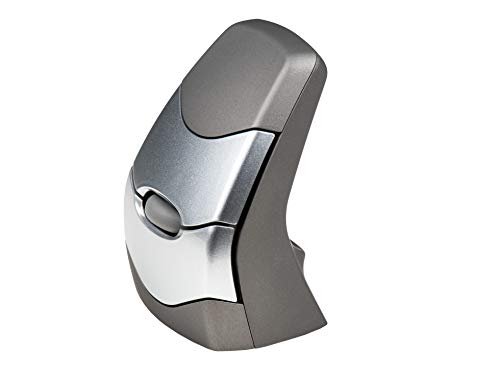
KINESIS DXT2 Ergonomic Vertical Mouse
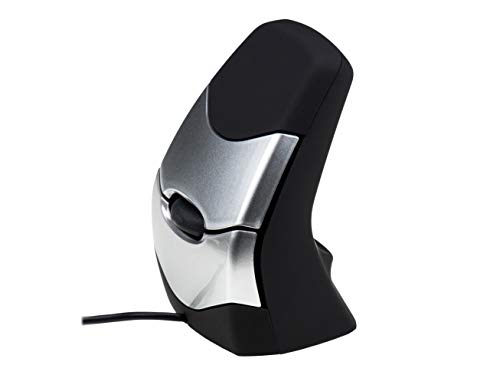
Logitech Lift Vertical Ergonomic Wireless Mouse Graphite

Logitech Lift for Business Vertical Ergonomic Wireless Mouse Graphite

R-Go Twister Ambidextrous Mouse Foldable Design

ProtoArc EM11 NL Wireless Ergonomic Vertical Mouse Black

Lekvey Ergonomic Mouse Rechargeable Vertical Wireless Mouse
More Details On Our Top Picks
The Razer leans into desk flexibility, not just shape. A vertical body, six buttons, and support for 2.4GHz, Bluetooth, or USB-C wired use make it easy to fit into a work setup that moves between a laptop, a desktop, and a dock.
That one-click AI prompt button adds a modern shortcut layer, though the real draw is the broad connectivity. You may find the RGB lighting useful for a personal desk and less necessary in a plain office, but that’s a small trade-off for the amount of control here.
Strong Points
- Three connection paths give you room to match the mouse to a laptop bag, a fixed desk, or a wired setup.
- Six buttons create useful room for shortcuts, which helps once daily tasks start piling up.
- The vertical body gives your hand a more neutral angle, a plus during long stretches of spreadsheet work or browsing.
- Mac and Windows support keeps it flexible across mixed-device homes and offices.
Things To Consider
- The RGB styling adds personality, but it also means this pick looks less understated than a plain office mouse.
- Extra buttons and modes can take a little setup time before everything feels natural.
- The more feature-rich layout may feel like overkill for simple point-and-click use.
Feature Rundown
Who It Suits Best
You’ll get the most from this mouse in a workstation that changes often, especially across laptop and desktop use.
A Better Fit Elsewhere
The Logitech Lift Vertical Ergonomic Wireless Mouse Graphite suits you better when you want a quieter, more minimalist vertical mouse for everyday office work.
The Nulea takes a different route from the vertical mice above, because the trackball stays put while your pointer moves. A 55mm ball and adjustable DPI, meaning pointer sensitivity, make it a smart fit for cramped desks, media setups, and anyone who wants less arm travel.
Left- or right-hand use adds flexibility, which matters in shared spaces or for anyone whose hand changes during the day. The trade-off is that trackball control usually asks for a short adjustment period, so it suits patient shoppers more than someone wanting instant muscle-memory comfort.
What We Like
- The trackball keeps the mouse body still, which helps on small desks and crowded workstations.
- Left- and right-hand compatibility makes it unusually flexible for shared use.
- Four DPI levels let you tune pointer speed for detail work or looser everyday control.
- Rechargeable power means you avoid the routine of swapping batteries.
Room For Improvement
- Trackball control takes a learning curve, especially for folks coming from a standard mouse.
- The ball area will need regular cleaning to keep motion feeling smooth.
- That compact body is practical, but it offers less of the palm support you get from a larger vertical shell.
Core Details
Best Suited To
This is a strong match for compact offices, side-table workstations, and shared home desks where arm movement is tight.
Swap It Out When
The R-Go Twister Ambidextrous Mouse works better for you if you want a more traditional vertical hand shape instead of a trackball.
The DXT2 keeps the shape compact and deliberate, which should appeal to you if larger palm-filling mice feel clumsy. RF wireless, meaning radio-frequency wireless, gives it a straightforward connection style for a desk that stays in one place.
Compared with the flashier Razer, this one feels more restrained and focused on posture rather than extras. That makes it a sensible choice for long office blocks, especially for anyone who wants a slimmer vertical profile and less hand spread.
Bright Spots
- The compact vertical shape keeps the hand in a more upright position without a bulky footprint.
- RF wireless keeps setup simple on a fixed workstation.
- The design should suit users who prefer precision over a large, cushioned grip.
Minor Gripes
- The lean profile may feel too small for hands that prefer broad palm contact.
- Because it focuses on shape first, it offers less of the feature-heavy flexibility seen in the Razer Pro Click V2.
- Cleaning and handling are easy, but the smaller body may not feel as relaxed during very long sessions for some users.
At A Glance
Whose Shelf It Belongs On
You’re the right match for this mouse if you want a compact ergonomic shape without extra layers of software-driven features.
Consider Something Else When
The ProtoArc EM11 NL Wireless Ergonomic Vertical Mouse fits better for multi-device setups that need Bluetooth and a USB-A receiver in the same routine.
The Lift is the quiet, easygoing option in this set, and that matters more than flashy specs for a lot of desks. Bluetooth and the included Logi Bolt USB-A receiver give you two simple ways to connect, while the quieter clicks suit shared rooms and open offices.
Compared with the KINESIS DXT2, this one feels friendlier for everyday use and less specialized in shape. Four of six buttons are customizable, so you get some shortcut control without turning setup into a project.
Upsides
- The vertical angle encourages a more natural hand position for routine desktop work.
- Quiet clicks make it easier to use in shared spaces or late-night home offices.
- Bluetooth and Logi Bolt give you practical connection flexibility.
- Customizable buttons add convenience for browsing, documents, and multitasking.
Softer Spots
- The shape is comfortable for many hands, but it still deserves a short adjustment period.
- Button customization is useful, though it’s not as expansive as the Razer Pro Click V2.
- Owners who like a very large grip may want a fuller-bodied mouse instead.
Details At A Glance
Right Fit For
You’ll likely appreciate this mouse most in a home office, a shared desk, or any workspace where quiet clicks matter.
Look Elsewhere When
The Lekvey Ergonomic Mouse suits you better if you want a simpler budget-friendly vertical mouse with USB-C charging and fewer setup concerns.
This version of the Lift keeps the same comfortable shape, but it leans harder into deployment-friendly wireless handling. Bluetooth and secured Logi Bolt support matter most in offices where you want easier setup across many machines and less friction during rollout.
The quiet click feel carries over, and the pitch toward Windows, Mac, Chrome, and Linux compatibility widens its reach. For IT-managed spaces, that’s the point, though the business angle may feel unnecessary for a single home desk.
Reasons To Buy
- Business-focused wireless support suits shared workstations and managed fleets.
- Quiet clicks help keep desk noise under control.
- Cross-platform compatibility broadens where you can place it.
- The familiar vertical shape keeps the learning curve mild for Logitech Lift users.
Areas To Watch
- The business-first setup makes more sense in office environments than in casual home use.
- Someone who wants a more playful or feature-heavy mouse may find this one plain.
- Its strengths show up most clearly once you have more than one system to support.
Core Details
Built With In Mind
This one belongs with IT teams, hybrid offices, and anyone who wants a calm vertical mouse across more than one platform.
Where A Sibling Pick Shines
The Logitech Lift Vertical Ergonomic Wireless Mouse Graphite is the better everyday home-office fit when you want the same basic feel without the business deployment angle.
The Twister is the most unusual shape in the lineup, and that’s exactly why it stands out. Its foldable body, ambidextrous layout, and vertical stance make it a smart talking point for a desk that needs flexibility rather than a standard mouse silhouette.
Break software adds a nudge toward healthier work habits, though the value of that will depend on your routine and how tightly your day is scheduled. Silent click behavior and Bluetooth-plus-USB-C pairing give it a practical side that keeps the design from feeling like a novelty.
Best Bits
- The foldable design makes it easy to store and carry compared with fixed-shell vertical mice.
- Ambidextrous use supports either hand, which is rare in this group.
- Silent clicks help in shared rooms or quiet home offices.
- Bluetooth and USB-C connection options add useful flexibility.
Small Caveats
- The folding mechanism introduces a bit more complexity than a standard one-piece mouse.
- Its unusual shape may take longer to feel natural than the Logitech Lift or ProtoArc EM11 NL.
- Break software only matters if you plan to follow the reminders in a real work routine.
Feature Card
Who Will Love This
You’ll like this most if you want a mouse that folds, travels well, and works for either hand without feeling ordinary.
Another Choice May Suit
The Nulea M512 Wireless Trackball Mouse suits you better when desk space is tight and you want pointer control without moving the mouse body around.
The ProtoArc takes a measured approach to vertical ergonomics with a 58° angle, which is steep enough to change wrist posture without looking extreme. It can connect to three devices through Bluetooth or a 2.4G USB-A receiver, so it suits a laptop-plus-desktop routine better than a single-device desk.
The rechargeable 500mAh battery keeps it away from disposable cells, and USB-C charging makes topping it up straightforward. That said, the design is more about steady comfort than flashy extras, so it fits best in a work setup that values calm consistency.
Standout Traits
- The 58° angle gives a clear vertical feel without pushing the hand into an overly dramatic position.
- Three-device pairing is handy for people moving between work and personal machines.
- USB-C rechargeability simplifies daily maintenance.
- The black finish keeps it visually simple on a busy desk.
Points To Note
- The calmer feature set means it won’t satisfy someone chasing lots of extra controls.
- Bluetooth and dongle switching can take a moment to get used to in multi-device routines.
- The 500mAh battery is practical, but it still adds another thing to keep charged.
Quick Facts
Perfect Match For
You’ll appreciate this most in a hybrid desk setup where you move between multiple devices and want a clean, steady vertical shape.
Skip It When
The Razer Pro Click V2 Vertical Wireless Mouse suits you better if you want extra buttons, RGB styling, and a more feature-packed feel.
The Lekvey is the straightforward comfort pick in this lineup, and that can be a good thing for a home desk or spare office computer. Its vertical shape, quiet click behavior, and USB-C rechargeable battery cover the basics without pushing into complicated territory.
Three DPI levels, namely pointer sensitivity settings, help you slow things down for careful work or speed them up for general browsing. The honest read is that it feels more utilitarian than polished, but for a lot of everyday setups, that’s enough.
Positives
- The comfort grip and vertical angle make it a sensible switch from a flat mouse.
- USB-C charging is easier to live with than a separate battery routine.
- Quiet clicks suit dorm rooms, shared offices, and late-night work.
- The included page back and page forward buttons help with browsing and document work.
- 3 DPI settings let you tune the pointer for different tasks.
Honest Caveats
- The design is practical, but it does not feel as premium as the Logitech Lift or Razer Pro Click V2.
- You may need a few days to get used to the vertical grip before it feels natural.
- The feature set stays simple, so power users may want more button depth elsewhere.
Core Details
Made For
This is a solid match for students, casual home-office setups, and anyone who wants a vertical mouse without a lot of extras.
Where Shoppers Go Wrong
The Logitech Lift Vertical Ergonomic Wireless Mouse Graphite is the smarter step up if you want a quieter, more polished vertical shape for daily office use.
How To Choose The Right Ambidextrous Vertical Mouses
Fit Comes First
The right hand shape matters more than brand names here. Vertical mice angle your hand so your palm faces inward instead of flattening over the desk, which can feel calmer during long email blocks or spreadsheet sessions.
Ambidextrous models add another layer, because they let you use either hand or share the same mouse in a mixed-use home. The trade-off is that some ambidextrous shells feel less sculpted than one-hand designs, so comfort depends on your grip style.
Connection And Device Switching
Bluetooth works well for clean desks and laptops, while a 2.4GHz receiver usually gives you a simple dongle-based setup. USB-C wired mode matters more for power users who want zero battery concerns and a direct link to a desktop.
Multi-device support is worth paying attention to in hybrid work routines. A mouse that jumps between your work laptop, personal machine, and tablet setup can save time, but the switching buttons and pairing steps should stay easy to reach.
Buttons, Sensitivity, And Daily Flow
DPI, short for dots per inch, controls pointer speed. Lower settings help with precision work, while higher settings move the cursor across larger screens with fewer wrist motions.
Extra buttons can speed up browsing, copying, and switching windows, though not everyone wants a crowded control layout. For most desk use, a mouse with a few well-placed buttons feels better than one packed with features you never touch.
Small Details That Change Ownership
Battery charging style, surface texture, and cleaning access all affect how pleasant a mouse feels after the first week. Trackballs need a bit more upkeep around the ball housing, while simple vertical shells are usually easier to wipe down.
Travel users may care more about size and storage than about button count. Office users usually get more value from quiet clicks, stable wireless behavior, and a shape that holds up through long work sessions.
Things Worth Knowing First
Wrong Turns To Avoid
People often focus on the word vertical and forget to check the grip size, button layout, or connection type. That usually leads to a mouse that sounds right on paper but feels awkward after a day at the desk.
Another common miss is buying for features alone. A bold design or extra software helps only when it matches your routine, so a quiet, simple mouse can be the better call for many setups.
The Upgrade Payoff
Higher-tier models usually spend more on button count, multi-device support, or a more polished shell. In this category, those changes matter because your hand stays on the mouse for hours, not minutes.
That upgrade is worth it when you split time between devices, rely on shortcuts, or want a more refined click feel. Basic models still make sense for light use, but the better-built options tend to feel easier to live with once workdays get long.
Final Thoughts
The best choice depends on how you work, not just how the mouse looks. The Logitech Lift models suit calm office routines, the Razer brings more control and device flexibility, and the Nulea trackball makes sense for tight desks. If you want something truly ambidextrous, the R-Go Twister is the most unusual option here, while the Lekvey keeps things simple for everyday use. Pick the shape that matches your desk habits, and the rest gets easier.
