
Anime-themed PC builds live or die on two things, clean presentation and sensible thermals. You want a case that shows off your hardware without turning cable management into a wrestling match, and that’s where the right layout matters. The picks below lean toward cases and display pieces that suit glossy showcases, collector builds, and daily-use rigs that still need practical cooling.
You’ll see compact micro-ATX options, roomy dual-chamber towers, and a few high-impact display-focused choices. Some are better for a tidy desk setup, while others suit a full centerpiece build with custom styling. The trade-offs are real, so each pick is matched to the kind of setup it serves best.
Quick Look At Our Shortlist
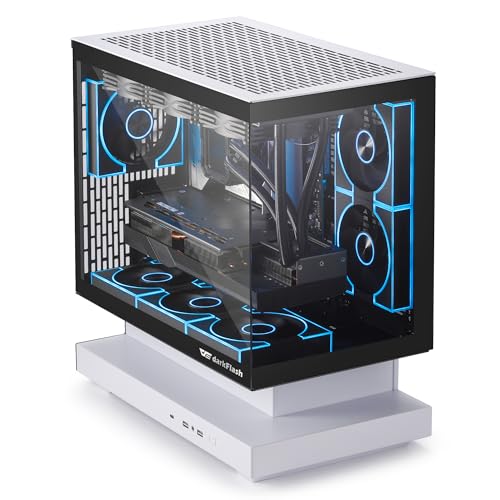
darkFlash FLOATRON F1(2025) Micro-ATX PC Case

darkFlash DS900WS(2025) ATX PC Case
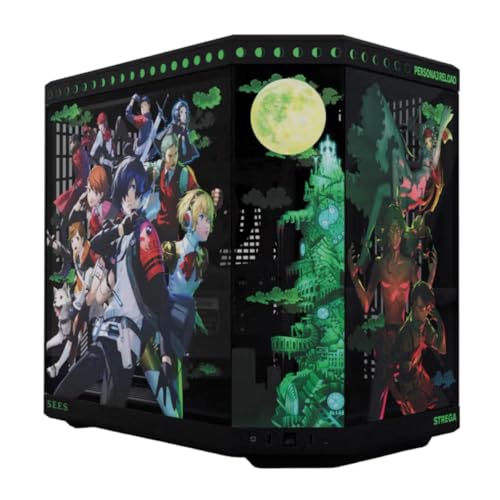
Hyte Y70 Persona 3 Reload Official Licensed Mid-Tower ATX Gaming PC Desktop Case

Hyte Y70 Metaphor ReFantazio Official Licensed Mid-Tower ATX Gaming PC Desktop Case
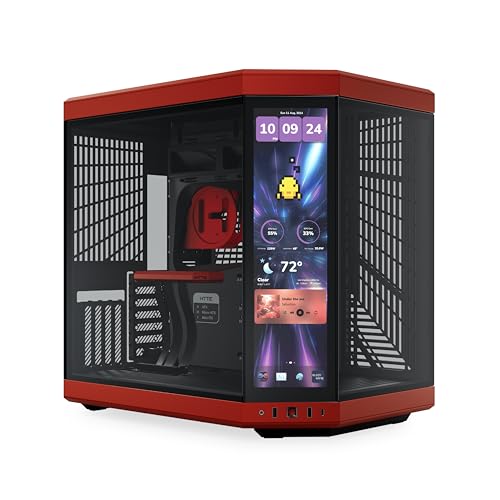
HYTE Y70 Touch Infinite Modern Aesthetic Gaming PC Case

HYTE Y70 Touch Infinite Modern Aesthetic Gaming PC Case

Vetroo A6 Display Board w/LED Lights

More Details On Our Top Picks
The FLOATRON F1 suits a desk setup that needs a full glass view without swallowing the whole surface. Its 270-degree panoramic shape makes it easier to show off a small anime build, and the back-connect support helps keep the front chamber cleaner. For a compact rig, that cleaner layout matters almost as much as the cooling.
The included three ARGB PWM fans give you a ready-made lighting base, while support for a 360 mm AIO means you still have room for a serious liquid-cooling setup. The trade-off is obvious, though, since micro-ATX space asks for tighter part planning than a mid-tower like the DS900WS. You’ll appreciate it most when you want style first, but not at the expense of sane airflow.
Strong Points
- 270-degree glass presentation suits character builds and display-heavy themes.
- Back-connect support helps the front chamber stay visually tidy.
- Three pre-installed ARGB PWM fans reduce setup effort and improve everyday airflow.
- Type-C front connectivity is handy for newer peripherals and storage gear.
- 360 mm AIO support leaves room for stronger cooling in a compact shell.
Things To Consider
- Micro-ATX sizing means you need to plan parts more carefully than with larger towers.
- The floating design can reward tidy cable work, but it also exposes mistakes more clearly.
- Cleaning the glass and interior surfaces takes regular attention, especially in bright lighting.
Feature Snapshot
Who It Suits Best
Small-form-factor builders who still care about a strong visual reveal will get the most out of this case, especially for a desk display rig.
A Better Fit Elsewhere
darkFlash DS900WS(2025) ATX PC Case suits you better when you want more interior room and a warmer, wood-accented look for a mid-tower setup.
The DS900WS leans into a calmer, more furniture-like look thanks to the genuine walnut wood accent. That matters in a room where you want an anime theme to feel curated instead of loud, and the black finish keeps the wood detail from drifting too rustic. Compared with the FLOATRON F1, it gives you a larger ATX mid-tower canvas and a more relaxed build experience.
Four pre-installed 120 mm PWM ARGB fans give you a strong starting point, and support for a 360 mm AIO keeps cooling options broad. Type-C on the front panel is a practical touch, especially for newer cases and accessories, while the airflow-first layout helps a loaded gaming system breathe better. The honest read is that the wood trim is the main draw, so it suits a clean showcase desk more than a rough-and-ready workshop setup.
What We Like
- Walnut wood detail gives the case a warmer, more finished feel.
- Four included PWM ARGB fans make the cooling starting point strong.
- ATX mid-tower sizing gives you easier component planning than a micro-ATX shell.
- Type-C support keeps the front panel useful for modern gear.
- 360 mm AIO support helps you scale cooling for a more demanding rig.
Worth Noting
- The wood accent adds style, but it also makes finish care more noticeable over time.
- Larger mid-tower dimensions need more desk or floor space than the FLOATRON F1.
- Owners who want a very bold anime theme may prefer a more overtly showy shell.
Core Details
Built With In Mind
You’ll get the most from this case in a room where the PC sits in plain view and the wood accent has space to breathe.
Swap It Out When
darkFlash FLOATRON F1(2025) Micro-ATX PC Case is the smarter call for tighter desks and smaller component stacks.
This licensed Persona 3 Reload edition is built for a themed desk where the case itself is part of the display. The panoramic tempered glass and dual-chamber layout make cable routing less visible, which helps your hardware and artwork stay in the spotlight instead of the wiring. Compared with the darkFlash cases, this one feels more like a stage piece than a standard chassis.
The included PCIe 4.0 riser cable matters because it supports vertical GPU presentation in a cleaner way, and the high-airflow chassis keeps the aesthetic from becoming purely decorative. You may find the dual-chamber format especially useful in a long-term build, since separating cables and components often makes maintenance less stressful. It’s a strong choice for collectors who want a licensed theme without giving up sensible airflow planning.
Highlights
- Official Persona 3 Reload styling gives the build a clearly defined theme.
- Panoramic tempered glass makes display parts easy to see.
- Dual-chamber layout helps keep wiring and core hardware separated.
- PCIe 4.0 riser cable supports vertical graphics-card presentation.
- High-airflow chassis keeps the case practical for everyday gaming use.
Small Caveats
- Themed hardware can lock the look in place more than a plain shell would.
- Glass surfaces ask for regular dusting, especially in bright rooms.
- Dual-chamber designs reward careful part planning during assembly.
Technical Sheet
Whose Shelf It Belongs On
Collectors and theme-first builders will appreciate this most, especially around a Persona setup that deserves a visual centerpiece.
Look Elsewhere When
MUSETEX Y6 PC Case makes more sense for you when you want a less branded look but still want plenty of visible fan lighting.
The Metaphor ReFantazio edition keeps the same Y70 formula but shifts the mood toward a browner, more grounded finish. That gives your setup a warmer tone than the Persona variant, which can be a nice fit for a room with wood furniture or softer lighting. For many desks, that balance between themed art and calmer color is exactly the point.
Like the earlier Y70, it uses panoramic tempered glass, a dual-chamber interior, and the included PCIe 4.0 riser cable. Those details help a vertical GPU build feel intentional instead of improvised, and the airflow-oriented chassis keeps it from being only a display box. The trade-off is simple: the design language is specific, so it suits a committed theme more than a flexible placeholder build.
Reasons To Buy
- Official licensed styling gives the case a distinct identity.
- Brown finish feels softer and more furniture-friendly than brighter themed shells.
- Dual-chamber layout helps keep the showcase side cleaner.
- Included PCIe 4.0 riser cable supports vertical graphics-card mounting.
- Panoramic tempered glass suits display-heavy anime setups well.
Areas To Watch
- The themed finish narrows the range of looks you can build around it.
- Glass and large visual surfaces mean dust is more noticeable.
- The Y70 format still asks for careful planning during assembly and cable routing.
Feature Rundown
The Right Fit
Theme-focused builders who want a warmer tone than black or bright white will probably feel at home with this one.
Where A Sibling Pick Shines
Hyte Y70 Persona 3 Reload Official Licensed Mid-Tower ATX Gaming PC Desktop Case makes more sense for you when the licensed artwork itself should carry the whole look.
The cherry-red Y70 Touch Infinite is for people who want the case itself to feel like part of the setup’s personality. Its integrated 2.5K LCD touchscreen changes the front-of-rig experience from static display to something more interactive, which is a big visual step up from the glass-only HYTE models. In a themed room, that screen can make the whole build feel like a small dashboard rather than just a tower.
The dual-chamber ATX layout and PCIe 4.0 riser cable keep the interior presentation clean, while the 10-fan capacity gives you room to shape airflow around a hotter graphics card. The catch is that this kind of feature stack rewards a patient, detail-minded build, and the touchscreen makes sense only when you’ll actually use it. You’re paying for style, utility, and presence all at once, so it suits a centerpiece rig more than a simple daily work machine.
Upsides
- Integrated 2.5K touchscreen adds a real visual focal point.
- Dual-chamber layout helps the showcase side stay uncluttered.
- 10-fan capacity gives you wide cooling headroom.
- PCIe 4.0 riser cable supports cleaner vertical GPU placement.
- Cherry-red finish makes the case feel more expressive than plain black.
Room For Improvement
- The touchscreen raises the price-and-complexity feel compared with simpler cases.
- The red finish is striking, but it narrows your color-matching options.
- Touch features and display surfaces ask for regular care to keep fingerprints down.
Details At A Glance
Who Should Grab It
You’ll get the most from this case when the PC is meant to sit in plain view and carry part of the room’s identity.
Another Choice May Suit
HYTE Y70 Touch Infinite Modern Aesthetic Gaming PC Case in Snow White is the better fit for a brighter desk or a lighter color scheme.
The Snow White version of the Y70 Touch Infinite softens the visual weight of the same screen-equipped design. That cleaner finish helps the LCD and internal lighting stand out more in a bright room, and it pairs neatly with white components or pastel-themed builds. Compared with the cherry-red version, this one feels a little easier to blend into mixed-color desks or lighter interiors.
You still get the integrated 2.5K touchscreen, the dual-chamber ATX structure, the 10-fan capacity, and the included PCIe 4.0 riser cable. Those shared details make it as capable as the red model, so the decision mostly comes down to color and room styling. For a lot of setups, that’s a simpler choice than juggling more technical differences.
Best Bits
- Snow White finish works well with light-themed and pastel builds.
- Integrated 2.5K touchscreen gives the case a distinct front-panel function.
- Dual-chamber layout helps with a cleaner visual presentation.
- 10-fan capacity supports flexible cooling plans for larger systems.
- PCIe 4.0 riser cable is included for vertical GPU mounting.
Softer Spots
- The touchscreen still adds complexity compared with a plain glass tower.
- White finishes can show dust and marks more easily in some rooms.
- The format suits a showcase build more than a minimal office setup.
Core Details
Whose Shelf It Belongs On
Builders who want a bright, modern showpiece will get the most from this version, especially in a white or pastel setup.
Where Shoppers Go Wrong
HYTE Y70 Touch Infinite Modern Aesthetic Gaming PC Case in Cherry/Red suits you better when you want a bolder color statement than the Snow White version offers.
The A6 Display Board is less about the case shell and more about what you want sitting inside it. Its 9.8 x 3.1 inch vertical format and LED lighting make it useful as an accent piece for custom decor, especially in builds that already have a strong visual theme. Compared with the full towers above, this is the small-screen option that lets you add motion and color without changing the whole chassis.
Full HD and 2K multi-mode support give you room to cycle between sharper presentation styles, which can work well for anime art, simple status panels, or scene-based visuals. The trade-off is that it’s a decorative component, not a structural case feature, so its value depends on how much you care about interior styling. For that reason, it suits modders and detail-oriented builders more than first-time system assemblers.
Positives
- Vertical 9.8 x 3.1 inch size fits neatly into many custom layouts.
- LED lighting adds a clear visual accent inside the case.
- Full HD and 2K modes give you flexible display styling.
- Useful for anime artwork, status panels, or visual meter ideas.
Points To Note
- This is an accessory display piece, not a main PC enclosure.
- Its value depends on how much visual customization matters to you.
- Screen placement and cable routing need a careful look before installation.
Quick Facts
Who Will Love This
Modders and styling-focused builders who already have a case picked out will get the most from this display piece.
Reach For A Different Pick When
HYTE Y70 Touch Infinite Modern Aesthetic Gaming PC Case makes more sense when you want a larger built-in screen as part of the chassis itself.
The MUSETEX Y6 goes for maximum visual presence with seven pre-installed infinity-mirror PWM ARGB fans and a 270-degree full-view tempered-glass design. That combination gives you a lot of light and movement straight away, which suits anime-inspired builds that lean into color and reflection. Compared with the quieter darkFlash DS900WS, this one is more about spectacle than warmth.
Type-C on the front panel is a useful modern touch, and the ATX mid-tower format gives you enough room to build without feeling cramped. The trade-off is that a case with this much glass and lighting asks for more regular dust care and a little patience with cable routing. You’ll like it most when your PC is meant to be seen as much as used.
Bright Spots
- Seven pre-installed ARGB fans create a strong visual base right away.
- Infinity-mirror styling adds depth to the lighting effect.
- 270-degree tempered glass makes the interior easy to showcase.
- Type-C front connectivity supports newer accessories and devices.
- ATX mid-tower sizing gives you familiar build flexibility.
Honest Caveats
- The lighting-heavy design can feel busy in a very minimal room.
- Glass panels need more routine cleaning than solid-sided cases.
- The showpiece look works best when your cable management is neat.
Feature Card
Perfect Match For
Builders who want a bright, attention-grabbing tower without jumping to a touchscreen model will get a lot from this case.
Skip It When
darkFlash DS900WS(2025) ATX PC Case fits better for you when a softer wood accent matters more than a high-gloss lighting focus.
How To Choose The Right Anime Pc Cases
Start With The Kind Of Build You’re Hiding Or Showing
Anime-themed cases work best when you decide early whether the PC should disappear into the room or act like part of the decor. A micro-ATX shell such as the FLOATRON F1 keeps the footprint smaller, while a dual-chamber tower like the HYTE Y70 gives you more room for a display-first layout. That choice affects everything that follows, from cable length to fan count to how much the glass side will matter day to day.
Pay Attention To Airflow Before You Chase Style
Glass panels, lighting, and themed finishes can be tempting, but the cooling layout still does the heavy lifting. PWM fans, which adjust speed based on need, help you balance noise and airflow more intelligently than fixed-speed fans. A case with support for a 360 mm AIO or a strong pre-installed fan set usually makes life easier in a warm room or on a desk that sees long gaming sessions.
Match The Case To Your Space And Maintenance Habits
Bright glass, mirror-like fan hubs, and touchscreen panels all invite more visible fingerprints and dust. A walnut-accented model such as the DS900WS can feel calmer in a living room, while a white touchscreen tower suits a brighter desk area. The honest read is that the more decorative the case, the more often you’ll notice dust and cable clutter.
Choose Features You’ll Actually Use
Type-C front ports, riser cables for vertical GPUs, and touch displays are useful only when they fit your daily routine. A display board like the Vetroo A6 makes sense for modders, but it’s overkill for a simple plug-and-play build. Think about whether you want the case to be a backdrop, a centerpiece, or a functional workspace before you spend more on extra features.
Things Worth Knowing First
Common Shopping Slip Ups
Many shoppers focus on the artwork theme and ignore the interior layout, which leads to cramped builds and awkward cable runs. Another common miss is buying a case with plenty of glass and lighting, then realizing the room setup makes dust and fingerprints hard to ignore.
You also want to avoid choosing a screen-heavy model just because it looks impressive in photos. A display-focused case only earns its place when you’ll actually use the screen or lighting effects every day.
The Upgrade Payoff
Higher-tier cases cost more because they often bundle stronger materials, more complex interiors, extra fans, and display hardware. Dual-chamber layouts, included PCIe riser cables, and integrated LCD panels all add parts and design work, so the price usually reflects that extra engineering.
The upgrade makes sense when your PC sits in a visible spot and you care about presentation as much as gaming performance. For a hidden under-desk tower, a simpler airflow case often gives you a better balance of cost and practicality.
Frequently Asked Questions
What Makes Anime Pc Cases Different From Regular PC Cases?
They usually lean harder into visual presentation, with panoramic glass, lighting, or licensed artwork. The best ones still keep airflow and cable routing in mind.
Do You Need A Large Case For A Themed Build?
No, a compact case can still look excellent with the right parts and lighting. A larger mid-tower just gives you more room for fan layouts, vertical GPUs, and cleaner cable routing.
Are Built-In Screens Worth It?
They make sense when you enjoy live visuals, system info, or animated art on the front of the setup. They add cost and complexity, so they suit showcase builds more than basic work rigs.
How Important Is Tempered Glass?
It matters a lot for display builds because it keeps the interior visible from the outside. You’ll need a little more care with cleaning, since glass shows dust and smudges more easily.
What Should You Check Before Choosing One?
Check motherboard size, graphics-card clearance, fan support, and front-panel ports. Those details matter more than the theme alone, especially for a first custom build.
Closing Thoughts
The right Anime Pc Cases balance theme with the practical stuff that keeps a PC pleasant to live with, like airflow, easy cable routing, and enough room for the parts you already own. A compact model works well for a smaller desk, while a dual-chamber showpiece suits a build that’s meant to be seen. Your best choice is the one that matches the room, the hardware, and how much attention you want the case to draw.
