
You want a pointing device that feels natural with an iPad, not something that fights the screen’s pace. That usually means weighing gesture support, battery style, shape, and whether you prefer a mouse, a trackpad, or a more compact travel piece.
This roundup keeps the focus on real use, like desk work, couch browsing, travel bags, and mixed Apple setups. You’ll see where each option fits best, plus where a different pick in this list makes more sense.
The Shortlist At A Glance

Apple Magic Trackpad White Multi-Touch Surface
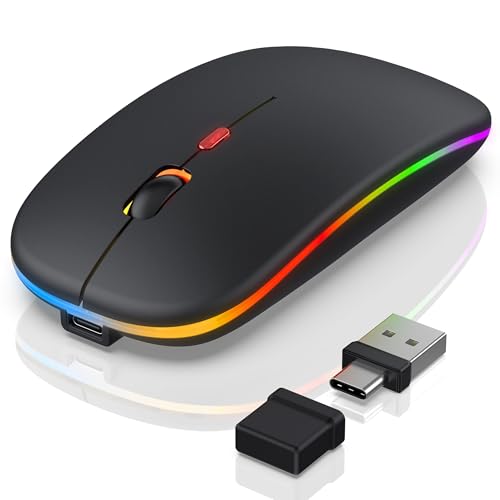
Bluetooth LED Wireless Mouse for MacBook Air iPad Pro

Logitech Signature Comfort Plus M850 L Wireless Mouse Bluetooth

Apple Magic Mouse White Multi-Touch Surface USB-C Renewed

Apple Magic Mouse White Multi-Touch Surface

Apple Magic Mouse Black Multi-Touch Surface

Bluetooth Wireless Mouse for Laptop MacBook iPad Chromebook

KLO Rechargeable Bluetooth Mouse for MacBook iPad Chromebook
More Details On Our Top Picks
The trackpad route makes sense for you if iPad use already feels close to laptop work. Force Touch adds pressure-sensitive control, while the USB-C connection keeps the setup modern and clean.
Compared with the mice in this roundup, it leans more toward gesture flow than pointer precision, which helps on a desk but can feel less natural for quick point-and-click habits. You’ll probably appreciate it most for editing, browsing, and any setup where swiping matters as much as clicking.
Strong Points
- Multi-Touch input makes scrolling and switching feel natural on a desk.
- Force Touch adds another layer of control without cluttering the surface.
- USB-C keeps the connection aligned with newer Apple hardware.
- Works across Mac, iPad, and Apple Vision Pro, which helps in mixed-device homes.
Things To Consider
- It asks you to adapt to a trackpad style, not a mouse shape.
- People who want fast, traditional pointer flicks may prefer a mouse instead.
- The flatter layout can feel less familiar during long sessions away from Apple gear.
Feature Snapshot
Who It Suits Best
You benefit most from this choice if your desk time already revolves around Apple gestures and you want a trackpad that feels like a natural extension of the screen.
A Better Fit Elsewhere
Apple Magic Mouse White Multi-Touch Surface is the simpler swap for you if you want a more familiar mouse shape with similar gesture support.
This one goes after convenience from several angles, since it offers Bluetooth 5.2 plus 2.4 GHz wireless and a USB-A/Type-C connection path. In a shared workspace or laptop bag, that flexibility matters more than flashy styling.
It also leans slimmer and more travel-friendly than the Logitech M850 L below, though the lighter build usually means less hand support over long sessions. The RGB lighting and jiggler mode add personality, but you may care more about the connection mix than the glow.
What We Like
- Bluetooth and 2.4 GHz support cover more device setups.
- USB-A and Type-C support make it easier to move between ports.
- The slim shape suits a laptop sleeve or carry pouch.
- RGB lighting gives it a more distinctive desktop look.
- Jiggler mode may help keep your screen active during long desk sessions.
Room For Improvement
- The slim body may feel less supportive than fuller mice.
- More features can mean more settings to sort out on day one.
- Glowing accents are a style choice, not a comfort upgrade.
Core Details
Who Should Grab It
You’ll get the most from this mouse if you switch between an iPad, a MacBook, and a desktop setup and want one compact accessory to cover them all.
Swap It Out When
Logitech Signature Comfort Plus M850 L Wireless Mouse Bluetooth makes more sense for you if hand support and a calmer shape matter more than lighting or extra modes.
Logitech takes a more classic route here, and that helps a lot during long work blocks. The palm cushion and customizable buttons make the mouse feel less spare than the slimmer FYBC option, while the graphite finish keeps it understated on a mixed Mac and iPad desk.
The 24-month battery claim is the headline feature, yet the real draw is comfort that should suit your daily rhythm better than a flat, gesture-heavy tool. Nothing flashy, just a sensible shape for email, spreadsheets, and the kind of browsing that eats up an afternoon.
Positives
- Palm support helps reduce that cramped feel during longer sessions.
- Customizable buttons make repeated tasks easier to streamline.
- The long battery window means fewer interruptions for charging.
- Bluetooth support keeps the desk clear of extra receivers.
Softer Spots
- It looks more practical than stylish, which is fine for many desks.
- Those who want Apple-style gestures will still prefer the trackpad.
- The larger shell may feel less travel-friendly than compact travel mice.
Details At A Glance
Perfect Match For
You should look at this mouse first if your priority is all-day comfort on a desk, especially for work sessions that stretch past a quick browse.
Where A Sibling Pick Shines
Apple Magic Mouse Black Multi-Touch Surface suits you better if you want the cleaner Apple gesture style and a slimmer desktop footprint.
This renewed version keeps the familiar Apple mouse shape and the Multi-Touch surface, so it lands squarely in the middle for Mac users who like simple control. The USB-C update also makes it easier to match newer cables without much fuss.
Compared with the new white Magic Mouse below, the value angle matters more than any cosmetic distinction. The honest read is that this works best for you if you want Apple styling first and are comfortable with a compact, low-profile mouse for light to moderate daily use.
Upsides
- Multi-Touch support gives you familiar Apple-style gestures.
- USB-C keeps charging and pairing aligned with modern gear.
- Renewed pricing logic can make the Apple shape easier to justify.
- The low profile leaves plenty of room in a tight laptop bag.
Minor Gripes
- The compact shell may not suit larger hands for long sessions.
- Gesture-heavy control takes a little adjustment for first-time users.
- Renewed condition can matter more to some shoppers than to others.
Core Details
Right Fit For
You’ll like this most if you want Apple’s flat mouse design without stepping up to the newest retail version.
A Better Fit Elsewhere
Apple Magic Mouse White Multi-Touch Surface is the cleaner choice if you want the same general feel in a non-renewed listing.
Here’s the familiar Apple mouse experience in its cleanest white finish. It keeps the Multi-Touch surface, so you can swipe through pages and documents without reaching for extra controls.
Compared with the renewed version, this one makes more sense for you if you want a new retail listing and a more straightforward purchase decision. The low, smooth body still asks for a light hand, so it suits neat desks and shorter work bursts better than marathon comfort sessions.
Best Bits
- Gesture support keeps everyday navigation quick and uncluttered.
- The white finish fits well with a bright Apple setup.
- Its slim shape tucks away easily beside an iPad or MacBook.
- Simple form factor makes it easy to learn and use.
Areas To Watch
- The low profile can feel plain to people who prefer fuller mice.
- Long hand sessions may call for a more padded shape.
- The gesture-heavy surface works best once you’ve built the habit.
Feature Rundown
Whose Shelf It Belongs On
You’re a strong match for this mouse if you value tidy design and already like the way Apple gestures work across your devices.
Another Choice May Suit
Logitech Signature Comfort Plus M850 L Wireless Mouse Bluetooth is the better route if your hand wants more support than the Magic Mouse shape provides.
The black finish gives the familiar Magic Mouse a sharper desktop look, and the Multi-Touch surface keeps the control style close to the white version. For dark accessories or a black keyboard, that visual match can matter more than you’d think.
The trade-off stays the same as the other Magic Mouse model, since this is still a low-profile, gesture-led device rather than a cushioned workhorse. You may find it best for lighter daily tasks, especially on a minimalist setup where clean lines matter.
Positives
- Black finish pairs neatly with darker Apple gear.
- Multi-Touch input supports smooth swipes and browsing gestures.
- The compact shell keeps desk clutter low.
Points To Note
- Comfort still trails fuller mice during long editing sessions.
- Gesture use can feel second nature after a little habit-building.
- The slim body is more about appearance and portability than support.
At A Glance
Built With In Mind
You’re the right match here if your desk already leans dark and you want the Apple mouse shape without a bright white body.
Look Elsewhere When
Apple Magic Trackpad White Multi-Touch Surface suits you better if you want broader gesture control instead of the mouse form factor.
This PEIBO mouse keeps things straightforward, and that can be useful for a student bag or a spare desk mouse. The auto-sleep behavior matters because it trims wasted battery use once the computer is off or the receiver drops out.
It feels less specialized than the Apple options above, yet that can be a good thing for everyday browsing and schoolwork. If your setup changes between a Chromebook, a laptop, and an iPad, you’ll likely value the simple, no-drama approach more than extra styling.
Highlights
- Auto-switch off helps reduce unnecessary battery drain.
- The sleeping mode wakes with a button press, which stays simple in daily use.
- Broad device wording points to flexible everyday compatibility.
Small Caveats
- The feature set is basic compared with the higher-end Apple picks.
- It looks plain, so it’s more about function than style.
- Some people may prefer a fuller shape for longer desk sessions.
Quick Facts
Who Will Love This
You’ll appreciate this mouse most if you want a simple wireless option for mixed school, home, or backup use.
Reach For A Different Pick
Logitech Signature Comfort Plus M850 L Wireless Mouse Bluetooth is the stronger match if long-session comfort matters more than a basic utility layout.
KLO packs a lot of connection flexibility into a small black shell, which is handy for anyone who moves between a MacBook, iPad, and school or office machine. Bluetooth 5.2, Bluetooth 3.0, Type-C, and 2.4G support mean the list is broad, even before you think about charging convenience.
That flexibility comes with a trade-off, since multi-mode mice can ask for a little more setup attention than the simplest options here. Still, for a travel bag or shared desk, it makes a lot of sense, especially when you want one mouse that can follow you across more than one device type.
Bright Spots
- Multiple wireless paths give you lots of setup flexibility.
- Rechargeable design reduces the need to juggle loose batteries.
- The compact build suits a carry case or backpack pocket.
Areas To Watch
- More connection modes can also mean more setup choices.
- The smaller body may feel less anchored during long desk use.
- It makes the most sense when you truly need cross-device flexibility.
Spec Overview
The Right Fit
You should grab this mouse if you want a compact travel companion that can keep up with several device types without taking much bag space.
Skip It When
Apple Magic Trackpad White Multi-Touch Surface is the better route if gesture control matters more than a small portable mouse body.
How To Choose The Right Apple Ipad Mouses
Match The Control Style To Your Routine
Trackpad-style control works well for you if swiping, scrolling, and app switching already feel natural on Apple hardware. A mouse suits a more traditional pointer habit, especially for web forms, spreadsheets, and quick desktop moves.
That difference matters more than branding. A flat Magic Mouse or Magic Trackpad can feel seamless on an iPad desk, while a fuller mouse like the Logitech M850 L usually feels better for longer work stretches.
Check Shape, Grip, And Session Length
Low-profile designs save space, but they ask more of your hand and wrist. Fuller shapes with palm support can feel steadier during long homework nights or remote work sessions.
Think about where you use the device most. A couch setup rewards compact gear, while a fixed desk usually gives you room for a more comfortable shell.
Look At Connectivity Before Extras
Bluetooth is the cleanest path for most iPad setups, since it avoids dongles. Some mice also add 2.4 GHz wireless, USB-A, or Type-C support, which helps across mixed laptops and desktops.
Extra modes help, but they also add choices. For a simple iPad pairing, fewer steps often feels better than more features on paper.
Think About Charging And Carrying
Rechargeable models suit you if you dislike buying spare batteries or packing extras. Long battery claims reduce charging interruptions, but they matter most for heavy daily use rather than occasional browsing.
Travel-friendly shapes usually trade comfort for portability. That’s fine for a school bag or commuter tote, as long as you’re comfortable with a smaller body in the hand.
What To Weigh Before You Commit
Hidden Buying Traps
Many people focus on looks first and comfort second, which backfires fast during longer sessions. A slim mouse can be appealing next to an iPad, yet it may feel too flat for regular work.
Another common miss is overlooking connection types. A mouse that sounds flexible on the product page still needs to match your ports, your pairing habits, and the device you use most.
The Upgrade Payoff
Higher-tier mice usually justify their cost through better materials, stronger gesture support, more usable buttons, or a shape that stays comfortable longer. Those things sound small until you use the device every day.
For a busy desk, the extra spend tends to make sense when the mouse becomes part of your work routine rather than a spare accessory. On occasional use, a simpler pick often covers the job just fine.
Final Thoughts
The right Apple Ipad Mouse depends on how you use your screen, not just which logo sits on top. Choose the Apple Magic Trackpad if gestures drive your day, the Magic Mouse if you want slim Apple styling, or the Logitech M850 L if comfort matters most. For travel or mixed-device flexibility, the smaller Bluetooth options are easier to live with. A good match here should feel natural after a few minutes, not after a week.
