
Big computer cases matter when your build stops fitting the neat little box most towers promise. You need room for long graphics cards, thicker radiators, cleaner cable routing, and airflow that does more than just look good through glass.
This lineup leans on full-size and mid-tower choices for gaming rigs, showpiece builds, and travel-heavy desktop setups. You also get two carry cases for moving a tower to a LAN night, a studio, or a new desk without juggling loose gear.
Quick Look At The Shortlist

HYXN H2 (2026) ATX PC Case

darkFlash DS900WS(2025) ATX PC Case
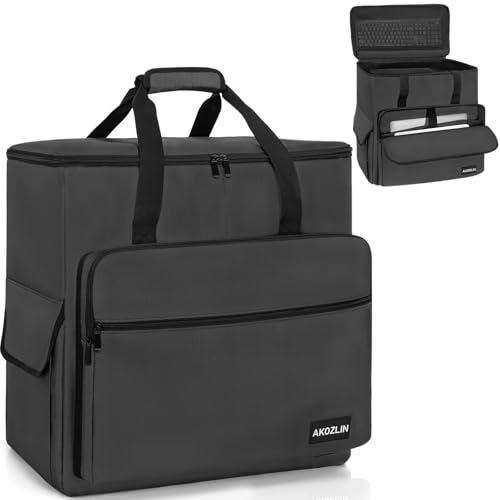
AKOZLIN PC Travel Case Desktop Carrying Case

CURMIO PC Carrying Case

CURMIO Double-Layer PC Carrying Case

DARKROCK EC2 ATX Mid Tower Gaming PC Case

KEDIERS PC CASE ATX K4(MAX)
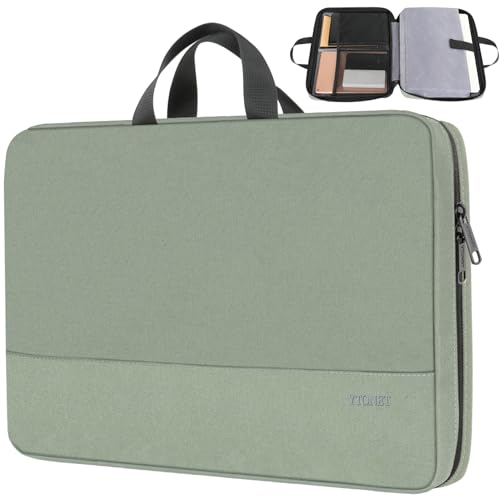
Ytonet Laptop Sleeve 16 inch
More Details On Our Top Picks
Roomy dual-chamber layouts matter most in high-wattage builds, and this HYXN case leans hard into that job. Eight pre-installed ARGB fans, with six 140mm units and two 120mm units, give you a busy airflow setup right out of the box, while the Type-C 3.2 front connection keeps modern peripherals in easy reach.
The 420mm radiator support makes it a strong fit for liquid-cooling plans, and the black finish keeps the look simple rather than loud. The honest trade-off is size and complexity, so smaller desks and first-time cable managers may prefer something less sprawling, but airflow-focused builders will appreciate the extra room.
Strong Points
- Eight included fans reduce the need for immediate add-ons.
- Dual-chamber layout helps hide cables and power hardware.
- 420mm radiator support suits larger cooling setups.
- Type-C 3.2 adds a current front-panel connection.
- Large interior gives long graphics cards more breathing room.
Points To Note
- The footprint can feel demanding on a compact desk.
- Eight fans mean more wiring to organize at install time.
- Dual-chamber cases usually take longer to plan neatly.
Feature Rundown
Who It Suits Best
You get the most from this case in a high-airflow gaming build or a showcase desktop with large cooling hardware.
A Better Fit Elsewhere
darkFlash DS900WS(2025) ATX PC Case suits you better if you want wood styling in a less aggressive build.
Wood accents change the mood of a desk fast, and this darkFlash case is built for that kind of setup. Genuine walnut wood gives it a warmer profile than the glass-heavy crowd, while four pre-installed 120mm PWM ARGB fans keep the airflow story front and center.
That PWM detail matters because pulse-width modulation lets the system manage fan speed more precisely, which usually helps with noise and tuning. You may find the styling the main attraction, but the 360mm AIO support keeps it from being just a pretty shell, especially in a living room PC or studio where looks matter as much as airflow.
What We Like
- Walnut wood gives the case a more furniture-like look.
- Four included PWM fans support better airflow planning.
- 360mm AIO support fits many mainstream liquid coolers.
- Type-C port keeps the front panel current.
Small Caveats
- Wood styling changes the vibe, but it may not suit every RGB-heavy desk.
- Four fans are useful, though airflow-focused builds may still want careful intake planning.
- The more refined exterior can make dust marks easier to notice.
Details At A Glance
Who Will Love This
You’ll appreciate this most in a room where the PC sits in plain sight and the wood finish can do real visual work.
Where A Sibling Pick Shines
HYXN H2 (2026) ATX PC Case suits you better if raw fan count and larger radiator space matter more than styling.
Moving a desktop tower is a very different problem from housing one, and this AKOZLIN bag focuses on transport rather than airflow. The padded nylon build and tote-style shape make more sense for LAN nights, studio moves, or a tower that needs to ride in the trunk without loose cables flopping around.
Compared with HYXN’s fixed case or darkFlash’s showcase build, this one is all about protection during the trip. You may find the carry format far more convenient than a rigid shell for short hops, though it obviously isn’t meant to replace a proper desktop enclosure.
Positives
- Padded construction helps cushion a tower in transit.
- Nylon body keeps the bag light and easy to carry.
- Tote layout suits quick packing before a move.
- Room for keyboard and mouse adds practical value.
Areas To Watch
- This is a transport bag, not a permanent case for a build.
- Bulkier towers can challenge any soft-sided carrier.
- Organizing accessories takes a little care before travel.
Core Details
Best Suited To
You’ll get the most from this bag when your tower travels between home, office, event space, or workshop on a regular basis.
Another Choice May Suit
CURMIO PC Carrying Case fits you better if you want a more structured tower carrier for repeated setup changes.
Shoulder straps make a desktop carrier feel more manageable, and this CURMIO bag leans into that convenience. It’s built for a full tower and has room for ATX and M-ATX motherboards, plus slots for a keyboard, mouse, cables, and earphones, which keeps the small gear from becoming a separate headache.
That mix suits office moves and event setups more than casual storage. The structure should help the bag hold its shape better than a simple tote, though the added fabric and compartments also mean a little more care when packing and zipping everything in.
Reasons To Buy
- Shoulder straps make longer carries less awkward.
- Fits a full tower, not just smaller desktop pieces.
- Accessory pockets help keep cables and peripherals together.
- Motherboard compatibility covers ATX and M-ATX builds.
Honest Caveats
- The bag works best with careful packing, especially around accessories.
- Soft storage still asks for common-sense handling in transit.
- Heavier full towers can feel substantial on a shoulder strap.
At A Glance
Whose Shelf It Belongs On
You’ll value this most in a routine where the tower gets moved often and the accessories need to travel with it.
Reach For A Different Pick When
AKOZLIN PC Travel Case Desktop Carrying Case makes more sense if you want a lighter tote-style carry option.
The double-layer layout gives this CURMIO bag a more organized feel than the simpler tower carriers above it. For desktop setups that travel with lots of small parts, that extra structure can keep cords, peripherals, and the chassis from turning into one crowded pile.
You’ll notice the same full-tower focus as the other CURMIO case, but this version leans harder into separation and packing order. The trade-off is a bit more bulk, yet that usually feels worth it for studio users or anyone who likes their gear sorted before the drive starts.
Highlights
- Double-layer design helps separate tower gear from accessories.
- Shoulder straps support easier transport.
- Fits ATX and M-ATX motherboard-based systems.
- Useful for keeping cables from tangling with peripherals.
Room For Improvement
- The extra structure can add bulk in storage.
- Layered packing takes a little more setup time.
- Soft transport bags still need careful handling around sharp edges.
Feature Snapshot
Who Should Grab It
You’ll benefit most from this bag when you carry a full setup and care about organized packing more than minimal bulk.
Swap It Out When
CURMIO PC Carrying Case is the simpler choice if you want a more straightforward tower carrier with less to organize.
Tempered glass gives a build that showroom feel, and the DARKROCK EC2 uses it without turning the whole case into a one-note display piece. The Type-C ready front panel and support for 50 Series graphics cards point toward a current gaming setup, while the single pre-installed fan gives you a starting point instead of a blank shell.
The cooling ceiling matters too, with room for up to eight 120mm fans and a 360mm radiator. That makes it useful for mainstream gaming rigs that need flexibility, though the one-fan starting point means you’ll likely plan extra airflow more carefully than you would with the HYXN case.
What We Like
- Tempered glass side panel shows off internal parts neatly.
- Type-C support makes the front panel feel current.
- Room for eight 120mm fans gives you upgrade space.
- 360mm radiator support helps with larger cooling plans.
Worth Noting
- Only one fan comes pre-installed, so airflow additions may be needed.
- Glass panels usually ask for a little more cleaning care.
- Planning the full cooling layout takes more thought than with fan-heavy cases.
Technical Sheet
Made For
You’ll like this best in a mid-range gaming build where a glass panel and current front I/O matter, but the case still needs room to grow.
Look Elsewhere When
HYXN H2 (2026) ATX PC Case is the stronger match if you want a much fuller fan package from day one.
Dual tempered glass pushes this KEDIERS case toward the showpiece side of the aisle, and five pre-installed fans keep it from leaning only on looks. The 420mm radiator support gives serious cooling flexibility, which matters for taller GPU builds and hotter gaming parts that need more room to breathe.
Compared with DARKROCK’s single-fan starting point, this one arrives with more of the airflow work already handled. The trade-off is that glass-heavy cases can call for more finger-wiping and a bit more cable care, though the visual payoff is obvious in a desk-facing setup.
Bright Spots
- Five pre-installed fans give the airflow setup a head start.
- Dual tempered glass creates a full-view look.
- 420mm radiator support leaves room for larger cooling hardware.
- Type-C front connectivity helps with newer gear.
Minor Gripes
- Glass-heavy builds usually need more regular cleaning.
- Visible internals reward tidy cable work.
- The visual focus can make hidden messes easier to notice.
Feature Card
The Right Fit
You’ll get the best use from this case in a setup where the PC sits on display and airflow still matters just as much as looks.
Where A Sibling Pick Shines
DARKROCK EC2 ATX Mid Tower Gaming PC Case is the cleaner choice if you want a simpler starting point with less glass to manage.
This sleeve sits outside the full-tower crowd, but it earns a place because many desk setups start with a laptop and travel case, not a hulking tower. The handle, slim shape, and 15 to 15.6 inch fit make it sensible for commuting, meetings, and tossing into a larger bag without adding much bulk.
The pack of two detail adds flexibility for households, office backups, or someone who keeps a spare sleeve at work. The main trade-off is obvious, since it’s for notebook-style machines rather than desktop cases, but that narrower focus is exactly why it feels so easy to live with.
Best Bits
- Slim profile makes it easy to slip into another bag.
- Handle adds convenience for short carries.
- Fits 15 to 15.6 inch laptops.
- Pack of two works well for backups or shared use.
Softer Spots
- This is for laptops, not desktop towers.
- A slim sleeve offers less structural protection than a rigid case.
- Exact fit still depends on your laptop’s dimensions and accessories.
Core Details
Who Should Grab It
You’ll appreciate this most if your daily carry revolves around a laptop and you want a slim sleeve for office, travel, or meetings.
Where Another Pick Fits Better
AKOZLIN PC Travel Case Desktop Carrying Case is the better route when you need to move an entire desktop tower instead of a notebook.
How To Choose The Right Big Computer Cases
Size First, Then Cooling
Big cases earn their keep by making space the easy part. You want room for long graphics cards, thick radiators, and neat cable routing, because cramped interiors turn a build into a chore.
Full towers help with that, but large mid-towers can still work well for many gaming setups. The smart move is matching the case to the parts you already plan to use, not the other way around.
Think About Your Desk And Your Room
Desk footprint matters more than many people expect. A dual-chamber model like the HYXN H2 gives you excellent internal separation, but it also asks for more surface space and a little patience during setup.
Wood-accented or glass-heavy cases can sit in a living room or studio without looking out of place, which is why the darkFlash and KEDIERS options feel so different from a plain black tower. The look should fit the room, because a case this large stays visible.
Pay Attention To Fan And Radiator Support
Fan count tells only part of the story, but it’s still useful. Pre-installed fans save setup time, while radiator support tells you how far the case can go with liquid cooling, especially on hotter gaming builds.
PWM fans, or pulse-width modulation fans, give you finer speed control than simple fixed-speed units. That usually helps you shape noise and airflow more deliberately, though it also gives you more settings to manage.
Don’t Ignore Transport Needs
Some desktop setups never leave the room, while others go to events, studios, or different offices every week. The CURMIO and AKOZLIN carry bags serve that second group far better than any rigid case.
Soft carriers work best when your tower travel is short and deliberate. They also make accessory storage easier, which is handy when keyboard, mouse, and cables need to stay together.
A Quick Reality Check
Common Shopping Slip Ups
It’s easy to fixate on fan count and forget measurements. A roomy-looking tower can still be awkward on a small desk, and a travel bag only helps when your desktop actually fits inside cleanly.
Another common miss is overlooking how much assembly patience a dual-chamber case needs. Cleaner cable paths are nice, but they usually reward careful planning rather than rushed hardware swaps.
When Paying More Pays Off
Higher-tier cases usually spend money on materials, included fans, and visual finish. Walnut wood, dual tempered glass, extra fan packs, and larger radiator support all cost more to produce and package well.
That upgrade makes sense when the case is part of the room, not just the hardware. It also makes sense for builders who want fewer add-ons later and less compromise around cooling headroom.
Frequently Asked Questions
What makes a computer case feel “big”?
Size usually comes from longer internal space, taller component clearance, and support for larger cooling hardware. A case can still be a mid-tower and feel spacious if the layout is open.
Do more fans always mean better airflow?
More fans help only when the case layout and cable routing support them well. Air movement works best when intake and exhaust are arranged with a clear purpose.
Is tempered glass hard to maintain?
Glass panels tend to show fingerprints and dust more readily than solid side panels. That usually means a little more wiping, especially on desk-facing builds.
Should you choose a dual-chamber case for a first build?
Dual-chamber designs can look cleaner, but they also ask for more planning during assembly. A simpler mid-tower often feels easier for a first-time build.
Are travel cases useful for regular desktop use?
Travel cases solve transport, not cooling or hardware mounting. They make sense when your tower needs to move often, while a standard case stays the right choice for a fixed setup.
Final Thoughts
Your best choice comes down to how your machine lives day to day. The HYXN and darkFlash cases favor builders who care about airflow and presentation, while the CURMIO and AKOZLIN carriers make more sense for people moving a desktop between spaces. The DARKROCK and KEDIERS options sit neatly in the middle for gaming setups that need size, cooling room, and a cleaner front-panel experience. Match the case to your room, your parts, and how often you move gear, and the right answer usually becomes obvious.
