
Big Touch Screen Monitors can turn a desk, cart, or shared room into a far more useful setup. You get hands-on control for work, streaming, teaching, checkout flows, or family use without crowding the space with extra gear.
That mix matters most when you want a display that moves easily, responds cleanly, and still feels large enough for comfortable viewing. The picks below lean into different use cases, from rolling 32-inch units to simpler office-friendly touch displays.
Quick Look At The Shortlist
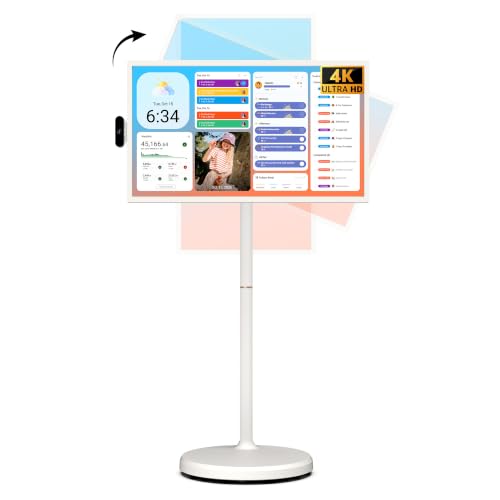
ApoloSign 32 Inch 4K UHD Smart Portable TV Gen2

LG Smart Monitor Swing 32U889SA-W 32-Inch 4K UHD IPS Touchscreen White

FYHXele 32 Inch Large Touchscreen Monitor QHD 1440P 100Hz

FYHXele 24 Inch Touchscreen Monitor IPS FHD 1080P 100Hz

FYHXele 27 Inch Touchscreen Monitor IPS FHD 1080P 75Hz

FYHXele 22 Inch Touchscreen Monitor IPS FHD 1080P 75Hz

ASUS 24″ 1080P Multi-Touch Monitor BE24ECSBT
More Details On Our Top Picks
ApoloSign’s 32-inch format makes sense in a family room, classroom corner, or office that needs a screen you can roll away after use. The 4K panel gives you plenty of room for menus, video calls, and side-by-side windows, while the built-in battery keeps the setup from feeling tied to one outlet.
That portability is the real hook, though the trade-off is obvious, because a wheel-mounted screen is never as simple as a fixed monitor on a desk. You’ll appreciate it most in shared spaces where one display has to move from room to room without much fuss.
Strong Points
- 32-inch size gives you generous viewing space for lessons, presentations, and casual streaming.
- Built-in battery adds mobility, so you can shift the display without hunting for a socket each time.
- Android 16 and Google Play support keep app access broad for everyday smart use.
- 256GB storage gives you room for apps and offline media, which helps in mixed-use settings.
- Voice remote makes quick control easier than constant tapping on the panel.
Things To Consider
- Rolling displays need more floor space than a fixed monitor, so cramped rooms may feel tight.
- The battery adds convenience, but it also means another thing you’ll eventually need to keep charged.
Feature Rundown
Who It Suits Best
You should gravitate toward this one for shared rooms, home teaching, or workspaces that need a large display on wheels.
Where A Sibling Pick Shines
LG Smart Monitor Swing 32U889SA-W is a better match for desk-centric users who want a more adjustable stand and less emphasis on battery-powered mobility.
The LG Smart Monitor Swing leans hard into adjustability, which is exactly what makes it feel different from the ApoloSign above. A wheeled base, tilt, height, swivel, and pivot support give you a lot of freedom for standing work, seated work, or side-by-side use.
The IPS panel and 4K resolution fit desks where color consistency and crisp text matter more than battery-powered portability. In a home office, that balance is very appealing, though the white finish and larger footprint may not disappear visually the way a simpler monitor can.
What We Like
- Wide adjustment range makes it easier to set a comfortable height and viewing angle.
- 4K resolution helps keep spreadsheets, design work, and media playback clean and readable.
- IPS panel supports steadier color from different seating positions.
- webOS keeps the display feeling like a smart station rather than a plain monitor.
- Built-in speaker support reduces the need for extra desktop audio in lighter-use setups.
Worth Noting
- The wheeled stand is useful, but it takes up more room than a standard desk arm or fixed stand.
- White surfaces usually show marks more readily, so regular cleaning matters more here.
- Owners who want a wall-mounted style setup will likely find the mobile base less convenient.
Technical Sheet
Who Will Love This
You’ll get the most from this one in a desk-heavy room where posture, screen angle, and clean visuals matter every day.
Look Elsewhere When
ApoloSign 32 Inch 4K UHD Smart Portable TV Gen2 suits people who care more about battery-powered movement between rooms than fine-tuned desk positioning.
This FYHXele lands in a sweet spot for work and play, because the 32-inch QHD panel sits between plain 1080p models and the more expensive 4K crowd. QHD means 2560 x 1440 resolution, so you get more detail than Full HD without pushing the system as hard as a UHD panel often does.
The 100Hz refresh rate should feel smoother in motion-heavy use, especially for browsing, light gaming, or fast interface work. The honest read is that this one makes more sense for people who want a large touch display that still feels lively, not just big.
Highlights
- QHD resolution gives you a sharp middle ground for text, graphics, and everyday multitasking.
- 100Hz refresh support helps motion feel smoother than standard 60Hz panels.
- USB-C, HDMI, and DisplayPort make it easier to match newer and older devices.
- The adjustable stand helps you fit the screen to a desk, kiosk, or shared station.
- 32-inch size gives you a broad workspace without jumping all the way to 4K pricing territory.
Small Caveats
- Its larger frame can overwhelm narrow desks, especially in compact home offices.
- Fewer smart features mean it works more like a serious display than an all-in-one entertainment hub.
Core Details
Best Suited To
You’ll likely appreciate this most for mixed work, touch-driven tasks, and occasional gaming on a large desk.
Swap It Out When
LG Smart Monitor Swing 32U889SA-W fits you better if a smart operating layer and a more premium adjustment system matter more than refresh rate.
The 24-inch size makes this FYHXele easier to fit into places where the 32-inch models start feeling oversized. For business counters, classrooms, or a desk with limited depth, that smaller footprint can be a real advantage.
Its 1080p panel is simpler than the higher-resolution options above, but that also keeps setup straightforward for everyday touch work. You may find it especially comfortable for kiosks, point-of-sale tasks, or a secondary touch display beside a main monitor.
Bright Spots
- 24-inch size fits tighter surfaces more comfortably than the larger 32-inch picks.
- 1080p resolution is plenty for routine office work, menus, and touch navigation.
- 100Hz support gives the display a smoother feel than basic 60Hz panels.
- VESA support helps it work with more mounting setups.
- HDMI, VGA, and USB connectivity make older and newer device pairing easier.
Areas To Watch
- The smaller size leaves less room for side-by-side windows than the 27-inch and 32-inch options.
- 1080p is serviceable, though sharpness won’t match the QHD and 4K models in this list.
- In busier public spaces, touch screens usually need regular cleaning to stay pleasant to use.
Feature Snapshot
Right Fit For
You should look here for smaller workspaces, storefront counters, or any setup that needs touch input without a huge panel.
Reach For A Different Pick When
FYHXele 32 Inch Large Touchscreen Monitor QHD 1440P 100Hz suits you better if you want more room for multitasking and a sharper image.
The 27-inch size sits in a useful middle zone, larger than the 24-inch pick but not as imposing as the 32-inch models. That makes it a comfortable fit for office tables, school setups, and counters that need a bit more room for touch work.
Its 75Hz refresh rate is gentler than the 100Hz FYHXele options above, so it feels more like a straightforward productivity display than a motion-first screen. For most office use, that’s enough, and the lower-key frame can make daily work feel less crowded.
Plus Points
- 27-inch sizing gives you a sensible balance between desk space and usable screen area.
- 1080p keeps setup simple for routine office, business, and education tasks.
- IPS panel supports steadier color across wider seating positions.
- VESA support makes mounting easier in shared or fixed installations.
- HDMI, VGA, and USB ports help mixed environments connect without much fuss.
Room For Improvement
- 75Hz is fine for work, though it won’t feel as fluid as the 100Hz picks.
- The size is useful, but it can still feel large on compact desks.
Details At A Glance
Who Should Grab It
You’ll like this most for a general office station, reception desk, or classroom monitor that needs touch input without overcomplication.
Another Choice May Suit
FYHXele 24 Inch Touchscreen Monitor IPS FHD 1080P 100Hz fits better for tighter counters, while the 32-inch FYHXele model suits bigger multitasking layouts.
The 22-inch frame is the smallest touch display in this group, and that gives it a very specific appeal. It suits narrow counters, kiosks, and workstations where every inch of desk space matters more than having a giant canvas.
That smaller size also makes the FHD panel easier to live with at close range, which is useful for touch-heavy tasks and simple business flows. It’s not the flashy option, but for compact setups it can feel refreshingly sensible.
Reasons To Buy
- 22-inch footprint works well where a larger screen would crowd the setup.
- 1080p resolution keeps the interface readable for routine business and touch tasks.
- 10-point touch support gives you room for gestures and multi-touch interaction.
- IPS panel helps with steadier color when the screen is viewed from the side.
Softer Spots
- The smaller panel gives you less working room than the 24-, 27-, and 32-inch picks.
- 75Hz is fine for daily use, though it’s not the smoothest option in the roundup.
- Like most public-facing touch screens, it’s easier to keep pleasant with regular wipe-downs.
Quick Facts
Whose Shelf It Belongs On
You’ll get the most from this pick in compact retail, service, or front-desk setups where space is tight and touch input is central.
Where A Sibling Pick Shines
FYHXele 24 Inch Touchscreen Monitor IPS FHD 1080P 100Hz is the better fit if you want just a little more room without jumping to a much larger display.
ASUS takes a more office-centered route than the FYHXele touch displays above, and that shows up in the connectivity and ergonomic details. A 24-inch Full HD panel is easier to slot into a normal desk setup, while USB-C with power delivery can cut cable clutter for compatible devices.
The display also adds DisplayPort daisy chain support, which is helpful in workstations that need multiple monitors linked in a cleaner way. One thing worth considering is operating system fit, since the 10-point touch function depends on the platform, but for Windows-based offices it feels thoughtfully put together.
Best Bits
- 24-inch size fits standard desks without feeling cramped.
- USB-C with power delivery reduces cable clutter for supported laptops.
- DisplayPort daisy chain support helps streamline multi-monitor setups.
- Height adjustment and VESA support make it easier to match your workspace.
- Eye Care focus adds a comfort-minded angle for long office sessions.
Points To Note
- The 10-point touch function depends on the operating system, so setup matters here.
- It’s more of a structured office monitor than a movable all-in-one display.
Core Details
The Right Fit
You’ll want this for a conventional office desk, a dual-screen workstation, or any setup where tidy ergonomics matter more than portability.
Where Shoppers Go Wrong
ApoloSign 32 Inch 4K UHD Smart Portable TV Gen2 makes more sense if your setup needs mobility, battery power, and a far larger screen area.
How To Choose The Right Big Touch Screen Monitors
Screen Size And Placement
Big Touch Screen Monitors need enough physical room to feel useful, not just impressive. A 22-inch display works well on a kiosk or narrow counter, while 24 and 27 inches usually feel more natural on a desk. At 32 inches, you’re choosing a display that can handle shared viewing, split windows, and more relaxed touch use, but it also demands more depth and a steadier stand.
Resolution And Image Sharpness
Resolution tells you how much detail the panel can show, and that matters more as screens get larger. Full HD, which is 1920 x 1080, is fine for routine office tasks and menu work, but QHD and 4K give you cleaner text and more room for side-by-side windows. For design, spreadsheets, or presentations, the sharper options feel less cramped and easier on the eyes.
Touch Response And Refresh Rate
Touch support is about how many contact points the screen can track, and 10-point touch gives you more natural gestures than simple single-touch setups. Refresh rate, measured in hertz, affects how fluid motion looks on screen, so 100Hz tends to feel smoother than 75Hz or standard office panels. That said, higher refresh is most useful when you’re scrolling a lot, moving windows around, or mixing touch with light gaming.
Connectivity And Stand Design
Ports matter because the best panel still frustrates you if it doesn’t fit your gear. USB-C can simplify laptop hookups, HDMI is still common across home and office setups, and DisplayPort helps with more workstation-style builds. Stand design matters just as much, since a wheeled base suits shared spaces, while height adjustment and VESA support suit desks, mounts, and more fixed layouts.
What To Weigh Before You Buy
Hidden Buying Traps
A lot of people focus on size and miss the practical stuff. Touch monitors need clean access, so a screen that sits too low, too high, or too close to the wall can feel awkward fast. You also want to check whether touch features depend on a certain operating system or a separate USB connection, because that detail affects setup more than the headline size does.
The Upgrade Payoff
Higher-tier models usually cost more because of panel quality, sharper resolution, better adjustment hardware, and wider input options. In this category, that extra spending starts to make sense when you use the screen for long work sessions, shared viewing, or multi-device desks. For casual touch use, a simpler 24-inch display often does enough, but heavier daily use usually rewards the more polished stand, stronger clarity, or added smart features.
Frequently Asked Questions
Are 32-inch touch monitors too big for a desk?
They can be, especially on shallow desks or crowded workstations. A wheeled base or a deep surface makes that size far easier to live with.
Is 4K worth it on a big touch display?
Yes, especially at 32 inches, because text and interface elements stay cleaner. For basic menus or point-of-sale use, 1080p still works well.
Do all touch monitors work the same way?
No, touch support depends on the panel, the operating system, and sometimes a separate USB connection. Multi-touch also varies by platform.
Which size fits a small business counter best?
A 22-inch or 24-inch model usually fits better on a tight counter. A 27-inch screen only makes sense when you have more width and depth to spare.
What makes a touch monitor more comfortable for long use?
Height adjustment, decent viewing angles, and sensible port placement matter a lot. A stable stand also helps more than shoppers often expect.
