
Big PC cases make sense when your build needs breathing room, cleaner cable routing, and space for larger cooling hardware. They also matter when you want a system that looks deliberate on a desk instead of crowded and cramped. The eight picks below lean into different strengths, from airflow-heavy layouts to quiet full towers and glass-forward showpieces.
You’ll see which cases suit showcase rigs, which ones favor easy maintenance, and which ones make sense for builders who expect to change parts later. That mix helps you match the case to your room, your hardware, and how much tinkering you actually want to do.
Quick Look At The Shortlist

H2 (2026) HYXN ATX PC Case 8 PWM ARGB Fans Dual-Chamber
HYTE Y70 Touch Infinite Modern Aesthetic Gaming PC Case

Geometric Future M5 Tempered Glass Mid Tower GEO-M5F-BY

NZXT H9 Flow RGB+ Dual-Chamber ATX PC Case Black

Fractal Design Define 7 XL Black Solid Brushed Aluminum Steel E-ATX Silent Modular Full Tower Computer Case

Lian Li Dynamic EVO XL Case Black O11DEXL-X

CORSAIR AIR 5400 RS-R ARGB Triple-Chamber Mid-Tower Panoramic PC Case Black

darkFlash Full-Tower ATX Gaming PC Case DY470 Black
The HYXN starts with a very practical mix: eight pre-installed PWM fans, a dual-chamber layout, and support for a 420 mm radiator. PWM means the fans can adjust speed as heat changes, which matters in a gaming tower that needs airflow without sounding unruly. That balance makes sense for builders who want strong cooling right away instead of piecing it together later.
The black RGB finish suits a desk setup that needs presence without becoming cluttered, and the USB-C 3.2 front connection is a nice modern touch. You may find the larger fan count a little much for a quieter office corner, but for a high-heat gaming build it’s an easy fit. Compared with the Fractal Design Define 7 XL, this one leans far more toward visible cooling and lighting than silence.
Strong Points
- Eight included fans give you a strong starting point for airflow.
- The dual-chamber structure helps keep cable clutter out of the main view.
- 420 mm radiator support leaves room for larger liquid cooling setups.
- USB-C 3.2 on the front panel adds convenient modern connectivity.
- The large layout suits full-size gaming hardware without feeling cramped.
Things To Consider
- The fan-heavy design can feel more visual than subtle in a quiet room.
- Large cases take more desk-side or floor space, so placement matters.
- Cleaning multiple fans usually takes a little more routine attention.
Feature Snapshot
Whose Shelf It Belongs On
You’ll appreciate this most as a gaming builder who wants strong airflow and a clean glass-side presentation without starting from a blank shell.
Where A Sibling Pick Shines
The Fractal Design Define 7 XL suits workstation setups and quieter spaces better, especially when visual flash matters less than subdued operation.
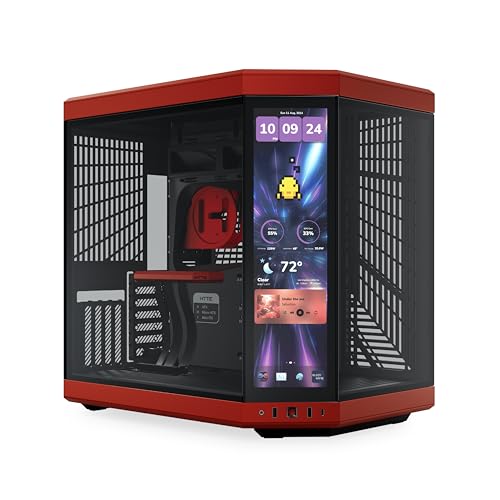
HYTE built this one for builders who want the case itself to be part of the setup, not just the shell around it. The integrated 2.5K touchscreen is the headline feature, and that kind of display suits a desk that doubles as a showcase. In most gaming rooms, that makes more sense than a plain tower because the front panel becomes part of the experience.
The dual-chamber ATX structure and 10-fan capacity give it the scale to handle serious parts, while the included PCIe 4.0 riser cable helps with modern vertical GPU layouts. The trade-off is obvious enough, though, since the screen and premium hardware support push this well past a basic case. Compared with the HYXN, you give up the ready-made fan count in exchange for a much more dramatic presentation.
What We Like
- The built-in 2.5K touchscreen adds a distinctive front-panel function.
- Dual-chamber layout helps keep the main compartment looking tidy.
- Room for up to 10 fans suits demanding thermal setups.
- The included PCIe 4.0 riser cable supports vertical GPU placement.
- Cherry/Red styling gives the chassis a strong visual identity.
Points To Note
- The display adds complexity, so cable planning takes more care.
- Premium styling makes this a stronger match for showcase builds than plain towers.
- Touchscreen features are best appreciated on a desk within easy reach.
Core Details
Who Should Grab It
You’ll get the most from this as a showcase-focused builder who wants the case to look like part of the system, not just a container for parts.
Swap It Out When
The HYXN H2 makes more sense for gamers who want more included cooling and less emphasis on screen-driven presentation.
The M5 lands in that sweet spot between hardware-friendly and easy to live with. Its 1.2 mm steel frame gives it a sturdier feel than many lightweight cases, and the toolless panels help you get inside without fighting screws every time. That matters for builders who swap drives, fans, or filters more often than they change wallpaper.
The support for 420 mm and 360 mm radiators is useful in larger cooling plans, and the five pre-installed 140 mm ARGB PWM fans mean you do not start from zero. Black and yellow styling keeps it from blending into the background, though the color split is not for everyone. Compared with the HYTE, it feels less premium-display and more hands-on practical.
Upsides
- 1.2 mm steel adds reassuring structure to the chassis.
- Toolless panels make everyday access easier for upgrades and maintenance.
- Five included 140 mm fans provide a strong airflow base.
- Support for large radiators suits demanding cooling builds.
- Type-C front connectivity brings a current connection option.
Softer Spots
- Black and yellow styling is bold, so it asks for a matching setup.
- Larger cooling support makes the frame better suited to bigger builds.
- Multiple included fans can mean more dusting around the intake areas.
Feature Rundown
Built With In Mind
You’ll like this most if you build often, change parts regularly, and want a case that opens up without a chore.
A Better Fit Elsewhere
The NZXT H9 Flow RGB+ suits someone who wants a more polished RGB ecosystem and a cleaner out-of-box lighting story.
The H9 Flow RGB+ is built for builders who want the wiring and lighting story handled from the start. Seven RGB fans and a pre-installed NZXT Control Hub mean the case already has the pieces needed for a synchronized look, and CAM support keeps that setup organized in software. For a desk that doubles as a showpiece, that kind of tidy integration matters.
The dual-chamber arrangement is the practical part behind the polish, since it gives cables and power hardware their own space. The trade-off is that the value sits more in the experience than in raw simplicity, so it suits someone comfortable with a more ambitious build. Compared with the Geometric Future M5, this one leans harder into ecosystem polish than tool-free utility.
Highlights
- Seven included RGB fans create a strong visual starting point.
- The NZXT Control Hub keeps the lighting setup neatly organized.
- CAM support helps with software-based coordination of the system look.
- Dual-chamber design reduces visual clutter in the main compartment.
- Black finish fits a wide range of desk styles.
Worth Noting
- The feature set makes more sense for a display build than a plain utility tower.
- Software-linked lighting is best for users who like a managed setup.
- The premium orientation leaves less room for a minimal, no-frills approach.
Details At A Glance
Who Will Love This
You’ll get the most from this as a style-conscious builder who wants a coordinated tower with software support already built into the plan.
Look Elsewhere When
The darkFlash DY470 is a smarter fit for someone who wants a more utility-first layout with back-plug convenience and vertical GPU options.
The Define 7 XL takes a very different path from the RGB-heavy picks above. Its brushed aluminum and steel build, plus the modular full-tower format, point toward a calmer workspace where the case disappears into the room instead of shouting for attention. That makes a lot of sense for workstations, editing rigs, or any build that stays on long hours.
The silent focus is the real draw here, although the trade-off is a look that feels restrained next to glass-heavy towers like the Lian Li EVO XL. In practice, that restraint helps in shared rooms and offices where loud styling can feel out of place. For most home studios, the honest read is that it gives you presence without fuss.
Best Bits
- Solid aluminum and steel construction feels built for long service.
- The modular full-tower format supports changing hardware needs over time.
- E-ATX compatibility suits large motherboard layouts.
- The silent approach works well in shared rooms or office spaces.
- The black finish keeps the look understated and flexible.
Room For Improvement
- The reserved styling will not satisfy someone after a flashy showcase tower.
- Full-tower size asks for generous floor space.
- Muted design means less visual drama than glass-rich alternatives.
Technical Sheet
Who It Suits Best
You’ll like this most for a workstation or studio build where quiet behavior and a clean, unfussy look matter more than RGB flash.
Another Choice May Suit
The NZXT H9 Flow RGB+ fits a more visual builder who wants the case itself to become part of the lighting setup.
The EVO XL is built for builders who think in layers, not just parts. Front and side tempered glass panels give it a showroom feel, and the support for up to a 280 mm E-ATX motherboard keeps it in serious-build territory. That combination is especially useful for water-cooling setups where hose paths, reservoirs, and cable routes all need room to breathe.
ARGB lighting is part of the package, so the case works well in a room where the build itself is meant to be seen. The trade-off is that glass-heavy design tends to ask for neater cable work and more cleaning attention than a closed steel tower. Compared with the Fractal Define 7 XL, this is the far more decorative option, and that difference is the whole point.
Standout Traits
- Front and side tempered glass panels create a strong display angle.
- E-ATX support keeps it useful for larger board layouts.
- Up to three 420 mm radiators suit advanced cooling plans.
- ARGB lighting helps the interior parts stand out after dark.
- The XL format leaves generous room for custom parts and routing.
Areas To Watch
- Glass panels show cable work and fingerprints more clearly.
- Large showcase layouts usually reward patient, careful assembly.
- The visual focus makes this less subtle than a silent tower.
Core Details
The Right Fit
You’ll appreciate this most if your build centers on custom cooling, display-oriented cable work, and a case that turns the hardware into part of the room.
Skip It When
The Fractal Design Define 7 XL is the better call for someone who wants the tower to stay quiet and visually restrained.
The AIR 5400 RS-R stands out because Corsair splits the internal space into three chambers, which gives cooling, cable management, and component placement more separation than a standard tower. The reverse-rotor RS120-R fans are pre-installed, and that design helps the airflow path stay coherent instead of fighting itself. For hot gaming systems, that structure can feel like a well-planned workshop.
The panoramic look suits a setup that’s meant to be seen from the front, especially with ARGB lighting in the mix. The catch is that triple-chamber layouts are not usually the simplest route for first-time builders, so patience pays off during assembly. Compared with the HYTE Y70 Touch Infinite, this one feels more thermally oriented and less centered on display hardware.
Reasons To Buy
- Triple-chamber layout separates major system zones very clearly.
- Three included reverse-rotor fans provide a cooling head start.
- High-airflow ducts suit hot-running gaming parts.
- Reverse motherboard support opens up a different build layout.
- Panoramic styling gives the system a strong front-facing presence.
Small Caveats
- The chambered layout asks for more planning during assembly.
- Front-facing glass looks best with tidy cable work.
- The design suits airflow-minded builders more than minimal setups.
Feature Card
Best Suited To
You’ll get the most from this as a high-heat gaming builder who wants a more structured internal layout and front-facing visual impact.
Reach For A Different Pick When
The HYXN H2 fits better for someone who wants more included fans and a simpler airflow-first approach.
The DY470 is built for tidy assembly, especially with its back-plug motherboard layout. That rear-connection style keeps the main face cleaner, which is a real advantage in a panoramic glass case where loose cables can steal attention fast. Add vertical GPU mounting and you get a layout that suits a polished gaming build without forcing every part to fight for the spotlight.
Four PWM ARGB fans come included, and the case supports two 360 mm radiators, so it still has the size to handle serious cooling. The RTX 40 compatibility note makes it relevant for newer graphics card plans, though the case’s usefulness still depends on careful part matching. Compared with the Corsair AIR 5400 RS-R, this one feels more straightforward and less structurally ambitious.
Positives
- Back-plug motherboard support helps reduce visible cable clutter.
- Vertical GPU mounting gives you a cleaner showcase layout option.
- The panoramic glass side suits front-and-center displays.
- Four included PWM ARGB fans provide a useful starting setup.
- Support for two 360 mm radiators leaves room for strong cooling plans.
Areas To Watch
- Back-plug layouts call for compatible parts, so planning matters.
- Vertical GPU placement can take more internal coordination.
- Panoramic glass looks best when dusting stays regular.
Feature Rundown
Whose Shelf It Belongs On
You’ll like this most if you want a large gaming case that keeps the face clean and makes cable management part of the design.
Another Choice May Suit
The Fractal Design Define 7 XL suits quieter workstation-style builds better, while the darkFlash leans harder into visual layout and modern GPU placement.
How To Choose The Right Biggest Pc Cases
Start With The Parts You Plan To Use
The right case begins with your motherboard size, cooler height, radiator length, and graphics card length. Large towers help only when they actually fit the hardware you already have in mind, especially for E-ATX boards or 360 mm and 420 mm radiators. A roomy shell can feel generous, but the space still needs to match your parts.
Dual-chamber and triple-chamber designs make cable routing easier, yet they also change how you assemble everything. That matters for builders who swap parts often or use liquid cooling, because access and routing become part of daily ownership. Pick a layout that supports your habits, not just your wishlist.
Match Cooling Style To Your Room
More fans usually mean stronger airflow, but they also bring more visible hardware and more dusting. In a gaming room, that’s often a fair trade. In a study or studio, a quieter full tower like the Fractal Design Define 7 XL can feel more comfortable over time.
Glass-heavy cases show off RGB lighting well, though they also show fingerprints and cable runs. Closed or muted cases feel calmer and often hide maintenance better. The right choice depends on whether you want the case to blend in or stand out.
Think About Build Convenience
Toolless panels, back-plug motherboard support, and included riser cables all save time during assembly. These details matter most on larger builds, where one awkward cable route can turn into a long evening. The easier a case is to open and organize, the less it resists future upgrades.
Modern front I/O also deserves a look, especially USB-C. It seems small, but it helps the case keep up with newer storage devices and peripherals. A large case should feel ready for present-day parts, not just big enough for them.
A Quick Reality Check Before You Choose
Common Shopping Slip Ups
Many people focus on size alone and ignore whether the case actually supports the radiator, motherboard, or GPU layout they want. That leads to awkward compromises later. The safer move is to match the case to the cooling plan first, then the style.
Another easy miss is underestimating how much desk or floor room a full tower needs. A large chassis can be comfortable to build in, yet it still needs a sensible home. Measure the space beside your desk before you commit.
Where The Extra Money Goes
Higher-tier cases often spend money on thicker materials, better accessory integration, more included fans, or a cleaner internal layout. You’re paying for convenience and presentation as much as raw size. That’s why a screen-equipped case like the HYTE feels different from a quieter modular tower.
The upgrade makes sense when you value easier building, cleaner routing, or a more polished look. It’s less compelling when all you need is basic enclosure space. In that case, a simpler full tower can cover the job without pulling the budget in too many directions.
Frequently Asked Questions
What makes a PC case “big” in practical terms?
A big case usually supports larger motherboard formats, longer graphics cards, and more substantial cooling hardware. It also tends to make routing cables and changing parts much easier.
Do larger cases always cool better?
Not automatically, because airflow depends on fan layout, panel design, and how the parts are arranged. Bigger internal volume just gives you more room to build a better cooling path.
Are full towers hard to move?
They can be, especially once you install heavy parts and glass panels. A smaller mid-tower is easier to shift around, while a full tower usually stays put once it’s built.
Is a dual-chamber layout worth it?
It helps a lot with cable separation and cleaner visuals. The trade-off is a more involved build process, so it suits patient builders best.
Which style fits a quiet workspace better?
A restrained full tower like the Fractal Design Define 7 XL fits that role very well. Glass-heavy RGB cases usually make more sense in a gaming room or showcase setup.
Closing Thoughts
The biggest PC cases earn their keep in different ways, so the right one depends on what you want your build to feel like day to day. HYXN brings a strong airflow start, HYTE and Lian Li lean into presentation, and Fractal keeps things quiet and controlled. Corsair and darkFlash push structural layout ideas farther, while Geometric Future gives you a smart middle ground with useful access features. Pick the case that fits your parts and your space, and the whole build feels easier from the first screw to the last cable.
