
Blue monitors can brighten a desk without turning it loud, and that makes them a nice middle ground for you if you want something a little different from the usual black rectangle. The seven picks below cover fast gaming panels, everyday office screens, a portable option, and even a monitor arm to finish the setup. You’ll find the differences that matter in real use, like size, refresh rate, ports, and how much desk space each choice needs.
Quick Look at the Shortlist

Pixio PX246 Wave Blue 24 inch 120Hz FHD IPS Monitor

Pixio PX248 Wave Blue 24 inch 200Hz FHD Fast IPS Monitor

Amazon Basics 24-inch Full HD IPS Monitor

Amazon Basics 27 Inch Monitor, FHD 100Hz IPS

Pixio PX278 Wave Blue 27 inch 180Hz Quad HD Fast IPS Monitor

Pixio PS1S Wave Blue Single Monitor Arm Stand Desk Mount
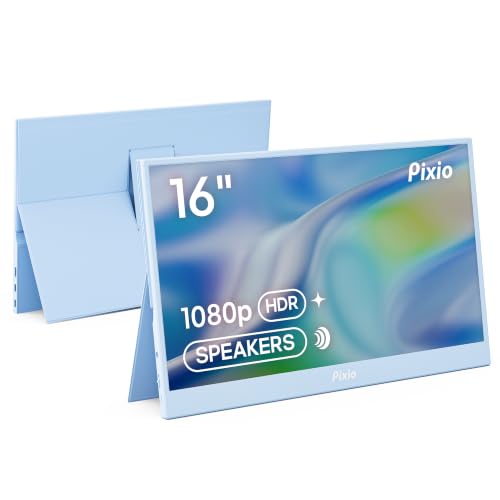
Pixio PX160 Wave Blue Portable Monitor 15.6 inch 60Hz FHD IPS
More Details On Our Top Picks
Pixio’s 24-inch size keeps this one friendly for desks that already feel crowded, and the 120Hz refresh rate gives motion a steadier look than a basic office panel. In daily gaming or long scrolling sessions, that middle ground is often enough without pushing you into a more demanding setup.
The IPS panel, which means in-plane switching for wider viewing angles and more even color from the side, suits a shared desk or a setup where you don’t sit dead center all day. The 4ms gray-to-gray response time is quick enough for casual play, though fast competitive users will still notice that faster panels exist above it.
What We Like
- 120Hz motion feels noticeably smoother than standard 60Hz screens.
- 24-inch size fits smaller desks without feeling cramped.
- IPS viewing angles help the image stay consistent from off-center seats.
- 4ms response time keeps everyday play and scrolling reasonably crisp.
Small Caveats
- 240Hz-class players may want more headroom for fast esports use.
- 24 inches leaves less workspace than the 27-inch picks below.
Core Details
Who It Suits Best
Desk gamers and general-use shoppers who want a cleaner blue display without giving up smooth motion will get the most from this screen.
Where A Sibling Pick Shines
Pixio PX248 Wave Blue 24 inch 200Hz FHD Fast IPS Monitor suits you better for faster competitive play, since it gives more motion headroom than this 120Hz model.
This Pixio steps up hard from the PX246, mostly through its 200Hz refresh rate and 1ms response time, which matter most when your games move quickly and your eye tracks every frame. In a dorm room, a compact gaming corner, or a desk that doubles for work, that speed upgrade is easy to appreciate.
Built-in speakers add a little convenience, though they rarely replace a decent headset or external audio setup. The trade-off is that the emphasis stays on speed and responsiveness, so you’re paying for gaming focus rather than extras like a larger screen or workspace.
Standout Traits
- 200Hz refresh rate gives smoother motion than the 120Hz Pixio above.
- 1ms response time helps fast action look cleaner.
- Fast IPS panel keeps the image lively and viewing angles broad.
- Built-in speakers add simple sound without extra desk clutter.
- 24-inch format still suits smaller setups.
Points To Note
- Built-in speakers suit casual use more than serious listening.
- Full HD at 24 inches is practical, but not as spacious as 27-inch 1440p options.
- The speed-first focus makes it less of an all-purpose entertainment screen than some larger models.
Feature Rundown
Who Will Love This
Competitive players and motion-focused shoppers who want a small but fast blue monitor should feel right at home here.
Another Choice May Suit
Amazon Basics 27 Inch Monitor, FHD 100Hz IPS is the calmer fit for mixed office and home use, especially when you care more about screen space than raw speed.
Where the Pixio picks lean into speed, this Amazon Basics model stays focused on dependable daily use. The 24-inch IPS screen and 75Hz refresh rate make sense for office work, webinars, documents, and lighter entertainment, especially in a setup that values simple compatibility over gaming flair.
The mix of HDMI, DisplayPort, and VGA helps older and newer gear live on the same desk, and the adjustable stand plus VESA support make placement more flexible. The built-in speakers are handy in a pinch, though they’re best treated as convenience audio rather than a reason to skip a separate sound setup.
Positives
- Three input types make it easier to connect mixed hardware.
- Adjustable stand helps you set a more comfortable viewing height.
- VESA compatibility opens the door to wall or arm mounting.
- 24-inch size works well on desks shared with laptops and paperwork.
Areas To Watch
- 75Hz is fine for office use, but it trails the faster Pixio panels.
- Built-in speakers are useful, though they usually stay basic.
- The black finish is plain compared with the blue models in this list.
At A Glance
Built With In Mind
Office users, casual home setups, and anyone juggling older peripherals will get the most from this monitor.
Swap It Out When
Pixio PX246 Wave Blue 24 inch 120Hz FHD IPS Monitor suits you better for gaming, since it brings a faster refresh rate and a more motion-friendly feel.
This one stretches out a bit more than the 24-inch Amazon Basics model, and that extra screen area matters when you keep a spreadsheet, browser, and chat window open at the same time. A 100Hz refresh rate also gives the display a little more smoothness than a standard office panel, without turning the setup into a gaming-first machine.
Four USB ports make a practical difference on a crowded desk, especially when your keyboard, mouse, headset dongle, and phone charger all fight for space. The built-in speakers and VESA support round it out well, though the trade-off is plain styling and a black finish that doesn’t match the more distinctive Pixio blue screens.
Highlights
- 27-inch size gives you more room for multitasking.
- 100Hz is a nice step up from basic office refresh rates.
- Four USB ports help cut down on hub clutter.
- IPS panel keeps the image usable from wider angles.
- Built-in speakers handle everyday sound without extra gear.
Room For Improvement
- The blue monitor theme from the title series is absent here, since this model is black.
- 27 inches asks for more desk depth than the 24-inch options.
- USB ports help with peripherals, but they do not change the screen’s office-first focus.
Details At A Glance
The Right Fit
Home office users and multitaskers who want a larger screen without getting too deep into gaming specs will appreciate this monitor.
Look Elsewhere When
Pixio PX278 Wave Blue 27 inch 180Hz Quad HD Fast IPS Monitor suits you better for sharper visuals and faster gameplay, especially when you want more detail than FHD can provide.
Compared with the 1080p Pixio models above, this 27-inch screen moves into Quad HD, which means 2560 x 1440 resolution and more space for fine detail. That matters on a larger panel, where text clarity, game scenery, and timelines all benefit from the extra pixel density.
The 180Hz refresh rate and 1ms response time make it a strong fit for fast play, while AMD FreeSync helps smooth out frame mismatch between the graphics card and the monitor. The honest read is that this is more monitor than many casual desks need, but it makes a lot of sense for a focused gaming setup.
Strong Points
- Quad HD resolution gives you sharper detail than the 1080p monitors here.
- 180Hz refresh rate supports very smooth motion.
- 1ms response time suits quick action and fast camera movement.
- AMD FreeSync helps keep gameplay feeling steadier.
- 27-inch size gives more room for work and entertainment.
Worth Noting
- Quad HD asks more from your graphics hardware than 1080p.
- The speed and resolution combo can be more than a casual office setup needs.
- Its larger footprint works best on a deeper desk.
Feature Snapshot
Whose Shelf It Belongs On
Gamers and desk users who want sharper 1440p image quality without giving up fast motion will get the most from this Pixio.
Reach For A Different Pick When
Amazon Basics 27 Inch Monitor, FHD 100Hz IPS suits you better for a simpler office setup, especially when you want a larger screen without the extra graphics load.
Once you start mixing 24-inch and 27-inch monitors into one desk setup, an arm like this becomes the piece that keeps everything tidy. The PS1S supports screens up to 32 inches and 19.8 pounds, and its 75x75mm and 100x100mm VESA plate covers the common mounting patterns used by the monitors in this roundup.
The integrated cable trays are the real convenience here, because they help keep cords from draping across the desk like loose threads. Installation usually takes a little patience, though, and that’s the trade-off for getting a cleaner, more adjustable workstation.
Best Bits
- Supports monitors up to 32 inches and 19.8 pounds.
- Covers both 75x75mm and 100x100mm VESA patterns.
- Built-in cable management helps reduce desk clutter.
- Works well with the 24-inch and 27-inch displays in this list.
Minor Gripes
- Desk-mount arms take more setup than a standard monitor stand.
- The arm makes the most sense on a sturdy desk surface.
Core Details
Made For
Anyone building a cleaner desk setup, especially with a Pixio monitor or a VESA-ready office screen, will get strong value here.
Where Shoppers Go Wrong
Pixio PX160 Wave Blue Portable Monitor is the better move for travel-heavy work, because a monitor arm stays put while a portable screen goes where your laptop goes.
This portable Pixio is the easiest way to add a second screen without rearranging your whole desk. The 15.6-inch FHD IPS panel gives you a crisp extra workspace for travel, side projects, or a laptop that needs more room for charts and windows.
USB-C and HDMI make it broadly compatible with laptops, PCs, game consoles, and phones, which is exactly why portable screens like this travel so well. The included cover stand helps with setup on the go, though the 60Hz refresh rate keeps it in everyday territory rather than fast-gaming territory.
Bright Spots
- 15.6-inch size slips easily into mobile work setups.
- USB-C and HDMI support a wide mix of devices.
- FHD IPS panel gives a clear picture for work or streaming.
- Cover stand adds convenience while traveling.
- HDR support can help content look richer in supported use cases.
Softer Spots
- 60Hz is fine for portable work, but slower than the gaming picks here.
- Small size is great for travel, yet it gives less screen space than the 24-inch and 27-inch monitors.
- Portable screens are easier to misplace cables for, so a tidy pouch helps.
Technical Sheet
Right Fit For
Hybrid workers, travelers, and laptop users who want a second screen they can pack away easily will get the most from this Pixio.
Skip It When
Pixio PX278 Wave Blue 27 inch 180Hz Quad HD Fast IPS Monitor suits you better for a permanent desk, since it gives more room and far more gaming headroom.
How To Choose The Right Blue Computer Monitors
Size Sets The Tone
A 24-inch screen usually suits tighter desks, shared spaces, and dorm rooms, while 27 inches gives you more room for split windows and easier reading from a slight distance. Blue monitor styling matters less than size in daily use, because the screen footprint changes how your desk feels every hour.
Portability changes the equation again. A 15.6-inch portable monitor works well beside a laptop on the road, but it won’t replace a main display for long sessions. The right size depends less on bragging rights and more on how much space you actually have in front of you.
Refresh Rate And Response Time
Refresh rate tells you how many times per second the screen updates, so 120Hz, 180Hz, and 200Hz all look smoother than 60Hz or 75Hz in motion. Response time, often shown as gray-to-gray or GTG, describes how quickly a pixel shifts from one shade to another, and lower numbers usually help fast motion look cleaner.
That matters most in gaming, quick scrolling, and drag-heavy desktop work. A 200Hz, 1ms screen like the Pixio PX248 makes more sense for fast play than a 75Hz office monitor, while a 100Hz screen sits in a comfortable middle zone for mixed use.
Resolution And Workspace
Resolution affects sharpness and usable desktop space, not just image quality. Full HD, which is 1920 x 1080, works well on 24-inch models, while Quad HD on a 27-inch screen gives you extra detail and breathing room for side-by-side windows.
The trade-off is graphics load and cost. A 1440p monitor asks more from your PC than a 1080p screen, so that upgrade makes the most sense for stronger systems or for you if text clarity and screen density matter every day.
Ports, Mounting, And Desk Fit
Inputs and mounting options decide how easily the monitor fits your setup. HDMI covers most modern gear, DisplayPort helps with desktop PCs, VGA still matters for older equipment, and VESA mounting means the screen can move onto an arm or wall bracket.
That’s where the Pixio PS1S monitor arm earns its place, because a VESA-ready screen can free desk space and improve positioning. Cable management also matters more than it sounds, since a neat rear path keeps the setup easier to live with.
What To Weigh Before You Buy
Wrong Turns To Avoid
A common mistake is chasing refresh rate without checking desk size. A fast 27-inch panel can feel awkward on a shallow worktop, and a portable display can feel too small for full-time desktop work.
Another miss is overlooking ports. Older PCs, laptops, and consoles don’t always share the same connection needs, so the right mix of HDMI, DisplayPort, USB-C, or VGA can save you headaches later.
The Upgrade Payoff
Higher-tier screens usually cost more because you’re paying for more pixels, faster motion handling, stronger adaptive sync support, or a larger panel with better fit for gaming and multitasking. In plain terms, the jump from 1080p to 1440p or from 60Hz to 180Hz changes how the screen feels, not just how it looks.
That upgrade makes sense for you if the monitor is part of a daily work or gaming setup. For lighter office use, a simpler 24-inch IPS screen often does enough without stretching your budget or your graphics hardware.
Frequently Asked Questions
What makes a blue computer monitor different from a regular one?
A blue computer monitor usually refers to the exterior finish, not the panel technology inside. You still want to compare size, refresh rate, ports, and resolution first.
Is 24 inches or 27 inches better for everyday use?
Twenty-four inches suits smaller desks and closer seating. Twenty-seven inches helps when you keep several windows open at once.
Do blue monitors work well for gaming?
Yes, especially the higher-refresh Pixio models in this list. Look for 120Hz or above, plus a low response time, for smoother motion.
Is IPS better than other panel types for office work?
IPS usually gives you wider viewing angles and more consistent color from the side. That makes it useful in shared spaces and for desks where you do not sit centered all day.
Should you buy a portable monitor instead of a standard one?
A portable monitor makes sense for travel, hybrid work, and laptop expansion. A standard monitor works better as your main screen at a fixed desk.
