
Blue PC cases can change the whole feel of a desk setup, but the right one still has to fit your parts, airflow needs, and cable routing plans. You’re not just picking a color, you’re choosing how easy the build will be to assemble, cool, and live with every day. That matters a lot in glass-heavy towers, compact mini-ITX builds, and cases with hidden-connector layouts.
This shortlist leans toward cases that balance looks with practical space for GPUs, radiators, fans, and cleaner internal wiring. You’ll see larger statement pieces alongside smaller blue options, so you can match your room, your hardware, and how much build time you want to spend.
Quick Look At The Shortlist

HYTE Y70 Modern Aesthetic Gaming PC Case Blueberry

HYTE Y70 Modern Aesthetic Gaming PC Case Taro

Thermaltake Tower 600 Hydrangea Blue Mid-Tower ATX Case

Geometric Future M5 Tempered Glass Mid Tower GEO-M5F-BY

Thermaltake View 380 TG ARGB Mid Tower Chassis Bubble Pink
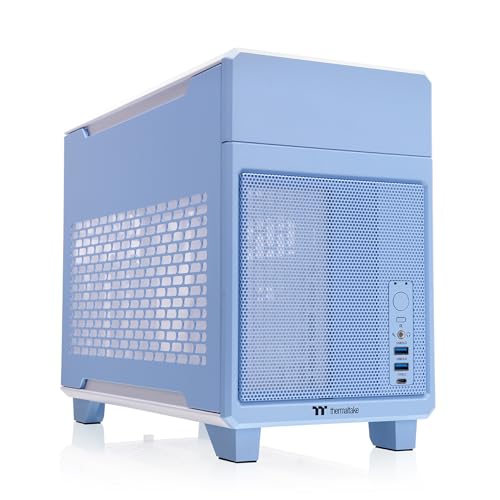
Thermaltake TR100 SFF Chassis Hydrangea Blue

Thermaltake TR100 Koralie Edition Cobalt Blue
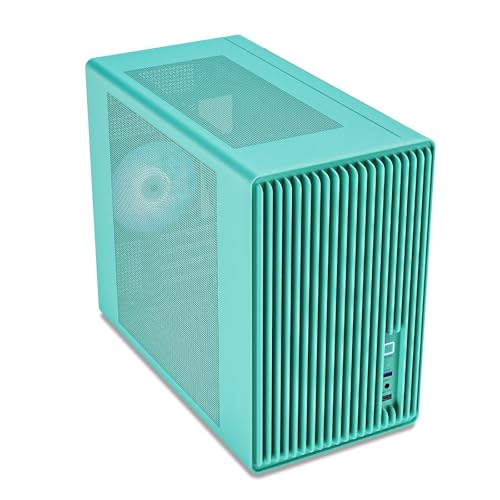
Vetroo M06 Mint Green Micro-ATX/Mini-ITX Mid Tower
More Details On Our Top Picks
The HYTE Y70 leans hard into a showpiece look, with panoramic glass and a dual-chamber layout that separates the main hardware area from cable and power supply space. That split makes the interior easier to keep tidy, especially in a build where clean lines matter as much as cooling.
You’ll also get room for a serious fan setup, since the chassis supports up to 10 fans and includes a PCIe 4.0 riser cable for a vertical graphics card layout. For a desk setup that doubles as room décor, it’s a strong match, though the all-glass style does ask for more dust care than a plain steel tower.
Strong Points
- Panoramic glass gives your build a wide display angle.
- Dual-chamber design helps cable routes stay out of sight.
- Support for 10 fans gives you plenty of cooling headroom.
- The included PCIe 4.0 riser cable supports a cleaner vertical GPU layout.
Points To Note
- Glass-heavy panels need more finger-print cleanup than simpler cases.
- The layout favors show builds, so minimalist buyers may see extra visual bulk.
Feature Snapshot
Who It Suits Best
Showcase builders who want a blue case with strong visual impact and flexible cooling space will get the most from this one.
A Better Fit Elsewhere
Geometric Future M5 Tempered Glass Mid Tower GEO-M5F-BY suits you better if you want a more steel-forward case with tool-free access and bigger radiator support.
This Taro version keeps the same broad Y70 structure, so you still get the dual-chamber ATX mid-tower layout and the clean route for cables. That familiar frame works well for a modern gaming build that needs to look deliberate rather than crowded.
Compared with the Blueberry version above, this one is less about color pop and more about a softer purple tone that can play nicely with RGB lighting. The honest read is that it suits you best when the case itself needs to feel like part of the room, not just a hardware box.
Highlights
- The dual-chamber structure keeps cable clutter easier to manage.
- Panoramic glass gives your parts a clear stage.
- The purple finish adds a distinct look without feeling loud.
- Up to 10-fan support gives room for future cooling changes.
Small Caveats
- The glass-forward design needs routine wiping to stay crisp.
- Color-forward cases can feel niche in stricter office-style setups.
Details At A Glance
Who Should Grab It
You’ll appreciate this most if you want the Y70 look in a purple tone and you’re building a polished desktop centerpiece.
Look Elsewhere When
Thermaltake TR100 SFF Chassis Hydrangea Blue fits you better for a far smaller footprint and mini-ITX planning.
The Tower 600 looks built for a desk where the case itself gets noticed, thanks to three tempered glass panels and a tall, display-like profile. Hidden-connector motherboard support matters here because it keeps modern board cabling tucked away, which is a big help in a case this visible.
Rotational PCIe slots give you more freedom in how the graphics card sits, which is handy for a vertical presentation or a cleaner internal line. Compared with the HYTE Y70, this one feels even more like a display cabinet for hardware, so it suits you best when aesthetics come first and the build plan is already sorted.
Best Bits
- Three tempered glass panels make the interior highly visible.
- Hidden-connector support helps modern boards look cleaner.
- Rotational PCIe slots offer more freedom for GPU orientation.
- The tall shape works well for statement desktop setups.
Areas To Watch
- The glass presentation asks for more regular cleaning.
- Its shape can feel less practical on shallow desks.
- Show-focused cases often need a little more planning before final assembly.
Core Details
Perfect Match For
You’re the best fit for this case if you want a bold display build and don’t mind spending extra time on layout planning.
Where A Sibling Pick Shines
HYTE Y70 Modern Aesthetic Gaming PC Case Blueberry suits you better for a more familiar ATX mid-tower shape with the same showcase spirit.
The M5 shifts the focus from pure glass spectacle to a more hardware-first build, with 1.2 mm steel, toolless panels, and support for E-ATX or ATX boards. That combination tends to suit you well in larger systems where access, rigidity, and part clearance matter more than visual drama.
Support for 420 mm or 360 mm radiators stands out, especially beside the Tower 600, because it gives you serious cooling room without pushing into a huge enclosure. The ARGB PWM 140 mm fans also make the interior more complete out of the box, though the black and yellow finish is a more assertive look than the softer blue cases in this roundup.
Bright Spots
- 1.2 mm steel gives the frame a sturdier feel on paper.
- Toolless panels make opening the case easier during upgrades.
- Large radiator support suits more ambitious cooling layouts.
- Five pre-installed 140 mm ARGB PWM fans reduce early setup work.
Worth Noting
- The color scheme is bolder than the blue cases here.
- Large hardware support can make the chassis feel substantial on a desk.
Feature Rundown
Built With In Mind
You’ll get the most from this case if you run a larger motherboard and want easier access for upgrades or cable changes.
Swap It Out When
Thermaltake View 380 TG ARGB Mid Tower Chassis Bubble Pink suits you better if you want a lighter-looking case with a more approachable price profile.
The View 380 is easier to like when you want a case that already includes much of the cooling setup. Four 120 mm ARGB Lite fans, 360 mm radiator support, and 415 mm GPU clearance give you a practical starting point for a mainstream gaming build.
Compared with the more display-heavy HYTE and Thermaltake Tower 600 picks, this one feels easier to live with in an everyday room setup. Hidden connector support also helps the interior stay orderly, though the Bubble Pink finish is a more personal style choice than the blue cases that lean toward calmer tones.
Reasons To Buy
- Four included fans save you from piecing together airflow right away.
- 360 mm radiator support opens the door to stronger cooling setups.
- 415 mm GPU clearance gives large graphics cards room to fit.
- Hidden connector support helps the inside look less cluttered.
Minor Gripes
- The bubble-pink finish is more specific in taste than neutral cases.
- Included lighting may be more than you want in a quiet office setup.
Quick Facts
Whose Shelf It Belongs On
This suits you best if you want a ready-to-build chassis with included fans and enough GPU room for a serious gaming rig.
Another Choice May Suit
Vetroo M06 Mint Green Micro-ATX/Mini-ITX Mid Tower works better for you if a smaller mesh case matters more than a larger ATX enclosure.
The TR100 is the small-footprint option in this list, and the 18.9 liter volume is the number that tells the story. That compact size matters in a dorm room, a cramped desk, or a living room setup where you still want room for a real graphics card and cooling gear.
It includes a PCIe 4.0 riser cable, supports mini-ITX boards, and leaves room for a 360 mm GPU and a 280 mm radiator. The trade-off is obvious: you gain size efficiency, but you’ll want a tidy build plan before assembly because compact cases leave less room for last-minute cable improvising.
Standout Traits
- The 18.9 liter size keeps the footprint easy to place.
- The included riser cable helps simplify a compact GPU setup.
- 280 mm radiator support gives small builds useful cooling options.
- 360 mm GPU clearance is generous for this size class.
Room For Improvement
- Small cases reward careful cable planning and patience.
- Mini-ITX support narrows the board choice compared with ATX cases.
Technical Sheet
The Right Fit
You’ll like this most if you want a compact blue case for a mini-ITX build without giving up serious component room.
Reach For A Different Pick When
Thermaltake View 380 TG ARGB Mid Tower Chassis Bubble Pink suits you better if you prefer an easier ATX layout and more room during assembly.
The Koralie Edition keeps the same compact TR100 footprint, but the Cobalt Blue finish gives it a more curated look. That makes it feel less like a plain mini-ITX shell and more like a finished desktop object, which matters in a setup that sits in plain sight.
Its 18.9 liter size, included PCIe 4.0 riser cable, 360 mm GPU clearance, and 280 mm radiator support mirror the standard TR100 in all the useful ways. Compared with the Hydrangea Blue model, this one is the better fit for you when the color treatment itself is part of the build story.
Upsides
- The cobalt blue finish gives the compact frame a more tailored look.
- Mini-ITX support keeps the layout tight and purpose-built.
- The included riser cable helps with vertical internal routing.
- 360 mm GPU clearance leaves room for many performance cards.
- 280 mm radiator support gives you cooling flexibility in a small shell.
Softer Spots
- Special-edition styling can be more specific in taste than the standard TR100.
- The compact format still calls for patient cable planning.
Core Details
Who Will Love This
You’re the right match here if you want a compact mini-ITX build with a more polished blue finish than the standard version.
Skip It When
Geometric Future M5 Tempered Glass Mid Tower GEO-M5F-BY is the better move for you if you need an easier path to a larger motherboard and bigger radiator support.
The M06 finishes the list with a smaller, airflow-first design that suits micro-ATX and mini-ITX builds. The mesh front matters here because it gives the case a more open intake path, which is useful in a compact gaming setup that still needs to breathe.
You also get support for up to five 120 mm fans, a 240 mm radiator, a GPU up to 355 mm, and an adjustable PSU mount. Compared with the Thermaltake TR100, this one is a more conventional small case shape, so it may feel easier to plan around for first-time compact builders.
Plus Points
- The mesh front helps the case feel less sealed-in.
- Support for five 120 mm fans gives you flexible cooling layouts.
- GPU clearance up to 355 mm suits many modern cards.
- USB Type-C on the I/O panel adds convenience at the desk.
- The adjustable PSU mount helps with internal layout planning.
Areas To Watch
- Micro-ATX and mini-ITX support narrows board size choices.
- The compact shell leaves less spare room for bulky cable bundles.
Feature Card
Who Should Grab It
You’ll get strong value from this one if you want a compact blue-toned case for a smaller gaming build with modern front-panel convenience.
Where Shoppers Go Wrong
Thermaltake TR100 SFF Chassis Hydrangea Blue is the better fit for you if you want an even smaller, more specialized mini-ITX footprint.
How To Choose The Right Blue Pc Cases
Size Comes First
Case size decides almost everything else, from motherboard support to cable slack to how easy the build feels on your desk. ATX mid-towers give you more room for standard gaming parts, while micro-ATX and mini-ITX cases ask for a tighter plan and usually reward more careful part matching.
Compact cases are attractive for small rooms, but they reduce your margin for error. A case like the Thermaltake TR100 keeps the footprint tiny, yet you still need to think through GPU length, radiator placement, and connector access before assembly starts.
Cooling And Airflow Matter More Than Color
Blue is the visual hook, but airflow is what keeps the build practical in everyday use. Fan support, radiator size, and mesh versus glass all shape how much heat the case can move, especially during long gaming sessions or a packed workday beside the desk.
Glass-heavy cases such as the HYTE Y70 and Thermaltake Tower 600 look striking, but they often ask more from your fan plan than a mesh-front design. A mesh case like the Vetroo M06 gives you a simpler airflow path, which can be easier to manage in a small room.
Think About Cable Management And Component Style
Hidden-connector support, dual-chamber layouts, and toolless panels all reduce assembly friction. Those features matter most when you want the inside to stay tidy after upgrades, or when you prefer not to spend an evening wrestling with front-panel leads and extra cable length.
The HYTE Y70 and Thermaltake Tower 600 do this in different ways, but both cater to builders who care about a clean interior as much as the outside finish. For a plain, functional setup, a simpler case can be easier, yet premium layouts often make the final build look much more deliberate.
A Quick Reality Check
Wrong Turns To Avoid
Shoppers often chase color first and check compatibility later, which is backwards for PC cases. A beautiful shell still disappoints when it can’t handle your motherboard size, graphics card length, or radiator plan.
Another common miss is ignoring how much maintenance glass panels need. A case with a strong visual finish can be a pleasure in a clean room, but it asks for more wiping than a plain steel panel.
The Upgrade Payoff
Higher-tier cases usually cost more because of the materials, layout work, included fans, and more polished cable-routing design. Steel thickness, tempered glass count, riser cables, and hidden-connector support all add complexity, and that complexity tends to show up in the build experience.
Spending more makes the most sense when the case sits in plain view or when you plan several upgrades over time. For a tucked-away office PC, a simpler chassis may make more sense, but a visible gaming setup often justifies the extra spend.
Frequently Asked Questions
What makes a blue PC case worth choosing?
A blue case stands out without needing aggressive styling. It works well when you want color that still feels calm and easy to live with.
Do glass panels make a case harder to maintain?
Glass panels usually show dust and fingerprints more easily than solid panels. That means a little more upkeep, especially in a bright room.
Is a compact case harder to build in?
Compact cases leave less room for hands, cables, and extra slack. Careful part planning makes the build much smoother.
Do I need hidden-connector support?
You do not need it, but it helps the interior look cleaner. It matters most when you care about a tidy display build.
Should I choose mesh or glass?
Mesh leans toward easier airflow, while glass leans toward presentation. Your choice depends on whether cooling ease or visual impact matters more.
Closing Thoughts
The right blue PC case should fit your hardware first and your style second, even though both matter. Large showcase towers like the HYTE Y70 and Thermaltake Tower 600 suit you when the build will live in the open, while smaller cases like the TR100 and Vetroo M06 make more sense in tighter spaces. Once you match the case size, cooling support, and cable layout to your parts, the color becomes the fun part instead of the hard part. That’s usually the smoothest way to end up with a setup you enjoy looking at every day.
