
Choosing a keyboard and mouse combo gets easier once you match the layout to your desk, your commute, and the way your hands actually move through a workday. Some setups lean compact and quiet, others feel roomier for long sessions, and a few are built for multi-device juggling across a laptop, desktop, and tablet. This roundup keeps the focus on practical fit, so you can spot the combo that feels natural instead of merely familiar.
The Shortlist At A Glance

seenda COE200 Wireless Bluetooth Keyboard and Mouse Combo with Wrist Rest

Logitech MK955 Signature Slim Wireless Keyboard Mouse Combo

Logitech MK850 Performance Wireless Keyboard and Mouse Combo – Graphite

Logitech Signature MK650 Combo for Business Keyboard and Mouse – Graphite
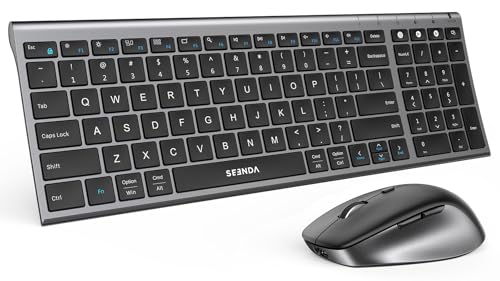
seenda COE401 3-Device Bluetooth Keyboard Mouse Combo, Silent, Black Gray

Logitech MK250 Wireless Bluetooth Keyboard and Mouse Combo – Graphite

Logitech MK270 Full Size Wireless Keyboard and Mouse Combo – Black

Logitech MK345 Full Size Wireless Keyboard and Mouse Combo – Black
More Details On Our Top Picks
The COE200 leans into comfort first, with a wrist rest that makes long work sessions feel less rigid and a full-size layout that keeps the number pad in play. The mix of USB and Bluetooth multi-device switching also fits desks that shift between a laptop and a desktop, or a home office that gets shared across more than one screen.
You may find it especially useful in a busy kitchen-office setup or any spot where quiet clicks matter more than flashy extras. Compared with the slimmer Logitech MK955, this seenda looks more focused on day-long comfort than a sleek profile.
Strong Points
- Wrist rest helps reduce strain during longer typing stretches
- Full-size layout keeps navigation and number entry easy
- USB and Bluetooth switching suits mixed-device desks
- Quiet clicks work well in shared rooms
Minor Gripes
- Full-size shape takes more desk space than compact sets
- The more comfort-led design adds some visual bulk
- Owners who move around a lot may prefer a lighter travel setup
Feature Snapshot
Who It Suits Best
You benefit most here when your desk stays put and you want a cushioned, low-noise combo for everyday office work.
A Better Fit Elsewhere
Logitech MK955 Signature Slim Wireless Keyboard Mouse Combo suits you better when you want a slimmer profile for larger hands and a neater visual footprint.
This one is built for people who want a slimmer desktop look without giving up a roomier feel under the hands. Quiet typing and clicking suit open offices, shared home tables, and late-night work sessions where you don’t want every keypress carrying across the room.
The three-device switching matters most when your day jumps between a MacBook, a Windows laptop, and a tablet. Compared with the seenda COE200, the MK955 feels more streamlined and less padded, which is a good trade for minimal setups but not the warmest fit for people who like a wrist rest.
What We Like
- Slim profile keeps a desk looking clean
- Quiet keys and clicks suit shared spaces
- Switching across three devices saves desk clutter
- Works across Windows and Mac setups
Points To Note
- No wrist rest, so long sessions may feel firmer
- The slim build can feel less cushioned than chunkier sets
- Large-handed users may want to check the fit carefully
Quick Facts
Who Will Love This
You fit this combo best when you like a slim layout, use more than one device each day, and want a low-noise office feel.
Another Choice May Suit
Logitech MK850 Performance Wireless Keyboard and Mouse Combo – Graphite makes more sense for power-heavy desk work, thanks to its oversized keyboard shape and button-rich mouse.
The MK850 is the workhorse of this list, with a wave-shaped keyboard that gives your hands a more relaxed angle across long stretches of typing. Its full-size mouse with eight customizable buttons is a clear step up from the simpler mice on the MK270 and MK250, especially for spreadsheet work, browser-heavy days, or anyone who likes shortcuts close at hand.
You can connect through Bluetooth or the included USB-A receiver, which gives this combo a broader fit than the Bluetooth-only MK250. The trade-off is size, because the larger keyboard shape asks for more desk room and feels less casual than the slimmer MK955.
Highlights
- Wave-style keyboard supports a more natural hand position
- Eight-button mouse helps speed up frequent tasks
- Bluetooth and USB-A receiver widen compatibility options
- Full-size layout suits office-heavy workdays
- Good match for users who keep many windows open
Softer Spots
- Larger footprint needs a more generous desk
- The performance focus may feel more than casual users need
- Cleaning around the larger keyboard and mouse takes a bit more care
Details At A Glance
Built With In Mind
You get the most from this set in a home office or project desk where shortcuts, multitasking, and long typing sessions are part of the routine.
Where A Sibling Pick Shines
Logitech MK955 Signature Slim Wireless Keyboard Mouse Combo makes more sense for a lighter, slimmer desk setup that still needs multi-device switching.
The MK650 feels aimed at workspaces that need steady wireless performance and less fuss during deployment. Logi Bolt is the standout feature here, and it suits office teams or home users who want a connection method built for busy environments, while Bluetooth keeps it versatile for laptops and mixed-device desks.
The small mouse is a real part of the appeal, especially beside the bulkier MK850. SmartWheel scrolling also gives you a more controlled feel through long documents, although the business-first styling may not be the warmest match for casual gaming corners or color-rich home setups.
Reasons To Buy
- Logi Bolt adds a business-focused wireless option
- Bluetooth support keeps everyday pairing flexible
- SmartWheel scrolling helps with long documents
- Small mouse fits neatly beside a laptop
- Comfort-led design suits long office hours
Areas To Watch
- Business styling feels more plain than playful
- The compact mouse may feel small for larger hands
- Office-grade setup may be more than a casual desk needs
Core Details
Right Fit For
You fit this combo best in a business workspace, shared office, or home office that values dependable wireless setup and a calm, practical feel.
Look Elsewhere When
Logitech MK270 Full Size Wireless Keyboard and Mouse Combo works better for a straightforward home setup that just needs a familiar full-size layout.
The COE401 keeps things slim, quiet, and easy to shift between three devices, which suits people who bounce between a desktop, a laptop, and a tablet. Rechargeability also makes daily ownership simpler than a battery-swap setup, though the trade-off is that you’ll want to stay mindful of charging habits rather than treating it like a set-and-forget combo.
Compared with the MK955, this one feels more travel-minded and less premium in stance, but that isn’t a bad thing for light office days or hybrid work. The black and gray finish stays understated, and the quiet operation helps in hotel rooms, libraries, or any shared table where sound matters.
Upsides
- Three-device switching helps mixed-device routines
- Rechargeable design cuts down on battery changes
- Slim shape packs easily into mobile setups
- Quiet use fits shared spaces well
Trade Offs
- You need to stay on top of charging
- Travel-focused shape may feel lighter than desk-first options
- Less substantial than the wrist-rested COE200 for long typing stretches
Feature Rundown
Perfect Match For
You get the most from this set when you work across several devices and like a slim, quiet combo that travels well.
Where A Sibling Pick Shines
Logitech MK650 Combo for Business Keyboard and Mouse – Graphite suits office environments better when wireless management and a business-first feel matter more than portability.
The MK250 is the sort of simple desk companion that makes sense in apartments, dorm rooms, and other tighter work areas. Bluetooth-only connection keeps the setup straightforward, and the compact keyboard still includes a number pad, which is handy for anyone who enters figures often but does not want a full-width board.
The small ambidextrous M196 mouse with three buttons keeps the footprint low, though it lacks the customization you get from the MK850’s richer mouse. That trade-off is easy to accept for casual work, yet the plain approach may feel limited for people who live in spreadsheets or want extra shortcut control.
Bright Spots
- Compact keyboard saves desk space without losing the number pad
- Bluetooth-only setup keeps pairing simple
- Ambidextrous mouse works for left- or right-handed use
- Small profile suits shelves, side tables, and tight desks
Small Caveats
- Mouse has only three buttons and no custom layout
- Bluetooth-only design leaves less fallback flexibility
- Compact format may feel cramped for wide-shouldered typing posture
Technical Sheet
The Right Fit
You fit this combo best when desk space is tight and you want a clean Bluetooth setup with a number pad intact.
Swap It Out When
Logitech MK850 Performance Wireless Keyboard and Mouse Combo – Graphite suits you better if shortcut-heavy work and a more advanced mouse matter more than compact simplicity.
The MK270 takes the no-nonsense path: full-size keyboard, simple mouse, and a layout that feels easy to understand right away. That makes it a sensible desk staple for home offices, school setups, and family computers where you want a familiar arrangement more than a feature parade.
Compared with the more specialized MK650 and MK850, this one stays plain in a good way. It won’t give you the extras of higher-tier combos, but that straight-ahead design also means less to learn and less to fuss over.
Best Bits
- Full-size layout feels familiar from the first use
- Simple mouse keeps the setup easy to manage
- Works well as a household shared computer combo
- Low-complexity design is easy to maintain on a daily desk
Honest Caveats
- Plain feature set may feel basic beside newer combos
- Lacks the extra device switching found on several rivals
- Standard design leaves less room for ergonomic refinement
Core Details
Who Should Grab It
You fit this combo best when you want a familiar full-size wireless set for everyday home or office work without extra bells and whistles.
Where Another Pick Fits Better
Logitech MK345 Full Size Wireless Keyboard and Mouse Combo – Black makes more sense for longer typing blocks, thanks to its integrated palm rest and more comfort-led keyboard shape.
The MK345 is the comfort-first choice near the end of this list, and the integrated palm rest gives the keyboard a calmer feel during longer stretches of email, writing, or spreadsheet cleanup. The compact right-handed mouse and single USB-A Nano Receiver keep the setup tidy, which helps on desks where you do not want extra clutter.
Compared with the leaner MK270, this one adds a more relaxed typing angle and a more settled hand position. That makes it a stronger match for people who spend a lot of time at the keyboard, though the right-handed mouse shape is a real consideration for left-handed use.
What We Like
- Integrated palm rest supports longer typing sessions
- Compact mouse keeps the set neat
- Single USB-A Nano Receiver simplifies the connection setup
- Full-size keyboard suits office work and home tasks
Room For Improvement
- Right-handed mouse shape limits flexibility
- USB-A receiver setup may not suit every newer device without an adapter
- Less travel-friendly than the slimmer seenda COE401
Spec Overview
Whose Shelf It Belongs On
You fit this combo best when comfort matters more than mobility and you want a settled keyboard-and-mouse set for daily desk work.
A Better Fit Elsewhere
seenda COE401 3-Device Bluetooth Keyboard Mouse Combo, Silent, Black Gray makes more sense for multi-device juggling and a slimmer carry-friendly profile.
How To Choose The Right Bluetooth Keyboard And Mouses
Layout And Desk Fit
Desk space changes everything. Full-size sets like the MK270 and MK345 keep a number pad and familiar spacing, while compact options like the MK250 fit better on side tables, shallow desks, and workstations already crowded with a monitor stand or laptop dock.
Comfort matters just as much as size. A wrist rest, like the one on the seenda COE200, can make longer typing sessions feel less rigid, while a slim board such as the MK955 keeps the setup visually lighter and easier to slide into a shared room.
Connection Style And Device Switching
Bluetooth-only designs simplify the setup, especially for laptops and tablets that already live wirelessly. Receiver-based combos can feel more flexible in a desktop office, and a hybrid model like the MK850 gives you both options without forcing one path.
Multi-device switching matters for hybrid work. A three-device set helps when your day moves between a MacBook, a Windows notebook, and a tablet, while a single-device routine may be perfectly fine for a home computer that never leaves the desk.
Mouse Shape And Typing Feel
The mouse deserves more attention than it usually gets. A compact mouse saves room, a right-handed shape feels more natural for some setups, and a button-rich mouse like the MK850 helps people who live in documents, browser tabs, and spreadsheet shortcuts.
Typing feel also changes the whole experience. Quiet keys fit shared spaces, larger hands may prefer the broader feel of the MK955, and business-focused users often care more about dependable navigation than flashy styling.
Long-Term Ownership Details
Cleaning and storage sound boring, but they matter. Slim combos wipe down quickly, while larger boards with palm rests or extra contours need a little more care around the seams and edges.
Rechargeable models reduce battery changes, though they ask for charging discipline. A receiver-based combo can be the steadier choice for a fixed desk, and that’s where daily routine should guide the final call.
What To Weigh Before You Decide
Common Shopping Slip Ups
One easy mistake is focusing only on Bluetooth and ignoring hand fit. A compact board may look tidy, but a full-size layout can be the better match for daily number entry or long email sessions.
Another slip-up is overlooking the mouse. A simple two- or three-button mouse works fine for casual work, yet shortcut-heavy users often feel the limit quickly.
What The Higher Tier Buys
More expensive combos usually spend the extra on comfort, connection flexibility, and better control. That can mean a wrist rest, a more advanced mouse, broader operating-system support, or a business-grade wireless layer like Logi Bolt.
The upgrade makes sense for people at a desk for hours, office teams managing multiple machines, or hybrid workers who move between laptop, tablet, and desktop. For lighter home use, the extra spend can feel unnecessary.
Final Thoughts
Your best match depends on how you work, not just how the combo looks on the product page. The MK345 and COE200 lean toward comfort, the MK955 and COE401 suit quieter multi-device routines, and the MK850 or MK650 make more sense for busier desks that need stronger control. Keep the desk space, mouse shape, and connection method in view, and the right choice becomes much clearer.
