
Bluetooth Mouse And Keyboards make sense when your desk has to do more than one job. You may be moving between a laptop, tablet, and desktop, or you just want a neater setup with fewer cables on the surface. The right combo saves space, keeps typing posture more comfortable, and cuts down on device juggling.
This roundup focuses on mix-and-match real life: commuting, hybrid work, home offices, and business desks. You’ll see slim travel sets, fuller ergonomic layouts, and a few business-minded options with multi-device switching. The trade-off is simple, smaller kits travel easier, while larger ones usually feel steadier for long sessions.
Quick Look At The Shortlist
GOGARA Rechargeable Bluetooth Keyboard and Mouse Combo

seenda COE200 Wireless Bluetooth Keyboard and Mouse Combo with Wrist Rest

Logitech MK955 Signature Slim Wireless Keyboard Mouse Combo

Logitech MK850 Performance Wireless Keyboard and Mouse Combo – Graphite

Logitech Signature MK650 Combo for Business Keyboard and Mouse – Graphite

Logitech MK370 for Business Wireless Keyboard and Mouse Combo – Graphite

Logitech MK540 Full Size Advanced Wireless Keyboard and Mouse Combo
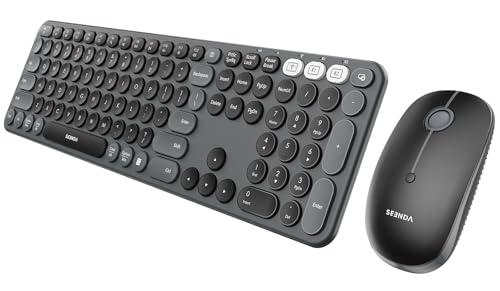
seenda COE202 Bluetooth Keyboard Mouse Combo, Retro Round Keys, Black
More Details On Our Top Picks
This slim GOGARA set makes sense for commuters, tablet users, and anyone who works across a kitchen table or coffee shop counter. Its universal positioning points to broad device use, and the rechargeable design means you’re not dealing with a drawer full of spare batteries. The trade-off is simple, ultra-slim gear usually feels lighter and less planted than fuller desktop kits.
Compared with the Logitech models later in this roundup, this one leans hard toward portability rather than long-session comfort. That makes it a sensible fit for travel bags, spare workstations, and students who want one setup that moves easily between Android, Windows, iPad, iPhone, and Samsung tablet use.
Strong Points
- Rechargeable setup keeps daily maintenance lighter.
- Thin footprint slips into compact bags with ease.
- Broad device positioning suits mixed gadget routines.
- Keyboard and mouse together simplify a fresh setup.
Things To Consider
- Ultra-slim builds usually feel less anchored on a desk.
- Portability focus can mean less hand support for long sessions.
- Those who type all day may want a fuller wrist-friendly layout.
Feature Snapshot
Whose Shelf It Belongs On
You’ll appreciate this most in a mobile setup where space and carry weight matter more than cushioned ergonomics.
Swap It Out When
Logitech MK540 Full Size Advanced Wireless Keyboard and Mouse Combo suits home-office users who want a steadier desk feel and a fuller layout.
The COE200 shifts the focus from travel size to everyday comfort, and that wrist rest is the detail that stands out first. For long desk sessions, a padded support strip can make the keyboard feel less abrupt under your hands, especially in a home office or shared work setup. Quiet clicks also help keep the mouse side from sounding sharp in close quarters.
Against GOGARA’s slim portable set, this seenda model is the more settled option for people who stay at one desk for most of the day. The multi-device switching idea fits laptop-plus-tablet routines well, though the fuller shape takes more room than a compact commuter combo.
What We Like
- Wrist rest adds welcome support for longer typing stretches.
- Quiet click behavior suits shared rooms and late work hours.
- Multi-device switching fits people who hop between screens.
- Full-size format feels natural on a permanent desk.
Worth Noting
- Full-size gear asks for more desk space than slim travel kits.
- The larger footprint is less handy in crowded carry bags.
- Comfort features can still take a little setup time to feel just right.
Core Details
Built With In Mind
You’ll get the most from this if your desk stays fixed and your hands spend long stretches on the keyboard.
Where A Sibling Pick Shines
GOGARA’s rechargeable ultra-slim set suits frequent travelers better, since it takes up less space in a bag.
MK955 feels aimed at people who want a cleaner, calmer desk setup without losing multi-device flexibility. The larger-hand emphasis matters because cramped keys and tiny mice can get tiring fast during spreadsheets, email, or long document sessions. Quiet typing and clicking help the whole combo stay understated, which is nice in open offices or shared homes.
Compared with the seenda COE200, this Logitech reads as more polished and less casual, while still staying slimmer than a full traditional desktop set. The Bluetooth and multi-OS support make it easy to fit into mixed Windows and Mac environments, though the slim profile still won’t feel as plush as a wrist-rest model.
Highlights
- Larger-hand orientation gives the layout more breathing room.
- Quiet input suits shared spaces and long desk days.
- Three-device switching keeps work flows moving smoothly.
- Multi-OS support helps with mixed computer setups.
Small Caveats
- Slip-friendly slim gear can feel less cushioned than bulkier sets.
- Those who want palm support may prefer a wrist-rest design.
- The cleaner profile may not suit every hand size equally well.
Details At A Glance
Who Will Love This
This fits professionals and home-office users who want a slim setup that still feels grown-up on the desk.
Reach For A Different Pick When
seenda COE200 Wireless Bluetooth Keyboard and Mouse Combo with Wrist Rest works better for anyone who puts comfort support ahead of a slim profile.
MK850 leans into a fuller desktop style, and that oversized wave-shaped keyboard is the first clue. A wave layout changes the hand position across the key field, which can make long typing stretches feel less flat, especially for people who spend hours in documents or project tracking. The mouse’s eight customizable buttons push it closer to a work tool than a basic starter combo.
Compared with the slimmer MK955, this one feels more anchored and more hands-on, which is a good thing for a desk that rarely changes. Bluetooth or the included USB-A receiver gives you a choice in setup style, though the larger footprint asks for more room than the travel-first picks in this list.
Upsides
- Wave-shaped keyboard supports a more relaxed hand position.
- Eight mouse buttons add useful control for busy workflows.
- Bluetooth and USB-A receiver coverage broadens setup options.
- Full-size build suits a permanent office desk well.
Areas To Watch
- The larger shape takes more desk real estate.
- Desk-centered styling is less friendly for frequent packing.
- Extra mouse controls are helpful only when your workflow uses them.
Feature Rundown
Right Fit For
You’ll get the most from this on a fixed workstation where comfort and shortcut control matter more than portability.
Look Elsewhere When
Logitech MK955 Signature Slim Wireless Keyboard Mouse Combo is the cleaner match for smaller desks and slimmer carry needs.
MK650 is the kind of combo that suits business desks and steady office routines more than casual couch use. Logi Bolt wireless tech is the headline here, and the Secure Connections Only Mode mention matters because IT teams tend to care about tighter wireless behavior and easier deployment. The small mouse also keeps the bundle compact on a crowded workstation.
Compared with MK850’s more performance-heavy layout, this one stays more business-practical and less button-heavy. The SmartWheel mouse detail helps scrolling feel more adaptable, and the broader compatibility list is useful in mixed Windows, Mac, Chrome, and Linux environments, though the small mouse won’t please everyone with larger hands.
Positives
- Business-focused wireless setup suits managed environments.
- Small mouse helps the combo stay desk-friendly.
- SmartWheel scrolling supports everyday navigation.
- Broad platform compatibility helps in mixed fleets.
Softer Spots
- The compact mouse may feel small during long sessions.
- Business-first design is less playful than a home setup.
- Teams still need to match it to their own device policies.
Core Details
Who Should Grab It
This suits office teams and solo professionals who want a tidy, business-ready combo with broad platform reach.
A Better Fit Elsewhere
Logitech MK370 for Business Wireless Keyboard and Mouse Combo – Graphite is the stronger match for IT rollouts that want a simpler full-size setup.
MK370 reads as a no-nonsense business keyboard and mouse combo, and that’s its strength. The full-size keyboard helps in office environments where number entry and consistent spacing matter, while the Logi Bolt USB receiver adds a secure wireless path for enterprise-style deployment. In a managed workspace, that can be easier to standardize than a more consumer-flavored bundle.
Compared with MK650, this one leans even more toward deployment simplicity and less toward comfort extras. The Bluetooth support broadens compatibility, but the real appeal is that IT-friendly, full-size format that works well across desks without needing much explanation.
Best Bits
- Full-size keyboard supports office data entry and steady typing.
- Secure wireless design fits managed work environments.
- USB receiver makes first setup straightforward on many computers.
- Graphite finish keeps the look understated and professional.
Room For Improvement
- Business-first design gives you fewer comfort extras.
- Full-size layout takes more desk room than slim kits.
- It feels built for function more than personality.
Technical Sheet
The Right Fit
You’ll like this most in standard office rollouts where consistency and simple wireless setup matter.
Another Choice May Suit
Logitech Signature MK650 Combo for Business Keyboard and Mouse – Graphite makes more sense for teams that want a smaller mouse and SmartWheel scrolling.
MK540 is the dependable, familiar shape many home-office desks still gravitate toward. The number pad and integrated palm rest make it friendlier for spreadsheets, data entry, and long typing stretches, while the ambidextrous mouse keeps the pointing side simple for a wide range of hand preferences. The included USB-A Nano Receiver also means setup stays direct on many laptops and desktops.
Compared with the sleeker MK955, this set is less about minimalism and more about comfort you can feel right away. In most home offices, that’s a useful trade, especially when you want a full-size layout that doesn’t demand much adjustment time. It also feels like the kind of combo you can leave on a desk and forget about, in a good way.
Reasons To Buy
- Number pad helps with spreadsheets and routine data work.
- Integrated palm rest adds everyday typing comfort.
- Ambidextrous mouse works for left- or right-handed use.
- Nano receiver keeps setup simple on many machines.
Minor Gripes
- Full-size hardware takes more desk room than compact options.
- USB-A receiver focus may not suit every newer laptop equally well.
- Utility-first styling feels practical rather than sleek.
Feature Card
Whose Shelf It Belongs On
This fits home-office users and students who want a familiar full-size combo with straightforward comfort touches.
Skip It When
GOGARA’s Rechargeable Bluetooth Keyboard and Mouse Combo suits anyone who needs a slimmer, more portable setup instead.
COE202 is for people who want a little personality on the desk without giving up practical function. The retro round keys change the look right away, and the silent behavior keeps the keyboard and mouse from sounding busy in a shared apartment or studio. Connection to three devices also matters for laptop, tablet, and desktop routines that stay in motion.
Compared with the more business-like MK650 and MK370, this seenda feels more style-driven and less corporate. That makes it appealing for smaller workspaces, dorm rooms, or creative desks where visual character matters as much as basic typing comfort.
Positives
- Retro round keys give the desk a distinct look.
- Silent typing and clicking suit shared spaces.
- Three-device support helps with mixed-device routines.
- Compact style works well on smaller desks.
Honest Caveats
- Style-first design may not suit a plain office setup.
- Rounded keys take some getting used to for some hands.
- Decorative styling can matter more than raw workhorse feel.
Core Details
Perfect Match For
You’ll like this most if you want a compact desk combo with a softer look and low-noise use.
Where Another Pick Suits Better
Logitech MK370 for Business Wireless Keyboard and Mouse Combo – Graphite is the safer choice for office fleets that want a simpler, more standardized format.
How To Choose The Right Bluetooth Mouse And Keyboards
Match The Layout To Your Workday
Start with the shape of your day, not the shape of the box. A slim combo such as GOGARA works well for commuting, tote bags, and temporary work surfaces, while MK540 and MK850 make more sense for desks that stay put. Full-size layouts help with number entry and spacing, but they ask for more room.
Palm rest, wave shape, and mouse size are comfort clues, not just marketing copy. A wrist rest like the one on seenda COE200 helps during long typing sessions, while a smaller mouse like Logitech MK650 keeps the desk tidy. Bigger hands, longer sessions, and more spreadsheet work usually point toward the fuller designs.
Think About Connection And Switching
Bluetooth is the cleanest starting point for many laptops and tablets because it cuts receiver clutter. Some combos also add a USB-A receiver, which helps older desktops and office machines that still rely on that port. That extra path matters in mixed environments, especially in homes with more than one computer.
Multi-device switching is worth paying attention to. MK955, COE202, and MK650 fit workspaces where you bounce between laptop, desktop, and tablet in a day, while a single-device setup can feel simpler for basic use. The practical benefit is less re-pairing and fewer pauses between tasks.
Comfort, Noise, And Desk Footprint
Quiet typing and quiet clicks matter more than most shoppers expect. In an apartment, a shared office, or a night-shift setup, softer input keeps the combo from sounding busy. That’s where quiet models such as MK955 and COE202 make sense, while louder, more mechanical-feeling sets may not suit everyone.
Desk space changes the decision too. Full-size keyboards with number pads help accountants, administrators, and students in numeric courses, but compact sets leave more room for notebooks and a mouse pad. Think of it as choosing between a compact travel seat and a roomy front row, because the shape changes the whole experience.
Business Features Deserve A Closer Look
Logi Bolt and similar secure receiver systems are aimed at offices that standardize equipment across many desks. For IT teams, easy deployment and consistent pairing matter as much as typing comfort. That makes MK650 and MK370 different from the more casual home-focused sets.
Business-oriented models often trade flair for predictability. You usually get cleaner deployment, broader platform support, and fewer surprises, while style-heavy options put more emphasis on design. Your best choice depends on whether the combo lives in a personal workspace or a managed environment.
Things Worth Knowing First
Wrong Turns To Avoid
Many shoppers focus only on Bluetooth and forget about hand size, desk depth, and mouse shape. That’s how a slim combo ends up feeling cramped after a week of use. A layout that looks neat in a photo can still feel awkward during a full workday.
Another common miss is buying for the wrong environment. A travel-first set suits a café table or laptop bag, while a full-size combo belongs on a desk with room to spare. Matching the kit to the space saves frustration later.
The Upgrade Payoff
Higher-tier combos often cost more because they add better ergonomics, multi-device switching, sturdier layouts, or business-grade wireless systems. You’re paying for more than materials, because the usability layer is usually richer too. That shows up in smoother scrolling, quieter input, and better long-session comfort.
The upgrade is worth it for daily desk work, shared offices, and managed fleets. For occasional use, a simpler combo can be enough, especially when portability matters more than comfort extras. The right spend level is the one that fits your routine without dragging around features you’ll never use.
Final Thoughts
The best Bluetooth Mouse And Keyboards for your setup depend less on brand labels and more on how you work. Choose a compact set for travel and smaller surfaces, choose a full-size layout for long desk sessions, and lean toward business models when deployment and consistency matter. GOGARA, seenda, and the Logitech lineup each solve a different version of the same problem. Once you match the combo to your space and habits, the desk starts feeling a lot calmer.
