
Android tablets and phones feel a lot easier to live with once the mouse matches the way you actually work. The right Bluetooth mouse helps you hop between apps, write longer notes, and keep a steadier hand on a cramped desk or a couch tray. This roundup focuses on compact, quiet, and multi-device options that make sense for travel bags, home offices, and mixed-device setups. You’ll see a range from simple Bluetooth-only models to dual-mode picks with a receiver for extra flexibility.
The Shortlist At A Glance

XBG B15Pro Tri-Mode Wireless Bluetooth Mouse 2400 DPI

WL300 Bluetooth Mouse Silent Wireless Mice Grey

Logitech M240 Compact Silent Bluetooth Wireless Mouse Graphite

Logitech M196 Compact Ambidextrous Bluetooth Wireless Mouse Graphite
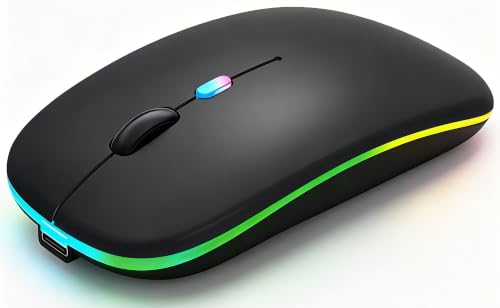
WREANU Wireless Bluetooth Mouse Rechargeable Black

Logitech M350s Pebble 2 Bluetooth Wireless Mouse Black

Afaartcci Rechargeable Wireless Mouse Silent Bluetooth Mouse Black

SUNGI Bluetooth Mouse for Laptop MacBook iPad Android PC
More Details On Our Top Picks
The B15Pro makes sense for anyone juggling an Android tablet, a laptop, and a desktop at the same desk. Its tri-mode setup adds Bluetooth 5.0, Bluetooth 4.0, and 2.4GHz wireless, so the switch is less about extra cables and more about keeping your workflow moving.
The LED display and 2400 DPI range give it a more feature-heavy feel than simpler picks like the Logitech M240 and M196. In a busy office or shared home setup, that kind of flexibility helps, though the extra features also mean you’re carrying more complexity than you’d get with a basic Bluetooth-only mouse.
What We Like
- Tri-mode connectivity helps you move between devices without changing tools.
- Bluetooth 5.0, Bluetooth 4.0, and 2.4GHz support covers mixed setups well.
- Switching in 0.8 seconds keeps small tasks from feeling fragmented.
- 2400 DPI gives you enough pointer range for general office work and browsing.
- The rechargeable 500mAh battery with Type-C charging cuts down on disposable cells.
Things To Consider
- The feature set is richer than you need for bare-bones use.
- The LED display adds another detail to manage on the desk.
- Multi-mode gear can feel busier than a single Bluetooth mouse.
Core Details
Who It Suits Best
Hybrid office users who shift between Android tablets, laptops, and PCs will get the most from the B15Pro.
A Better Fit Elsewhere
Logitech M350s Pebble 2 Bluetooth Wireless Mouse Black suits you better when slim portability matters more than multi-mode flexibility.
The WL300 leans into comfort first, with a sculpted grip and six buttons that make it feel more tailored than the most basic travel mouse. In a train seat, a hotel desk, or a home office, that extra hand support can matter more than flashy extras.
Its adjustable DPI gives you room to tune pointer speed, and the silent click design keeps desk noise down during late-night work. Compared with the XBG B15Pro, it gives up the multi-device tri-mode setup, but you also get a simpler shape that may suit longer sessions better for some hands.
Positives
- Sculpted shape supports a steadier hand position.
- Six buttons add useful control without feeling crowded.
- Quiet clicking suits shared spaces and evening work.
- Adjustable DPI helps you match the mouse to your screen size.
- The reported 18-month battery life reduces how often you need to think about power.
Areas To Watch
- The six-button layout is helpful, but it may feel busier than a simple two-button mouse.
- Grey finish and shaped surfaces can show desk wear over time.
- Travel users may want to confirm the grip feels natural in smaller hands.
Technical Sheet
Who Should Grab It
You’ll get the most from the WL300 if you want a quieter, shaped mouse for work travel or mixed desk use.
Swap It Out When
Logitech M196 Compact Ambidextrous Bluetooth Wireless Mouse Graphite is the cleaner fit for you if you prefer a simpler, less contoured shape.
The M240 keeps things stripped down in a way that suits Android use well. No USB receiver means fewer parts to track, and the compact shape makes sense in a backpack, sleeve, or small desk drawer.
Compared with the WL300, you lose the sculpted feel and extra buttons, but that also leaves you with a cleaner, lighter tool. For commuting students or anyone hopping between a phone dock and a laptop, the honest read is that simplicity is the point.
Highlights
- Bluetooth-only pairing keeps setup lean.
- Compact body suits travel bags and crowded desks.
- Quiet clicks help in libraries, offices, and shared spaces.
- Three-button layout stays easy to learn.
- Reported 18-month battery life reduces upkeep.
Softer Spots
- The non-customizable buttons keep it simple, but they also limit personalization.
- Small size can feel less filling in larger hands during long sessions.
- Basic control layout may feel plain beside the XBG B15Pro or WL300.
Feature Snapshot
Built With In Mind
You’ll appreciate the M240 most if you want a compact Bluetooth mouse for everyday Android navigation and travel.
Another Choice May Suit
Logitech M350s Pebble 2 Bluetooth Wireless Mouse Black suits you better if you want a sleeker shape with a customizable button.
The M196 feels like the no-drama option in this group. Its ambidextrous shape works for either hand, which helps in a shared office, classroom, or on a trip where you don’t want to think twice about grip orientation.
Against the M240, it keeps the same quiet, Bluetooth-first logic but adds the left-right neutrality that can make daily use simpler. You won’t get the extra controls of the WL300 or the multi-mode flexibility of the XBG B15Pro, and that narrower focus is exactly why some people will prefer it.
Upsides
- Ambidextrous shape suits both left- and right-handed use.
- Bluetooth connection avoids dongle clutter.
- Quiet clicks help keep desk noise low.
- Compact size makes storage and transport easier.
- The 12-month battery life is long enough for easy maintenance planning.
Minor Gripes
- The three-button design keeps things simple, but power users may want more control.
- The shorter battery life than the M240 may matter for frequent travelers.
- Plain styling won’t feel as feature-heavy as the B15Pro or WL300.
Details At A Glance
Whose Shelf It Belongs On
This fits best for mixed-use homes, office desks, and anyone who wants a simple ambidextrous mouse for Android work.
Look Elsewhere When
WL300 Bluetooth Mouse Silent Wireless Mice Grey suits you better if you want a sculpted grip and more buttons for daily shortcuts.
The WREANU is the sort of mouse that tries to cover a lot of ground without demanding much money or desk space. Bluetooth 5.2, a 2.4GHz receiver, LED lights, and a slim shell give it more personality than the plainest entry-level options.
For Android tablets, laptops, and casual office use, that mix can feel handy. The catch is that the LED styling and dual-mode setup may be more than you need for a simple phone-and-tablet routine, so the fit depends on how much versatility you want.
Bright Spots
- Dual-mode connection gives you both Bluetooth 5.2 and 2.4GHz choices.
- The rechargeable setup keeps battery swaps out of the routine.
- Slim body stores easily in a laptop sleeve or small pouch.
- Silent operation suits dorm rooms, libraries, and open offices.
Room For Improvement
- LED lighting may not matter much for work-focused setups.
- The included receiver adds one more small piece to keep track of.
- Slim mice can feel less substantial in larger hands.
Core Details
The Right Fit
You’ll like this most if you want a slim rechargeable mouse with both Bluetooth and receiver-based flexibility.
Where A Sibling Pick Shines
Logitech M240 Compact Silent Bluetooth Wireless Mouse Graphite is better for you if you want a cleaner Bluetooth-only setup with less visual clutter.
The Pebble 2 M350s is the sleekest-feeling option here, and that matters more than it sounds like it should. Its slim, lightweight shape is easier to tuck beside a tablet, yet it still keeps quiet clicks and a customizable button for small workflow tweaks.
Easy-switch support across Windows, macOS, iPadOS, Android, and Chrome OS makes it especially friendly for mixed-device homes. Compared with the M240 and M196, this one feels more polished and a little more deliberate, though the slim shell may not suit hands that prefer a fuller body.
Best Bits
- Slim profile travels well in packed bags.
- Customizable button adds a bit of flexibility.
- Quiet clicks suit shared workspaces.
- Easy-switch support helps across several operating systems.
- Lightweight build makes long carry days easier.
Trade Offs
- The compact shape may feel small during long desktop sessions.
- Style-first design can be less comfortable for bigger hands.
- Fewer physical controls than the WL300 or B15Pro keep it simple, but also less flexible.
Feature Rundown
Who Will Love This
This is a strong match for Android users who also move between tablets, laptops, and compact travel setups.
Reach For A Different Pick When
XBG B15Pro Tri-Mode Wireless Bluetooth Mouse 2400 DPI suits you better if multi-mode switching matters more than a slim profile.
The Afaartcci sits in the useful middle ground between simple Bluetooth-only mice and heavier feature sets. Its ergonomic shape, BT5.2 support, and 2.4GHz receiver give you a practical mix for laptops, iPads, MacBooks, and other tablets.
One detail worth noting is that the receiver stores inside the mouse, and the two modes are not meant to run together. That trade-off keeps the body cleaner, but it also means you’ll want to choose the connection style that fits the moment before you settle in.
Reasons To Buy
- Ergonomic shape offers a more natural hand position.
- BT5.2 and 2.4GHz support broadens compatibility.
- Receiver storage inside the mouse keeps the bag organized.
- No-driver setup is handy for quick desk changes.
- Silent operation works well in shared rooms.
Points To Note
- You can’t use both connection modes at once.
- The stored receiver is easy to misplace during frequent swaps.
- Ergonomic shapes can feel personal, so hand fit matters.
Quick Facts
Made For
You’ll get the most from this mouse if you want a comfortable, dual-mode option for mixed Apple and Android use.
Where A Sibling Pick Shines
Logitech M196 Compact Ambidextrous Bluetooth Wireless Mouse Graphite is the easier fit if you prefer a simpler Bluetooth-only path.
The SUNGI aims at broad compatibility, and that matters for Android households with a mix of tablets, laptops, and older desktops. Bluetooth 4.0 support means you skip the extra USB receiver, while the slim black shell keeps it easy to stash beside a charger or notebook.
The jiggler feature adds another angle for people who spend long stretches on a screen, though that isn’t the same thing as a comfort feature for everyone. Compared with the Pebble 2 and the M240, this one leans more toward utility than polish, and that is exactly the sort of trade-off some setups need.
Plus Points
- Wide device support keeps it useful across many setups.
- Bluetooth 4.0 connection removes the need for a receiver.
- Slim housing stores well in small bags.
- The jiggler feature adds a special-purpose convenience.
Small Caveats
- The utility-first focus may feel less refined than the Pebble 2.
- Jiggler features are not equally useful for every desk routine.
- Older Bluetooth support can be fine, but newer devices may feel more current with later versions.
Core Details
Perfect Match For
This works best for Android users who also move between tablets and laptops and want broad compatibility in one mouse.
Another Choice May Suit
Logitech M350s Pebble 2 Bluetooth Wireless Mouse Black is the cleaner fit if you want a more refined everyday carry option.
How To Choose The Right Bluetooth Mouses For Android
Match The Mouse To Your Screen Life
Android use changes a lot depending on the device in front of you. A tablet on a desk needs steadier pointer control than a phone in hand, and a mouse with adjustable DPI or a calmer click sound usually feels better in that setting. Compact Bluetooth-only options suit simple navigation, while dual-mode picks make more sense for mixed laptops, tablets, and desktops.
Weigh Comfort Before Extra Features
Shape matters more than spec sheets suggest. A sculpted grip like the WL300 can feel better during long work blocks, while an ambidextrous shell like the M196 keeps things straightforward for shared setups. Slim mice such as the Pebble 2 travel well, but they can feel a little spare in larger hands, so hand size and session length should guide the choice.
Check Connection Style And Device Mix
Bluetooth 4.0, 5.0, 5.2, and 2.4GHz each solve a slightly different problem. Bluetooth-only models remove receiver clutter, which is handy for Android tablets and bag carry, while 2.4GHz support helps on desks where you want another connection path ready. Tri-mode models like the XBG B15Pro are useful when your week includes multiple devices and you’d rather not keep swapping tools.
Think About Power And Maintenance
Rechargeable mice are convenient for regular use, but battery life still changes the day-to-day rhythm. Long-life options such as the M240 or WL300 reduce how often you think about charging, while smaller rechargeable picks make more sense for light to moderate use. Quiet switches, matte finishes, and compact bodies also tend to age better in busy bags and crowded desks than flashy surfaces that need more attention.
A Quick Reality Check
Common Shopping Slip Ups
A common miss is choosing a mouse for its extra buttons when the real need is simple Android navigation. Another is ignoring hand size, which can make a slim shell feel awkward after an hour or two. You also want to match the connection type to the device you use most, because a receiver-heavy setup can be more than you need for a tablet-first routine.
What The Higher Tier Buys
More expensive models usually put money into versatility, better shaping, and multi-device convenience. That means tri-mode connectivity, customizable controls, stronger ergonomics, or broader platform support rather than just a nicer finish. Paying up makes the most sense when you shift between Android, laptop, and desktop work during the same week.
Final Thoughts
The best Bluetooth mouse for Android is the one that fits your hands, your bag, and the way you actually move between screens. For simple carry and quiet everyday use, the Logitech M240, M196, and Pebble 2 keep things tidy. For more switching power, the XBG B15Pro, Afaartcci, and WREANU open up extra flexibility. Choose the model that trims friction from your routine, and your Android setup will feel a lot easier to live with.
