
Travel mice live or die on small things: pocketable size, quick pairing, quiet buttons, and a shape that still feels steady after a day in a terminal or hotel room. That matters even more now, because your work setup may shift between a laptop, tablet, and a borrowed desk in a single trip.
The eight picks below cover very different travel styles, from ultra-compact shells to folding designs and multi-device control. You get a clear path whether you want something simple for a carry-on pocket or a more feature-packed mouse for road work.
The Shortlist At A Glance

Logitech M350s Pebble 2 Bluetooth Wireless Mouse – Tonal Rose
Dell Bluetooth Travel Mouse MS700

Satechi OntheGo Bluetooth Mouse
elec Space Wireless Mini Finger Mouse

wegear Bluetooth Wireless Mouse for Laptop, PC, MacBook, Chromebook-Black

Logitech Mobi Fold Foldable Wireless Mouse with Quiet Click

WL300 Bluetooth Mouse Silent Wireless Mice, Cordless Computer Mouse-Grey

DELUX Wireless Bluetooth Pocket Mouse, MF20-Black
More Details On Our Top Picks
The Pebble 2 keeps the travel brief and tidy, with a lightweight body, quiet clicks, and a custom button that helps shorten repetitive tasks. Its Easy-Switch support matters for people bouncing between a Windows laptop, an iPad, and an Android phone without wanting another setup headache.
Compared with the Dell MS700, this one feels more about comfort and simplicity than precision-heavy control. The shape is small enough for a sleeve or side pocket, though the compact profile means it won’t suit hands that prefer a fuller palm rest.
What We Like
- Quiet clicking helps in libraries, coffee shops, and shared cabins.
- The small body slips into a sleeve or day bag with little fuss.
- Easy-Switch support fits a laptop, tablet, and phone routine.
- The customizable button can speed up common tasks on the road.
Minor Gripes
- The small size may feel cramped for larger hands during long sessions.
- Compact mice usually ask for a little more care in packing, so it helps to keep it in a case or pouch.
- Nothing here is built for a very aggressive grip style.
Feature Snapshot
Who It Suits Best
You get the most from this pick as a light-travel mouse for tablets and laptops, especially in shared workspaces.
A Better Fit Elsewhere
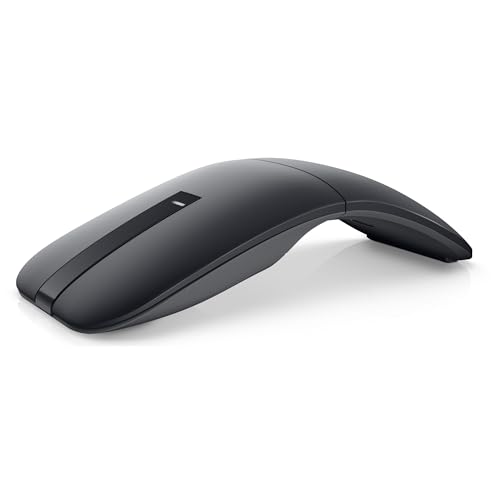
Dell Bluetooth Travel Mouse MS700 suits you better if pointer precision and a more feature-forward travel mouse matter more than a tiny footprint.
This Dell leans into control, with 4000 DPI, touch scrolling, and Bluetooth 5.0 LE for a cleaner wireless setup. DPI, or dots per inch, is a sensitivity setting, and here it matters because quicker pointer movement can feel less cramped on hotel desks or airport tables.
Swift Pair is handy for fast first-time pairing on supported Windows systems, and the included AAA batteries keep the purchase straightforward. The trade-off is simple: you get a more businesslike travel mouse, not the softest or smallest shape in this group, so it suits you best when precision matters more than pocket minimalism.
Bright Spots
- 4000 DPI gives you more pointer range in less hand movement.
- Touch scrolling feels useful for long documents and spreadsheets.
- Bluetooth 5.0 LE keeps the connection path clean for travel work.
- AAA batteries are included, so setup feels straightforward out of the box.
Points To Note
- The shape is more functional than plush, which may not suit every hand.
- Two-button layouts keep things lean, but they leave less room for shortcuts.
- Battery swaps add one more thing to manage on a long trip.
Core Details
Who Will Love This
You should look at this Dell first when your travel desk work needs a precise pointer and an uncluttered wireless setup.
Another Choice May Suit
Logitech M350s Pebble 2 Bluetooth Wireless Mouse – Tonal Rose is easier to carry in a soft pouch if your trips favor simplicity over control depth.
Multi-device control is the point here, and that fits the way many travel workdays actually unfold. The Satechi mouse can stay linked with up to three devices, so you can move from laptop to tablet to a second computer without dragging out a spare accessory or hunting through settings.
USB-C charging also suits people who already pack one cable for several devices, which is a small but real packing win. Compared with the Pebble 2, it leans more toward device juggling than quiet minimalism, so you may find it especially useful on longer work trips with mixed gear.
Positives
- Up to three-device switching helps you stay organized on the road.
- USB-C charging cuts down on battery swaps and loose spares.
- Compact sizing fits easily beside a laptop in a carry-on pocket.
- Wide compatibility across Mac, Windows, iOS, and Android broadens its usefulness.
- No extra setup requirement keeps the handoff between devices simple.
Areas To Watch
- The device-switching strength may matter less if you only travel with one machine.
- Keeping a rechargeable mouse topped up becomes part of your packing routine.
- The black finish is practical, though it does not stand out visually.
Details At A Glance
Right Fit For
You should consider this one for a travel bag that carries a laptop, tablet, and another computer during the same trip.
Reach For A Different Pick When
Logitech Mobi Fold Foldable Wireless Mouse with Quiet Click is the neater option if you care more about folding storage than device juggling.
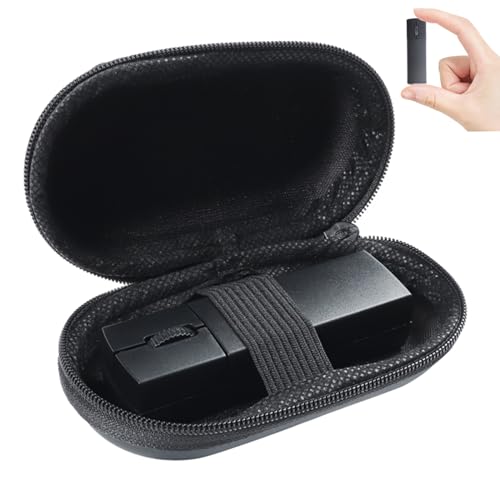
Storage space is the whole story with this mini finger mouse, and the included case makes that angle much clearer. The dual-mode setup, Bluetooth plus 2.4 GHz wireless, gives you flexibility across different computers, which helps in hotels, classrooms, or borrowed desks.
Compared with the Satechi and Logitech options, this one is more about saving space than looking polished. You may find the tiny format appealing for a travel pouch, though finger-style mice always ask for a little adjustment before they feel natural.
Highlights
- The miniature body is easy to tuck into crowded travel gear.
- A carrying case helps protect the mouse inside a packed bag.
- Bluetooth and 2.4 GHz support broaden device compatibility.
- Silent clicks suit shared spaces and late-night hotel work.
Small Caveats
- Finger-style control can feel unfamiliar during the first few sessions.
- The tiny body may not suit longer editing work or larger hands.
- Dual-mode convenience is useful, though it adds one more switch to remember.
Feature Card
Built With In Mind
You’ll get the most from this pick in a very tight travel kit where every inch of space matters.
Swap It Out When
DELUX Wireless Bluetooth Pocket Mouse, MF20-Black suits you better if you want a foldable pocket design with rechargeable power.
The wegear mouse keeps the pitch practical, with 1600 DPI optical tracking and a travel-friendly body that should feel familiar fast. Bluetooth 5.0 pairing within a 10-meter range makes the setup feel straightforward for laptop work, and that no-dongle approach is useful when USB ports are already scarce.
Compared with the Dell and Logitech picks above, it gives you a simpler feature set and a less fussy learning curve. The honest read is that this one suits budget-conscious travel setups better than demanding desktop work, but that simplicity also makes it easy to live with.
Upsides
- 1600 DPI gives enough control for normal browsing and office tasks.
- Bluetooth 5.0 pairing keeps the setup lean without a receiver.
- The compact body works well in small laptop sleeves and side pockets.
- Broad compatibility makes it a flexible travel companion across several computer types.
Worth Noting
- The simpler feature set may feel plain next to the Dell MS700.
- Longer trips call for more attention to battery management, as with any non-rechargeable travel mouse.
- The black finish is sensible, though it does not bring much visual distinction.
Feature Rundown
Whose Shelf It Belongs On
You’ll like this most as a simple, no-drama mouse for work trips, school travel, or everyday laptop carry.
Where A Sibling Pick Shines
Logitech M350s Pebble 2 Bluetooth Wireless Mouse – Tonal Rose is the better match for quiet use and a slightly more polished feel.
The foldable body is the obvious hook, and it makes sense for travel bags where storage shape matters as much as size. Quiet clicks, 4K DPI, and Fast Pair support round out a mouse that feels tuned for modern laptops, especially Chromebook, PC, and Mac setups.
Compared with the Pebble 2, this one gives you a more distinctive travel form, while still staying compact enough for a carry-on. Folding hardware can add a little complexity over a fixed shell, so the trade-off is a more interesting design in exchange for one more moving part.
Standout Traits
- Foldable construction saves space in a packed work bag.
- Quiet clicks help keep things discreet in shared spaces.
- 4K DPI offers precise cursor movement for tighter layouts.
- Fast Pair support can streamline setup on compatible devices.
Honest Caveats
- The folding mechanism introduces a moving part you’ll want to handle with a bit of care.
- Some travel bags fit a flat mouse more naturally than a folding one.
- The more specialized shape may not suit everyone’s grip habits.
Quick Facts
The Right Fit
You’ll appreciate this most in a carry-on setup where compact storage and a more polished travel form both matter.
Look Elsewhere When
WL300 Bluetooth Mouse Silent Wireless Mice, Cordless Computer Mouse-Grey is the steadier pick if you want more buttons and a sculpted grip.
The WL300 looks built for long days, not just short hops through an airport. Six buttons, a sculpted grip, and adjustable DPI give you more control than the bare-bones travel mice above, which is helpful on spreadsheets, browsers, and heavier desktop tasks.
Its tri-mode connectivity is the real convenience play, because you can move between wired, 2.4G wireless, and Bluetooth without drivers. That breadth is handy in mixed-device situations, though the extra flexibility makes the mouse feel more like a do-everything desk companion that can travel, rather than a tiny pocket tool.
Best Bits
- Six buttons give you more room for shortcuts and daily control.
- The sculpted grip should feel steadier over a long work session.
- Adjustable DPI lets you tune pointer feel to the task at hand.
- Tri-mode connectivity adds useful flexibility across many setups.
- Quiet clicking helps keep the mouse unobtrusive in shared spaces.
Room For Improvement
- The fuller shape may take up more bag space than the smallest travel mice.
- More modes can mean more things to remember during a rushed setup.
- The stronger feature set may feel like more than you need for light travel use.
Feature Rundown
Who Should Grab It
You’ll like this most if your travel mouse also needs to behave like a serious everyday work mouse.
Skip It When
Logitech M350s Pebble 2 Bluetooth Wireless Mouse – Tonal Rose is the easier carry for very light packers who want less bulk.
This DELUX model reads like a pocket-first option, with a sliding foldable body, quiet clicks, dual connectivity, and a rechargeable 300mAh battery. The front USB-C charging port is practical during long transit days, because it lets you top up without turning the mouse into an untidy desk ornament.
Up to 4000 DPI gives it a stronger precision ceiling than several simpler travel picks here, while the standby time helps it stay ready between trips. The trade-off is that the slim, foldable format feels more specialized, so it rewards space-conscious packing more than broad comfort preferences.
Strong Points
- The pocket-style shape is easy to tuck into tight carry space.
- Rechargeable power means fewer spare batteries to remember.
- USB-C charging at the front is convenient during travel downtime.
- 4000 DPI gives it a useful precision ceiling for a slim mouse.
- Quiet clicks suit hotel rooms, flights, and other shared settings.
Softer Spots
- The foldable design may feel more specialized than a standard shell.
- Ultra-slim mice can ask for a bit more care during packing.
- The best fit shows up most clearly in compact travel bags.
At A Glance
Perfect Match For
You’ll get the best fit from this mouse when your travel routine rewards slim packing, rechargeable gear, and a fast handoff from bag to desk.
Where Another Pick Suits Better
Satechi OntheGo Bluetooth Mouse, Black is the smarter fit for you if multi-device switching matters more than folding storage.
How To Choose The Right Bluetooth Mouses For Travel
Size, Shape, And Bag Space
Travel mice live in the gap between convenience and comfort, so size matters more than most desk mice. A slim shell like the Pebble 2 or the DELUX pocket model disappears into a pouch, while the WL300 asks for a little more room but rewards that with a fuller grip.
The shape should match the length of your workday, not just the size of your bag. Small, flat mice are easy to carry, but a sculpted body or foldable frame can feel better once you settle in at a hotel desk for several hours.
Connection Style And Device Switching
Bluetooth keeps travel simple because it removes the need for a receiver in your bag. That matters on laptops with scarce ports, and it matters even more for people who jump between Windows, macOS, iPadOS, Android, or Chrome OS devices.
Multi-device switching is worth paying attention to when your work life spreads across more than one screen. The Satechi model stands out here, while the Logitech M350s Pebble 2 offers a cleaner, easier path for mixed-device use without feeling bulky.
Clicks, Tracking, And Real-World Comfort
Quiet clicks help in libraries, conference rooms, and cabins, where sound carries farther than you expect. DPI, short for dots per inch, tells you how sensitive the pointer feels, and higher settings can make a tiny hotel table feel less cramped.
Comfort is the part you notice after the novelty wears off. If you spend long stretches in spreadsheets or documents, a sculpted grip such as the WL300’s matters more than a tiny pocket silhouette, even though the smallest mice win on portability.
Power Choices For Frequent Trips
Rechargeable mice cut down on battery swaps, which helps when your bag already carries chargers, adapters, and cables. That makes the Satechi and DELUX models appealing for people who travel often and want one less small item to track.
Battery-powered options still have a place, especially for short trips where you want a mouse ready the moment you unpack it. Dell’s included AAA batteries make that easier, while a compact rechargeable model pays off more once travel becomes routine.
Things Worth Knowing First
Hidden Buying Traps
Compact mice can look interchangeable online, yet their hand feel is very different once you start using them beside a laptop tray or café table. A tiny body saves space, but it can also feel cramped during longer sessions, so the smallest option is not always the calmest one to live with.
Another common miss is ignoring connection habits. A mouse that switches between several devices sounds handy, but you only need that extra complexity when your setup actually spans more than one machine.
The Upgrade Payoff
Higher-tier mice tend to cost more because they add finer tracking, multi-device features, rechargeable power, quieter switches, or a more considered shape. Those details sound small until you spend a week moving through airports, hotel rooms, and temporary desks.
The upgrade makes sense when your mouse becomes part of your daily work kit instead of an occasional backup. In that case, a more polished shape or better switching behavior can feel worth it, much like choosing a better carry-on handle after too many rough connections.
Final Thoughts
Your best travel mouse depends on how light you pack and how often you change devices. The Pebble 2 keeps things simple, the Dell pushes precision, and the DELUX leans hardest into pocket storage. For a frequent flyer, the right choice usually comes down to whether you want the smallest shape, the cleanest setup, or the most control. Pick the one that fits your actual work rhythm, not the one that looks clever on paper.
