
Travel mice live or die by small details, since your bag, tray table, and coffee shop desk all put different demands on the same device. You want something that pairs quickly, slips into a sleeve without drama, and feels comfortable after a long work session. The eight options below cover slim, foldable, silent, and multi-device setups, so you can match the mouse to your commute, your laptop bag, and the way you actually work.
The Shortlist At A Glance

Logitech MX Anywhere 2S Bluetooth Edition Compact Wireless Mouse

Bluetooth Wireless Arc Travel Mouse
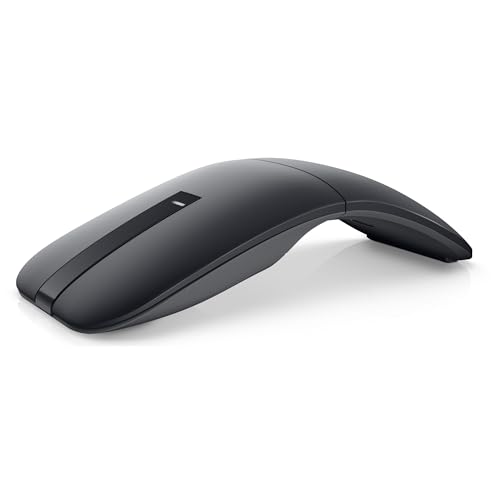
Dell Bluetooth Travel Mouse MS700
Bluetooth Arc Mouse Foldable Slim and Portable Mini Wireless Computer Travel Mouse

Logitech Mobi Fold Foldable Wireless Mouse

DELUX Wireless Bluetooth Pocket Mouse MF20-Black

Logitech M240 Compact Silent Bluetooth Wireless Mouse

Logitech M350s Pebble 2 Bluetooth Wireless Mouse
More Details On Our Top Picks
The MX Anywhere line makes sense for anyone who works across a train seat, a hotel desk, and a home office without wanting to change gear each time. Its 4K DPI tracking, meaning the sensor reads movement with very fine granularity, gives you a controlled feel on tighter surfaces, and the ability to handle up to three Macs or Windows laptops suits a mixed-device setup.
The trade-off is that this style leans more toward capability than simplicity, so you may not need everything here for casual browsing. Even so, the no-receiver Bluetooth setup keeps your bag tidier than a dongle-based mouse, and that matters when you carry a charger, cables, and a laptop in the same sleeve.
Strong Points
- Works across multiple computers, which helps you move between office and home hardware without re-pairing constantly.
- Compact body suits crowded desks and airplane trays, where larger mice feel clumsy.
- High-resolution tracking gives you tighter pointer control on less forgiving surfaces like cafe tables.
- Bluetooth-only setup keeps one more small accessory out of your bag.
Things To Consider
- Feature depth may be more than you need for a basic laptop carry.
- The compact shape favors portability over a fuller palm fill.
- More capability usually means more setup decisions, which can feel unnecessary for light use.
Feature Snapshot
Who It Suits Best
You work between several laptops and want one compact mouse that stays useful across different desks and trips.
A Better Fit Elsewhere
Logitech M240 Compact Silent Bluetooth Wireless Mouse suits you better when you want a simpler, lower-fuss travel mouse for one main computer.
This arc-style mouse is the kind of compact travel companion that makes sense for packed bags and short laptop sessions. The foldable shape is the big story, and the Type-C rechargeable design keeps it aligned with the chargers most people already carry for phones, earbuds, and tablets.
It also runs in tri-mode, meaning it can work across Bluetooth 5.0, Bluetooth 4.0, and 2.4G wireless, so you have more connection paths than the simpler Logitech M240. The honest trade-off is that the rotating body asks you to store and shape it properly, which is fine for organized carry but less ideal for people who toss everything into a tote.
Highlights
- Foldable arc design saves space in a slim laptop bag.
- Three connection modes give you more pairing flexibility.
- Type-C charging fits common modern charging setups.
- Silent click behavior helps in libraries, airports, and shared rooms.
Minor Gripes
- The curved form needs a little care during packing.
- The shape may feel unusual until your hand adjusts.
- Moving parts can deserve gentler handling than a fixed-shell mouse.
Core Details
Who Will Love This
You carry a compact laptop kit and want a mouse that folds down without giving up wireless flexibility.
Swap It Out When
Logitech M240 Compact Silent Bluetooth Wireless Mouse fits you better when you want a fixed shape with less to think about during daily carry.
The MS700 feels aimed at workdays that still happen away from your desk, not just quick browsing between flights. Its 4000 DPI sensor, Bluetooth 5.0 LE connection, and touch scroll surface make it the most productivity-minded pick in this list, especially beside the simpler two-button Logitech M240.
Swift Pair support should make first-time setup easier on compatible Windows systems, and the included AAA batteries mean you can start using it without charging gear in the picture. The trade-off is that a button-light layout can feel spare to anyone who likes more controls under the fingers, but that spareness is part of the travel appeal.
Reasons To Buy
- Touch scroll surface gives you smoother movement than a basic wheel.
- High DPI rating helps with detailed pointer work.
- Swift Pair support is handy for quick setup on compatible machines.
- Included AAA batteries reduce the number of things to pack.
- Two-button design stays uncluttered for mobile work.
Worth Noting
- Fewer buttons may feel limited for heavy shortcut use.
- Battery-powered designs add a bit of upkeep over rechargeables.
- The clean layout suits focus work more than customization-heavy workflows.
Technical Sheet
Built With In Mind
You want a slim work mouse that feels more polished than a bare-bones spare and travels well with a business laptop.
Where A Sibling Pick Shines
Logitech Mobi Fold Foldable Wireless Mouse is the better fit for you when a softer-click foldable shell matters more than touch scrolling.
Some travel mice shrink down, but this one is built around a bendable arc that changes its shape for storage and power control. That makes it useful for laptop bags where every pocket matters, although the design depends on you bending it into the correct position before use.
The touch bar replaces a traditional wheel, which can feel neat on a tablet desk or a stripped-down workspace. One thing worth considering, though, is that this is not a Microsoft Surface Arc mouse, so matching expectations to the actual form matters more than the branding vibe.
Bright Spots
- Very slim storage profile suits tight sleeves and crowded pouches.
- Foldable arc body helps the mouse stay compact in transit.
- Touch control offers a cleaner top surface than a standard wheel.
- Portable size makes sense for tablet and laptop travel alike.
Areas To Watch
- The curved shape needs correct positioning before it powers on.
- Touch-based scrolling can take a little getting used to.
- Shape-driven designs usually ask for a bit more care in a bag.
Details At A Glance
The Right Fit
You pack minimally and want a mouse that disappears into the bag until you need it.
Look Elsewhere When
Logitech MX Anywhere 2S Bluetooth Edition Compact Wireless Mouse suits you better when you want a more conventional shape with stronger multi-computer flexibility.
The Mobi Fold sits in a sweet spot between desk comfort and travel restraint, which is a hard balance to get right. Quiet clicks make it friendlier in libraries, open offices, and late-night hotel rooms, while the 4K DPI sensor gives it enough precision for everyday productivity.
Fast Pair support matters because nobody wants to waste time in a terminal or coworking space wrestling with setup prompts. Compared with the more gadget-like arc mice here, this Logitech keeps the look and behavior straightforward, and that usually ages better in real carry use.
Upsides
- Quiet clicks help keep shared spaces calmer.
- Foldable design packs more neatly than a fixed shell.
- 4K DPI gives you a precise pointer for office tasks.
- Fast Pair support can streamline first connection on compatible devices.
Small Caveats
- Foldable mice usually ask for a little more handling care.
- The shape is tuned more for portability than a full desktop feel.
- Quiet clicks are nice, but some people prefer a firmer button response.
Feature Rundown
Made For
You want a foldable mouse that still feels calm and practical during regular work travel.
Another Choice May Suit
Logitech MX Anywhere 2S Bluetooth Edition Compact Wireless Mouse is a better fit for you when multi-device switching matters more than a quieter shell.
DELUX takes a more compact, pocket-first route, and the sliding, foldable body is the part that immediately separates it from the fixed shapes above. Dual-mode connectivity gives you Bluetooth 5.2 plus 2.4GHz wireless, which is useful for people who split time between laptops and older devices.
The 300mAh battery, a rechargeable cell, is paired with USB-C charging on the front, so topping it up is easier to manage during long trips or office days. Seven working hours after a full hour of charging is handy in a pinch, though the larger trade-off is that the battery profile asks more attention than a simple coin-cell mouse.
Positives
- Sliding foldable build makes the mouse easy to stash.
- Bluetooth plus 2.4GHz support broadens connection options.
- USB-C charging is convenient during travel or desk use.
- Quiet clicks suit hotel rooms and open work areas.
- Compact shape helps keep bag space under control.
Room For Improvement
- The compact shell may feel small for larger hands.
- Rechargeable upkeep adds one more thing to remember on long trips.
- Sliding mechanisms can deserve a little more care than a fixed mouse body.
Core Details
Perfect Match For
You want a pocketable mouse that can move between modern and older wireless setups without much fuss.
Reach For A Different Pick When
Logitech M240 Compact Silent Bluetooth Wireless Mouse is the easier fit for you when battery simplicity matters more than dual-mode flexibility.
The M240 is the no-drama option in this roundup, and that can be exactly what travel calls for. You get Bluetooth connectivity without a receiver, three non-customizable buttons, and a quiet-click feel that suits shared spaces without asking you to manage much.
The 18-month battery figure stands out because fewer battery swaps usually mean fewer interruptions during a packed work calendar. Compared with the richer-featured MX Anywhere 2S and MS700, this one trims the extras and sticks to the basics that most commuters actually use.
Best Bits
- Bluetooth-only setup keeps the carry kit simple.
- Quiet clicks work well in libraries and meeting rooms.
- Three-button layout stays easy to learn and use.
- Long battery claim supports lower-maintenance travel.
Softer Spots
- Non-customizable buttons limit shortcut tuning.
- It focuses on ease more than advanced control.
- The plain layout is practical, but not especially feature-rich.
Quick Facts
Whose Shelf It Belongs On
You want a practical travel mouse that works without much setup thinking and suits a single laptop or a simple office kit.
Skip It When
Logitech MX Anywhere 2S Bluetooth Edition Compact Wireless Mouse is the better fit for you when multi-device control and finer tracking matter more than simplicity.
The Pebble 2 keeps the footprint small and the feel calm, which is useful for anyone who carries a laptop, tablet, and charger in the same bag. Its slim body and quiet clicks make it easy to live with in shared spaces, while the customizable button gives you at least one bit of personal control.
Easy Switch support stretches its usefulness across Windows, macOS, iPadOS, Android, and Chrome OS, so this is the most cross-platform option in the list. Compared with the simpler M240, it gives you more flexibility without turning into a complicated travel tool, and that middle ground is the appeal.
What We Like
- Slim, lightweight build is easy to carry every day.
- Quiet clicks make it suitable for shared or late-night use.
- Customizable button adds a bit of personal control.
- Easy Switch broadens compatibility across several platforms.
- Portable shape suits backpacks, totes, and compact sleeves.
Trade Offs
- Small size may not suit hands that prefer a fuller shell.
- Single-button customization keeps things flexible, but not deeply programmable.
- Lightweight travel builds often favor portability over desk-style heft.
Spec Overview
Best Suited To
You want a slim travel mouse that moves between laptops, tablets, and mixed operating systems without much friction.
Where A Sibling Pick Shines
Logitech M240 Compact Silent Bluetooth Wireless Mouse suits you better when you want a more stripped-back choice with fewer setup decisions.
How To Choose The Right Bluetooth Travel Mouses
Size, Shape, And Carry Comfort
Travel mice need to earn their space. A slim shell like the Pebble 2 or a foldable shape like the arc-style picks above works well in a laptop sleeve, while a more traditional compact body such as the MX Anywhere 2S gives you a steadier hand position on long work sessions.
The trade-off is usually comfort versus packing ease. Smaller mice disappear in a bag, but your palm may want more support during an airport layover or a late-night spreadsheet run.
Connection Style And Device Switching
Bluetooth-only designs keep your kit neat, and that matters when your bag already holds a charger, a phone cable, and earbuds. Multi-mode mice add flexibility for older laptops or alternate setups, which is useful for hybrid workers who jump between office and home devices.
Look closely at pairing support too. Fast Pair, Swift Pair, and multi-device memory can save time on the road, especially when you do not want to sit through setup screens in a cafe.
Button Layout, Scroll Feel, And Noise
Quiet clicks matter more than many people expect. In a shared workspace or on a red-eye flight, a softer button sound can keep the mouse from feeling out of place, while touch scroll or a standard wheel changes how naturally you move through documents.
Two-button mice stay simple, but more controls can help with shortcuts and multitasking. The right call depends on whether you want a tool that vanishes into the background or one that takes a bigger role in your daily workflow.
A Quick Reality Check
Common Shopping Slip Ups
People often focus on portability and forget the grip. A mouse that folds or shrinks neatly can still feel awkward in larger hands, so balance the bag-friendly shape with the amount of time you spend at a desk.
Another common miss is overlooking connection needs. A Bluetooth-only mouse is tidy, but a dual-mode option can be the safer choice when you work across older laptops, tablets, or mixed operating systems.
The Case For Spending Up
Higher-tier mice usually cost more because of better sensors, multi-device control, smarter pairing features, and more careful shell design. The MX Anywhere 2S and MS700 sit in that lane, where extra control and smoother scrolling matter to people who work all day on mobile setups.
Spending more makes sense when the mouse is part of your daily kit rather than an occasional spare. For light travel and email, a simpler model like the M240 does the job without extra complexity.
Final Thoughts
Your best Bluetooth travel mouse depends on how much packing room, control, and connection flexibility you want to juggle. The MX Anywhere 2S stands out for multi-device work, the M240 keeps things plain and easy, and the Pebble 2 lands in a smart middle ground for mixed-device carry. Foldable options are handy too, but they suit organized packing more than loose throw-in-the-bag habits. Pick the shape that fits your routine, and the rest gets easier fast.
