
Budget computer cases are where a tight parts budget can still leave room for a tidy build. You want enough clearance for your graphics card, sensible airflow, and front-panel ports that don’t feel stuck in the past. The right shell also saves you from small annoyances, like cramped cable routing or dusty intake paths, once the PC is sitting under your desk for daily use.
That’s the focus here, cases that suit gaming towers, starter work rigs, and upgrade paths without pushing you into overspending. You’ll see some glass-heavy picks for show builds, plus simpler steel options for practical setups that just need to run cool and stay easy to live with.
Quick Look At Our Shortlist

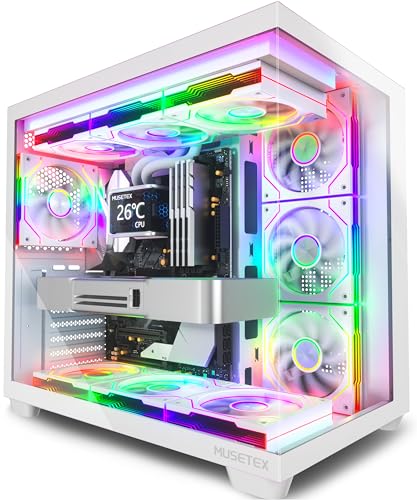
MUSETEX Y6 PC Case 7 Infinity Mirror PWM ARGB Fans

Thermaltake Versa H21 SPCC ATX Mid Tower Chassis

FOIFKIN F1 PC Case 6 PWM ARGB Fans

MUSETEX Y6 PC Case 4 Non-LED Fans

DARKROCK EC2 ATX Mid Tower Gaming PC Case

MOROVOL PC Case Pre-Install 4 RGB Fans 621

KEDIERS PC CASE ATX 5 Fans Pre-Installed K4(MAX)
More Details On Our Top Picks
The HYXN H2 leans hard into airflow and space, which makes sense for a hotter gaming build or a system with a large graphics card. The dual-chamber layout separates the main components from the cable zone, so the inside can stay cleaner and less cramped during assembly. For a desk-side tower that needs strong cooling without looking bare, that’s a useful mix.
The trade-off is size, because a case built around six 140 mm fans and two 120 mm fans is not trying to be subtle. You may also spend a bit more time planning cable paths, especially with a bigger radiator in the mix, but the payoff is smoother airflow and easier parts access than many tighter budget shells.
Strong Points
- Pre-installed fan load helps you start with a strong airflow baseline.
- Dual-chamber construction gives cable routing more breathing room.
- 420 mm radiator support suits large cooling setups.
- Type-C 3.2 on the front panel fits newer peripherals well.
- Works well for a gaming tower that needs thermal headroom.
Things To Consider
- The larger footprint asks for more desk or floor space.
- Fan-heavy cases usually take longer to keep clean.
- Assembly can feel busy the first time you route all the cables.
Feature Snapshot
Who It Suits Best
PC builders who want a roomy gaming case with serious cooling capacity will get the most from this layout.
A Better Fit Elsewhere
Thermaltake Versa H21 SPCC ATX Mid Tower Chassis suits a simpler office or starter build more comfortably, especially when you want a plain steel case with less visual bulk.
This MUSETEX Y6 goes after the showpiece crowd, and the 270-degree tempered glass layout makes that clear from the start. The seven infinity-mirror PWM ARGB fans give it a more decorative look than the HYXN case, so it fits a room where the tower is meant to be seen, not tucked away. PWM means pulse-width modulation, which lets fan speed respond more intelligently to heat, so the visual flair still comes with practical cooling control.
The white finish keeps the whole build feeling lighter, though it will ask a bit more of you on dust and fingerprints than the black option in this roundup. For a shelf-top PC, stream setup, or gaming desk with a clean theme, this is the sort of case that feels intentional rather than accidental.
Upsides
- 270-degree glass coverage makes hardware and lighting easy to show off.
- Seven PWM ARGB fans give you a strong factory-installed starting point.
- White colorway works well in bright, modern setups.
- Type-C front connectivity keeps it in step with newer accessories.
Small Caveats
- Glass-heavy cases need a bit more wiping to stay tidy.
- The visual focus matters more here than pure minimalism.
- It suits display builds better than hidden-under-desk machines.
Core Details
Whose Shelf It Belongs On
PC enthusiasts building a visible, lighting-focused tower will find this case especially fitting.
Where A Sibling Pick Shines
MOROVOL PC Case Pre-Install 4 RGB Fans 621 suits a shopper who wants more airflow-first styling and less glass coverage.
The Thermaltake Versa H21 is the plainspoken option in this group, and that can be a strength for a first build or a no-drama office tower. SPCC steel, meaning cold-rolled steel sheet, usually points to a more traditional chassis feel, with less visual flair and more emphasis on structure. Compared with the MUSETEX and KEDIERS cases, it’s the one that steps back and lets the parts do the talking.
That simpler approach can also mean less fuss during upkeep, since there’s less glass and fewer decorative extras to manage. For a work PC, a home lab, or a budget build that just needs to sit quietly and stay out of the way, this style still makes a lot of sense.
Highlights
- SPCC steel body gives it a straightforward, familiar chassis feel.
- ATX mid-tower sizing suits common motherboard layouts.
- Plain black finish works in office or home setups.
- Low-key design can be easier to live with long term.
Worth Noting
- It lacks the visual drama of the glass-heavy cases here.
- Cooling convenience depends more on your own fan plan.
- The simpler exterior will feel basic beside the newer show-build options.
Details At A Glance
Built With In Mind
Starter builders and office users who want a simple ATX shell without extra visual noise should feel comfortable here.
Look Elsewhere When
HYXN H2 (2026) ATX PC Case fits better for a gaming rig that needs much more airflow and radiator room.
The FOIFKIN F1 looks built for thermal headroom, and the six pre-installed PWM ARGB fans back that up. Compared with the Thermaltake case, this one is far more tuned for gaming hardware or a warmer graphics card, especially since it supports a 360 mm radiator. A radiator is the cooling plate used in liquid-cooling loops, so that support matters most for people building around heat management rather than just basic airflow.
Type-C on the front keeps it current, while the black mid-tower frame makes the build feel less flashy than the MUSETEX glass showcase. You may need to spend a little more time balancing fan curves and internal cable layout, but the case gives you a strong starting point for that work.
What We Like
- Six pre-installed PWM ARGB fans create a strong airflow base.
- 360 mm radiator support broadens cooling options.
- Type-C front access suits newer peripherals.
- Mid-tower size keeps it easier to place than oversized cases.
Areas To Watch
- Fan-rich interiors need regular dust checks.
- The look leans gaming-forward, so it may not suit a plain office desk.
- More cooling parts can mean a busier first build.
Quick Facts
Right Fit For
PC builders who want a cooling-forward gaming case without jumping to a huge tower should find this setup appealing.
Swap It Out When
Thermaltake Versa H21 SPCC ATX Mid Tower Chassis is a calmer match for a basic office system or minimalist desk.
Same MUSETEX family, different mood, and this black version keeps the 270-degree glass look while dropping the lighting-heavy fan package. That makes it a better fit for a build that still wants a clean show window but doesn’t need the whole interior glowing like a display case. The absence of LED fans can also make the setup feel calmer in a bedroom, office nook, or shared living space.
The trade-off is obvious: you give up some visual drama for a more restrained look. For most people building on a budget, that’s a sensible place to save, especially when the rest of the hardware already has enough style on its own.
Bright Spots
- Four pre-installed fans give you a useful base without overdoing the lighting.
- 270-degree tempered glass still shows the build from multiple sides.
- Black finish feels easy to match with common parts.
- Type-C front access keeps day-to-day use convenient.
Room For Improvement
- Less lighting means less visual punch than the seven-fan MUSETEX Y6.
- Glass surfaces can ask for a little extra cleaning.
- The style works best for people who like a polished but quieter look.
Feature Rundown
The Right Fit
PC owners who want a glass-forward case without committing to a loud lighting theme should feel at home with this one.
Another Choice May Suit
KEDIERS PC CASE ATX 5 Fans Pre-Installed K4(MAX) is the better match for a shopper who wants a fuller fan bundle and a more aggressive gaming look.
The DARKROCK EC2 is the sort of case that makes sense when your parts list is already leaning newer and more demanding. Its support for 50 Series graphics cards gives it a forward-looking angle that the older Thermaltake shell simply doesn’t try to match, and the tempered glass side panel keeps the build visible without turning it into a full showcase. For a gaming setup that may grow over time, that kind of headroom matters.
There’s only one pre-installed fan, so you’re getting a starter base rather than a complete cooling story. That trade-off can work well for builders who already have a fan plan or prefer to choose their own layout, though it does mean the case arrives with more room for your own decisions than some of the fuller bundles here.
Best Bits
- Support for 50 Series graphics cards gives it a future-friendly angle.
- Type-C readiness keeps the front panel useful.
- Tempered glass side panel shows off the interior without overcomplicating the design.
- 360 mm radiator support expands cooling choices.
Softer Spots
- Only one pre-installed fan means you’ll likely add more cooling yourself.
- The cleaner look is less dramatic than multi-fan glass cases.
- Builders chasing a ready-made lighting package may want a fuller bundle.
Feature Card
Perfect Match For
Upgraders who want a case that can keep pace with newer graphics hardware will get the most out of this one.
Where A Sibling Pick Shines
FOIFKIN F1 PC Case 6 PWM ARGB Fans suits a shopper who wants more pre-installed cooling right from the start.
With the diamond-shaped mesh front, this MOROVOL case aims for airflow first and decoration second. That mesh front should suit a budget gaming build that still needs decent breathing room, and the tempered glass side panel lets you keep an eye on the parts without making the whole case feel fragile-looking. Compared with the MUSETEX glass-forward picks, this one feels a little more grounded.
The four pre-installed RGB fans make it easier to get started, though the lighting is more about atmosphere than excess. For a first-time gaming tower or a family PC that sits in a shared room, it balances practical cooling and visual personality in a way that stays approachable.
Positives
- Diamond mesh front helps air move through the case more easily.
- Four RGB fans give the build a lively starting look.
- Tempered glass side panel lets you see the interior clearly.
- USB 3.0 front access supports common everyday peripherals.
- Mid-tower size stays manageable for most desks and floors.
Points To Note
- RGB styling will feel busier than a plain black chassis.
- Mesh fronts usually need occasional dusting to stay tidy.
- It suits airflow-minded builds more than minimalist office machines.
Core Details
Who Should Grab It
Entry-level gaming builders who want airflow, RGB, and a familiar ATX shape will find this case easy to work with.
Not Your Match When
Thermaltake Versa H21 SPCC ATX Mid Tower Chassis is the calmer pick for a plain office setup or a machine that should blend into the background.
The KEDIERS K4(MAX) sits near the flashier end of this roundup, with full-view dual tempered glass and five pre-installed fans. That gives it a stronger show-build personality than the MOROVOL case, while still keeping the mid-tower format manageable for many desks. The 420 mm radiator support also makes it attractive for people planning a more serious cooling setup later.
Dual glass looks sharp, but it also means more surfaces to keep clean, so the honest read is that this one rewards a bit more upkeep. For a gaming tower meant to be seen, though, it has the right kind of visual weight and enough cooling room to support a more ambitious parts list.
Standout Traits
- Five pre-installed fans create a strong factory cooling base.
- Dual tempered glass gives the build a polished display look.
- 420 mm radiator support opens the door to larger cooling plans.
- Type-C front connectivity adds useful everyday convenience.
Honest Caveats
- Dual-glass designs need more regular wiping.
- The look is more display-driven than subtle.
- Builders who want a quiet visual profile may prefer a plainer shell.
Technical Sheet
Who Will Love This
PC builders who want a bold gaming case with plenty of cooling headroom will get the most from this layout.
Skip It When
Thermaltake Versa H21 SPCC ATX Mid Tower Chassis is a better match for a plain, low-maintenance setup that values simplicity over display appeal.
How To Choose The Right Budget Computer Cases
Airflow, Space, And The Parts You Already Own
Start with your graphics card length, cooler height, and radiator plan, because those three pieces decide whether a case will feel roomy or cramped. Mid-towers can still vary a lot inside, and a dual-chamber layout like the HYXN H2 changes cable routing in a very different way from a simpler steel chassis like the Thermaltake Versa H21.
Front-panel airflow matters too, especially in a gaming room or a warm apartment. Mesh fronts and larger fan counts help, but the trade-off is that you usually clean them more often, so the right pick depends on how much upkeep you’re comfortable handling.
Glass, Steel, And The Kind Of Desk You Keep
Tempered glass suits a build you want to see, while steel leans more practical and less reflective. MUSETEX and KEDIERS give you the display-first look, but that style makes dust, fingerprints, and cable neatness more visible, which is fine for some setups and tiring for others.
Steel cases feel quieter visually and often feel easier to live with in an office or shared space. That’s why a plain option can be the smarter call for a work PC, even when a glass model looks more exciting in photos.
Cooling Packages Are Not All The Same
Some cases arrive with enough fans that you can build and move on, while others give you a shell and let you choose the rest. FOIFKIN and HYXN lean toward the first camp, while DARKROCK leaves more of the cooling plan to you, which can be a plus for experienced builders who already know their preferred fan setup.
The fan count matters, but fan type and layout matter just as much. PWM fans can adjust speed more intelligently than fixed-speed units, so they’re often the cleaner fit for a rig that needs to stay cool without sounding busy all the time.
Front Ports And Upgrade Path
Type-C on the front panel is a small detail that pays off every day once you start plugging in newer drives and accessories. It’s less dramatic than glass or RGB, but it tends to make the case feel current for longer.
Think ahead to your next graphics card or radiator before you settle on a shell. A case that feels a little roomy today is usually the easier one to live with a year from now, especially for gaming systems that don’t stay unchanged for long.
Things Worth Knowing First
Common Shopping Slip Ups
Shoppers often focus on looks first and discover later that the case is tight around the graphics card or cooling hardware. A tall GPU, a large radiator, or thick front fans can change the fit in a hurry.
Another frequent miss is ignoring maintenance. Glass-front and fan-heavy cases can look great, but they also ask for more dusting than a plain steel tower.
The Upgrade Payoff
Higher-tier cases usually spend more on materials, airflow design, stronger glass panels, and better internal space management. That extra money often shows up as cleaner cable routing, more radiator room, and fewer compromises during assembly.
The upgrade makes the most sense for gaming rigs, display builds, and systems that may grow over time. A basic work PC does not need every bell and whistle, so spending more there rarely changes the day-to-day result very much.
Frequently Asked Questions
Do Budget Computer Cases Still Work For Gaming?
Yes, plenty of them do, especially mid-towers with mesh fronts and multiple fan mounts. The key is matching the case to the heat your parts create.
Is Tempered Glass Hard To Live With?
It usually needs a little more wiping than steel, especially in a dusty room. In return, you get a cleaner view of the build.
How Many Fans Should You Look For?
A good starting number depends on your parts, but more fans can help a warm gaming system breathe better. Too many only helps when the case layout and airflow path make sense.
Does Type-C Really Matter On A Case?
It matters most when you use newer accessories, external drives, or phones with that connector. It also helps the case feel less dated over time.
Should You Choose A Bigger Mid-Tower Or A Simpler One?
A bigger mid-tower helps with radiator space and cable room. A simpler case can be easier to place and easier to keep tidy.
Closing Thoughts
You’ve got two clear paths here: go for airflow and room, or go for a cleaner, simpler shell that keeps the build process calm. HYXN, FOIFKIN, and KEDIERS suit bigger gaming ambitions, while Thermaltake makes sense for a straightforward system that just needs to work without extra attention. MUSETEX and MOROVOL sit in the middle, with enough style to matter but not so much that they feel hard to live with. Match the case to your parts and your desk, and the rest of the build gets easier.
