
Long desk sessions can make a plain mouse feel like a small daily tax, especially when your wrist starts asking for a break. These budget-friendly ergonomic picks focus on vertical grips, trackballs, adjustable DPI, and multi-device connection options, so you can match the shape and control style to your own work rhythm. You’ll find solid options for laptop carry, office routines, shared family computers, and tighter budgets. The real difference comes down to fit, hand size, and how much desk space you want to give up.
Quick Look At Our Top Budget Picks

Logitech MX Ergo S Advanced Wireless Trackball Mouse Graphite
Acer Ergonomic Mouse Wireless with Side Scroll Bluetooth

Kensington Pro Fit Ergo Vertical Wireless Mouse Black
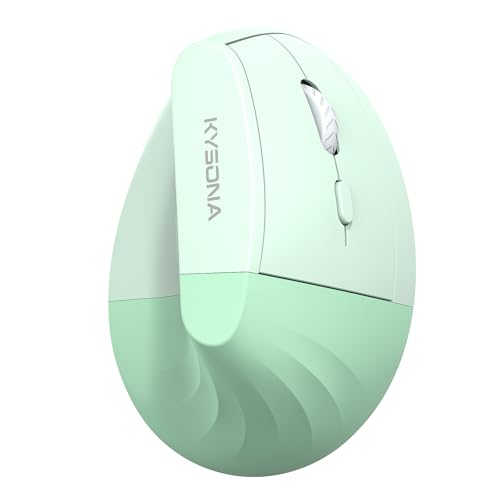
KYSONA EM18 Wireless Ergonomic Vertical Mouse Green

TECKNET RGB Bluetooth Ergonomic Mouse Rechargeable White
Wireless Ergonomic Mouse 2.4G Vertical Ergo Mouse Black

Logitech Ergo M575S Wireless Bluetooth Trackball Mouse Graphite Blue Ball

Anker 2.4G Wireless Ergonomic Mouse Right Hand Vertical Mouse Black
More Details On Our Top Picks
The MX Ergo S leans into thumb-based control, so your hand stays mostly planted while the pointer moves. That setup matters on long desk days, especially beside a laptop dock or dual-monitor workstation, and the rechargeable battery plus Bluetooth and encrypted dongle support give you a little more flexibility than a basic office mouse.
The six programmable buttons make sense for spreadsheet work, browser shortcuts, or editing chores, though the learning curve is real the first few days. Compared with the more straightforward vertical mice in this roundup, this one feels like the smarter desk anchor for you if comfort and efficiency matter more than a tiny footprint.
Strong Points
- Thumb trackball control keeps most movement in one spot, which helps on crowded desks.
- Rechargeable power means you are not managing disposable batteries.
- Bluetooth and the encrypted dongle give you connection flexibility across different setups.
- Six programmable buttons can shorten repeated office tasks.
- PC and Mac compatibility makes it easy to move between work machines.
Things To Consider
- Trackball control takes a short adjustment period, especially for first-time users.
- The shape is less familiar than a vertical mouse, so it may not suit everyone on day one.
- Cleaning around the ball area is part of long-term upkeep.
Feature Rundown
Who It Suits Best
Desk-bound professionals who want trackball control and custom buttons will get the most from this one.
Where A Sibling Pick Shines
The Logitech Ergo M575S suits you better if you want a simpler thumb-trackball feel without the more advanced control layout.
Side scroll is the detail that sets this Acer apart, and that matters more than it sounds like on wide spreadsheets or editing timelines. The 58-degree tilt, 4000 DPI sensor, and Bluetooth 5.2 plus 2.4 GHz support make it feel aimed at desk workers who split time between a laptop and a full office setup.
Small to medium hands are the safer match here, since larger palms may want a fuller grip than this shape suggests. Compared with the Logitech MX Ergo S above, this one is more of a standard pointer with ergonomic shaping, not a trackball style, so your adjustment period should be shorter.
Highlights
- Side scroll adds real convenience in wide documents and timelines.
- Bluetooth 5.2 and 2.4 GHz support broaden your connection options.
- 4000 DPI gives you finer pointer control for office work.
- The 58-degree tilt supports a more relaxed hand posture than a flat mouse.
- Eight buttons leave room for shortcuts without feeling overloaded.
Small Caveats
- The side-scroll feature is useful, but not everyone needs it every day.
- Small to medium hands are the better fit, so hand size matters here.
- The listing image is missing, which makes color judgment harder before purchase.
At A Glance
Right Fit For
Office workers who spend time in spreadsheets, tabs, and dual-device setups are the strongest match.
Another Choice May Suit
The Kensington Pro Fit Ergo Vertical Wireless Mouse suits you better if you want a simpler vertical shape with less feature layering.
This Kensington keeps the pitch simple, with a vertical grip that puts your hand into a more upright hold. That shape can feel especially sensible during long email sessions or lighter office work, and the compact 2.8 by 3 by 4.4 inch size gives it a less bulky feel than the larger trackball picks above.
You may find it easiest to live with on a small desk or in a work bag, since it does not ask for much space. The trade-off is that it stays more basic than the Acer or TECKNET picks, so you are getting fit and simplicity rather than extra control features.
Best Bits
- Vertical grip encourages a more natural handshake posture.
- Compact body works well beside a laptop or in tighter work areas.
- Wireless connection keeps the desk uncluttered.
- The size is practical for smaller hands and portable use.
Areas To Watch
- The straightforward design is less feature-packed than some others here.
- Compact sizing may feel a little small for larger hands.
- Anyone who wants side scroll or buttons beyond the basics will look elsewhere.
Core Details
Built With In Mind
You should look here for compact offices, lighter daily work, and users who want a simple vertical mouse.
A Better Fit Elsewhere
The TECKNET RGB Bluetooth Ergonomic Mouse suits you better if you want rechargeable power and more visual flair in the same budget range.
The EM18 is pitched toward medium and large hands, and that matters because many budget vertical mice feel cramped once your palm settles in. Silent clicking, Bluetooth connection, and five DPI levels make it feel more rounded than the very basic KUNSI and Anker picks later in this list.
For office work, the green finish gives it a little personality without getting loud about it. The honest read is that you are trading advanced extras for a friendly price-to-feature balance, which is usually enough for day-to-day PC, Mac, or laptop use.
Bright Spots
- Medium and large hands get a more realistic fit than many entry-level vertical mice offer.
- Silent click behavior is helpful in shared rooms or late-night work.
- Five DPI steps let you fine-tune cursor speed.
- Bluetooth support keeps it useful across common computer setups.
Minor Gripes
- The listing does not spell out every comfort detail, so shape preference still matters.
- Color-forward styling may not suit a very formal office look.
- As with most vertical mice, you may need a short adjustment period.
Details At A Glance
Whose Shelf It Belongs On
This is a sensible match for budget shoppers who need a vertical mouse with a better chance of fitting larger hands.
Reach For A Different Pick When
The Logitech MX Ergo S suits you better if you want thumb-trackball control and programmable buttons for heavier office work.
TECKNET takes a more dressed-up route than the plain black vertical mice in this roundup, and the 11 backlight modes are part of that story. The rechargeable battery, Bluetooth plus USB connection options, and 4800 DPI sensor make it a strong fit for mixed laptop and desktop use, especially on a desk where you care about both function and appearance.
The trade-off is obvious enough, since lighting modes add personality more than practical control. Still, for most home offices, the combination of wireless flexibility and vertical shaping makes this one easier to live with than a flashy mouse that forgets comfort.
Upsides
- Eleven lighting modes give your desk setup a more styled look.
- Rechargeable power helps reduce routine battery buying and swapping.
- Bluetooth and USB support cover different device setups.
- 4800 DPI gives you a wide speed range for pointer tuning.
- Vertical shape keeps the comfort angle in play, not just the styling.
Room For Improvement
- Lighting features are fun, though they are not essential for everyone.
- The white finish may show grime sooner than darker finishes, so cleaning matters.
- Style-heavy design may not suit a very plain office.
Quick Facts
Perfect Match For
Style-conscious office users and laptop owners who still want a vertical mouse will get the most value here.
Look Elsewhere When
The Acer Ergonomic Mouse Wireless with Side Scroll suits you better if spreadsheet navigation matters more than lighting.
KUNSI keeps things direct: a vertical shape, 2.4G wireless, and three DPI settings tied to everyday laptop or desktop work. That stripped-back approach is useful for you if you want a simple ergonomic starter mouse without extra features getting in the way.
The 6-button layout gives it more usefulness than the most bare-bones office mice, and the neutral handshake angle is the core comfort story. Compared with the higher-feature TECKNET and Acer options, this one is less about extras and more about getting the basics right.
What We Like
- Vertical grip supports a more neutral hand position.
- Three DPI settings cover simple everyday pointer tuning.
- Six buttons provide more control than a stripped-down mouse.
- 2.4G wireless keeps the desk free of cords.
Things To Consider
- The feature set is modest, so power users may want more control.
- Batteries are part of the setup, so replacement planning matters.
- The shape is practical, but not especially polished in feel.
Core Details
The Right Fit
Budget-conscious office users who want an uncomplicated vertical mouse will feel at home here.
Swap It Out When
The Logitech MX Ergo S makes more sense if you want rechargeable power and trackball-style control for heavier desk work.
The Ergo M575S is the cleaner, simpler trackball choice in this group, and that makes it easier to recommend for daily desk use. Your thumb does the moving while the mouse itself stays put, which is handy on cramped desks, beside a laptop stand, or anywhere you do not want the mouse skidding around.
Bluetooth plus the included Logi Bolt receiver gives you connection flexibility that feels practical rather than flashy. Compared with the MX Ergo S, this model is the lighter touch, so it suits you better when you want trackball comfort without extra programmability.
Positives
- Thumb control keeps hand movement localized on the desk.
- Bluetooth and the included receiver give you connection options.
- Tracking feels precise enough for regular office navigation.
- The shape works well where desk space is tight.
Worth Noting
- Trackball use still asks for a short learning curve.
- Cleaning the ball area is part of normal upkeep.
- It is less customizable than the MX Ergo S.
Feature Snapshot
Who Should Grab It
Desk workers who want a calmer thumb-trackball setup and less mouse travel should look here first.
Skip It When
The Acer Ergonomic Mouse Wireless with Side Scroll fits you better if you want traditional pointer movement and spreadsheet-friendly scrolling.
Anker keeps this one focused on the basics, with a right-hand vertical shell and 2.4G wireless connection for simple desktop or laptop use. The three DPI settings and five-button layout make it a sensible starting point for someone who wants ergonomic shape without a long feature list.
That straightforward approach is also its biggest virtue, because there is very little to learn and very little to maintain. Compared with the more feature-rich Acer and TECKNET picks, this mouse is better suited to a plain office routine where comfort and simplicity matter most.
What We Like
- Vertical design supports a more neutral wrist position.
- Three DPI settings keep pointer speed easy to adjust.
- Five-button layout adds a bit more function than a basic mouse.
- 2.4G wireless keeps your workspace cleaner.
Areas To Watch
- Batteries are required, so you will want spares on hand.
- Right-hand shaping limits who can use it comfortably.
- The design is plain, which suits some desks better than others.
Quick Facts
Made For
First-time ergonomic mouse shoppers who want a simple right-handed vertical shape should start here.
Where Shoppers Go Wrong
The Logitech Ergo M575S is the better route if you want a trackball that keeps desk movement to a minimum.
How To Choose The Right Budget Ergo Mouses
Grip Style Sets The Tone
Vertical mice place your hand in a handshake-like position, which can feel more natural than a flat shell during long office sessions. Trackballs do something different, since the mouse stays still and your thumb controls the cursor, so they suit cramped desks and heavy pointer use.
That first choice matters more than DPI or button count. A comfortable shape that matches your habits will usually beat a feature list that looks busy on paper.
Connection And Device Fit
Bluetooth helps when you switch between modern laptops and tablets, while 2.4G wireless usually means a USB receiver and a very simple plug-in setup. Dual-mode models are handy for mixed desks, though they often sit a little higher in price than the plain single-connection options.
PC and Mac compatibility is common in this group, but the real question is how often you move between machines. A desk mouse can feel great in one setup and awkward in another, so match the connection method to your routine.
DPI, Buttons, And Daily Workflow
DPI, or dots per inch, is the cursor speed setting. Lower numbers tend to feel steadier for careful work, while higher numbers suit quicker screen movement and multi-monitor use.
Extra buttons help most when you repeat the same actions all day, but too many controls can be distracting for casual use. For most people, a modest button layout with one or two useful shortcuts is the sweet spot.
Size, Hand Shape, And Desk Space
Hand size matters more than many shoppers expect. Some vertical mice are clearly better for medium or large hands, while compact models fit travel bags and smaller desks more easily.
Trackballs save space because the body does not travel, and that can be a real comfort during busy workdays. Your desk setup, not just your budget, should decide the shape you choose.
A Quick Reality Check Before You Choose
Hidden Buying Traps
One common miss is choosing a mouse for the feature list instead of the grip. A model can look rich on paper and still feel off after an hour at your desk, especially with vertical shapes that ask your wrist to adapt.
Another trap is ignoring hand size and desk space. A compact mouse can be easier to carry, while a larger shell may feel steadier for long typing blocks, so the right answer depends on your routine.
When Paying More Pays Off
Higher-tier ergonomic mice usually spend more on materials, programmable controls, rechargeable power, and connection flexibility. Trackball mechanisms and extra buttons also add complexity, which often shows up in the final cost.
The upgrade makes sense when you sit at a desk for long stretches, split time across multiple devices, or rely on shortcuts throughout the day. For light browsing and occasional office work, a simpler vertical mouse often gets the job done without added fuss.
Closing Thoughts
The best budget ergonomic mouse for you is the one that fits your hand, your desk, and the way you work, not the one with the longest feature list. Trackballs like the Logitech MX Ergo S and Ergo M575S suit desk-centered routines, while vertical options from Kensington, KYSONA, Anker, and KUNSI keep things simpler and easier to learn. Acer and TECKNET bring extra control and a little more polish for spreadsheet-heavy or style-conscious setups. Choose the shape that feels most natural, and the rest gets easier fast.
