
Busy hotbars, crowded skill wheels, and too many keybinds can turn a good session into finger gymnastics. That’s where a 12-button mouse earns its keep, especially for MMO play, macro-heavy work, and long desktop days where side keys matter more than flashy styling. Some of these picks lean fully into programmable inputs, while others keep a lighter button count but bring better comfort, sensor quality, or wireless freedom. You’ll see the trade-offs clearly below, so you can match the mouse to the way you actually use your desk.
Quick Look At The Shortlist

Razer Naga V2 Pro Wireless MMO Gaming Mouse 300 Hr Battery Black

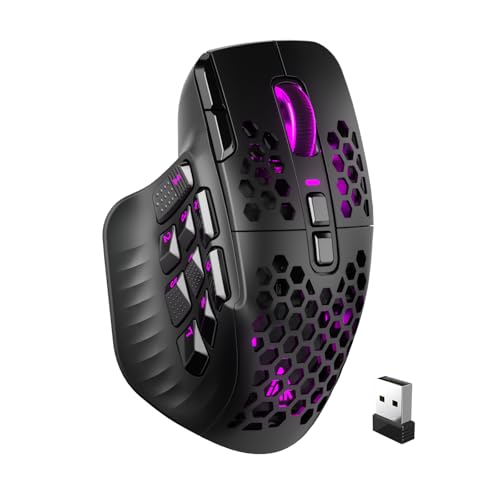
12 Programmable Buttons C12 Gaming Mouse AFUNTA
Logitech G305 Lightspeed Wireless Gaming Mouse Black

Corsair Scimitar RGB Elite Wired MOBA MMO Gaming Mouse Black

Redragon M921 Wired RGB MMO Gaming Mouse 12400 DPI Remapping Keys

Bloody J90s RGB Gaming Mouse High Precision 8000 CPI

Redragon M908 Wired MMO RGB Gaming Mouse 12400 DPI Remapping Keys

Razer Basilisk V3 X HyperSpeed Customizable Wireless Gaming Mouse Black
More Details On Our Top Picks
Razer’s Naga line has long been about putting a lot of actions under your thumb, and this version keeps that focus with swappable side plates and a 19 plus 1 button layout. The removable panels matter because your grip style may not match every game, and the HyperScroll Pro wheel adds another layer of control for long inventories or spell bars. You’re also looking at a wireless shape built for people who spend hours in one seat, not just quick desktop sessions.
The trade-off is that this much flexibility can feel like more mouse than a light office setup needs. It makes the most sense for MMO mains, macro-heavy creators, and anyone who wants one mouse to adapt across several game genres. Compared with the simpler AFUNTA C12, this is the more polished long-term option, though you’ll pay for that refinement with complexity.
Strong Points
- Swappable side plates help the mouse fit different hand positions and keybind habits.
- The 19 plus 1 control layout gives you room for game commands and desktop shortcuts.
- HyperScroll Pro wheel support helps you move through long lists, hotbars, and documents with less finger strain.
- Wireless use keeps the desk cleaner, which matters in compact setups or crowded streaming spaces.
Things To Consider
- The control set can feel busy at first, especially for anyone coming from a plain two-button mouse.
- Extra parts mean more setup choices, so a little time goes into finding the right plate and button map.
- Its MMO focus makes it less attractive for someone who wants a simple pointer for light browsing.
Feature Snapshot
Who It Suits Best
MMO players and macro-heavy desk users who want a wireless mouse with a deep control layout and adjustable side fit.
Another Choice May Suit
The Logitech G305 Lightspeed Wireless Gaming Mouse Black suits you better for lighter gaming and a simpler button layout.
The AFUNTA C12 leans hard into thumb access, with a left-side grid that makes MMO bind organization straightforward. Its four DPI steps and double-speed adjustment give you enough room to shift from slow menu work to faster camera movement, which suits casual dungeon runs and general gaming sessions. Compared with the Razer Naga V2 Pro, this one is far less elaborate, and that can be a plus for a first gaming mouse with lots of side keys.
There’s a real “no frills, lots of buttons” feel here, and that’s the appeal. The built-in weights and contoured body help the mouse feel more planted on the desk, though the styling is more functional than polished. You’ll appreciate it most in a setup where value matters and macro access matters even more.
What We Like
- 12 programmable side inputs make hotbar mapping easier for MMO skills and work shortcuts.
- Four DPI steps give you quick sensitivity changes without digging through software every time.
- The 8-weight system lets you tune the feel for a steadier glide or a lighter hand.
- TEFLON feet tend to move smoothly, which helps during long sessions on hard mouse mats.
- The dedicated triple-click button can speed up repeated actions in games that reward rapid taps.
Room For Improvement
- The design language is more utilitarian than refined, so it suits function-first setups best.
- The wide button grid needs a short learning period before your thumb lands cleanly on each key.
- Owners who prefer a lighter shell may find the weight-tuning approach unnecessary.
Core Details
Who Will Love This
Budget-conscious MMO and macro users who want plenty of side buttons without moving into a more complex premium shell.
Skip It When
The Razer Basilisk V3 X HyperSpeed suits you better if you want fewer controls, wireless convenience, and a cleaner daily-use shape.
The G305 takes a simpler route than the MMO-heavy entries above, and that restraint is useful. You get a wireless body with a HERO sensor, six programmable buttons, and onboard memory, which means the mouse can carry your setup with you more cleanly than a bigger macro rig. For commuters, laptop gaming setups, and anyone who hates cable clutter, the shape feels refreshingly easy to live with.
The honest read is that six buttons won’t satisfy a full MMO hotbar by itself, but the mouse makes sense for a lot of everyday gaming. The 250-hour battery claim points to long stretches between charging, and the compact black shell should be easy to tuck into a bag. Compared with the AFUNTA C12, you give up raw button count and gain a much lighter daily routine.
Upsides
- Wireless freedom keeps your desk tidy and removes cable drag during fast turns.
- The HERO sensor suits steady aiming and general gaming without feeling overcomplicated.
- Six programmable buttons cover common binds, media shortcuts, and daily desktop actions.
- Onboard memory helps keep a saved setup handy across different systems.
- The battery spec supports long stretches away from a charger, which is handy for travel bags and work desks.
Softer Spots
- The button count is modest for MMO players who want a full thumb grid.
- Its compact shape may feel small in larger hands during extended sessions.
- The simpler control set is less suited to heavy macro workflows than the Razer Naga V2 Pro.
At A Glance
Best Suited To
Casual gamers, laptop users, and commuters who want a wireless mouse with a clean shape and a few programmable controls.
Consider Something Else When
The Corsair Scimitar RGB Elite Wired MOBA MMO Gaming Mouse Black fits better for you if a denser side-button layout matters more than portability.
Corsair gives you the most obviously MMO-shaped layout in this group, and that matters the second your thumb starts mapping spells instead of guesswork. With 17 programmable buttons and iCUE support, this mouse suits players who like to sculpt their own control scheme and keep it consistent across a PC or console-connected setup. In a busy gaming desk, that level of structure feels almost like having a small command panel under your hand.
The wired design keeps things straightforward, though it also means the mouse stays tethered to the desk. The 18,000 DPI sensor spec gives you plenty of range for pointer sensitivity, but the real draw is the dense button field. Compared with the Logitech G305, this is the stronger choice for control depth and the less convenient choice for travel.
Reasons To Buy
- Seventeen programmable buttons leave room for dense MMO and MOBA key maps.
- iCUE support gives you a deeper software path for remapping and profile management.
- The high DPI ceiling supports broad pointer tuning across games and larger displays.
- Wired operation removes battery planning from the equation.
- It works across several platforms, which helps in mixed-device gaming corners.
Minor Gripes
- The wired cable keeps movement tied to the desk area.
- The button-rich side can feel crowded during the first few days of use.
- It suits control-heavy play more than relaxed browsing or travel use.
Details At A Glance
Whose Shelf It Belongs On
MOBA and MMO players who want a dense button grid and a wired mouse that stays fixed in a home battlestation.
Look Elsewhere When
The Logitech G305 Lightspeed Wireless Gaming Mouse Black makes more sense for a lighter, travel-friendly setup with fewer binds.
The M921 is built for people who like a lot of remapping without drifting into the most expensive tier. It carries 18 programmable buttons, a dedicated fire button, and an 8-piece weight kit, so the shape can feel more tailored than the plain-looking price class suggests. In practice, that makes it a sensible desk mouse for long MMO sessions or repeat-heavy work where one-thumb commands save time.
The sensor spec is broad enough for fast movement, yet the mouse still reads as a control-first tool rather than a speed demon. The 5 DPI presets cover common gaming needs, while the software-adjustable range adds extra headroom for finer tuning. Compared with the Corsair Scimitar RGB Elite, it gives you a slightly different balance of control and cost-conscious design, though it lacks that model’s more polished ecosystem.
Best Bits
- 18 programmable buttons make it easy to build a dense command layout.
- The separate fire button helps with repeated actions in games that reward rapid taps.
- Weight tuning gives you a more settled hand feel for desktop use.
- The 1,000 Hz polling rate supports a responsive pointer feel for many common tasks.
- RGB lighting adds a bit of personality without changing the grip itself.
Areas To Watch
- The many controls can take time to memorize, especially in the first week.
- The aggressive shape may not suit every hand size equally well.
- Wired use keeps the mouse anchored to the desk, which is fine for stationary setups but less handy for travel.
Feature Rundown
Made For
Macro-heavy gamers and desk workers who want a wired mouse with lots of remap options and adjustable heft.
A Better Fit Elsewhere
The Razer Naga V2 Pro Wireless MMO Gaming Mouse 300 Hr Battery Black fits you better if wireless freedom and swappable side plates matter more.
Bloody takes a slightly different route here, offering 12 customizable buttons in an ambidextrous body. That shape matters more than people expect, because a mouse that works cleanly in either hand can be a relief for left-handed setups or shared desks. The 15-zone RGB setup adds visual polish, but the practical appeal sits in the sniping modes and the high report rate.
The 8000 CPI ceiling is enough for a lot of gaming needs, and the 150 IPS and 25g acceleration specs point to a mouse that stays composed during faster hand movement. In a small apartment desk or a shared family setup, that balance of side access and handedness flexibility makes sense. Compared with the Redragon M921, this one is less about raw macro density and more about ergonomic versatility.
Positives
- Ambidextrous construction helps right-handed and left-handed setups alike.
- 12 customizable buttons cover common gaming binds without feeling overwhelming.
- The 2000 Hz report rate supports a fast-feeling response chain.
- Six sniping modes add sensitivity options for precision-heavy play styles.
- 15-zone RGB styling gives the mouse a more personalized desktop presence.
Small Caveats
- The ambidextrous shell can feel less sculpted than a mouse shaped strictly for one hand.
- Lighting and control features add interest, though they also make setup a bit more involved.
- Button count is solid, but it still trails the denser MMO layouts above.
Quick Facts
Right Fit For
Left-handed users, shared desks, and gamers who want 12 buttons without giving up an ambidextrous shell.
Reach For A Different Pick When
The Corsair Scimitar RGB Elite Wired MOBA MMO Gaming Mouse Black fits you better for a more specialized MMO layout and deeper bind density.
The M908 sits in the classic MMO-mouse lane, where side buttons and macro mapping matter more than sleek restraint. Like the M921, it pushes hard on remapping and a grip that stays planted, but its whole presentation feels aimed at people who want a dedicated desk mouse for complex command chains. That makes it a natural choice for long sessions in games with crowded bars and repeated actions.
Its wired connection keeps response simple, and the 12400 DPI ceiling gives you enough room for tuning across different screen setups. The shape is familiar in this category, which helps once your thumb has learned the layout, though newcomers may need a little patience. Compared with the Bloody J90s, this one leans more into MMO function than ambidextrous comfort.
Highlights
- Dense side access helps you keep more commands under your thumb.
- Remapping support makes it useful for both games and repetitive desktop actions.
- The wired setup avoids battery management.
- RGB accents give the mouse a more animated desk presence.
Worth Noting
- The side-heavy layout needs some practice before it feels truly natural.
- Wired use is steady, though it can feel less flexible on crowded desks.
- Its design favors MMO control, so it’s less friendly for minimalists.
Core Details
Built With In Mind
MMO players and macro-heavy desk users who want a wired mouse with a familiar command-grid layout.
Where A Sibling Pick Shines
The Redragon M921 Wired RGB MMO Gaming Mouse 12400 DPI Remapping Keys suits you better if adjustable weight matters more than a more traditional MMO shell.
The Basilisk V3 X HyperSpeed rounds out the list for people who want a wireless Razer shape without jumping into a full MMO grid. Nine programmable controls, second-generation mechanical switches, and the 5G Advanced 18K optical sensor give it a more everyday balance than the Naga V2 Pro, which is much more command-dense. For mixed work and play, that balance can feel just right.
It also offers both 2.4 GHz wireless and Bluetooth, so you can choose the faster-feeling connection path or the one that suits longer desktop use. The 285-hour battery figure is a strong comfort point for a cordless mouse used across workdays and gaming nights. The trade-off is plain enough, though, since nine controls will not satisfy someone chasing a full 12-button layout.
Bright Spots
- Wireless and Bluetooth options make it easy to pair with different setups.
- Nine programmable controls cover useful shortcuts without crowding the shell.
- Mechanical switches tend to give clicks a more defined feel.
- The 18K optical sensor supports tuned pointer movement for games and office use.
- Long battery life helps keep charging off your daily checklist.
Trade Offs
- Nine controls are fewer than a true MMO-focused mouse provides.
- The shape is more general-purpose than specialized for heavy hotbar play.
- Gamers who want deep thumb access should look to the Naga V2 Pro or Scimitar instead.
Feature Card
The Right Fit
Mixed-use shoppers who want wireless comfort, a sensible control count, and a mouse that moves easily between work and play.
Swap It Out When
The Razer Naga V2 Pro Wireless MMO Gaming Mouse 300 Hr Battery Black fits you better if you want a much deeper button set for MMO hotbars.
How To Choose The Right 12 Button Mouses
Match The Button Layout To Your Habit
A 12-button mouse only helps when your thumb can reach the controls without hunting. MMO players and macro-heavy desktop users usually benefit from a side grid that follows a clear row-and-column pattern, while people who only need a few shortcuts can do better with a lighter layout like the Logitech G305 or Basilisk V3 X. The real question is whether you want every bind on the mouse or just the commands you use constantly.
Shape matters just as much as count. A sculpted thumb rest can feel great during long sessions, but an ambidextrous shell makes sense for shared desks or left-handed use. The best match is the one that lets your hand stay relaxed while your commands stay obvious.
Decide Between Wired Convenience And Wireless Freedom
Wired mice keep power simple and usually stay ready without charging routines. That makes them attractive for desk-bound MMO setups, especially when you want the cable to disappear into a stationary battle station. Wireless picks, on the other hand, clean up the desk and work better for people who move the mouse between rooms, bags, or multiple devices.
Battery life is only part of the story, because the charging habit matters too. A long-runtime mouse like the Naga V2 Pro or Basilisk V3 X can suit busy weeks, while a wired model can feel easier for someone who would rather not think about power at all.
Check The Software And Memory Support
Button count means little without remapping support that feels workable. Software such as iCUE, onboard memory, or general programmable controls matters because you can save profiles for games, work tasks, or different desks. That becomes especially useful once your setup spans several titles or you share the same mouse with another user.
Also think about how much setup time you want. A deep software ecosystem can feel rich, but it takes more patience to configure, while a simpler mouse with basic remaps gets out of the way faster. For many people, that trade-off decides the whole purchase.
Look At Sensor Quality, Not Just DPI
DPI is sensitivity, meaning how far the pointer travels for each inch of hand movement. Higher numbers help on large displays or fast in-game turns, but the rest of the sensor matters too, including tracking speed and acceleration claims. A solid sensor can feel calm and predictable, which matters more than a big number printed on the box.
For most desks, a mid-to-high sensor spec is enough. The upgrade becomes worthwhile when you play fast-paced games, use large monitors, or need finer control across repeated daily sessions.
A Quick Reality Check
Hidden Buying Traps
It’s easy to chase button count and ignore shape, which leads to a mouse that looks great on paper and feels awkward after an hour. Another common miss is overlooking software, because a crowded thumb grid without good remapping support turns into clutter. The safer path is to match the shell, the layout, and the setup time to the way you work or game.
Weight is another detail worth checking. Some people like a heavier, steadier mouse, while others prefer a lighter glide for quick movement. A detachable weight kit helps, but it also adds setup choices you may not need.
What The Higher Tier Buys
More expensive models usually spend money on better sensors, stronger software, extra profile control, and better fit options like swappable side plates or mechanical switches. Wireless systems also tend to cost more once low-latency performance and long runtime enter the picture. That’s why the Naga V2 Pro and Scimitar sit above simpler mice in both feature depth and complexity.
Pay up only where the extras solve a real problem. A premium mouse makes sense for heavy MMO players, multi-game streamers, and anyone who uses the same device for long desk sessions and wants less compromise.
Closing Thoughts
Your best 12-button mouse comes down to how much control you want under your thumb and how much setup you’re willing to manage. The Razer Naga V2 Pro is the most adaptable all-round MMO choice here, while the Corsair Scimitar RGB Elite and Redragon M921 suit button-hungry desk setups with different comfort priorities. For lighter daily use, the Logitech G305 and Razer Basilisk V3 X are easier to live with. Match the layout to your habit first, and the rest gets a lot simpler.
