
Choosing a mouse for CAD work is less about flash and more about control, comfort, and how much hand movement your day can absorb. You feel that difference fast during long model sessions, repeated zooming, or a commute between office and home setup. The right shape can save your wrist from feeling worn down by midafternoon, and the wrong one can make precise work feel fussy.
This roundup focuses on devices that suit drafting, modeling, and heavy desktop use, from classic ergonomic mice to specialist trackballs and 3D controllers. You’ll also see which picks suit Mac setups, wired desks, and tighter workspaces. Each option brings a different trade-off, so you can match the tool to the way you actually work.
The Shortlist At A Glance

Logitech MX Master 3S Bluetooth Wireless Mouse Graphite
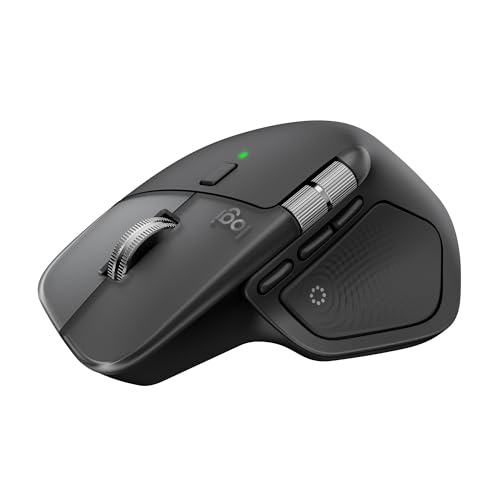
Logitech MX Master 4 for Mac Space Black

ProtoArc EM02 Wireless Trackball Mouse Gray

3Dconnexion SpaceMouse Wireless Bluetooth Edition 3DX-700115

3Dconnexion CadMouse Compact Wireless

ELECOM Huge Plus Wireless Trackball Mouse
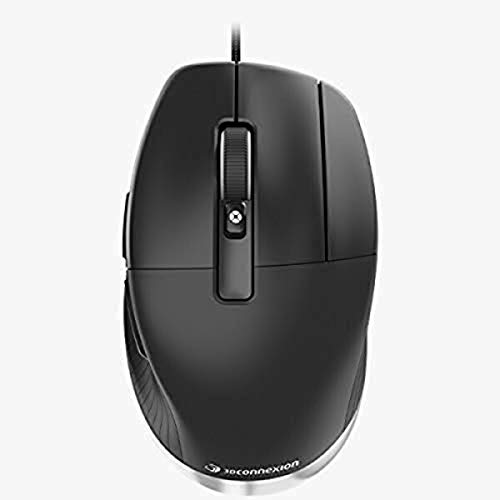
3DConnexion CadMouse Pro Mouse Black

3Dconnexion SpaceMouse Pro Wireless BT
More Details On Our Top Picks
For CAD sessions that mix drafting, scrolling, and everyday desktop work, this Logitech shape makes sense right away. The Bluetooth-only setup keeps the desk uncluttered, and the quiet click feel is a real plus in shared spaces or late-night work sessions.
The 8,000 DPI sensor matters because it gives you fine cursor control without forcing big hand movements, even on glass. You may miss a USB receiver or charging cable in the box, though, so this feels most natural for a setup that already has a charger and Bluetooth ready to go.
What We Like
- MagSpeed scrolling makes long drawings and timelines easier to move through without constant wheel flicking.
- Quiet clicks keep noise down in a home office or shared studio.
- The high-DPI sensor helps you make small cursor moves with less arm strain.
- Bluetooth-only pairing keeps the desk simpler for laptop-heavy setups.
Things To Consider
- No receiver or cable comes in the box, so you need your own charging plan.
- The feature set feels rich, which also means the learning curve is a little steeper than a plain mouse.
- Its shape suits larger hands better than very compact workstations.
Feature Rundown
Who It Suits Best
You should look at this one first if you spend long hours in CAD, jump between apps, and want a familiar mouse shape with more control than a basic office pick.
A Better Fit Elsewhere
3Dconnexion CadMouse Pro Mouse Black suits stationary desktop work more cleanly, especially for you if a wired setup and a dedicated CAD shape matter more than Bluetooth flexibility.
This one leans hard into a Mac-first desk, which gives it a clearer identity than the MX Master 3S. The haptic feedback adds a more tactile feel to controls, and the ultra-fast scrolling suits you well during timeline work, layout review, or file sorting.
USB-C charging is the practical part of the story, since it fits the way many modern desks already run. The trade-off is simple, it’s less about universal compatibility and more about sitting neatly in a Mac, iPadOS, or Windows environment where that extra polish matters.
Highlights
- Haptic feedback gives the controls a more deliberate, tactile feel.
- Ultra-fast scrolling helps you move through large files with less effort.
- USB-C charging fits modern desk gear cleanly.
- Works across MacOS, iPadOS, and Windows, so mixed-device desks stay flexible.
Room For Improvement
- Its strongest appeal sits inside the Apple ecosystem, so it feels less universal than the MX Master 3S.
- The advanced feature set may be more than casual desktop use needs.
- Space Black looks sharp, but darker finishes tend to show fingerprints more clearly.
At A Glance
Made For
You’ll get the most from this model in a Mac-based studio or home office where a refined feel matters as much as pointer control.
Skip It When
Logitech MX Master 3S Bluetooth Wireless Mouse Graphite is the better match for you if you want nearly the same comfort in a more broadly flexible, Bluetooth-only package.
The thumb-controlled ball changes the whole feel of a desk, because your hand stays mostly planted while the cursor moves. That’s handy for narrow work surfaces, and the adjustable angle can make a long session feel less rigid.
Multi-device support is the useful bonus here, since Bluetooth and 2.4G USB-A give you flexibility across laptops and desktops. Compared with the Logitech mice above, this one asks for a short adjustment period, but it can feel like a relief once you get used to keeping your arm still.
Reasons To Buy
- Thumb-ball control reduces the need for broad arm movement.
- Adjustable angle helps you find a wrist position that feels easier to hold.
- Bluetooth and 2.4G options make multi-device use simpler.
- Rechargeable power keeps battery swaps off your to-do list.
Softer Spots
- Trackballs take a little time to learn, especially after years on standard mice.
- The ball area may need regular dusting to stay smooth.
- Its shape works best for users who want stationary control rather than broad movement.
Core Details
Whose Shelf It Belongs On
You’re a strong match for this pick if you want to keep motion tight and controlled at a small desk or laptop station.
Another Choice May Suit
ELECOM Huge Plus Wireless Trackball Mouse works better for you if you want a larger thumb-ball layout and more onboard controls for a heavier desktop routine.
This isn’t a conventional mouse, and that’s exactly why it earns a place here. SpaceMouse-style control is aimed at 3D navigation rather than everyday pointing, so it suits CAD work where model movement matters more than casual browsing.
In a serious drafting or modeling setup, that specialization can feel like a second steering wheel for your software. The trade-off is clear, it’s not the pick for general desktop use, but for the right workflow it can remove a lot of awkward keyboard-and-mouse juggling.
Best Bits
- Built around 3D navigation rather than standard pointer duty.
- Bluetooth wireless keeps the desk cleaner than a corded controller.
- Pairs well with software-heavy modeling workflows.
- Gives you a dedicated tool for moving around complex scenes.
Points To Note
- It serves a specialized role, so it won’t replace a normal mouse for everyone.
- Learning the control style takes patience at first.
- The shape makes most sense beside a regular mouse, not as a solo device.
Feature Card
Right Fit For
You should focus on this if your CAD day revolves around moving through models, rotating views, and keeping your hands on a specialized controller.
Reach For A Different Pick When
Logitech MX Master 3S Bluetooth Wireless Mouse Graphite is the safer match for you if you still need a traditional mouse that works across more general office tasks.
Among the more portable options here, this one feels intentionally pared back. Its smaller footprint makes sense for travel bags, hot desks, and cramped work surfaces where a full-size ergonomic mouse would crowd the keyboard tray.
That compact shape is useful, but it also means you give up some of the plush hand support you get from the MX Master models. The honest read is that it suits a lighter, more mobile CAD routine better than all-day, heavy desktop work.
Upsides
- Compact body travels well and takes little desk space.
- CAD-focused design helps it feel more purposeful than a general office mouse.
- Wireless setup works cleanly in mobile workstations.
Areas To Watch
- Smaller size offers less palm support than fuller ergonomic shapes.
- Long sessions may feel tighter for larger hands.
- Its compact profile is handy, but not as plush as bulkier picks.
Details At A Glance
The Right Fit
This works well for you if you move between spaces often and want a CAD mouse that stays easy to carry.
Where A Sibling Pick Shines
Logitech MX Master 3S Bluetooth Wireless Mouse Graphite is the better fit for you if long desk sessions matter more than saving a bit of bag space.
ELECOM goes big here, both in ball size and in the number of controls you can assign. The 52 mm ball gives you a substantial thumb surface, and the multi-connection setup covers Bluetooth, 2.4 GHz wireless, and wired use for desks that change shape from week to week.
That flexibility makes it a serious desk tool for power users, especially in a Mac, iPad, or Windows mixed setup. It also has quiet clicks, which helps in shared spaces, though the larger body will feel more desk-bound than the compact 3Dconnexion option above.
Positives
- The 52 mm trackball gives the thumb a broad, stable control surface.
- Ten programmable buttons can save time on repeated CAD actions.
- Bluetooth, 2.4 GHz, and wired modes give you more setup freedom.
- Silent clicks help keep office noise down.
- Rechargeable power reduces the hassle of swapping batteries.
Minor Gripes
- The larger body takes more space than a compact mouse.
- Trackball upkeep matters, since dust can build up around the ball area over time.
- It leans toward committed desk use rather than quick travel packing.
Technical Sheet
Built With In Mind
You’re the right match for this one if you want a dense control layout and don’t mind a more stationary trackball footprint.
Swap It Out When
ProtoArc EM02 Wireless Trackball Mouse Gray suits you better if you want a lighter, easier-to-adapt trackball for a smaller desk.
A wired CAD mouse still makes a lot of sense for fixed desks, especially where you want a direct, no-battery connection and a focused button layout. Seven buttons is enough to support frequent commands without making the shell feel crowded.
The optical sensor and cable keep the setup straightforward, which some station-based workflows still prefer over wireless flexibility. Compared with the compact wireless CadMouse above, this one feels steadier and more anchored, though that also means it’s less convenient for moving around.
Standout Traits
- Wired connection keeps the desk setup simple and consistent.
- Seven buttons support command-heavy work without overcomplicating the body.
- Optical tracking suits precise desktop use.
- Its CAD-first shape feels more focused than a general office mouse.
Small Caveats
- The cable limits how easily you can move between stations.
- It makes the most sense in a fixed desk setup.
- Black finishes can show wear and dust more readily over time.
Feature Snapshot
Best Suited To
You should choose this if your CAD work stays at one desk and you want a wired mouse with a practical button count.
Look Elsewhere When
3Dconnexion CadMouse Compact Wireless is the better fit for you if portability matters more than the steadiness of a cable.
This is the specialist end of the list, aimed at people who want a wireless 3D controller rather than a standard mouse. In a model-heavy workspace, that separation can make navigation feel more direct and less cramped.
The wireless layout is appealing for cleaner desks, but the bigger story is how narrowly it focuses on CAD-style movement. It pairs best with a normal mouse nearby, which makes it a strong addition instead of a full replacement.
What We Like
- Built for 3D navigation, not just pointer movement.
- Wireless design helps keep the workstation tidy.
- Feels well matched to advanced CAD routines.
- Works nicely alongside a regular mouse rather than replacing one.
Worth Noting
- Specialized control means a learning curve is part of the package.
- It shines most in a two-device setup.
- General office tasks still call for a normal mouse.
Core Details
Who Will Love This
You should reach for this if your day revolves around 3D modeling and you want a dedicated wireless controller beside your main mouse.
A Better Fit Elsewhere
Logitech MX Master 3S Bluetooth Wireless Mouse Graphite suits you better if you need one device that can handle CAD work and ordinary desktop tasks more gracefully.
How To Choose The Right Cad Mouses
Match The Control Style To Your Work
Standard ergonomic mice suit you best when your day mixes drawing, email, file management, and light modeling. Trackballs shift the movement to your thumb, which helps on smaller desks or during long sessions with less arm travel. Dedicated 3D controllers sit in a different lane altogether, since they help most with model navigation instead of everyday pointing.
The right choice depends on how often you switch between CAD and general desktop tasks. A mouse like the MX Master 3S feels broader in purpose, while the SpaceMouse models stay tightly focused on navigation. That difference matters more than headline features.
Check The Grip, Size, And Button Layout
Hand shape plays a big part in comfort, especially during long drafting days. Larger ergonomic bodies usually suit palm grips, while compact models travel better and take less room beside a keyboard. Trackballs need room for your thumb rather than your whole arm, so the feel changes even more than the size suggests.
Button count also matters, but only up to the point where it still feels usable. A handful of programmable buttons can save time on repeat commands, while too many can become a memory exercise. You want enough control for your workflow, not a cluttered shell that slows you down.
Think About Connection And Workspace Fit
Bluetooth keeps setups neat, which helps on laptop docks and shared desks. A 2.4 GHz dongle adds another route for compatibility, while wired models stay straightforward for fixed stations. That trade-off becomes clear once you start moving between home, office, and travel use.
Battery style matters too. Rechargeable models cut down on upkeep, but a charging cable still needs a home. Wired picks avoid charging altogether, and that simplicity can feel like a relief in a permanent workstation.
Focus On Software Compatibility And Workflow
Mac users should pay close attention to platform fit, especially on models built with Apple-first support in mind. Windows and Linux compatibility broadens the field, which is helpful when your setup changes or your work machine is not the same every day. For specialist controllers, software support and your own habits matter as much as the hardware shape.
Think about the tasks you repeat most often. Ultra-fast scrolling helps with long documents and timelines, programmable buttons help with shortcuts, and trackballs help when desk space is tight. That’s the real filter, not the marketing language on the box.
Things Worth Knowing First
Hidden Buying Traps
One common miss is buying a specialist controller for everyday desk work and then feeling stuck with a tool that only shines in certain apps. Another is overlooking what comes in the box, especially with Bluetooth-only models that may leave out extras you expected. Space matters too, since a large trackball can crowd a small desk faster than the listing suggests.
A cleaner choice starts with your real workday, not the feature list. Match the shape to your hand, the connection to your setup, and the control style to the software you use most.
The Upgrade Payoff
Higher-tier CAD mice usually cost more because they layer in better shaping, more buttons, quieter clicks, and more flexible controls. You also pay for tighter build quality and more specialized navigation features, especially on devices aimed at 3D work. That extra money goes toward making long sessions feel less tiring and more exact.
The upgrade makes sense once you spend real time in modeling, drafting, or heavy editing. Casual desktop work doesn’t need this much hardware, but a daily CAD routine often does.
Final Thoughts
The best Cad Mouses for 2026 depend on how you work, not just what software you open. For a broad everyday setup, the Logitech MX Master 3S stands out as the safest all-round fit, while the 3Dconnexion and ELECOM trackball options make more sense for specialized desks. You have a clear path here, whether you want comfort, portability, or deeper CAD control.
