
Cheap 1080p monitors for gaming can still feel responsive, look clean, and fit a cramped desk without draining your setup budget. You’re mostly balancing refresh rate, panel type, port layout, and stand flexibility, because those details shape daily use more than a glossy product name ever will.
For gaming at 1080p, a sensible monitor should make motion feel steady, keep text readable during work, and avoid annoying setup limits. The seven picks below cover small desks, faster esports play, mixed work-and-play use, and a few size or feature upgrades that matter in real rooms.
Quick Look At The Shortlist

ArcticPro 22 Inch Gaming Monitor 144Hz, FHD Monitor, 105% sRGB

LG 24G411A-B 24-inch Ultragear Full HD IPS Gaming Monitor, 144Hz, 1ms MBR

Dell 27 240Hz Gaming Monitor SE2726HG 27-inch FHD IPS Display, 240Hz
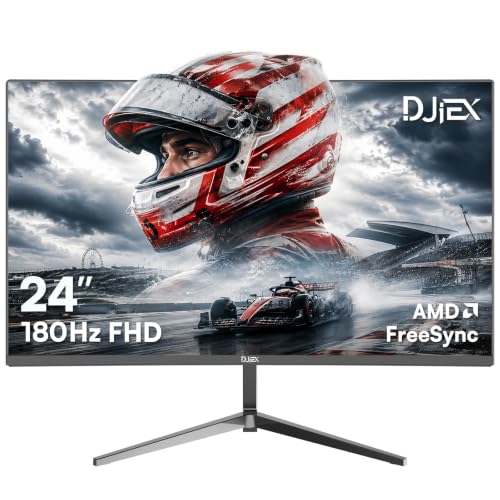
24 Inch Gaming Computer Monitor, FHD 1920x1080p, 180Hz, High Contrast VA Screen

Westinghouse 22 Inch Computer Monitor 1080P FHD IPS Frameless Gaming Monitor, 100Hz, Built-in Speakers

Sealan 24 Inch Computer Monitor FHD 1080P, 100Hz VA Display, Built-in Speaker

Viewedge 24 Inch Gaming Monitor 1080p 144hz, VA 1ms FHD Monitor, 100% sRGB
More Details On Our Top Picks
The ArcticPro fits neatly into a dorm desk, a small office nook, or a corner gaming setup where a 22-inch screen keeps the view manageable. Its 144Hz refresh rate means motion can feel smoother than a standard office panel, while the three-sided frameless look helps the screen feel a bit larger than it measures.
The 105% sRGB claim matters most for color-rich games and everyday creative work, though the real trade-off is that a compact 1080p panel will never feel as expansive as a 24- or 27-inch alternative. You also get HDMI, VGA, VESA mounting, and tilt support, so this one makes sense for a simple, tidy setup that still wants a little style.
Strong Points
- 144Hz helps fast movement look smoother during shooters and racing games.
- 22-inch size suits shallow desks and close viewing distances.
- Three-sided frameless styling keeps the footprint visually light.
- VESA support gives you more mounting flexibility than a fixed stand alone.
- HDMI and VGA cover both newer and older devices.
Things To Consider
- Smaller screens can feel cramped for multitasking beside a game.
- The compact footprint is handy, though it leaves less room for future desk expansion.
- VGA is useful for legacy gear, but HDMI will be the cleaner path for most gaming rigs.
Feature Card
Who It Suits Best
Students, apartment dwellers, and casual gamers with tight desk space will get the most from it.
Where A Sibling Pick Shines
LG 24G411A-B 24-inch Ultragear Full HD IPS Gaming Monitor suits you better when you want a larger IPS panel with stronger all-round versatility.
This LG makes sense for you when a fast monitor also needs to look good during long sessions at the desk. The IPS panel, meaning in-plane switching, is built to keep color and viewing angles more consistent than many basic VA screens, so the image stays stable even when you shift posture.
With 144Hz, 1ms MBR, FreeSync, G-Sync compatibility, HDR10, HDMI, and DisplayPort, it lands in the sweet spot for mixed PC play. The trade-off is that this fuller feature set usually matters more to gamers who notice motion smoothness and sync support, while casual single-player use may not need every last option.
What We Like
- IPS color and viewing consistency help during gaming and daily use.
- 144Hz and 1ms MBR support quick motion with less blur.
- FreeSync and G-Sync compatibility help reduce tearing across more systems.
- HDR10 adds a better starting point for supported content.
- HDMI and DisplayPort make desktop hookup straightforward.
Worth Noting
- The slimmer stand looks clean, though it can leave less room for extras beneath the screen.
- 144Hz is strong for this class, but competitive play still favors higher refresh panels like the Dell 27 SE2726HG.
- HDR support is useful, yet it depends heavily on the game or video source.
Details At A Glance
Whose Shelf It Belongs On
PC gamers who want a well-rounded 24-inch screen with strong motion handling will appreciate it most.
Look Elsewhere When
Dell 27 240Hz Gaming Monitor SE2726HG suits serious competitive play better, especially for fast shooters where 240Hz can matter more.
For fast shooters, rhythm games, and competitive action, the Dell SE2726HG stands out because 240Hz pushes far beyond the refresh rates of the first two picks. That higher cadence can make motion feel more immediate, and the 27-inch size gives you a larger field of view without moving into 1440p territory.
The IPS panel, FreeSync Premium support, HDMI VRR, and DisplayPort 1.4 make it a strong fit for mixed PC and console use. The honest trade-off is that 27 inches at 1080p is less sharp at close range than a smaller screen, so text-heavy work and very close seating may feel a bit softer.
Upsides
- 240Hz delivers a fast feel that suits competitive play.
- 27-inch size gives you a bigger screen area for games and media.
- IPS technology helps preserve color consistency across the panel.
- FreeSync Premium and HDMI VRR support smoother play on compatible devices.
- DisplayPort 1.4 and dual HDMI inputs make multi-device setup easier.
Room For Improvement
- 1080p on 27 inches can look less crisp at a short desk distance.
- The tilt-only stand keeps things simple, though it offers less positioning range than a fully adjustable arm.
- Fast refresh helps the most in demanding games, not in everyday browsing.
Core Details
Perfect Match For
Competitive PC gamers who want a large 1080p display with very quick motion handling will get the most from it.
Swap It Out When
LG 24G411A-B 24-inch Ultragear Full HD IPS Gaming Monitor fits you better when a slightly smaller 24-inch screen feels more balanced on a desk.
The DJiEX lands in a useful middle ground, especially for someone who wants a faster-than-average 1080p monitor without moving up to a larger or pricier-feeling class. A 24-inch VA panel usually gives deeper contrast than many budget IPS options, so darker game scenes and movie nights can look a bit richer.
Its 180Hz refresh rate is the eye-catcher here, and that extra speed makes it easier to enjoy quick motion without committing to the 240Hz tier. The trade-off is simple: VA panels often favor contrast over the widest viewing angles, so this screen is happiest when you sit more or less centered.
Bright Spots
- 180Hz gives you a noticeable step up from common 100Hz or 144Hz screens.
- 24-inch size keeps text and game UI easy to read from a normal desk distance.
- VA contrast can help darker scenes feel fuller and less washed out.
- FreeSync support is a practical match for frame-rate swings in many games.
Minor Gripes
- VA viewing angles can soften the image more than IPS when you sit off-center.
- VESA mounting is useful, though it adds a little setup work if you plan to use an arm.
- Higher refresh matters less for slower story games than it does for fast action.
Feature Rundown
Built With In Mind
Budget-conscious gamers who want strong motion speed and a modest desk footprint are the best match.
Another Choice May Suit
Westinghouse 22 Inch Computer Monitor 1080P FHD IPS Frameless Gaming Monitor suits you better when built-in speakers and a smaller shell matter more than higher refresh.
The Westinghouse is the easygoing pick in this lineup, especially for a dorm room, guest room, or first gaming desk where you want simple setup more than bells and whistles. Its 22-inch IPS panel, 100Hz refresh, and built-in speakers make it convenient for a space where every extra box or cable feels like clutter.
That convenience does come with limits, since 100Hz sits below the quicker options from LG, Dell, and the DJiEX. Still, the frameless design, eye-care focus, HDR support, HDMI and VGA inputs, and FreeSync compatibility make it a comfortable everyday monitor for casual gaming and general use.
Highlights
- Built-in speakers reduce the need for separate desktop audio.
- 22-inch size helps small desks feel less crowded.
- IPS panel support gives you steadier color from off-angle viewing.
- 100Hz is a nice step above basic office screens.
- HDMI and VGA keep setup broad enough for older and newer gear.
Softer Spots
- 100Hz feels good for casual play, though faster competition-minded screens exist here.
- Small speakers are handy, but desktop audio still depends on your room and volume needs.
- VGA can be useful, yet most gaming setups will lean on HDMI instead.
Quick Facts
Right Fit For
Casual gamers and small-space setups benefit most, especially where convenience matters as much as screen quality.
Reach For A Different Pick When
Sealan 24 Inch Computer Monitor FHD 1080P, 100Hz VA Display suits you better if you want a slightly larger 24-inch screen with a built-in speaker and richer contrast.
The Sealan feels tailored to a desk that shifts between spreadsheets, streaming, and casual gaming, which is where its mix of 24-inch size, VA contrast, and built-in sound starts to make sense. Compared with the Westinghouse, it leans a little more toward a work-first setup, while still keeping gaming-friendly extras like FreeSync and HDR10.
The 98% sRGB figure also gives you a better clue about its color coverage, and that matters when you want desktop visuals that don’t look flat. The trade-off is still the same VA-style compromise: good contrast, but not the widest viewing angles, so a centered seat suits it best.
Reasons To Buy
- 24-inch size is comfortable for work and gaming alike.
- Built-in speaker support keeps the desk setup simpler.
- HDMI and DisplayPort give you modern connection flexibility.
- FreeSync and HDR10 round out a practical gaming-ready feature set.
- 98% sRGB is a useful sign of broad everyday color coverage.
Points To Note
- VA panels can feel less even from side angles than IPS options.
- 100Hz is fine for casual play, but quicker monitors in this list suit sharper competitive motion.
- Built-in audio is convenient, though some desk setups still benefit from separate speakers.
Spec Overview
Who Should Grab It
You’ll like it most if your desk handles both work tasks and relaxed gaming sessions.
Look Elsewhere When
Viewedge 24 Inch Gaming Monitor 1080p 144hz suits you better when your focus shifts toward faster gameplay and a higher refresh ceiling.
Viewedge is the kind of monitor that keeps the setup straightforward, especially for a first gaming desk or a secondary PC in a shared room. The 144Hz refresh rate, 1ms response time, and 100% sRGB coverage give it a stronger gaming tilt than the Sealan, while the blue-light filter and wall-mount support add a little everyday practicality.
The VA panel should appeal to anyone who wants a bit more contrast than a basic office screen, and HDMI plus VGA keeps the connection story simple. The catch is that this is still a 24-inch 1080p monitor, so the upgrade is more about speed and feature balance than about a big jump in sharpness.
Best Bits
- 144Hz keeps motion smooth for fast-paced games.
- 1ms response time helps the screen feel more immediate.
- 100% sRGB is a nice color coverage signal for everyday use.
- Blue-light filter can make longer sessions feel easier on the eyes.
- Wall-mount support opens up more desk layout options.
Areas To Watch
- VA viewing angles are usually less forgiving than IPS at the sides.
- HDMI and VGA cover common needs, though DisplayPort would add more flexibility.
- Its strength is sensible balance, not a flashy spec stack.
Technical Sheet
Built With In Mind
Everyday gamers who want a clean, practical 24-inch screen with decent speed will feel right at home.
Skip It When
Dell 27 240Hz Gaming Monitor SE2726HG suits you better if very fast competitive play matters more than a simple feature mix.
How To Choose The Right Cheap 1080p Monitors For Gaming
Refresh Rate Comes First
Refresh rate tells you how many times per second the screen updates, and that matters because motion in games looks steadier at 100Hz, 144Hz, or 180Hz than on a basic office panel. For fast shooters or racing games, the jump is easy to notice in the way camera pans and quick turns feel less choppy.
The trade-off is that a high refresh screen only pays off when your PC or console can keep up. A 240Hz monitor like the Dell SE2726HG makes sense for serious competitive play, while the Westinghouse at 100Hz suits more relaxed gaming and general desk use.
Panel Type Changes The Feel
IPS, VA, and similar panel types shape color, contrast, and viewing angles in different ways. IPS screens, such as the LG 24G411A-B, usually keep colors steadier from the side, while VA screens like the DJiEX or Sealan often bring deeper contrast for darker scenes.
That choice matters more than many shoppers expect. If your desk view stays centered and you like moody game visuals, VA can feel satisfying; if you share the screen or shift around a lot, IPS tends to feel more forgiving.
Size Should Match Your Desk
A 22-inch screen can feel perfect in a dorm, studio apartment, or cramped corner setup, and the ArcticPro shows how a smaller footprint can still support fast play. A 24-inch panel is the safest middle ground for most desks, since text stays readable and the screen does not dominate the space.
A 27-inch 1080p panel brings more screen area, but sharpness drops faster at close range. That is why the Dell SE2726HG suits a gamer who values scale and speed, while a smaller 24-inch option may feel cleaner for daily work beside play.
Ports And Mounting Matter More Than They Seem
HDMI covers the basics for most modern rigs, while DisplayPort can give you a cleaner path on desktop PCs that support it. VESA mount support also helps when you want to move the monitor onto an arm and free up desk space.
That flexibility is worth paying attention to, because desk clutter affects how a setup feels every day. A stand that only tilts can be perfectly fine, but a mount-ready screen often ages better as your workspace changes.
A Quick Reality Check
Common Shopping Slip Ups
A lot of people fixate on refresh rate and ignore the rest of the setup, which can leave you with a screen that looks quick but feels awkward on the desk. Size, stand movement, and port choice matter just as much, especially in small rooms.
Another common miss is buying a 27-inch 1080p panel for very close viewing without thinking about sharpness. That can work for gaming-first setups, but text and desktop work may feel softer than expected.
Where The Extra Money Goes
Higher-tier models usually spend more on faster refresh, stronger sync support, wider color handling, and better stands or port layouts. You see that in the jump from simpler 100Hz screens to models like the Dell SE2726HG or LG 24G411A-B.
That upgrade starts to make sense when you play fast games often, sit at the monitor for long stretches, or want a screen that also handles work without feeling basic. For a casual setup, simpler options still cover the essentials without asking for much from your desk or budget.
Frequently Asked Questions
Is 1080p still enough for gaming in 2026?
Yes, 1080p still makes a lot of sense for budget gaming, especially on 22- to 24-inch screens. It lets you focus more on refresh rate and motion smoothness than on raw pixel count.
What refresh rate should you look for first?
144Hz is a very solid starting point for most gaming setups. If competitive play matters most, 180Hz or 240Hz gives you more headroom.
Is IPS better than VA for gaming?
Neither one is automatically better, because each favors a different look. IPS usually handles viewing angles and color consistency more gracefully, while VA usually brings stronger contrast.
Do built-in speakers matter on a gaming monitor?
They help keep a small desk simple, especially in a dorm or secondary room. Separate speakers or headphones still usually sound better, so built-in audio is more about convenience.
Should you choose a 22-inch or 24-inch screen?
A 22-inch monitor suits very tight spaces and close seating. A 24-inch screen usually feels more balanced for mixed gaming and everyday computer use.
