
Shopping for a 32-inch monitor gets easier once you sort out what matters most, sharpness, motion handling, desk space, and the way the screen fits your day. A roomy display can make spreadsheets calmer, games smoother, and side-by-side work far less cramped, especially on a busy desk or shared home office. The seven picks below lean in different directions, from simple full HD screens to sharper QHD and 4K models, so you can match the panel to your routine instead of guessing.
Quick Look At The Shortlist

Samsung 32″ Flat Computer Monitor LS32B304NWNXGO
Sceptre C325W-1920R 32″ Curved Monitor

KTC 32 Inch 2K Computer Monitor H32D6

32 Inch 1K FHD Monitor
32 Inch 4K Computer Monitor

Samsung LS32B300NWNXGO-RB 32″ FHD Monitor
Philips 32 Inch Computer Monitor 32E1N1100L
More Details On Our Top Picks
Samsung keeps this one clean and straightforward, which suits a desk that does double duty for work and light gaming. The flat panel, 75Hz refresh rate, and AMD FreeSync point to smoother motion than a basic office screen, while the borderless look helps a multi-monitor setup feel less cluttered.
Advanced Eye Care is a practical touch for long sessions, especially in a home office where the screen stays on for hours. The trade-off is simple: you get a polished everyday display, not a high-resolution panel, so detail-first tasks have more room to grow elsewhere in this list.
Strong Points
- 75Hz refresh handling feels a step up from standard 60Hz screens during scrolling and casual play.
- AMD FreeSync helps reduce torn-looking motion when the graphics card and panel are working together.
- The three-sided borderless design looks tidy on a shared desk or in a dual-monitor setup.
- Advanced Eye Care suits long work blocks, evening browsing, and school projects.
Things To Consider
- It stays at full HD, so text density is lower than the sharper QHD and 4K picks here.
- Color-critical editing is better served by the higher-resolution options in this roundup.
- The most noticeable value comes from balance, not from a long feature sheet.
Feature Snapshot
Who It Suits Best
Work-from-home setups, students, and casual gamers get the most from this model’s balanced feature set.
Swap It Out When
Choose the KTC 32 Inch 2K Computer Monitor H32D6 instead for sharper text and heavier multitasking.
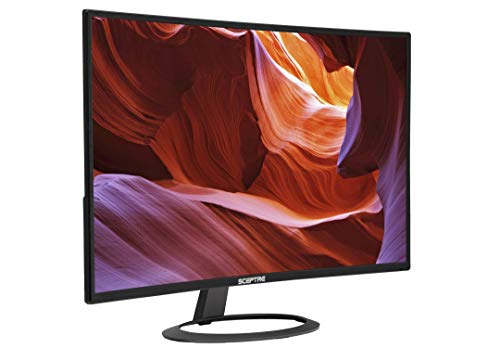
The 1800R curve is the reason this Sceptre model earns attention, because the screen bends gently around your field of view and gives movies and games a more wrapped-in feel. In a spare bedroom or media corner, that shape can be more engaging than a flat panel, even though it won’t replace higher-detail options for productivity.
The ultra-thin build and metal-black finish help it look a bit more stylish than the most basic budget screens, and built-in speakers keep the desk setup simpler. The honest read is that you’re paying for atmosphere and simplicity first, with full HD resolution keeping the focus on casual use rather than sharp text work.
What We Like
- 1800R curvature adds a more enveloping feel for movies, streaming, and relaxed gaming.
- Built-in speakers reduce desk clutter in a bedroom, dorm, or secondary setup.
- The slim body helps it sit lightly on a smaller table or console-style space.
- HDMI and DisplayPort keep it flexible for common PCs and game systems.
Minor Gripes
- Full HD at 32 inches is fine for casual use, but text can look less crisp up close.
- Curved panels are a personal fit, and some people prefer a flat screen for spreadsheets.
- The integrated speakers are handy, though separate audio gear usually sounds fuller.
Details At A Glance
Who Will Love This
Movie watchers, casual gamers, and anyone building a simple second-screen setup will get the most from it.
Where A Sibling Pick Shines
The Samsung 32″ Flat Computer Monitor LS32B304NWNXGO is the better desk-work choice for people who want a straighter line and a tidier multi-monitor arrangement.
This KTC model sits near the sharp end of the group, because QHD resolution gives you more room for windows, text, and detail than the full HD picks above. In a home office with spreadsheets on one side and reference material on the other, that extra clarity can feel worth the step up, and the white finish softens the look a little.
The IPS panel, short for in-plane switching, usually means better viewing consistency from the side, which helps on wider desks or shared setups. Adaptive Sync and a 120Hz ceiling also make it the most versatile pick here for mixed work and gaming, though the higher-spec panel makes sense only when you want to notice the difference.
Highlights
- QHD resolution gives you noticeably more working space than 1080p on the 32-inch panel.
- 120Hz support helps motion look smoother for fast scrolling and lighter gaming sessions.
- IPS viewing angles suit desks where you don’t sit dead-center all the time.
- HDR10 support adds another layer for compatible video and games.
- Tilt adjustment and VESA compatibility help the monitor fit a custom desk setup.
Worth Noting
- The higher-resolution panel costs more attention and budget than the simpler full HD options.
- HDR support depends heavily on source quality, so it’s not the main reason to choose it.
- A 32-inch QHD screen feels best when your desk depth leaves enough viewing room.
Quick Facts
Best Suited To
Power users, desk multitaskers, and mixed-use shoppers who want sharper detail without jumping to 4K fit it well.
Look Elsewhere When
The DJiEX 32 Inch 4K Computer Monitor is the better match for spreadsheet-heavy work and the sharpest text on this list.
This ZZA monitor keeps the formula simple, and that is exactly why it makes sense for basic office duty or a spare-room computer. Full HD, IPS, 60Hz, and AMD FreeSync cover the everyday essentials without pushing you into a higher price tier for features you may not use.
The 178-degree viewing angle helps the screen stay readable from off-center positions, which comes in handy on a shared desk or when the monitor sits a little higher than usual. It’s a plainspoken option, and that can be a strength, although it won’t feel as sharp or as quick as the KTC or Philips choices.
Upsides
- Simple 1920 x 1080 resolution keeps setup and scaling straightforward.
- IPS viewing consistency helps the picture stay even across the panel.
- VESA mounting support gives you room to clear desk space with an arm or wall mount.
- Tilt adjustment helps you tune the angle for a taller or shorter desk position.
Room For Improvement
- 60Hz is fine for routine work, but smoother-motion picks in this list feel more lively.
- Full HD at 32 inches is serviceable, though sharper text is available higher up the shortlist.
- The plain feature set means it’s better as a utility screen than a showcase piece.
Core Details
Made For
Home office users and first-time desk setup shoppers who want a basic 32-inch screen should feel right at home here.
Another Choice May Suit
The Samsung 32″ Flat Computer Monitor LS32B304NWNXGO makes more sense for casual gaming, thanks to its 75Hz panel and FreeSync support.
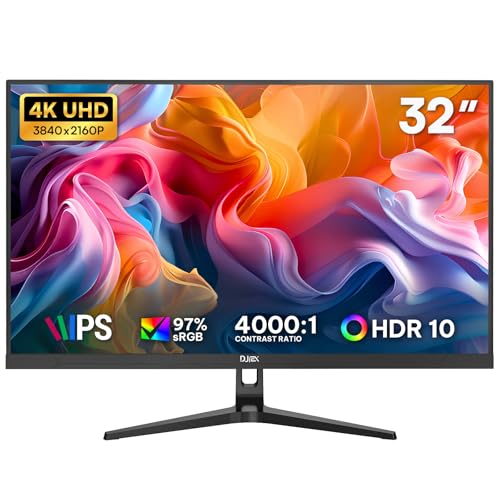
DJiEX aims this one at people who spend long hours inside documents, browsers, and dashboards, because 4K resolution gives you the most room and the sharpest text in this roundup. On a big 32-inch panel, that extra pixel density can make dense work feel less cramped, and the IPS screen helps the image stay consistent across the desk.
HDR10, FreeSync, and 60Hz round out the package, so it still handles light entertainment without turning into a gaming-first display. The trade-off is predictable: it asks more from your budget and your graphics hardware, which makes it a smart upgrade for office-heavy setups rather than a casual one.
Reasons To Buy
- 4K resolution gives you the strongest text clarity and workspace expansion in the group.
- 97% sRGB coverage suits color-aware office work and general content viewing.
- HDMI, DisplayPort, and VESA 75 x 75 mm support keep setup options flexible.
- Low blue light support is helpful for late work sessions at a desk.
Softer Spots
- The sharper panel is most useful when your computer can comfortably feed 4K output.
- 60Hz keeps it in the productivity lane rather than the fast-action lane.
- The extra clarity is great, but only worth it when you’ll use the added screen space.
Feature Card
Right Fit For
Spreadsheet-heavy workers, home office users, and anyone who values crisp text will appreciate it most.
Reach For A Different Pick When
The Samsung 32″ Flat Computer Monitor LS32B304NWNXGO is easier to justify for simple browsing and lighter desktop use.
This renewed Samsung keeps the appeal simple: 32 inches, full HD resolution, 75Hz refresh, and FreeSync for smoother motion than a plain office panel. That combination fits a budget-conscious desk that still wants a little help with scrolling and light gaming, especially in a second room or starter setup.
The renewed label matters because it can be a sensible way to stretch value without chasing extras you may never use. The catch is straightforward, though, since you are relying on the condition of a renewed unit, so a shopper who wants the cleanest path to peace of mind may prefer a brand-new option higher on the list.
Bright Spots
- 75Hz and FreeSync make it feel more fluid than a plain 60Hz office screen.
- Full HD keeps it easy to run on modest laptops and desktop systems.
- The Samsung name will be familiar to many people who want a conservative, no-drama setup.
- Renewed pricing logic can suit a spare-room display or a first apartment desk.
Areas To Watch
- Renewed condition means cosmetic wear can be part of the equation.
- The 1080p panel is fine, but sharper choices appear earlier in the roundup.
- It is most appealing when you prioritize value over a long feature list.
Feature Rundown
Whose Shelf It Belongs On
Budget-minded home users and casual desk shoppers who want a simpler Samsung screen fit it well.
Skip It When
The Philips 32 Inch Computer Monitor 32E1N1100L is the better bet for people who want faster motion and a newer feature mix.
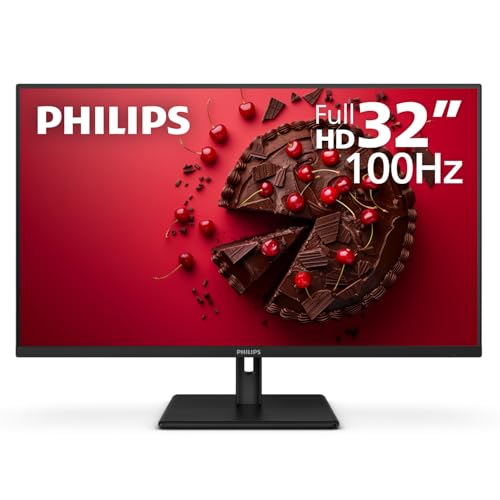
Philips gives this 32-inch screen a strong all-round shape, because 100Hz motion, VA contrast, and Adaptive Sync make it feel a bit more lively than a plain office monitor. VA, or vertical alignment, usually leans toward stronger contrast, so it can suit mixed work, streaming, and casual gaming in one setup.
The 1ms MPRT rating, which refers to motion picture response time, is aimed at reducing blur in fast-moving content, and the VESA mount support plus VGA input add practical flexibility. The 4-year advance replacement warranty is a standout detail in the source data, though the main value still comes from the balanced mix of speed, contrast, and connection options.
Best Bits
- 100Hz refresh gives scrolling and light gaming a smoother feel than 60Hz panels.
- VA contrast usually helps darker scenes look fuller and less washed out.
- Adaptive Sync supports steadier motion with compatible graphics output.
- HDMI, VGA, and VESA support make it easy to slot into older or newer setups.
- 1ms MPRT is useful for people who want a faster-sounding motion spec.
Small Caveats
- Full HD at 32 inches is practical, though not as crisp as QHD or 4K.
- The strongest appeal comes from flexibility, not from a premium panel tier.
- VA behavior can vary a little in off-angle dark scenes compared with IPS models.
At A Glance
Perfect Match For
Mixed-use desks, home entertainment corners, and shoppers who want a little more motion speed without moving up to a sharper tier fit it well.
Consider Something Else When
The KTC 32 Inch 2K Computer Monitor H32D6 is the better choice for people who care more about sharp text and higher resolution.
How To Choose The Right Cheap 32 Inch Monitors
Resolution Comes First
On a 32-inch screen, resolution shapes everything you notice day to day. Full HD keeps costs down and works well for browsing, streaming, and basic office tasks, while QHD gives you extra room for side-by-side windows and finer text, and 4K pushes clarity even farther.
The trade-off is easy to feel. Lower resolution is easier on your budget and your graphics hardware, while higher resolution rewards anyone who stares at spreadsheets, documents, or design tools for long stretches.
Refresh Rate And Motion Fit
Refresh rate means how many times per second the screen updates, and it affects how smooth movement looks. A 60Hz panel is enough for emails and documents, 75Hz adds a bit of softness to scrolling, and 100Hz or 120Hz feels more responsive for lighter gaming and fast-moving desktop work.
That extra smoothness matters more than people expect during long sessions. A commuter plugging in after work or a student bouncing between tabs may notice the difference right away, though the jump is less important for static tasks.
Panel Type And Viewing Angles
IPS panels usually keep colors and brightness more even when you shift position, which suits wider desks and shared setups. VA panels often lean toward stronger contrast, so dark scenes can look richer, though off-angle behavior varies a bit more.
Curved screens change the feel rather than the math. They can make movies and games feel more enveloping, but flat screens are easier to line up in dual-monitor layouts and often feel more natural for documents.
Connections, Mounting, And Desk Fit
HDMI and DisplayPort cover most modern desktops and laptops, while VGA still matters for older gear. VESA mounting is worth checking because it lets you use an arm or wall mount and reclaim desk space, which helps in compact rooms.
Tilt adjustment sounds minor, yet it affects daily comfort more than flashy extras do. A screen that sits at the right angle often feels better after a full workday, especially on a shallower desk where your posture changes all afternoon.
What To Weigh Before You Order
Common Shopping Slip Ups
Many people fixate on size and forget that a 32-inch full HD screen can look softer than expected at close range. Others overlook desk depth, then end up with a panel that sits too close for comfort.
Another easy miss is skipping the connection check. A laptop with only USB-C may need an adapter, and an older tower can still benefit from HDMI or VGA depending on the monitor.
Why Higher Tier Costs More
Sharper panels cost more because they pack in more pixels, and that extra density shows up in text clarity and multitasking space. Faster refresh rates, better color coverage, and more adjustable stands also tend to push the price upward.
The upgrade makes sense for people who spend real time at the desk. A 4K or QHD screen can feel worth it for spreadsheets, editing, or long office days, while a basic full HD monitor is still sensible for lighter use.
Frequently Asked Questions
Is 32 inches too large for a desk monitor?
Not usually, but desk depth matters a lot. A deeper desk makes a 32-inch screen feel more natural and less overwhelming.
Is 1080p enough at 32 inches?
It works fine for casual use, streaming, and basic office work. Sharper text and tighter multitasking are easier on QHD or 4K screens.
Does refresh rate matter on a 32-inch monitor?
Yes, especially during scrolling and light gaming. A higher refresh rate can make the whole screen feel more responsive.
Should you choose curved or flat?
Curved panels can feel more immersive for media. Flat panels are usually easier for documents and multi-monitor layouts.
What connection should you look for first?
HDMI covers most modern setups, while DisplayPort helps with many desktop systems. Older computers may still need VGA support.
