
You want a mouse that feels sensible, not fussy. For office work, school laptops, shared desktops, or a travel bag, the right one keeps your hand calm and your desk tidy without asking much in return. This roundup focuses on simple wired and wireless options that suit real daily use, from bulk setups to compact travel mice. The trade-offs matter too, because low-cost mice often balance comfort, connection style, and button count in different ways.
Quick Look At Our Shortlist
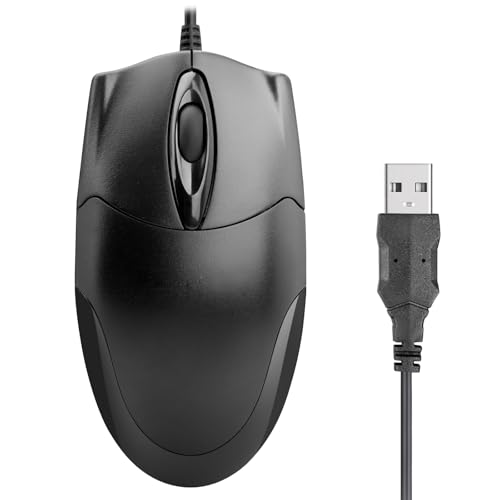
ONE-UP Wired Office Mouse 1000DPI, Black

3-Button USB Wired Mouse, Black
Hoteam 12 Pcs Wired Computer Mouse Bulk, Black
Wired Mini Optical Mouse, Black

Rii Wireless Mouse 2.4G, Black

Amazon Basics 3-Button USB Wired Mouse, Black

Afaartcci Rechargeable Wireless Mouse, Black

More Details On Our Top Picks
The ONE-UP leans into the kind of setup that just makes sense on a work desk: wired USB, three buttons, and an ergonomic shape that suits both hands. Its 1000 DPI sensor sits in the comfortable middle ground for office pointing, so you get steady cursor movement without the twitchy feel some low-sensitivity mice bring.
That makes it a calm fit for long spreadsheet sessions, school assignments, or a shared family PC, especially since you do not have to think about charging or pairing. The trade-off is simple, there are no extra side controls here, so power users who want more shortcuts may want a richer layout like the Acer wireless option later in this list.
Strong Points
- Ambidextrous shape suits left- or right-handed use.
- Wired USB connection keeps setup straightforward.
- Three-button layout stays easy to learn.
- 1000 DPI feels steady for office tasks.
- No battery management helps keep desk use simple.
Things To Consider
- Three buttons leave little room for shortcut-heavy workflows.
- The wired cable adds a bit of desk clutter.
- Users who prefer a smaller travel body may want something more compact.
Feature Snapshot
Who It Suits Best
Office workers, students, and home PC users who want a plain wired mouse without much setup fuss will feel right at home.
A Better Fit Elsewhere
The Acer Wireless Mouse for Laptop 2.4GHz, 1600 DPI suits you better when you want extra buttons and a cordless desk.
This Retail Digitals mouse keeps the formula plain, which is exactly why it works for basic desktop duty. The optical tracking language points to steady pointer control, and the three-button layout means you can move through documents, tabs, and menus without a learning curve.
Compared with the ONE-UP, it sounds even more stripped back, so it fits a spare workstation, a family laptop, or a backup mouse drawer. You may find the simplicity welcome, though anyone wanting extra ergonomics or laptop-friendly portability might lean toward the mini Yadojingcn model instead.
What We Like
- Simple three-button layout stays uncluttered.
- Optical tracking supports predictable daily use.
- USB wired setup avoids pairing steps.
- Works well for desktop and laptop basics.
Room For Improvement
- Button count stays limited for shortcut-heavy work.
- Wired use means one more cable to manage.
- No extra comfort features are called out in the source details.
Core Details
Who Should Grab It
You fit this mouse best when you want a no-frills option for routine computer tasks and little else.
Where A Sibling Pick Shines
ONE-UP Wired Office Mouse 1000DPI, Black suits you better when comfort over long work sessions matters more than barebones simplicity.
The Hoteam set changes the whole conversation, because it is built for more than one desk. Twelve wired mice make sense in offices, labs, classrooms, or rental setups where you need a batch of matching peripherals and want to keep replacements on hand.
Compared with the single-user picks above, this one is about consistency and stocking up rather than personal comfort extras. The honest read is that bulk gear is usually chosen for practicality, so you benefit most when you care more about deployment across multiple machines than about premium feel in one hand.
Highlights
- Pack of twelve supports multi-seat spaces.
- Wired design keeps each unit straightforward to deploy.
- Useful for classrooms, offices, and shared work areas.
- Easy to store as backup replacements.
- Uniform look helps keep workstations consistent.
Minor Gripes
- Bulk focus makes little sense for a single desk.
- Wired cables add management chores at every station.
- Comfort details are more functional than plush.
Details At A Glance
Built With In Mind
You suit this set best when you manage a shared workspace, a school lab, or a training room that needs a lot of matching hardware.
Swap It Out When
Rii Wireless Mouse 2.4G, Black fits you better for one laptop or a travel bag where cords would just get in the way.
The mini form factor changes everything here, and that is exactly the point. A small wired mouse like this tends to make sense for backpacks, student desks, or tight side tables where a full-size shell would feel bulky.
The ergonomic design helps it stay comfortable for longer stretches, though a mini body still gives you less palm support than the larger ONE-UP or Amazon Basics picks. You may find that trade-off worth it for school, a travel kit, or a child’s computer setup, especially when desk space is limited.
Reasons To Buy
- Mini body fits well in compact setups.
- Wired USB connection keeps the setup simple.
- Ergonomic shaping aims for easier long sessions.
- Works for laptops, PCs, home use, school, and kids.
Areas To Watch
- Smaller shape may not satisfy larger hands.
- Wired use leaves you with cable management.
- Less palm support than a full-size office mouse.
Feature Rundown
The Right Fit
You suit this mouse best when you want a small, easy-to-stash pointer for mixed use across home, school, and travel.
Another Choice May Suit
ONE-UP Wired Office Mouse 1000DPI, Black suits you better for all-day desk work that needs more palm support.
Rii moves the list into cordless territory, and that matters the moment you use a laptop away from a fixed desk. The included USB dongle keeps the connection straightforward, which is handy in coffee shops, classrooms, or on the road where you want less cable clutter.
Compared with the wired entries above, this one feels better suited to mobility than to a permanent desktop setup. The trade-off is that wireless convenience usually asks for a little more attention to receiver storage, so it suits you best when portability matters more than absolute simplicity.
Upsides
- 2.4G wireless design keeps the desk clear.
- USB dongle makes laptop use more flexible.
- Portable shape suits bags and mobile work.
- Useful for office, Windows, and general PC use.
Softer Spots
- Wireless gear needs receiver storage discipline.
- Less straightforward than a simple wired mouse.
- Best sense of value comes from mobile use, not a fixed workstation.
Quick Facts
Who Will Love This
You suit this mouse best when you move between workspaces and want a light cordless option for a laptop bag.
Look Elsewhere When
Amazon Basics 3-Button USB Wired Mouse, Black suits you better for a desk setup that values zero-fuss wired reliability.
This Amazon Basics mouse sticks to the familiar three-button shape, which is often exactly what you want for a spare office machine. Responsive tracking is the key phrase here, and that translates into a straightforward cursor feel for email, browsing, and document work.
Compared with the Retail Digitals mouse, it comes across as a clean, dependable alternative with broad Windows and Mac compatibility. The catch is that it stays firmly in the basics lane, so people who need extra controls or a smaller travel body will probably prefer one of the more specialized picks above.
Best Bits
- Three-button layout keeps the learning curve low.
- Plug-and-play setup saves time on new machines.
- Responsive tracking suits everyday pointer use.
- Works with Windows and Mac systems.
Points To Note
- Basic feature set leaves out extra controls.
- Wired design adds another cord to manage.
- Plain shape may feel too simple for power users.
Technical Sheet
Whose Shelf It Belongs On
You fit this mouse best when you want a plain spare or daily driver for a common office desk.
Reach For A Different Pick When
Afaartcci Rechargeable Wireless Mouse, Black suits you better for silent cordless use across more than one device.
Afaartcci brings the most versatility in the group, because it mixes Bluetooth with a 2.4G receiver and adds a rechargeable design. The Bluetooth 5.2 mention matters for newer laptops, tablets, and Apple devices, while the wireless receiver gives you a second route for standard computer use.
That flexibility makes it a smart fit for people who bounce between devices, though the note about not using both modes at once is worth keeping in mind. Compared with the Rii mouse, this one feels more capable for mixed-device setups, but it asks a bit more attention during switching and charging.
Positives
- Bluetooth and 2.4G options add flexibility.
- Rechargeable design avoids disposable batteries.
- Silent click style suits shared spaces.
- Works across laptops, iPads, MacBooks, and Apple devices.
- Ergonomic shaping helps longer sessions feel easier.
Small Caveats
- You can only use one connection mode at a time.
- The USB receiver stores inside the mouse, so keeping track of it still matters.
- Recharge routines add a little upkeep.
Feature Card
Made For
You fit this mouse best when you move between a laptop and a tablet, or between home and office devices.
Where Shoppers Go Wrong
Rii Wireless Mouse 2.4G, Black suits you better when you want a simpler cordless setup without mode switching.
The Acer model stretches beyond the simplest mice by adding three DPI steps, six buttons, and a size range aimed at medium to large hands. DPI, short for dots per inch, is a sensitivity setting, so the adjustable levels help you tune cursor speed for spreadsheets, browsers, or a larger display.
That makes it more adaptable than the stripped-back wired options, especially for a work laptop that lives on a desk most of the week. The trade-off is that more controls can feel like more mouse than you need for casual use, so it suits people who will actually use the extras rather than ignore them.
Positives
- Three DPI levels help you tune sensitivity.
- Six buttons give you extra control options.
- Wireless 2.4GHz setup keeps the desk cleaner.
- Medium to large hand fit broadens comfort for many users.
Worth Noting
- Extra buttons add some learning time.
- Wireless gear still needs a receiver to stay organized.
- Casual users may not need the full control set.
Key Specs
Perfect Match For
You fit this mouse best when you want wireless convenience with more controls for daily work on a laptop or desktop.
Not Your Match When
Retail Digitals 3-Button USB Wired Mouse, Black suits you better for the simplest possible desk setup.
How To Choose The Right Cheap Computer Mices
Connection Style Sets The Tone
Wired mice stay easy to trust because you plug them in and go. That suits desktops, school labs, and any home office where a cable does not bother you much, while wireless models make more sense on laptops and crowded desks. The real choice is between total simplicity and a cleaner workspace.
Bluetooth and 2.4GHz wireless are not the same thing. Bluetooth is useful for multi-device setups, while a USB receiver usually feels quicker to set up on a standard laptop or desktop. For a shared computer or a machine that rarely moves, the wired route often keeps life easier.
Comfort Matters More Than The Box Says
Shape, size, and button layout decide whether a mouse feels fine after twenty minutes or still fine after two hours. Ambidextrous mice like the ONE-UP suit mixed-handed households, while mini mice work better in small bags and smaller hands. Larger-hand users usually do better with models that explicitly mention fuller hand support, such as the Acer.
DPI also deserves attention, because it affects pointer speed and control. Lower settings usually feel calmer for office work, while adjustable DPI gives you a little room to tailor the cursor to a larger screen or a faster pace. More buttons help only when you actually want shortcuts, so plain three-button mice stay a smart match for everyday use.
Match The Mouse To The Job
A bulk pack belongs in a workspace with several desks, not in a single-user setup. That is why the Hoteam set makes sense for offices, classrooms, and labs, while the Rii and Afaartcci models fit mobile work better. For most home users, one dependable mouse is enough, and extra features matter only when they solve a real use case.
Maintenance stays simple on most of these picks, but wireless models add receiver storage and charging chores, while wired ones ask you to keep cable routing tidy. In a busy home office, that small difference can matter more than a flashy feature list. Choose the mouse that matches your routine, not the one with the longest spec line.
A Quick Reality Check
Hidden Buying Traps
A common mistake is grabbing a tiny mouse for long desk sessions, then wondering why your palm feels cramped. Another is treating wireless as automatically better, even though a cable can be the more practical choice for a fixed workstation. Focus on size, connection type, and hand comfort before you think about extras.
The other trap is ignoring the receiver or charging side of cordless use. A wireless mouse can be convenient, but only when you are comfortable keeping track of the dongle or topping up the battery. That small bit of upkeep is the real trade-off.
The Upgrade Payoff
Higher-tier mice usually cost more because they add a better sensor, more buttons, multiple connection modes, or a shape designed for longer sessions. Those extras matter most for heavy laptop use, mixed-device work, or anyone who wants finer pointer control on a larger display. Basic models still make sense for simple browsing and document work.
The upgrade is worth it when the mouse sits under your hand for hours every day. At that point, adjustable sensitivity, extra buttons, or a better hand fit can feel less like luxury and more like a small workday improvement. For casual use, plain often wins by staying out of your way.
Closing Thoughts
Cheap mice are at their best when they match a specific job, not when they try to do everything. A wired basic model still works beautifully for a desk, while a cordless or multi-mode option pays off for travel and mixed-device use. The shortlist above gives you clear lanes, so you can choose the mouse that fits your hand, your desk, and the way you actually work.
