
Cheap gaming monitors can still make sense for your desk, your budget, and your patience. You get the most value when the panel size, refresh rate, and ports match the way you actually play, whether that means late-night matches, a shared home office, or a small apartment setup.
The seven picks below lean toward sensible screen sizes, smoother motion than older office displays, and enough connectivity to keep setup simple. Some favor speed, some favor color, and some are better for mixed work and play.
Quick Look At The Shortlist

ArcticPro 22 Inch Gaming Monitor 144Hz

AOC 22 Inch Computer Monitor FHD 120Hz 22B35HM23

19-inch Full HD 75Hz Small Thin Monitor
Amazon Basics 24 Inch Gaming Monitor 23.8 inch viewable

ETiansu 22 FHD 75Hz AMD FreeSync Monitor
DJiEX 24 Inch Gaming Computer Monitor 180Hz

Westinghouse 22 Inch Computer Monitor 100Hz
More Details On Our Top Picks
ArcticPro leans hard into motion clarity, and that matters most on a small gaming desk where you still want the screen to feel lively. The 22-inch size keeps text and HUD elements compact, while the 144Hz refresh rate, which means the screen updates more often each second, gives fast movement a cleaner look than a basic office panel.
The 105% sRGB figure also makes this feel a bit more color-aware than the most stripped-down budget picks here, including the YOTETION 19-inch model. The trade-off is simple, it stays in the compact class, so you get less desktop presence than the 24-inch options, but that can be a plus for dorm rooms and narrow tables.
Strong Points
- 144Hz suits fast action and quick camera movement.
- 105% sRGB helps colors look fuller in games and media.
- 3-sided frameless styling keeps bezels out of the way.
- VESA mount support gives you more setup freedom.
- HDMI and VGA make older and newer gear easier to connect.
Points To Note
- 22 inches can feel small for split-screen work or couch gaming.
- The compact footprint leaves less room for multitasking than the 24-inch picks.
- Front-panel care matters, since slim bezels can show dust quickly.
Feature Snapshot
Who It Suits Best
Competitive-leaning gamers with a modest desk and a simple single-monitor setup fit this one well.
Another Choice May Suit
DJiEX 24 Inch Gaming Computer Monitor 180Hz suits you better if you want a larger panel and quicker refresh on the same desk.
The AOC 22B35HM23 sits in a comfortable middle ground, which is useful for anyone who wants gaming-friendly motion without moving up to a bigger and pricier desk footprint. Its VA panel, or vertical alignment panel, usually gives deeper dark areas than many plain entry screens, so story games and darker menus can look more settled.
Compared with the ArcticPro, this one plays a little more like the sensible all-rounder. The overclocked 120Hz mode is the catch, though, since the smoother setting depends on the right HDMI path, so it rewards a setup that is already fairly modern.
What We Like
- 120Hz overclocked mode keeps motion brisk for gaming.
- VA panel handling suits darker scenes and mixed use.
- Adaptive Sync helps reduce tearing in supported setups.
- HDMI and VGA cover newer systems and legacy gear.
Room For Improvement
- The smoother refresh relies on the overclocked mode, not the native rate.
- 22 inches leaves less room than the 24-inch picks for side-by-side windows.
- VA panels can feel a little slower than some faster IPS options.
Core Details
Whose Shelf It Belongs On
You fit this best if you want a balanced monitor for gaming after work and everyday desktop use.
Where A Sibling Pick Shines
Amazon Basics 24 Inch Gaming Monitor 23.8 inch viewable suits you better if a larger screen and faster 165Hz refresh matter more.
This YOTETION display is the smallest and most space-conscious choice in the group, and that makes it useful for a laptop side screen or a desk that already feels crowded. The anti-glare finish is the practical part here, since bright rooms can make reflections annoying fast, especially on a monitor this size.
Its 75Hz refresh rate is a modest step up from a plain 60Hz office screen, but not in the same league as the faster ArcticPro or DJiEX picks. The honest read is that you get portability and simplicity first, then gaming second, so it suits light play more than twitch-heavy sessions.
Highlights
- 19-inch size fits tight desks and secondary stations.
- Anti-glare coating helps in brighter rooms.
- HDMI and VGA support keep setup flexible.
- Lightweight form works well beside a laptop.
Softer Spots
- 75Hz is only a modest gaming step up.
- The smaller screen can feel cramped for long sessions.
- HD+ resolution is less sharp than the Full HD wording suggests in some use cases.
Details At A Glance
Built With In Mind
You suit this best if you want a compact secondary monitor for schoolwork, browsing, and occasional gaming.
Look Elsewhere When
ArcticPro 22 Inch Gaming Monitor 144Hz fits better for you if faster motion and sharper gaming focus matter more.
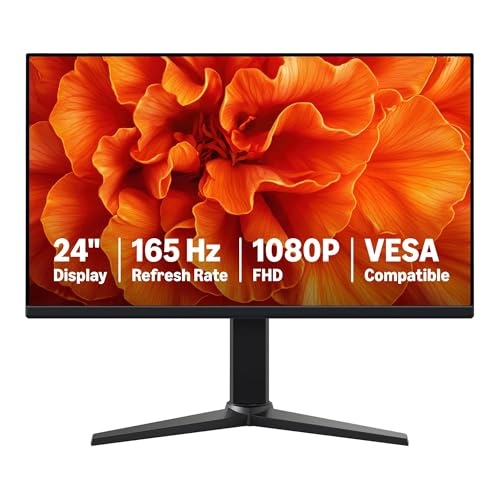
This one feels aimed at the shopper who wants a more serious starter gaming screen without moving into flashy territory. The 23.8-inch viewable area gives you more breathing room than the 22-inch picks, and the 165Hz refresh rate, which keeps updates moving very quickly, should feel especially welcome in shooters or racing games.
Compared with the AOC and ArcticPro, this model pushes refresh rate harder while staying in a plain black finish that disappears into most setups. One practical note stands out, the protective film needs to come off before use, so setup is simple but not quite mindless.
Upsides
- 165Hz gives you a fast-feeling desktop for games.
- 23.8-inch viewable size feels easier for long sessions than 22-inch panels.
- 1ms response helps cut obvious motion smear.
- Adaptive Sync supports smoother frame matching in compatible systems.
- VESA support makes desk and arm mounting easier.
Minor Gripes
- The larger size asks for a little more desk depth.
- Maximum refresh depends on the rest of your PC hardware.
- The shipping film step can be overlooked during setup.
Feature Card
Who Should Grab It
You fit this well if you want a larger, faster monitor for gaming and everyday desktop use.
Swap It Out When
ETiansu 22 FHD 75Hz AMD FreeSync Monitor suits you better if you want a gentler display for mixed work and casual play.
ETiansu goes after the shopper who wants color confidence without giving up the basic gaming staples. The 99% sRGB coverage, which points to a wider standard color range, gives this pick an easy edge for photo browsing, creative work, and game art that should look less washed out than on the most basic panels.
It sits close to the AOC in size, but the ETiansu feels more tuned to everyday mixed use than to pushing frame rates as far as possible. That makes it a nice middle road for home offices that turn into gaming corners after dinner.
Bright Spots
- 99% sRGB supports richer-looking color in normal use.
- IPS panel helps the screen stay consistent from different seating angles.
- AMD FreeSync can smooth out supported gameplay.
- HDMI and VGA keep old and new systems easy to attach.
Areas To Watch
- 75Hz is fine for casual gaming, but not a high-speed figure.
- 22 inches still feels compact for heavy multitasking.
- The design leans practical, so it is not the flashiest desk piece.
Quick Facts
Right Fit For
You fit this best if you want a balanced monitor for schoolwork, office tasks, and casual gaming.
Reach For A Different Pick When
Amazon Basics 24 Inch Gaming Monitor 23.8 inch viewable suits you better if you want a faster 165Hz panel.
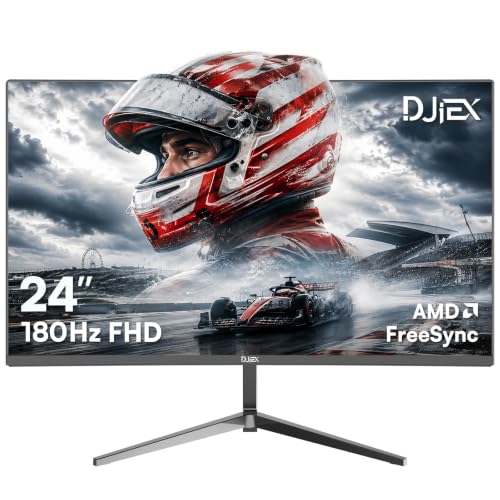
DJiEX is the speed-first 24-inch option in this roundup, and that makes it feel more assertive than the Amazon Basics screen in the same size class. The 180Hz refresh rate pushes motion even farther, while the VA panel and 4000:1 contrast give darker scenes a stronger sense of depth.
For most desk setups, this is the pick that leans hardest toward gaming without giving up the usefulness of Full HD. The trade-off is that a fast panel like this asks more from your graphics card, so the rest of your PC needs to keep up for the screen to feel worthwhile.
Best Bits
- 180Hz is a strong match for fast-paced play.
- 24-inch size gives you more screen than the 22-inch models.
- 4000:1 contrast can make dark scenes feel deeper.
- FreeSync support helps with compatible frame pacing.
- HDR10 adds another layer for supported content.
Trade Offs
- The higher refresh rate only pays off with a capable PC.
- 24 inches needs a bit more desk room than 22-inch picks.
- Brightness and color tuning may still need manual adjustment after setup.
At A Glance
The Right Fit
You fit this best if you care more about quick motion and a larger screen than about keeping the setup tiny.
Where Shoppers Go Wrong
Westinghouse 22 Inch Computer Monitor 100Hz is a better match for you if you want simpler everyday use and built-in speakers.
Westinghouse brings together the features that make a budget gaming monitor easy to live with: an IPS panel, 100Hz refresh, 1ms response, and built-in speakers. That mix makes sense for a bedroom desk, a student setup, or a spot where you do not want to add separate audio gear right away.
Compared with the ETiansu and AOC picks, this one adds speakers and a frameless look, so it feels more complete straight out of the box. The flip side is that built-in audio usually stays modest, so you still get the best experience with headphones or external speakers.
Reasons To Buy
- 100Hz gives you smoother movement than standard office screens.
- IPS panel helps keep colors steady across viewing angles.
- Built-in speakers reduce the need for extra desk clutter.
- Eye care features may feel easier on long work or play sessions.
- HDMI and VGA give you familiar hookup options.
Small Caveats
- Built-in speakers usually stay basic compared with separate audio gear.
- 22 inches is still compact beside the 24-inch models.
- The 100Hz ceiling sits below the faster gaming picks here.
Feature Rundown
Who Will Love This
You fit this best if you want a tidy desk monitor for gaming, schoolwork, and everyday media.
Skip It When
DJiEX 24 Inch Gaming Computer Monitor 180Hz is the smarter choice if you want faster motion and a bigger panel.
How To Choose The Right Cheap Computer Monitors For Gaming
Refresh Rate, Size, And Desk Fit
Refresh rate is the first number worth watching, because it controls how often the image updates. A 100Hz or 120Hz monitor feels smoother than a plain office display, while 144Hz and 165Hz make fast camera movement look cleaner still. For twitch games, that extra smoothness matters more than flashy extras.
Screen size matters just as much. A 22-inch panel works well on a narrow desk, but a 24-inch screen gives you more room for menus, maps, and side windows. The right choice depends on how close you sit and how much space you can spare behind the stand.
Panel Type, Color, And Contrast
IPS panels usually keep colors steadier from off-center seats, which helps in shared rooms and small apartments. VA panels often lean into stronger contrast, so dark game scenes can look deeper and less washed out. Neither one is wrong, they just solve different problems.
Color coverage numbers, such as sRGB, matter most when you care about artwork, streaming thumbnails, or game visuals that should feel more complete. A wider figure can make the monitor feel more polished, though it does not replace good calibration. The trade-off is that the richer color screens can cost a little more and sometimes ask for more setup tweaking.
Ports, Mounting, And Everyday Use
HDMI is the port you’ll use most often for modern laptops, consoles, and graphics cards. VGA still helps with older desktops, school computers, and hand-me-down hardware, so it keeps a budget setup flexible. VESA mounting, which means the screen can attach to a stand or arm with a standard hole pattern, matters if you want extra desk room.
Built-in speakers are handy for quick setup, but they usually stay modest. Eye care labels, anti-glare coatings, and flicker-reduction features can also make long desk sessions feel easier, especially in bright rooms. For most gaming desks, convenience and comfort matter just as much as raw speed.
What To Weigh Before You Click
Common Shopping Slip Ups
Many shoppers focus on refresh rate and forget the rest of the setup. A fast screen still feels underwhelming if the desk is too small, the connection is wrong, or the graphics hardware cannot feed it well.
Another common miss is buying for gaming alone and ignoring everyday use. A 24-inch panel may sound appealing, but a 22-inch or 19-inch screen can fit better in a cramped room and feel easier to live with.
The Upgrade Payoff
Higher-tier budget monitors usually spend the extra money on faster refresh, stronger contrast, better panels, and more flexible mounts. That can make a visible difference in motion-heavy games and in shared spaces where viewing angles matter.
The upgrade is worth it when your PC can keep up and your desk gives the monitor room to breathe. Spending up also makes sense for mixed-use setups, where the screen handles work, school, and gaming in the same day.
Frequently Asked Questions
What refresh rate makes sense for budget gaming?
75Hz is a mild upgrade, while 100Hz, 120Hz, and 144Hz feel more responsive in fast games. Higher numbers help most when your PC can push enough frames to match them.
Is a 22-inch monitor enough for gaming?
Yes, 22 inches works well on small desks and in bedrooms. You may want 24 inches for more comfortable multitasking and a larger view of the action.
Do IPS and VA panels suit different uses?
IPS usually gives steadier color from different angles, which helps in shared rooms. VA often gives deeper contrast, which can suit darker games and movie nights.
Should you care about sRGB coverage?
sRGB coverage matters most when you want color that feels fuller and more consistent. Casual gaming still works fine on a simpler panel, but wider color can make the screen feel nicer overall.
Are built-in speakers enough?
They work fine for quick setup, system sounds, and light use. Headphones or separate speakers usually sound better for games and media.
