
Cheap computer mouses can be a smart fix for desks that need a spare, a travel backup, or a simple everyday pointer without extra fuss. You want something that tracks cleanly, feels steady in the hand, and doesn’t turn basic work into a chore. The eight picks below cover wired and wireless setups, compact shapes, multi-device flexibility, and a few comfort-focused designs for long office sessions.
Quick Look At The Shortlist

wegear USB Wireless Mouse 2.4GHz Cordless Black
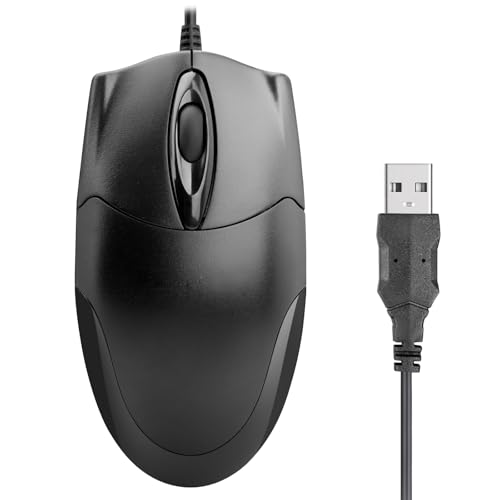
ONE-UP Wired Office Mouse USB Ergonomic 3-Button Black

3-Button USB Wired Mouse High-Precision Optical Black

Rii Wireless Mouse 2.4G Portable Black

Guiheng Wired mini Mouse USB Black

Amazon Basics 3-Button USB Wired Mouse Black

Afaartcci Rechargeable Wireless Mouse Silent Bluetooth Black

Acer Wireless Mouse 2.4GHz 1600 DPI Black
More Details On Our Top Picks
The wegear mouse leans into flexibility, with six buttons and a 5-level DPI range that lets you shift pointer speed without changing hardware. That matters on a packed desk because you can keep one mouse for casual browsing, spreadsheet work, and travel carry. The black shell keeps it plain, not flashy, which suits a work bag or a home office drawer.
You may find the 2.4GHz wireless setup most useful on laptops that live in meetings or dorm rooms, where cable clutter gets annoying fast. The 24-month battery life claim is the kind of feature that reduces small daily hassles, though actual upkeep still depends on how often you use it and how you power it. Compared with the simpler wired picks like Amazon Basics and ONE-UP, this one gives you more freedom without moving into a fancier price tier.
Strong Points
- Six-button layout adds quick access for back, forward, and extra shortcuts.
- Five DPI settings help you match pointer speed to the task.
- Wireless design keeps your desk cleaner and your bag less tangled.
- The portable shape fits commuting, library tables, and shared workstations.
- Long battery claim lowers the number of charging interruptions you need to think about.
Things To Consider
- Wireless convenience adds a small layer of setup compared with plug-in models.
- The extra buttons may matter more to office multitaskers than casual home use.
- Battery dependence means occasional checking and replacement still matter.
Feature Snapshot
Who It Suits Best
You’re a commuter, student, or home-office shopper who wants cordless convenience and a few extra controls without paying for a more complex setup.
Where A Sibling Pick Shines
Amazon Basics 3-Button USB Wired Mouse works better for someone who wants the simplest possible desk mouse with no battery planning at all.
ONE-UP keeps the formula simple, and that simplicity is the point. A USB connection, three buttons, and 1000 DPI make it a straightforward fit for office tasks, email, and web work on Windows or Mac laptops and desktops. The ergonomic shape is meant for either hand, which helps in a shared workspace where the mouse gets passed around.
Compared with the wegear pick, you give up wireless flexibility and extra controls, but you also avoid battery management and multi-button clutter. That trade-off makes sense for a cubicle, a school computer lab, or a spare mouse at home. In most desk setups, the modest shape is enough, though very large hands may want a fuller body.
What We Like
- Three-button layout keeps daily computer work very straightforward.
- Ambidextrous shape suits both left- and right-handed use.
- Wired USB connection means no pairing steps or battery planning.
- 1000 DPI is a calm, predictable fit for office pointing.
Worth Noting
- Corded use limits how far you can move from the laptop or tower.
- The simple design offers less shortcut control than the wegear mouse.
- Smaller ergonomic shells can feel basic during very long workdays.
Core Details
Made For
You’re the kind of shopper who wants a no-drama mouse for office paperwork, school assignments, or a shared family computer.
A Better Fit Elsewhere
wegear USB Wireless Mouse 2.4GHz Cordless Black suits you better when you want extra buttons and a cable-free desk.
This Retail Digitals mouse is built around plain, reliable control, with three buttons and optical tracking for desktop or laptop use. Optical tracking means the sensor reads movement using light, which usually feels smoother on everyday surfaces than a very old ball mouse. For daily browsing, document edits, and schoolwork, that’s often all you need.
It sits close to the ONE-UP pick in simplicity, though this one leans even harder into basic navigation with no extra frills to think about. That makes it handy as a second mouse for a work bag, an IT drawer, or a kitchen desk where you just want a pointer that behaves. The honest read is that it’s a practical tool, not a comfort piece.
Highlights
- Three-button layout keeps the learning curve almost flat.
- Optical tracking helps with smooth cursor movement on common desk surfaces.
- Wired connection avoids battery checks and wireless pairing.
- Works neatly as a backup mouse for laptops and desktops.
Areas To Watch
- Basic design leaves little room for shortcut-heavy workflows.
- The shell may feel plain during long, heavy office sessions.
- Corded use is less tidy than the wireless picks in this roundup.
Quick Facts
Best Suited To
You want a spare or primary desk mouse for homework, admin work, and routine computer use without a learning curve.
Look Elsewhere When
wegear USB Wireless Mouse 2.4GHz Cordless Black makes more sense for you when you want extra buttons and wireless movement.
Rii’s mouse keeps the setup very compact, which is useful for a laptop sleeve, a coffee shop table, or a carry-on work kit. The included USB dongle handles the wireless link, so you can leave the cable drawer untouched and stay focused on the task. Compared with the wegear model, you get a simpler design with less emphasis on extra controls.
That trade-off makes it a tidy fit for travel-minded use, especially for people who want a mouse that disappears into a bag without adding much bulk. One thing worth considering is that the long product history suggests a familiar form rather than a fancy one, so you should expect utility over polish. For many school and office setups, that’s enough.
Bright Spots
- Portable wireless setup works well with laptops on the move.
- USB dongle storage keeps the tiny receiver paired with the mouse.
- Simple body shape makes packing and stowing easier.
Small Caveats
- Wireless only fits best when you’re comfortable keeping track of the dongle.
- The design focuses on portability more than desktop refinement.
- Users who want more buttons will likely prefer the wegear mouse.
Details At A Glance
The Right Fit
You’re a laptop user who wants a compact wireless mouse for class, travel, or occasional office work.
Another Choice May Suit
Amazon Basics 3-Button USB Wired Mouse is a better fit for desks where you want no dongle to keep track of.
Guiheng keeps things small and ambidextrous, so it works for either hand without asking much of the desk. That matters in shared homes, school labs, or hotel workstations, where a mouse often gets used by more than one person. The wired connection also keeps setup very straightforward, which is why it stands out as a plain utility piece.
Compared with the larger ONE-UP mouse, this one is easier to tuck into a travel pouch or slide beside a laptop. The honest trade-off is comfort, since mini mice can feel tight during long sessions, especially for larger hands. For quick tasks, though, that small body is part of the appeal.
Positives
- Mini size saves space on crowded desks and in laptop bags.
- Ambidextrous shape works for both left- and right-handed use.
- USB wiring keeps setup direct and dependable.
- Simple structure makes it easy to use as a travel spare.
Points To Note
- Small size can feel snug during longer editing or spreadsheet sessions.
- Wired use is less flexible than the wireless Rii mouse.
- The compact shell may not suit very large hands for all-day work.
Technical Sheet
Whose Shelf It Belongs On
You want a small, no-fuss mouse for quick work, shared spaces, or travel packing.
Skip It When
ONE-UP Wired Office Mouse fits you better if your hands need a fuller shape for longer desk sessions.
This Amazon Basics mouse is the plainest kind of desk companion, and that can be a strength. Three buttons, USB wiring, and responsive tracking cover the basics for browsing, document work, and day-to-day navigation without asking you to learn anything new. It feels aimed at people who value a dependable tool more than extra features.
Compared with Guiheng’s mini shape, this one should feel a bit more traditional under the hand, which helps for regular office use. The trade-off is that you do not get wireless freedom or extra controls, but you also get a very low-maintenance setup. For a backup mouse or a shared family computer, that simplicity has real value.
Best Bits
- Plug-and-play setup keeps the first use very easy.
- Three-button layout stays familiar for almost any computer task.
- Responsive tracking supports smooth pointer movement for routine work.
- Wired design reduces battery upkeep to zero.
Room For Improvement
- No wireless option means the cable stays part of the desk setup.
- Extra shortcut control is absent compared with the wegear mouse.
- Comfort is serviceable, though not especially shaped for long sessions.
Feature Rundown
Who Should Grab It
You want a plain, dependable mouse for school, office, or a household computer that just needs to work.
Reach For A Different Pick
Rii Wireless Mouse 2.4G Portable Black fits better for laptop use that benefits from cable-free movement.
Afaartcci adds more flexibility than the wired picks because it can connect by Bluetooth or through a 2.4G USB receiver. Bluetooth 5.2 is the newer wireless standard here, and the practical upside is that you can move between devices without tying up a port on your laptop all the time. That makes it handy for MacBooks, iPads, and mixed-device desks.
The trade-off is simple, you cannot run both wireless modes at the same time, so the mouse fits a switched workflow better than a many-device juggling act. The receiver storing inside the mouse is useful for travel, though you’ll want to keep track of it during packing. Compared with the wegear mouse, this one is the more versatile option for people who bounce between laptop and tablet work.
Upsides
- Bluetooth and receiver options give you two connection paths.
- Rechargeable design reduces the need to keep spare batteries around.
- Silent click behavior is helpful in libraries, offices, and late-night work.
- Works well across laptops, tablets, and Apple devices listed by the maker.
Minor Gripes
- Both wireless modes cannot run together.
- The stored receiver is easy to misplace during packing.
- Recharge routines matter, so you’ll want to keep an eye on power.
Core Details
Built With In Mind
You switch between devices often and want a quiet wireless mouse for laptops, tablets, and mixed home-office setups.
Swap It Out When
Amazon Basics 3-Button USB Wired Mouse suits you better when the simplest possible plug-in routine matters more than flexibility.
Acer’s mouse sits in the middle of the pack in a useful way, with 2.4GHz wireless, six buttons, and 1600 DPI across three sensitivity settings. That combination helps for office work because you can nudge the pointer speed up or down depending on whether you’re editing text or moving through large screens. The medium-to-large hand fit is a nice detail for anyone who finds tiny travel mice cramped.
Compared with the Rii and Guiheng options, this one feels more like a desk-first wireless mouse than a pocket companion. The USB-A receiver matters for older laptops and desktops that still rely on that port style, though the wireless setup still asks you to keep track of the dongle. For many home offices, that mix of comfort and control lands in a sensible place.
Reasons To Buy
- Three DPI settings let you adjust cursor feel for different jobs.
- Six buttons add useful control without becoming hard to learn.
- Medium-to-large hand sizing supports a more relaxed grip.
- Wireless design keeps the desk neater than a corded mouse.
Honest Caveats
- The dongle needs a safe place so it doesn’t disappear in a bag.
- Wireless convenience is less simple than the Amazon Basics wired mouse.
- The fuller shape may feel oversized for very compact travel kits.
Feature Card
Who It Belongs On
You want a wireless office mouse with a fuller body and adjustable sensitivity for steady desk work.
Where A Sibling Pick Shines
wegear USB Wireless Mouse 2.4GHz Cordless Black suits you better if you want more sensitivity range and a more travel-friendly shape.
How To Choose The Right Cheap Computer Mouses
Connection Style Matters More Than You Think
Wired mice suit desks that stay in one place. A USB plug keeps setup simple, avoids battery checks, and removes one more thing from your bag. That is why the Amazon Basics and ONE-UP models make sense for school labs, office cubicles, and backup drawers.
Wireless mice earn their keep on laptops, coffee shop tables, and shared rooms where cords get in the way. A 2.4GHz receiver works well for single-device use, while Bluetooth adds convenience for tablets and newer laptops. The trade-off is small but real, because you need to think about pairing, power, or a stored dongle.
Buttons And DPI Change Daily Comfort
Buttons are not just extra parts, they shape how quickly you move through work. A three-button mouse keeps things clean and familiar, while six-button layouts can speed up browsing or office shortcuts. People who open lots of tabs or jump between folders usually notice that difference first.
DPI, or dots per inch, describes pointer sensitivity. Lower DPI feels calmer for precise tasks, while higher DPI moves the cursor farther with less hand motion. You’ll feel that most on large monitors or when you want quick travel across spreadsheets, which is where the wegear and Acer picks stand apart from the simpler 1000 DPI ONE-UP.
Shape Should Match Your Hand, Not The Box
Mini mice save space, but small shells can feel tight after a long work session. Larger ergonomic bodies, like the Acer, usually suit medium to large hands better and reduce that cramped feeling a little. Ambidextrous shapes help shared desks because either hand can use them without a lot of adjustment.
For travel, compactness often beats comfort. For all-day office work, a fuller shell usually pays off more than extra styling. The honest read is that your hand size and daily routine matter more than the marketing copy.
What To Weigh Before You Choose
Wrong Turns To Avoid
Shoppers often focus on the connection first and ignore hand fit. That usually leads to a mouse that works fine on paper but feels awkward after an hour of spreadsheet work. Another common miss is picking a tiny travel mouse for a full-time desk setup.
It also helps to check whether you want a dongle or Bluetooth. A receiver is easy for single-device use, but it can vanish in a bag, while Bluetooth suits cleaner setups and multi-device routines. The fix is simple, match the connection to your actual desk life instead of the spec sheet alone.
Why Top Tier Costs More
Higher-tier mice usually pay for extra controls, adjustable sensitivity, rechargeable power, and broader device support. Those parts cost more because they add convenience and reduce friction during daily use. Silent switches, dual wireless modes, and larger ergonomic shells also tend to lift the price.
That upgrade makes sense for long workdays, shared devices, and anyone who wants the mouse to feel like a small part of the workflow instead of a distraction. For basic homework, email, or a spare computer, a plain wired mouse is often enough. For heavier daily use, the extra flexibility can be worth it.
Final Thoughts
For cheap computer mouses, the smartest choice is the one that matches how you actually sit and work. Wired models like Amazon Basics and ONE-UP keep things calm and simple, while the wegear, Afaartcci, and Acer picks offer more flexibility for busier desks. Compact options such as Guiheng and Rii make sense for travel or tight setups, and that keeps the category pleasantly practical. Pick the shape and connection that fit your routine, and the rest gets easier.
