
Cheap gaming monitors are where you balance motion, size, and desk space without overthinking it. You want a screen that keeps up with fast movement, looks clean in desktop use, and still fits a small room, dorm, or home office.
That’s the real challenge behind this list. Some of these picks lean toward smoother play, others favor compact setups, and a few make more sense for mixed work and gaming than for pure competition.
Quick Look At Our Shortlist

ArcticPro 22 Inch Gaming Monitor 144Hz FHD

19-inch Thin Monitor 75Hz HD+
Amazon Basics 24 Inch Gaming Monitor 165Hz

Dell 24 Monitor SE2426H 23.8-inch FHD 144Hz

ETiansu 22-inch FHD 75Hz Monitor
DJiEX 24 Inch Gaming Computer Monitor 180Hz

Westinghouse 22 Inch Computer Monitor 100Hz
More Details On Our Top Picks
ArcticPro’s 22-inch size keeps the footprint friendly for a cramped desk, yet the 144Hz panel gives it a more serious feel than most budget screens in this class. The 3-sided frameless design helps the screen look less boxed-in, which matters in a small room where every inch of visual space counts.
The 105% sRGB claim points to broader color coverage than a plain office display, so your games and everyday media should look less flat. The trade-off is that the smaller panel won’t feel as expansive as a 24-inch option like the Dell 24 Monitor SE2426H, but for dorm rooms and secondary setups, the compact shape is the point.
Strong Points
- 144Hz refresh rate supports smoother motion in fast scenes.
- 1920 x 1080 resolution keeps text and game detail crisp at this size.
- Three-sided frameless styling helps with a cleaner dual-monitor layout.
- VESA mounting opens up desk-saving arm or wall setups.
- HDMI and VGA inputs make older and newer gear easier to connect.
Things To Consider
- 22 inches feels compact for long spreadsheet sessions or split-screen work.
- The smaller chassis can be less forgiving for distant seating.
- VGA is handy for legacy devices, though HDMI is the better everyday route.
Feature Snapshot
Who It Suits Best
You’ll get the most from this pick in a small bedroom, dorm, or starter gaming setup where desk space is tight but smooth motion still matters.
A Better Fit Elsewhere
The Amazon Basics 24 Inch Gaming Monitor 165Hz suits you better for a larger desk and a little more screen room, especially for mixed gaming and multitasking.
This YOTETION screen makes sense in places where a normal 24-inch panel would feel too large. The 19-inch size, anti-glare finish, and thin body suit a laptop dock, a guest room desk, or a simple home office that also sees light gaming.
Its 75Hz refresh rate is modest beside the faster ArcticPro and Dell picks, but it still moves more smoothly than a standard 60Hz office monitor. The 1440 x 900 HD+ resolution is the real trade, because you gain a compact footprint and lose some desktop room compared with full 1080p screens.
Highlights
- Small footprint works well on narrow desks and shelves.
- Anti-glare treatment helps in bright rooms with window light.
- HDMI and VGA inputs cover newer and older hardware.
- 75Hz refresh suits casual play and everyday scrolling.
Softer Spots
- HD+ resolution leaves less workspace than full 1080p models.
- 19 inches can feel cramped for long gaming sessions.
- The lighter-duty format is less appealing for a main desktop display.
Core Details
Made For
You’re the right match for this one if you want a secondary monitor, a compact laptop companion, or a simple display for light use in a small room.
Another Choice May Suit
The ETiansu 22-inch FHD 75Hz Monitor fits you better once you want a larger 1080p workspace without jumping into a faster gaming panel.
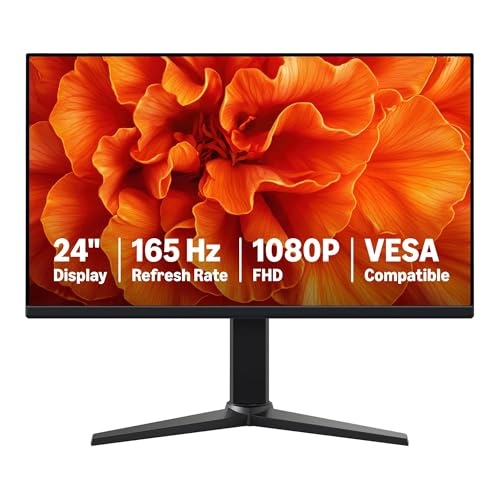
This one leans hard into motion speed, and the 165Hz panel is the obvious draw for fast shooters, racing games, and general PC use that benefits from cleaner scrolling. The 23.8-inch viewable area also gives you a little more breathing room than the 22-inch ArcticPro without pushing all the way into a large desk footprint.
Adaptive sync helps reduce visual tearing by keeping the panel and graphics card in step, which matters when frame rates wobble during busy scenes. The trade-off is simple: to make full use of 165Hz, your PC hardware and ports need to keep up, so this is a stronger fit for a capable gaming setup than for an older office tower.
Upsides
- 165Hz refresh rate suits quick, reactive play.
- 1ms response time helps reduce blur in fast motion.
- 23.8-inch viewable area feels roomy without going oversized.
- VESA support gives you desk setup flexibility.
- Adaptive sync is useful for smoother frame pacing.
- Black finish keeps the look simple and easy to place.
Points To Note
- High refresh performance depends on matching PC output.
- The brand-neutral styling is practical rather than flashy.
- Like many glossy-front panels, a careful wipe-down helps keep it clean.
Details At A Glance
Who Should Grab It
You’re in the sweet spot here if you want a faster 1080p display for competitive gaming without jumping to a larger, pricier class of monitor.
Look Elsewhere When
The Dell 24 Monitor SE2426H is the calmer choice for mixed work and play, especially if you care more about panel polish than raw refresh speed.
Dell’s 24-inch frame lands in a useful middle ground, especially for a desk that handles work during the day and gaming at night. The IPS panel, or in-plane switching panel, is about steadier color and wider viewing angles, so the image stays more consistent when you’re not sitting dead center.
The 144Hz refresh and 1ms MPRT pair well for smoother motion, and that keeps it close to the Amazon Basics monitor while leaning a bit more toward everyday polish. The TÜV 3-star eye-comfort note and tilt stand make sense for long sessions, though you’ll want to remember it’s still a simple two-HDMI display rather than a feature-heavy hub.
What We Like
- IPS panel keeps colors and viewing angles more stable.
- 144Hz refresh handles both gaming and daily scrolling well.
- 1ms MPRT supports cleaner motion in fast scenes.
- Tilt adjustment helps with basic desk ergonomics.
- Two HDMI ports make simple source switching easier.
Room For Improvement
- It focuses on the basics, so connectivity stays simple.
- The stand only tilts, which limits fine-tuning.
- Power users may want more advanced input options.
Technical Sheet
Best Suited To
You’re a strong match for this monitor if you want one screen that can handle work tabs, streaming, and casual gaming without feeling fussy.
Where A Sibling Pick Shines
The Amazon Basics 24 Inch Gaming Monitor 165Hz makes more sense for you if raw speed matters more than the Dell’s quieter all-around balance.
ETiansu splits the difference between a basic office monitor and a light gaming screen. The 22-inch size stays manageable, while 99% sRGB suggests a broader color range than many budget panels, which can matter for photo work, media, or games with strong visual styling.
It sits below the faster 144Hz and 165Hz picks in motion speed, but that also keeps the setup straightforward for day-to-day use. The HDMI and VGA mix is helpful for mixed hardware, though the 22-inch frame may still feel a touch small if you spend long stretches on split-screen work.
Bright Spots
- 99% sRGB coverage supports richer-looking color.
- 22-inch size stays easy to place on modest desks.
- HDMI and VGA options make connection planning simpler.
- 75Hz and AMD FreeSync help casual play feel smoother.
- EyeCare features suit long office or homework sessions.
Areas To Watch
- 75Hz is fine for casual gaming, not speed-chasing play.
- The 22-inch layout gives you less workspace than 24-inch rivals.
- Color claims help, though the setup still feels budget-minded.
Core Details
Whose Shelf It Belongs On
This fits you well if you want a compact daily monitor that can handle schoolwork, streaming, and casual gaming without taking over the desk.
Swap It Out When
The Westinghouse 22 Inch Computer Monitor 100Hz is the better route if you want built-in speakers and a faster-feeling panel without moving up in size.
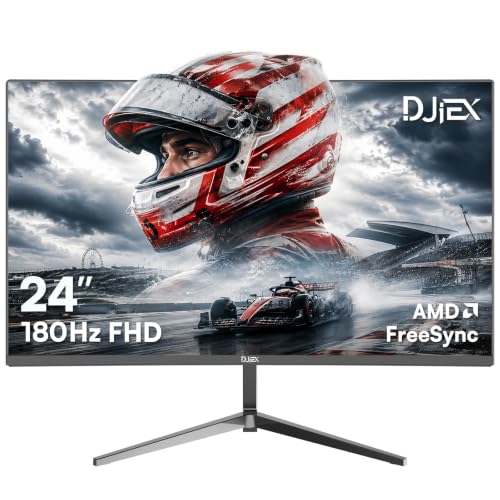
DJiEX pushes the refresh rate higher than the rest of this group, and that makes it the most aggressive pick here for motion-heavy gaming. The VA panel, or vertical alignment panel, is known for stronger contrast than many basic LCD designs, so darker scenes tend to look fuller rather than washed out.
HDR10 adds a little extra range to supported content, and the VESA mount support helps this 24-inch screen fit cleaner desk or arm setups. The honest read is that this model makes the most sense for a gaming-first space, since the 180Hz ceiling is more monitor than casual desktop work really needs.
Standout Traits
- 180Hz refresh rate suits fast, smooth motion.
- VA panel contrast helps darker scenes look deeper.
- 24-inch size gives you useful workspace without feeling oversized.
- HDR10 support adds more headroom for compatible content.
- VESA mounting supports a cleaner desk layout.
Minor Gripes
- The speed focus makes it more specialized than some rivals.
- VA panels can feel different from IPS in off-angle color handling.
- Higher refresh use depends on a capable PC setup.
Quick Facts
Built With In Mind
You’ll like this best if you spend more time gaming than doing office work and want the highest refresh rate in the group.
Reach For A Different Pick When
The Dell 24 Monitor SE2426H is the safer all-rounder if you want a gentler balance of speed, color stability, and everyday comfort.
Westinghouse takes a very usable middle path, with a 22-inch IPS frameless panel that stays friendly for a bedroom desk or starter gaming station. The built-in speakers matter more than they sound at first glance, because they reduce the need for separate desktop audio in a simple setup.
Its 100Hz refresh rate lands between casual and fast, so it’s a cleaner daily screen than a basic 75Hz model without asking you to chase the highest frame rates. The trade-off is that it doesn’t bring the sheer speed of the Amazon Basics or DJiEX picks, but the mix of HDMI, VGA, eye-care support, and gaming mode keeps it easy to live with.
Best Bits
- Frameless IPS panel keeps the look neat and modern.
- 100Hz refresh rate feels smoother than basic office screens.
- Built-in speakers cut down on desk clutter.
- Eye care support suits long homework or gaming sessions.
- HDMI and VGA keep older and newer devices usable.
- Gaming mode can help tune the display for play.
Worth Noting
- 22 inches is a modest size for heavy multitasking.
- Built-in speakers are convenient, though separate audio gear still sounds better.
- The 100Hz ceiling sits below the faster 144Hz and 165Hz picks.
Feature Rundown
The Right Fit
This is a solid match for you if you want a tidy all-purpose monitor for gaming, classes, and general home use without adding extra speakers.
Where Shoppers Go Wrong
The DJiEX 24 Inch Gaming Computer Monitor 180Hz makes more sense when your main goal is competitive play and you want a bigger jump in motion speed.
How To Choose The Right Cheap Gaming Computer Monitors
Refresh Rate And Response Time Matter First
Refresh rate tells you how many times the screen updates each second, so 100Hz, 144Hz, or 165Hz usually looks smoother than 75Hz in motion-heavy games. Response time is how quickly a pixel changes, and lower numbers usually help reduce blur when your camera swings across a scene.
For casual play, 75Hz can be fine, especially on a small monitor like the YOTETION 19-inch model. Competitive play feels better with the Amazon Basics 24 Inch Gaming Monitor 165Hz or the DJiEX 24 Inch Gaming Computer Monitor 180Hz, since quick movement gets cleaner treatment.
Screen Size Changes How The Desk Feels
Small screens save space, but they also shrink your working area. A 22-inch panel like the ArcticPro or Westinghouse makes sense on tighter desks, while 24-inch models give you more room for maps, tabs, and launcher windows.
The trade-off is simple: the bigger you go, the more desk depth and viewing distance you usually want. In a dorm room or compact bedroom, a 22-inch monitor can feel easier to live with than a larger screen that sits too close.
Panel Type Shapes Color And Viewing Angles
IPS panels usually keep colors steadier when you’re not sitting dead center, which helps in shared spaces and mixed-use setups. VA panels often bring deeper contrast, so dark scenes can look fuller, while the trade-off is that they may feel less even from sharp side angles.
That’s why the Dell 24 Monitor SE2426H suits mixed work and gaming, while the DJiEX model leans into darker game scenes. If your desk setup is narrow or you share the screen with someone beside you, IPS is often the easier fit.
Ports And Mounting Should Match Your Setup
HDMI covers most modern PCs and consoles, while VGA still helps with older equipment. VESA mount support is worth paying attention to because it lets you move the screen onto an arm or wall bracket and free up space beneath it.
For a cleaner desk, the ArcticPro, Amazon Basics, and DJiEX options give you that mounting flexibility. Built-in speakers, like the Westinghouse includes, can also simplify a basic setup, though separate audio usually sounds fuller.
Things Worth Knowing First
Hidden Buying Traps
Many shoppers focus only on refresh rate and ignore the panel size. That can leave you with a fast monitor that still feels cramped for schoolwork or everyday desktop use.
Connection types matter too, since HDMI is the safer everyday choice and VGA is mainly there for older hardware. A quick check of your PC or console ports keeps the setup from becoming a headache later.
The Upgrade Payoff
Higher-tier screens usually cost more because they add faster refresh rates, steadier panels, better contrast, or more careful tuning. The extra money often goes into smoother motion and a more polished picture, not just a bigger number on the box.
That upgrade makes sense for longer gaming sessions, shared desks, or anyone who notices tearing and blur right away. For lighter use, a simpler 75Hz or 100Hz model can already feel like a sensible step up from a basic office display.
Frequently Asked Questions
What size works best for a tight desk?
A 22-inch screen usually lands in the sweet spot for smaller desks. The ArcticPro and Westinghouse models are strong examples of that size.
Is 75Hz enough for gaming?
Yes, for casual play it can feel perfectly usable. Faster options like 144Hz or 165Hz matter more once you play action-heavy titles often.
Do I need IPS or VA?
IPS is usually the safer all-around choice for color consistency and side viewing. VA can be appealing when you want deeper contrast in darker scenes.
Why does VESA support matter?
It lets you use a mount or arm instead of the included stand. That can free desk space and make positioning easier.
Are built-in speakers useful?
They’re handy for a simple setup, especially on a secondary desk or in a small room. Separate speakers or headphones still tend to sound fuller.
