
Cheap Micro-Atx Cases can make a small build feel organized instead of cramped, and that matters whether you’re setting up a gaming tower, a work PC, or a living-room system. The right case gives you enough room for the parts you already own, sensible airflow, and front-panel access that doesn’t feel awkward to use every day. Some of the picks below lean flashy with glass and lighting, while others keep things plain and practical. The trade-off is usually size, cooling flexibility, or build convenience, so the best match depends on how you plan to use the machine.
Quick Look At The Shortlist
TGDGAMER MATX Micro ATX Case

Thermaltake View 170 TG ARGB Black Micro-ATX Case

JOYJOM Micro ATX Case PC Case

Okinos Genuine Walnut Wood Micro ATX Case

MOROVOL MATX PC Case
Lian Li A3-mATX Computer Case 26.3L

JONSBO D32 STD Micro-ATX PC Case
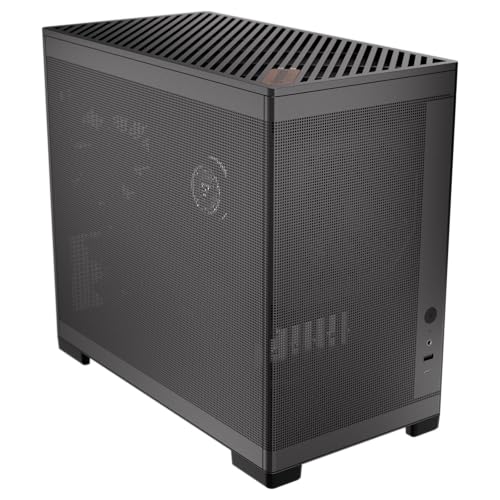
Okinos MiniArt 4 Micro ATX PC case
More Details On Our Top Picks
Thin cases can become a headache fast, and this one tries to stay friendly with a slim chassis and a built-in 80mm fan. You also get a USB 3.0 front port, plus support for mini-ITX and ATX power supplies, which helps when your parts list is modest but not tiny.
It makes sense for a basic office box or a light gaming tower in a smaller room. The honest trade-off is that a slim layout can leave less breathing room for large upgrades, so this feels better for straightforward builds than for hardware experiments.
Strong Points
- Slim footprint fits tighter desks.
- Included 80mm fan helps with starter airflow.
- USB 3.0 front access is handy for quick drives and peripherals.
- ATX power compatibility broadens part choices.
Points To Note
- Compact interiors can feel restrictive during upgrades.
- Small-fan cooling usually suits lighter systems more than hot builds.
- The plain black finish is practical, not decorative.
Feature Rundown
Who It Suits Best
Students, home office users, and casual builders who want a small black case with simple front access will get the most from it.
Swap It Out When
Okinos MiniArt 4 Micro ATX PC case is the better fit for you, with a stronger cooling bundle and a more polished small-form look.
This Thermaltake leans into showpiece styling, with front and side tempered glass that puts the interior on display. The three included 120mm ARGB fans, meaning addressable RGB lighting with individual control, give you a ready-made look without starting from scratch.
Support for a 280mm radiator gives you room for liquid cooling hardware in a compact frame. That makes it a strong match for a gaming desk build, though glass-heavy cases do ask you to keep cable work neat because mess shows quickly.
What We Like
- Three included ARGB fans save setup time.
- Front and side glass create a clean display angle.
- 280mm radiator support opens more cooling layouts.
- Black finish keeps the look sharp and easy to match.
Softer Spots
- Glass panels can feel less forgiving during handling and cleaning.
- Lighting-focused builds usually need more cable tidying.
- It suits showcase setups more than plain utility builds.
Feature Card
Who Will Love This
Stylish gaming setups and desk builds with visible lighting will get the most from this case.
A Better Fit Elsewhere
JOYJOM Micro ATX Case PC Case suits you better for a simpler, less visual build where the budget goes into basic function first.
JOYJOM keeps the pitch straightforward, with support for micro-ATX, MATX, DTX, and ITX boards, so you’ve got room to build around a range of compact platforms. It also includes USB 3.0 and support for a 3.5-inch hard drive, which makes it practical for a school PC or a simple storage-heavy setup.
The simpler shell is part of the appeal, though it also tells you where the money stayed out of the frame. For a first-time build or a low-drama office tower, that plain approach can feel refreshing instead of bare.
Positives
- Wide board support gives you more build paths.
- USB 3.0 suits everyday front-panel use.
- 3.5-inch drive support helps with local storage.
- Simple layout makes the case easy to plan around.
Room For Improvement
- Plain styling will not suit every desk.
- Less source detail means you’ll want to confirm part fit before building.
- Basic cases like this usually ask for a tidy cable approach.
Core Details
Made For
Starter desktops, school machines, and utility PCs built around common parts are the best match here.
Where A Sibling Pick Shines
TGDGAMER MATX Micro ATX Case is the better fit for you, since it adds a clearer airflow angle and a more defined compact gaming feel.
Walnut trim changes the mood right away, and that’s rare in this category. The wood accent gives the Okinos a warmer desk presence, while the four pre-installed 120mm fans and tempered glass side panel keep the case anchored in practical cooling and visibility.
Type-C on the front adds modern convenience for newer accessories, which helps in a shared office or a neat home setup. The non-PWM fans, meaning they run at a fixed speed instead of variable control, keep things simple, though they leave less room for tuning noise and airflow behavior.
Highlights
- Walnut finish gives the case a more furniture-like look.
- Four included fans are generous for the size.
- Temper glass side panel shows off the build.
- Type-C front access helps with newer peripherals.
- Good fit for desks where style matters as much as function.
Areas To Watch
- Fixed-speed fans offer less control than adjustable models.
- Wood detail may call for a little extra care during cleaning.
- It feels more style-forward than plain utility cases.
Details At A Glance
Whose Shelf It Belongs On
Style-conscious builders who still want practical cooling will appreciate this one most.
Look Elsewhere When
Thermaltake View 170 TG ARGB Black Micro-ATX Case suits you better for a more lighting-heavy show build with a different visual direction.
The 270-degree glass layout is the headline here, and it gives the MOROVOL a wraparound display feel that suits RGB-heavy parts. Three pre-installed fans keep it from being all style and no utility, so you’re not starting with a bare shell.
USB 3.0 on the front adds the everyday convenience that a show case still needs. The trade-off is simple enough: panoramic glass looks impressive, yet it also asks you to keep the interior neat because there’s nowhere to hide sloppy routing.
Bright Spots
- Wide glass viewing angle gives the build strong visual presence.
- Three included fans help with the initial setup.
- USB 3.0 suits regular drive swaps and accessories.
- Good match for lighting-heavy gaming components.
Small Caveats
- Large glass surfaces need more careful cleaning.
- Visual builds usually reward tidy cable planning.
- It is more about presentation than a plain office look.
Feature Snapshot
Right Fit For
RGB gaming rigs and desk builds where visual presentation matters most will fit this case well.
Another Choice May Suit
JOYJOM Micro ATX Case PC Case is the better fit for you, since it stays simpler and keeps the focus on basic build value.
This Lian Li takes a more serious build approach, and the 26.3L volume gives you a compact but not cramped shell. The modular design matters because it gives you flexibility in how you arrange parts, which is useful for a cleaner custom system or a small workstation.
It supports 360mm AIO cooling, where AIO means all-in-one liquid cooling, so the case can work with more ambitious thermal plans. The catch is that no fans are included, so you’re choosing the case platform first and finishing the cooling kit yourself.
Reasons To Buy
- 26.3L size keeps the footprint compact.
- Modular approach helps with custom planning.
- 360mm AIO support broadens cooling options.
- Works with both M-ATX and ITX boards.
Worth Noting
- No included fans means extra planning on your side.
- Modular layouts can take more time to assemble neatly.
- It fits a more involved build style than a quick setup.
Technical Sheet
Best Suited To
Experienced builders and compact custom PC projects are the best match for this one.
Reach For A Different Pick When
Okinos MiniArt 4 Micro ATX PC case is the better fit for you, since it arrives with fans already in place and asks for less extra work.
Compatibility is the draw here, and JONSBO goes after it from several angles at once. Back-connect and BTF board support, meaning boards that route cables behind the tray, plus room for a 365mm GPU, a 240mm AIO, and a 163mm air cooler, make this case feel unusually flexible.
That breadth helps a lot in mixed-part builds where you want to keep upgrade paths open. The only real caution is that more flexibility usually means more planning, so your build time may be a little longer than it would be with a simpler shell like the JOYJOM.
Best Bits
- Back-connect and BTF support broadens motherboard choices.
- 365mm GPU room helps with larger graphics cards.
- 240mm AIO support covers mainstream liquid cooling.
- 163mm air cooler support helps with tall tower coolers.
- ATX, SFX-L, and SFX PSU support adds flexibility.
Trade Offs
- High compatibility can mean more careful planning.
- Complex builds usually take longer to organize cleanly.
- It feels more technical than a basic starter case.
Feature Rundown
The Right Fit
Builders who want one case to cover several hardware paths will get a lot of mileage out of this model.
Skip It When
JOYJOM Micro ATX Case PC Case suits you better for a simpler, lower-effort route that focuses on basic compatibility.
Okinos makes a strong case for small desks, because the MiniArt 4 arrives with three pre-installed fans and support for a 240mm radiator. Two of the fans use a reverse layout, which helps with airflow direction and gives the case a more deliberate internal setup.
Front-mounted PSU placement, meaning the power supply sits toward the front of the chassis, keeps the footprint compact and changes how the interior is arranged. It’s a neat pick for a tidy room or a smaller gaming nook, though it rewards careful planning around cable paths and component depth.
Positives
- Three included fans lower the setup burden.
- Reverse-fan layout helps shape airflow direction.
- 240mm radiator support keeps cooling options open.
- Front PSU placement helps the case stay compact.
Areas To Watch
- Front PSU layout can take a little getting used to.
- Compact interiors reward careful cable management.
- It suits builders who like a tighter internal arrangement.
Feature Snapshot
Built With In Mind
Small-room gaming setups and compact desktop builds are the best match for this case.
Where Shoppers Go Wrong
Lian Li A3-mATX Computer Case is the better fit for you if you want a more modular shell and plan to add your own cooling pieces.
How To Choose The Right Cheap Micro-Atx Cases
Check The Case Around Your Parts
Micro-ATX is only the starting point. You still need to match graphics card length, cooler height, and power supply format to the space inside the chassis, because a compact case can look roomy online and feel tight once parts arrive.
Air cooler height matters most in smaller towers, while radiator support matters more in glass-heavy or performance-focused builds. A case like the JONSBO D32 STD gives you more layout flexibility, while a simpler shell like the JOYJOM keeps the decision tree shorter.
Decide How Much Cooling You Want Built In
Included fans save time and reduce guesswork, especially for a first build or a secondary machine. The TGDGAMER and Okinos MiniArt 4 make that easier, while the Lian Li A3-mATX assumes you’ll choose your own cooling path.
That difference matters more than people expect. A case with fans already fitted can get a system running sooner, but a bare case often gives you better freedom over noise, airflow direction, and part quality.
Match Style To Use Case
Glass panels, RGB fans, and walnut accents serve different kinds of desks. A Thermaltake View 170 TG ARGB belongs in a visual gaming setup, while the Okinos Genuine Walnut Wood case suits a room where the PC sits beside furniture instead of hiding under a desk.
Plain black enclosures still have a place. They usually clean up easier, blend into an office, and keep the focus on value rather than presentation.
Think About Build Effort Before You Commit
High-compatibility cases often ask for more planning, because more options mean more decisions. That’s fine for experienced builders, but a straightforward chassis can be less stressful for a first-time setup or a work machine that just needs to run quietly.
The right pick is the one that fits your skill level, your parts list, and the room where the PC will live. A case that feels a little plain on paper can be the smartest choice once your real hardware enters the picture.
Things Worth Knowing First
Common Shopping Slip Ups
Many compact builds go wrong because the case looks compatible without showing enough interior detail. Check board support, cooler room, and storage layout before you settle on the styling.
Another common miss is choosing a glass-heavy shell for a plain office machine. That looks nice in photos, but it can add cleaning work without adding much value for daily use.
Where The Extra Money Goes
Higher-tier cases often pay for thicker materials, more included fans, wider radiator support, and easier cable routing. Those upgrades matter most in gaming rigs and long-term builds where the case stays in service through several part changes.
That’s also where modularity earns its keep. A more flexible shell can take longer to set up, but it usually gives you a cleaner final result and more room to change direction later.
Frequently Asked Questions
What makes a Micro-ATX case different from a full-size tower?
A Micro-ATX case is built for smaller boards and usually takes less desk space. You give up some expansion room, but you gain a more manageable footprint.
Do cheap Micro-ATX cases usually include fans?
Some do, and some leave cooling to you. The source data here shows both styles, from bare cases like the Lian Li A3-mATX to fan-loaded picks like the Okinos MiniArt 4.
Is tempered glass worth it for a small build?
It depends on whether you want to show the hardware. Tempered glass adds visual presence, but it also asks for cleaner cable work and a little more care during handling.
What should you check before fitting a larger graphics card?
Check the case’s stated GPU clearance and look at radiator or fan placement too. A long card can fit on paper and still feel awkward once other parts take up room.
Do pre-installed fans remove the need to plan airflow?
No, they only give you a head start. You still need to think about intake, exhaust, and how the rest of your parts affect internal heat.
Final Thoughts
The best Cheap Micro-Atx Cases are the ones that match your parts and your room, not just your wishlist. A plain utility case can be the smartest fit for an office build, while glass, lighting, or wood details make more sense on a desk where the PC stays visible. The good news is that this category has strong options for simple systems and more ambitious ones alike. Choose the case that makes the rest of your build easier, and the whole project tends to feel calmer from the start.
