
Cheap gaming mice can still feel responsive, steady, and comfortable for long sessions, as long as you match the shape and controls to your setup. You’ll see a wide gap here, from simple wired models for a dorm desk to wireless options that make a cramped work-and-play space feel less tangled. The right choice depends on how many buttons you actually use, how much sensitivity control matters, and whether you prefer a light shell or a fuller grip.
Quick Look At The Shortlist

TECKNET Wired Gaming Mouse 12800 DPI 8 Buttons
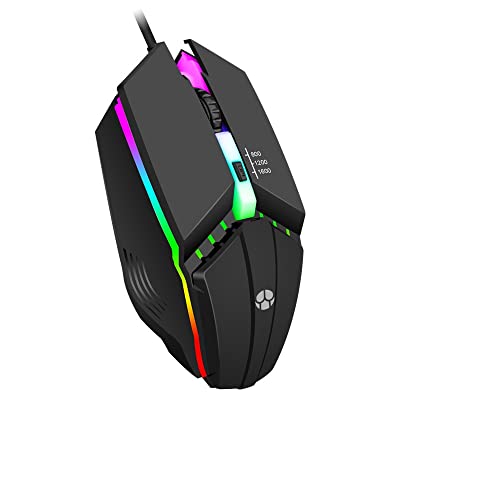
Guiheng Wired Gaming Mouse 800 to 1600 RGB Light

ONITOON Wired USB Mouse with RGB Lighting 7 Buttons
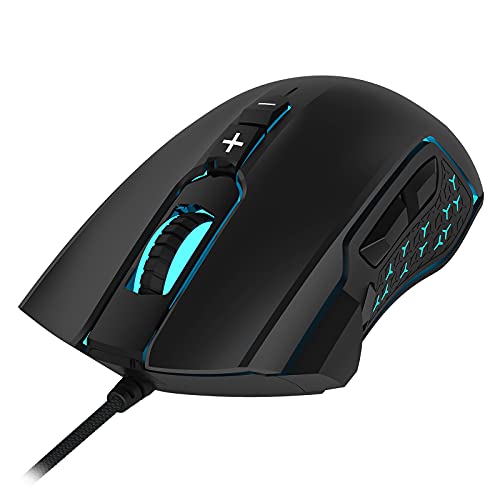
LeadsaiL Gaming Mouse Wired RGB 7200 DPI 8 Buttons

MELOGAGA Wireless Gaming Mouse 3-Mode Bluetooth/2.4G/USB-C White

Typehaven G57 Wireless Gaming Mouse 8000 DPI Black

GM300 Wired Gaming Mouse for PS4 Xbox One PC Black

Guiheng Wired Gaming Mouse 7-Color Optical USB Mice
More Details On Our Top Picks
That 12,800 DPI ceiling matters most for fast cursor travel and small on-screen corrections, especially on a larger monitor or a crowded desktop. The software-side control adds six selectable sensitivity steps, so you can keep one setting for slower aim and another for quick sweeps without reaching into system menus.
The 8-button layout suits games that lean on macros, and the rapid-fire plus side macro buttons give it a clear edge over the simpler picks below. The trade-off is plain too, a wired shell with a lot going on can feel busier than a stripped-down mouse on a tight desk, but that also makes sense for you if you want many controls in one body.
Strong Points
- 12,800 DPI gives you a wide sensitivity range for twitchy movement and fine pointer work.
- Six software-tunable DPI steps make it easier to keep one hand feel for game and desktop tasks.
- Eight programmable buttons suit MMO skills, shortcuts, or repeated office commands.
- The rapid-fire button helps reduce repeated clicking in games where that matters.
- Ergonomic shaping should feel more natural during longer evening sessions than a flat office mouse.
Things To Consider
- Wired use keeps the desk tidy only to the extent your cable routing does.
- The feature set is richer than the Guiheng wired mice, so it asks for a little more setup attention.
- The many controls can feel busy for a simple work laptop.
Feature Rundown
Who It Suits Best
You suit this best when you want a wired mouse with a lot of control at the desk, especially for games that reward custom button mapping.
A Better Fit Elsewhere
Typehaven’s G57 Wireless Gaming Mouse 8000 DPI Black suits you better if you want a lighter feel with wireless flexibility for mixed work and play.
This one keeps the formula simple, and that can be a relief on a travel laptop or a spare desk. Three sensitivity steps, from 800 through 1600, cover everyday play without making you wrestle with a crowded control panel.
Compared with the TECKNET mouse above, it trims the button count and the sensitivity ceiling, which makes it easier to learn and less fussy to live with. The hand shape is pitched for comfort, though you should expect the fit to matter more here than the spec sheet does, especially during longer sessions.
What We Like
- The 800, 1200, and 1600 DPI steps keep control straightforward.
- Four programmable buttons cover basic shortcuts without crowding the shell.
- Broad system support makes it useful across older Windows installs and common laptop setups.
- RGB lighting adds a bit of desk character without demanding extra software detail in the source data.
Room For Improvement
- The lower sensitivity range limits you compared with the higher-ceiling options in this roundup.
- Owners who keep a tidy bag should still expect a cable to manage.
- It feels more modest than the feature-dense LeadsaiL and the TECKNET pick.
Core Details
Made For
You suit this best if you want an uncomplicated wired mouse for casual gaming, a second PC, or a laptop that sees lighter use.
Another Choice May Suit
LeadsaiL’s Gaming Mouse Wired RGB 7200 DPI 8 Buttons fits you better if you want more steps, more buttons, and a stronger work-and-play balance.
The ONITOON leans a little more toward all-day desk use than the two simpler wired mice above, mainly because the 7-button layout gives you more room for shortcuts. Its RGB lighting turns on as soon as it’s plugged in, which makes it feel a touch more lively on a plain workspace.
The low-light mode triggered by holding the DPI control is a thoughtful touch for late-night gaming or shared spaces. You may find the white finish looks clean at first, though lighter shells usually ask for a bit more attention to smudges and desk dust over time.
Highlights
- Seven buttons create more room for everyday commands than the four-button Guiheng model.
- Four DPI levels give you a simple way to adjust sensitivity without overcomplicating the setup.
- The ergonomic shell is a better match for mixed office and gaming use than a bare-bones budget mouse.
- RGB lighting makes a small desk feel more active without changing how you hold the mouse.
Softer Spots
- The source details stay light on specific sensitivity numbers, so you’re choosing more by feature set than by a long spec list.
- White hardware usually asks for more cleaning care than darker finishes.
- It sits behind the TECKNET and LeadsaiL picks for sheer control depth.
Quick Facts
The Right Fit
You suit this best if you want a wired mouse for homework, browsing, and casual gaming on the same desk.
Where A Sibling Pick Shines
Guiheng Wired Gaming Mouse 800 to 1600 RGB Light suits you better if you want fewer buttons and a simpler shape for a small laptop setup.
This LeadsaiL lands in a useful middle ground, because it gives you more control than the simpler wired models without jumping to the busier TECKNET layout. Six sensitivity levels, from 1200 up to 7200 DPI, make it easier to tune for work, general play, or faster movement.
The lighting system is more adjustable than the others here, with color, brightness, breathing speed, and effect all listed in the source data. That flexibility is handy on a gaming desk, though it also means you may spend a little more time dialing in the look than you would with a plain black shell.
Reasons To Buy
- 7200 DPI gives you a higher sensitivity ceiling than the Guiheng wired options.
- Eight buttons help with shortcuts, in-game actions, and general multitasking.
- Lighting adjustments give you more control over desk look than a fixed-color mouse.
- Plug-and-play setup keeps first use simple on most Windows, Mac, and Linux systems.
Areas To Watch
- Back and forward button behavior is not compatible with Mac and Linux, according to the source notes.
- The adjustable lighting is useful, though it can feel unnecessary on a very plain office desk.
- It carries more features than the basic Guiheng 800 to 1600 model, so the learning curve is a touch higher.
Feature Card
Built With In Mind
You suit this best if you want a wired mouse that still feels flexible enough for gaming and office work on the same machine.
Swap It Out When
TECKNET Wired Gaming Mouse 12800 DPI 8 Buttons fits you better if you want more sensitivity headroom and a deeper control set.
The MELOGAGA shifts the roundup into lighter, more flexible territory. At about 71 g, it should feel easy to move around during longer sessions, and the three connection modes make it useful for a laptop bag, a desk, or a tablet stand.
That mix stands apart from the wired models above, especially for commuters or hybrid work setups that don’t want a cable in the way. The 120-hour battery claim is the kind of feature that matters in daily ownership, though the trade-off is that wireless gear always asks you to stay mindful of charging rhythm.
Upsides
- Three connection paths give you real flexibility across devices and workspaces.
- 71 g weight helps the mouse feel quick without getting in the way.
- Eight DPI levels let you tune sensitivity more finely than the simpler wired budget models.
- The USB-C play-and-charge setup helps reduce downtime during long use sessions.
- Broad device support suits PCs, Macs, tablets, and Android gear in one small travel kit.
Points To Note
- Wireless flexibility adds charging habits to your routine.
- The lighter shell may feel less planted than heavier mice on a rough desk mat.
- It costs a little more complexity than the plain wired Guiheng and ONITOON picks.
Technical Sheet
Whose Shelf It Belongs On
You suit this best if you move between devices often and want one mouse that can follow you from desk to bag to hotel room.
Look Elsewhere When
GM300 Wired Gaming Mouse for PS4 Xbox One PC Black fits you better if you want a simpler wired setup with no battery routine at all.
The G57 looks like the cleaner wireless step up for desks that need flexibility without a bulky shell. At 80 g, it stays in that light-but-not-feathery zone that many people prefer for day-long use, and the three connection modes make it easy to shift between machines.
Compared with the MELOGAGA model, it gives you a little more weight and a different button layout, which may suit you better if you like a steadier feel in the hand. The 5 programmable buttons are a practical middle point, though you won’t get the same control density as the TECKNET or LeadsaiL picks.
Best Bits
- 80 g weight keeps the mouse easy to move without feeling overly hollow.
- Bluetooth, 2.4G, and USB-C support make it useful across modern desk setups.
- Five programmable buttons give you enough room for shortcuts without clutter.
- 8000 DPI offers more headroom than the lower-step budget wired picks.
Minor Gripes
- It has fewer buttons than the TECKNET and LeadsaiL options.
- Wireless use still asks you to keep track of charging.
- The source data stays light on shape details, so hand fit matters more than a long feature list.
Details At A Glance
Perfect Match For
You suit this best if you want a wireless mouse that feels more polished than the simplest budget wired options and still stays easy to carry.
Where A Sibling Pick Shines
MELOGAGA Wireless Gaming Mouse 3-Mode Bluetooth/2.4G/USB-C White fits you better if you want a lighter 71 g body and a longer stated battery window.
The GM300 keeps things plain in a way that still makes sense for a budget gaming desk. Four DPI steps, from 1000 through 3600, give you a basic range that works for console-adjacent play, schoolwork, or a spare PC without much setup drama.
The honeycomb-like side texture should help grip during sweaty sessions, and the six-button layout stays approachable. Compared with the ONITOON and LeadsaiL models, you lose some feature depth, but you also get a simpler mouse that’s easier to hand to another person.
Bright Spots
- PS4 and Xbox One compatibility broadens where you can use it.
- Four DPI steps keep sensitivity choices easy to understand.
- Six buttons, including two side buttons, give you a little more control than a basic office mouse.
- The textured sides can help steady your grip during longer sessions.
- 3 million click durability is listed for the buttons, which adds peace of mind for regular desk use.
Worth Noting
- Its feature set is more modest than the TECKNET and MELOGAGA options.
- RGB wave lighting is more about style than practical control.
- For players who want a lot of programmable control, this one stays fairly basic.
Feature Snapshot
Who Will Love This
You suit this best if you want a plain wired mouse for console play, casual gaming, or a second computer in the house.
Where Another Pick Suits Better
ONITOON Wired USB Mouse with RGB Lighting 7 Buttons fits you better if you want more buttons and a stronger office-plus-gaming mix.
This Guiheng version looks like the more control-heavy sibling to the simpler 800 to 1600 model. Seven programmable buttons and a 1200 to 3600 DPI range give it more room for shortcuts and a slightly wider sensitivity spread, which is useful on a mixed gaming and study desk.
The lighting adds personality without changing the fundamentals, and the broad platform support should help it move between older Windows systems and newer everyday machines. Compared with the GM300, it feels more flexible on paper, though the trade-off is that it remains a wired mouse, so cable management still matters.
Plus Points
- Seven programmable buttons give you more control than the four-button Guiheng model.
- DPI options from 1200 to 3600 cover everyday use and casual game movement.
- Wide OS support makes it practical across many home and school setups.
- The ergonomic shape should suit long desk sessions better than a bare-bones shell.
Small Caveats
- The wired format still keeps you tied to the desk.
- It competes directly with ONITOON and LeadsaiL for feature space, so the fit matters more than the marketing gloss.
- Lighting and button count help, but they do not replace a higher sensitivity ceiling like the TECKNET option.
Core Details
Best Suited To
You suit this best if you want more button control than the entry-level wired picks and you still prefer a cable over charging.
Reach For A Different Pick When
MELOGAGA Wireless Gaming Mouse 3-Mode Bluetooth/2.4G/USB-C White fits you better if you want wireless flexibility and a lighter travel-ready build.
How To Choose The Right Cheap Mouses For Gaming
DPI, Buttons, And Why They Matter
DPI, or dots per inch, is the sensitivity setting that changes how far the pointer moves with each hand motion. Higher numbers can help on large monitors or in fast-paced games, while lower steps usually feel steadier for precise aim and desktop work.
Buttons matter just as much, because every extra control can pull a repeat command off your keyboard and onto the mouse. A four-button design fits light play and office use, while eight programmable buttons suit you better for MMOs, shortcuts, or a workbench full of repetitive tasks.
Wired Or Wireless Fits Different Habits
Wired mice stay simple, and that simplicity appeals to students, spare-PC owners, and anyone who does not want another battery to watch. They also tend to feel a touch more direct, which some people prefer for long evening sessions.
Wireless models earn their place when desk clutter, travel, or multi-device use matters more than absolute simplicity. A 2.4G dongle, Bluetooth, and USB-C cable can turn one mouse into a flexible tool for a laptop, tablet, or living-room setup.
Shape, Weight, And Long-Session Comfort
Shape is where a budget mouse either feels fine or starts to annoy you. An ergonomic shell, side texture, or lighter body can reduce drag on the wrist, but the best shape still depends on your grip, palm, claw, or fingertip.
Weight changes the whole feel of the desk. A 71 g mouse moves quickly, while an 80 g or heavier body often feels more planted, so you can choose speed or steadiness without chasing features you will never use.
A Quick Reality Check
Where Shoppers Go Wrong
Many people chase the highest DPI number and ignore button layout or hand shape. That usually leads to a mouse that looks exciting on paper but feels awkward after a week of ordinary use.
Another common slip is overlooking compatibility notes. A mouse can still work across many systems, yet some side-button functions may not behave the same on Mac or Linux, so the details matter.
The Upgrade Payoff
More expensive models usually pay for better control density, broader software options, lighter housings, or more polished wireless behavior. You also tend to get more sensitivity steps, better button mapping, and more adjustable lighting or grip shaping.
That extra cost makes sense for regular gaming, shared desks, or cross-platform use. For a second computer or a casual setup, the simpler wired picks in this list already cover a lot without asking for much in return.
Closing Thoughts
The right budget gaming mouse feels like a tool that disappears into your hand, not a gadget that keeps asking for attention. TECKNET suits you best when control matters most, the wireless MELOGAGA and Typehaven picks fit a more flexible desk, and the simpler Guiheng and GM300 options keep things easy. Match the mouse to your grip, your desk, and the way you actually play, and you’ll get a much better result than chasing features alone.
