
Cheap OLED monitors are easier to sort through in 2026, but the trade-offs still matter. You want deep contrast, fast motion, and a panel that fits your desk, your console, or your travel bag without wasting money on features you won’t use.
This roundup focuses on seven models that make sense for different setups, from a 27-inch gaming screen to a portable second display. You’ll see where each one fits best, what it gives up, and which pick makes the most sense for your space and pace.
The Shortlist At A Glance

LG 27GX704A-B 27-inch Ultragear QHD OLED Gaming Monitor
Samsung 27” Odyssey OLED G5 (G50SF) QD-OLED Gaming Monitor

Dell 27 240Hz Gaming Monitor SE2726HG
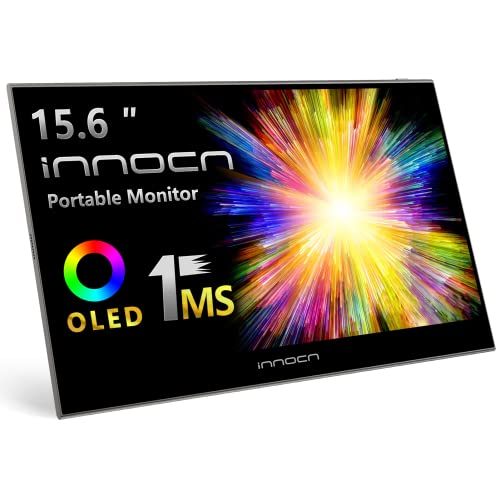
INNOCN 15.6 OLED Portable Monitor Full HD 1080P
LG 27GX700A-B 27-inch Ultragear QHD OLED Gaming Monitor

Samsung 27″ Odyssey OLED G6 (G61SH) QD-OLED Gaming Monitor

AOC 27″ Gaming Monitor QHD 240Hz QD OLED Q27GAZDV
More Details On Our Top Picks
LG’s 27-inch QHD panel lands in a sweet spot for you if fast shooters or high-motion action matter more than desktop minimalism. The 240Hz refresh rate means the screen updates very quickly, while the 0.03ms response time helps keep blur in check during abrupt movement.
The HDMI 2.1 and DisplayPort support make it easy to pair with a modern PC or console setup, and G-Sync Compatible plus FreeSync Premium Pro help smooth out tearing from both camps. Compared with the Dell SE2726HG later in this list, this one trades a plain FHD panel for a sharper OLED image that feels much more premium on a 27-inch desk.
Strong Points
- QHD resolution gives you more room for fine text and sharper in-game detail.
- 240Hz suits fast play and keeps motion looking clean in busy action scenes.
- OLED contrast makes dark game worlds and streaming video feel deeper and more layered.
- HDMI 2.1 helps console setups feel less dated, especially on a mixed-use desk.
- G-Sync Compatible and FreeSync Premium Pro support broader device matching.
Things To Consider
- The glossy finish can show room reflections, so placement near bright windows needs more care.
- OLED panels reward steady brightness habits, which matters for desk users who leave static windows open for long stretches.
- The feature set is clearly tuned for gaming, so casual office work doesn’t get much extra payoff from the premium panel.
Feature Card
Who It Suits Best
You’ll like this most as a desktop gaming monitor for a setup that does more than casual browsing.
A Better Fit Elsewhere
LG 27GX700A-B 27-inch Ultragear QHD OLED Gaming Monitor suits you better if you want even higher refresh speed and can justify the extra step up.
This Samsung makes sense for a mixed gaming and media desk where color richness matters as much as speed. The 180Hz refresh rate is lower than the LG picks above, but the QD-OLED panel still gives you the deep contrast and punchy color that make OLED feel special.
Samsung’s included support package is unusually practical, with setup help, surge coverage from day one, and service handled by Samsung technicians using Samsung parts. That matters more if you want a monitor you can keep in service for a while, though the panel speed sits a step below the 240Hz models here.
What We Like
- QD-OLED brings rich color and strong contrast for games, video, and photo work.
- 180Hz still feels fast enough for most competitive play without chasing the very top refresh tier.
- Support coverage from the start adds peace of mind for setup and power issues.
- Samsung parts and technicians give the service path a more controlled feel.
Points To Note
- It trails the 240Hz LG models in motion headroom.
- The panel still favors gaming-first use, so office-only desks won’t use its strengths fully.
- You may want a careful stand or arm setup, since a glossy OLED display tends to be happier away from direct light.
Details At A Glance
Who Will Love This
You’re the right fit for this Samsung if you want vivid color, fast response, and a more service-friendly ownership setup.
Swap It Out When
LG 27GX700A-B 27-inch Ultragear QHD OLED Gaming Monitor is the stronger call for you if chasing the highest refresh speed matters more than support extras.
This Dell is the practical one in the group, especially for you if speed matters more than deep OLED contrast. The 27-inch IPS panel gives you wide viewing angles, and the 240Hz refresh rate keeps motion smooth for console or PC play.
Compared with the OLED models above, the image won’t have the same black-level depth, but it also avoids some of the premium-panel trade-offs. That makes it a sensible desk monitor for mixed use, especially in a bright room where a simple matte-style gaming screen can feel less fussy.
Upsides
- 240Hz gives you fast motion for shooters and racing games.
- IPS technology keeps colors and viewing angles steady from a normal desk position.
- Two HDMI ports make it easier to switch between devices.
- FreeSync Premium and HDMI VRR support smoother console and PC play.
- It avoids the higher-maintenance feel of a glossy OLED panel.
Room For Improvement
- FHD resolution is fine at 27 inches, but text and detail are less sharp than on QHD screens.
- The picture lacks the dramatic contrast OLED brings, which you’ll notice in darker games and films.
- Tilt-only adjustment gives you less positioning freedom than the stands on some other picks here.
Core Details
Best Suited To
You’ll get the most from this Dell if you want a straightforward high-refresh monitor for gaming and general use.
Where A Sibling Pick Shines
LG 27GX704A-B 27-inch Ultragear QHD OLED Gaming Monitor suits you better if visual contrast and sharper QHD detail matter more than keeping costs lower.
INNOCN takes a very different path from the 27-inch desk monitors above, because its whole point is portability. A 15.6-inch OLED screen is much easier to carry for laptop work, travel editing, or a console setup that moves from room to room.
The Full HD panel, 100% DCI-P3 color coverage, and 1ms response time make it feel aimed at content work and casual gaming rather than a single-purpose desktop battlestation. The trade-off is obvious, though, since you’re giving up screen space and the long-term comfort of a larger monitor.
Best Bits
- Portable size makes it easy to pack beside a laptop.
- OLED contrast helps media and photo work look richer on the move.
- Full HD resolution stays friendly for lighter laptops and travel systems.
- Mini HDMI and USB support broadens how you can connect it.
Areas To Watch
- The smaller panel can feel tight for side-by-side editing or full-time desktop use.
- Travel gear usually needs a little more care, so the finish and case deserve attention in a packed bag.
- The panel size makes it less comfortable for long spreadsheet sessions than a 27-inch desk monitor.
Quick Facts
Whose Shelf It Belongs On
You’re the right fit for this INNOCN if you need a second screen that travels easily and still looks good for creative work.
Another Choice May Suit
Samsung 27” Odyssey OLED G5 (G50SF) QD-OLED Gaming Monitor is the better call for you if the display stays at a desk and you want a larger all-round gaming screen.
LG’s 27GX700A-B pushes harder than the earlier LG model, and that extra speed is the whole point. The 280Hz refresh rate is the highest in this list, so you get a little more motion headroom for twitchy shooters and rapid camera movement.
The 27-inch QHD panel and OLED contrast keep it useful beyond gaming too, especially for you if a bright, sharp desktop also handles streaming or light creative work. The honest read is that the jump from 240Hz to 280Hz is subtle for many people, but enthusiasts tend to notice the extra breathing room.
Bright Spots
- 280Hz gives this monitor the most motion speed in the roundup.
- QHD resolution balances sharpness and system load well on a 27-inch panel.
- OLED contrast makes night scenes and dark UI elements look clean and rich.
- HDMI 2.1 suits newer consoles and high-refresh PC rigs.
- 99.5% DCI-P3 coverage points to wide color range for visual work and games.
Softer Spots
- The jump from 240Hz to 280Hz matters more to committed gamers than casual ones.
- Like most glossy OLED panels, it benefits from careful placement in a bright room.
- The premium feature mix makes more sense for gaming-first desks than simple office setups.
Technical Sheet
The Right Fit
You’ll appreciate this LG most if you want a premium-feeling gaming monitor and plan to use it daily at a dedicated desk.
Skip It When
Dell 27 240Hz Gaming Monitor SE2726HG is the easier fit for you if you want a simpler screen that keeps the focus on value rather than OLED speed.
Samsung leans into comfort here, and that matters more than raw speed for a lot of desk setups. The glare-free finish helps in rooms with side lighting, while the height-adjustable stand makes it easier to line up the panel without stacking books under the base.
Compared with the G5 above, this G6 adds a better stand and a more polished viewing setup, which gives it stronger everyday appeal. The 240Hz and 0.03ms specs still keep it firmly in gaming territory, yet it’s the small quality-of-life details that make this one feel thoughtful.
Highlights
- Glare-free finish helps reduce reflections in brighter rooms.
- Height adjustment makes desk setup easier and more ergonomic.
- Pantone Validated color support can matter for visual work beyond games.
- 240Hz and 0.03ms keep gameplay smooth and responsive.
- OLED Safeguard adds a useful layer of care for long-term use.
Worth Noting
- The service extras are nice, but they don’t change the fact that this is still a premium gaming monitor.
- Some desk spaces won’t need the stand adjustments, so that feature may feel more valuable in shared rooms.
- OLED care still rewards sensible brightness habits during long static work sessions.
At A Glance
Best Suited To
You’ll like this Samsung most if you want a gaming monitor that feels easier to live with day after day.
Look Elsewhere When
LG 27GX700A-B 27-inch Ultragear QHD OLED Gaming Monitor fits you better if you’d rather trade comfort extras for the faster 280Hz panel.
AOC rounds out the list with a clean mix of speed, QHD detail, and desk-friendly extras. The 240Hz refresh rate and 0.03ms response time make it comfortable for fast play, while the height-adjustable stand and VESA mount support give you flexibility on how the monitor sits in your space.
That makes it a sensible option for a home office that pulls double duty after hours. Compared with the Dell SE2726HG, this one gives you the richer QD-OLED image and a more premium display path, while keeping the setup practical rather than flashy.
Reasons To Buy
- QHD resolution gives you a sharper image than 1080p at this size.
- 240Hz and 0.03ms support responsive gaming in fast-paced titles.
- USB 3.2, HDMI 2.1, and VESA support make setup more flexible.
- Height adjustment helps with posture and screen alignment.
Minor Gripes
- The feature mix is strong, so the menu of choices may feel a little more involved than a basic monitor.
- OLED care still matters for desk use with static windows and taskbars.
- Some users will want a brighter room setup planned in advance to get the most from the panel.
Feature Rundown
Built With In Mind
You’re the right fit for this AOC if you want a balanced gaming monitor that can also handle daily desk duty.
Where A Sibling Pick Shines
Samsung 27″ Odyssey OLED G6 (G61SH) QD-OLED Gaming Monitor suits you better if glare control and stand comfort matter more than port flexibility.
How To Choose The Right Cheap Oled Monitors
Resolution And Screen Size Go Together
A 27-inch OLED panel makes the most sense when you want a real desktop feel without taking over the whole room. QHD, which means 2560 x 1440, gives you a sharper image than FHD and usually feels like the better match for OLED at this size.
A 15.6-inch portable monitor tells a different story. That smaller screen is easier to carry, but it works best as a travel companion or second display rather than your only screen.
Refresh Rate Matters More Than Marketing
Refresh rate tells you how many times per second the image updates. Higher numbers help fast motion look smoother, which is why 240Hz and 280Hz models make sense for shooters, racing games, and high-movement console play.
You don’t need the fastest panel for every desk. A 180Hz OLED like the Samsung G5 still feels quick for most gaming, while the Dell IPS monitor gives you speed without chasing the premium tier.
Panel Type Changes The Whole Feel
OLED and QD-OLED both deliver deep contrast, but they don’t behave the same way. QD-OLED usually brings stronger color pop and a vivid look, while standard OLED often appeals to people who want a clean, rich image with excellent black levels.
The trade-off is that these panels ask for a bit more care than a basic LCD. Bright windows, long static taskbars, and crowded desks can affect how comfortable the monitor feels to live with, so placement matters.
Ports, Stands, And Daily Comfort
HDMI 2.1 is useful for newer consoles and high-performance PCs, while DisplayPort stays valuable for desktop rigs. USB ports, VESA mounts, and height-adjustable stands matter less in spec sheets and more once the screen sits on your desk.
That’s why a monitor like the AOC feels easy to recommend for mixed use, while the Samsung G6 stands out for a more polished setup. The honest read is that comfort features often matter as much as panel speed after the first week.
Things Worth Knowing First
Hidden Buying Traps
A common mistake is chasing the fastest refresh number without thinking about the rest of the setup. A 280Hz panel sounds exciting, but a cramped desk, a dim GPU, or the wrong connection can stop you from enjoying that speed.
Another trap is treating every OLED like a pure gaming screen. Portable models, bright-room models, and office-friendly models solve different problems, so the right pick depends on where the monitor lives.
The Upgrade Payoff
Higher-tier OLED monitors usually cost more because you’re paying for a better panel, stronger motion handling, and more thoughtful hardware around the edges. That can mean a faster refresh rate, better color handling, a more adjustable stand, or cleaner protection and support details.
The upgrade makes sense for you if the screen stays on a main desk and gets heavy daily use. For a secondary setup, the Dell or INNOCN can make more practical sense than stepping all the way up.
Frequently Asked Questions
Are Cheap OLED Monitors Good For Everyday Use?
Yes, especially when your desk mix includes gaming, streaming, and some general work. A 27-inch QHD model usually feels the most balanced for that job.
Do You Need 240Hz For An OLED Monitor?
No, but it helps a lot in fast games where motion clarity matters. Most casual use looks fine at lower refresh rates, so the premium only pays off for certain setups.
Is A Portable OLED Monitor Worth It?
It can be, especially for travel, laptop expansion, or creative work on the move. The smaller screen is the main compromise, so it suits portability more than all-day desktop use.
What Matters More, Resolution Or Refresh Rate?
That depends on your use case. Resolution helps with detail and text sharpness, while refresh rate improves motion smoothness.
Can You Use These Monitors With Consoles?
Yes, several of the 27-inch models pair well with modern consoles through HDMI. A model with HDMI 2.1 gives you the most flexible setup for newer systems.
