
You want a gaming monitor that keeps motion clean, fits a desk without hogging it, and doesn’t ask for a huge spend. That usually means weighing refresh rate, panel type, screen size, and the ports you’ll actually use with your PC or console.
The seven picks below lean toward practical gaming setups, dorm desks, home offices, and mixed-use rooms. Some favor speed, others give you richer color or a larger 24-inch view, so you can match the screen to your routine instead of chasing spec sheets alone.
Quick Look At The Shortlist

ArcticPro 22 Inch Gaming Monitor 144Hz

22′ FHD 75Hz AMD FreeSync Monitor

Westinghouse 22 Inch Computer Monitor

Viewedge 24 Inch Gaming Monitor 1080p 144hz

AOC 22B30HM2 21.5′ Gaming Monitor
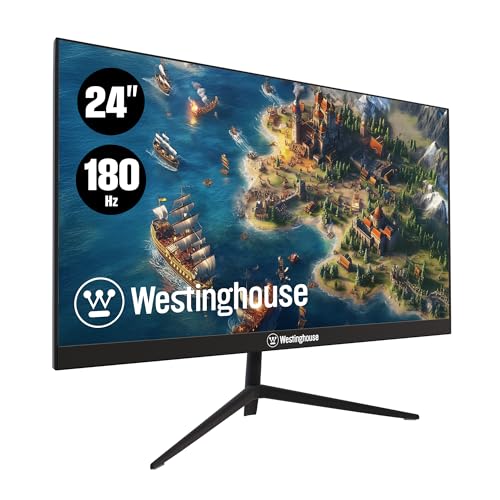
Westinghouse 24 Inch Gaming Monitor, IPS, 180Hz

24 Inch Gaming Monitor, FHD 1080P IPS 100Hz
More Details On Our Top Picks
ArcticPro leans hard into speed, with a 144Hz refresh rate that should feel smoother in fast shooters, racing titles, and quick desktop movement. The 22-inch size keeps it manageable on tighter desks, while the 3-sided frameless look helps the screen feel a bit cleaner without adding bulk.
You also get HDMI, VGA, VESA mount support, and eye care in the mix, so it fits both older towers and tidier wall or arm setups. The honest trade-off is that this one is more about motion and desk efficiency than cinematic size, so it suits a solo gaming corner better than a shared entertainment screen.
Strong Points
- 144Hz suits fast-paced game movement.
- 22-inch footprint works well on small desks.
- 105% sRGB points to lively color for games and general use.
- 4000:1 contrast can help dark scenes look fuller.
- VESA support gives you more mounting flexibility.
Things To Consider
- The 22-inch size feels compact next to 24-inch screens.
- VGA keeps older gear in play, but HDMI is the cleaner route.
- The slim frame is neat, though it does not add extra screen area.
Feature Snapshot
Who It Suits Best
Competitive PC gamers with limited desk space will get the most from this monitor.
A Better Fit Elsewhere
Viewedge 24 Inch Gaming Monitor 1080p 144hz suits you better if you want a larger 24-inch canvas without giving up quick motion handling.
ETiansu goes for a calmer pace than the 144Hz screens above, and that makes sense for casual gaming, schoolwork, or a shared desk. The 22-inch size stays easy to place, while the IPS panel, or in-plane switching panel, is the type people often choose for steadier color and wider viewing angles.
The mix of 99% sRGB, HDMI, VGA, and AMD FreeSync gives it a nicely balanced spec sheet for mixed use. The trade-off is straightforward: 75Hz is fine for everyday play, but it won’t feel as quick as the 100Hz and 144Hz options later in this list.
Upsides
- 99% sRGB is useful for color-conscious browsing, media, and light creative work.
- FreeSync helps smooth out compatible game play.
- HDMI and VGA widen the range of devices you can connect.
- The 22-inch size keeps your setup compact.
Worth Noting
- 75Hz is modest beside the faster gaming options here.
- The panel is more about balance than dramatic punch.
- Older VGA users may like the fallback, though HDMI is the cleaner everyday connection.
Core Details
Who Will Love This
Casual gamers and homework setups benefit most from this easygoing 22-inch monitor.
Swap It Out When
ArcticPro 22 Inch Gaming Monitor 144Hz fits better for you if fast action matters more than extra color coverage.
This Westinghouse feels like the middle ground many desk setups need, because it pairs a 100Hz refresh rate with a 1ms response time. That response time is the panel’s speed in reacting to image changes, and while it does not erase every blur issue, it usually helps motion feel tighter than slower office-first screens.
Built-in speakers, HDR, Adaptive Sync support, HDMI, VGA, and VESA mount support make it flexible in a guest room, small bedroom, or starter gaming desk. The catch is that 22 inches still keeps things modest, so you get convenience first and a little less immersion than the 24-inch picks.
Best Bits
- 100Hz gives you a smoother feel than basic office monitors.
- 1ms response time supports more responsive on-screen movement.
- Built-in speakers cut down on desk clutter.
- Adaptive Sync support is useful with compatible graphics hardware.
- VESA mounting opens up a cleaner desk layout.
Points To Note
- The speaker pair is handy, though dedicated audio still sounds fuller.
- 22 inches stays compact, which may feel small for couch gaming.
- HDR is useful to have, but the viewing experience still depends on the source and settings.
Quick Facts
Built With In Mind
Small-space gamers who still want a flexible feature set should feel at home here.
Look Elsewhere When
Westinghouse 24 Inch Gaming Monitor, IPS, 180Hz gives you more speed headroom and a larger view for serious fast-action play.
Viewedge steps up to a 24-inch frame, and that extra width matters once you want more room for side-by-side windows or a wider gaming view. Its VA panel, short for vertical alignment, usually emphasizes deeper contrast than many budget IPS screens, so dark scenes can feel a bit richer.
That said, the 144Hz refresh rate keeps the monitor squarely in gaming territory, and the 1ms response time adds to the fast-motion appeal. HDMI, VGA, blue light filtering, and wall-mount support round it out, though the larger size makes desk depth more important than it is with the 22-inch options.
Bright Spots
- 24-inch size gives you a roomier view for games and multitasking.
- 144Hz keeps motion looking smoother during quick action.
- 100% sRGB is useful for color-sensitive everyday work.
- Wall-mount support helps free up desk space.
- VA contrast can suit darker game scenes.
Room For Improvement
- The larger panel needs a deeper desk to feel comfortable.
- VA tuning can be a matter of taste for mixed office and gaming use.
- VGA is there, though HDMI is the better everyday connection.
Details At A Glance
Right Fit For
Gamers who want a larger screen without leaving the budget lane should feel drawn to this one.
A Better Fit Elsewhere
ArcticPro 22 Inch Gaming Monitor 144Hz suits you better if your desk is short on depth and you want the same quick-feeling refresh class in a smaller shell.
This renewed AOC lands in a practical lane for shoppers who want a familiar brand shape without chasing extra screen size. The 21.5-inch panel is slightly smaller than the other 22-inch choices, so it can feel especially tidy on a desk that also holds a keyboard, notebook, or work laptop.
Flicker-free operation, FreeSync, blue light filtering, HDMI, VGA, and VESA mounting make it easy to slot into a simple setup. The trade-off is that renewed gear can be a little more dependent on condition and seller handling, so it suits someone who values utility over showroom polish.
Reasons To Buy
- 100Hz keeps everyday motion smoother than basic 60Hz displays.
- 1ms response time supports brisk on-screen action.
- Flicker-free design can feel easier on the eyes during long sessions.
- VESA support lets you mount it and reclaim desk room.
Areas To Watch
- Renewed condition means the exact finish and accessory package can vary.
- 21.5 inches is compact, though some gamers will want a larger view.
- VGA is useful for legacy gear, but HDMI remains the cleaner choice.
Technical Sheet
Whose Shelf It Belongs On
Shoppers who want a smaller, practical gaming monitor with simple placement needs will get the most out of it.
Another Choice May Suit
Westinghouse 22 Inch Computer Monitor is the better fit for you if you want built-in speakers and a slightly more feature-rich setup.
This Westinghouse pushes the speed dial farther than almost everything else here, and the 180Hz refresh rate is the headline reason. In plain terms, you get more frequent image updates, which can help fast movement look smoother in competitive games and high-motion desktop work.
The IPS panel, built-in speakers, 110% sRGB, AMD FreeSync, DisplayPort, and two HDMI inputs make it the most feature-packed screen in the group. The honest catch is that more features can mean more setup choices, so it fits best on a desk where you’ll actually use those extras instead of leaving them idle.
Best Bits
- 180Hz gives this screen serious motion headroom.
- IPS panel helps keep color and viewing angles steady.
- 110% sRGB is appealing for richer-looking visuals.
- DisplayPort plus two HDMI inputs make source switching easier.
- Built-in speakers help keep the desk uncluttered.
Softer Spots
- The long feature list is handy, though setup may take a little more time.
- Built-in speakers are convenient, but separate audio can sound fuller.
- The extra speed matters most for fast-action play, not slow strategy titles.
Feature Rundown
Who Should Grab It
Fast-action gamers and desk users who want a fuller feature set should look closely at this monitor.
Reach For A Different Pick When
Viewedge 24 Inch Gaming Monitor 1080p 144hz is a calmer fit if you want a simpler 24-inch screen without the extra speed focus.
ReHisk keeps the formula straightforward: 24 inches, IPS, 100Hz, and a 3ms response time. That 3ms figure is slower than the 1ms monitors above, but it still lands in a comfortable zone for everyday gaming, streaming, and office work at a shared desk.
HDMI, DisplayPort, built-in speakers, low blue light support, and VESA mount compatibility give it a practical finish. You may find this one especially easy to live with in a laptop dock setup, because it mixes a roomier panel with a simple connection set and doesn’t overcomplicate the desk.
Highlights
- 24-inch screen size gives you useful workspace and a wider play area.
- IPS panel helps keep colors and viewing angles steady.
- 100Hz is a nice step up for casual gaming and smooth scrolling.
- DisplayPort and HDMI support flexible hookups.
- Built-in speakers reduce the need for extra gear.
Minor Gripes
- 3ms is fine for casual use, though faster panels feel snappier in twitch play.
- Built-in speakers are serviceable, but external audio usually sounds better.
- The style is practical rather than flashy, so it suits a clean setup more than a showpiece desk.
Spec Overview
The Right Fit
Gamers who split time between work, streaming, and lighter play will probably find this the easiest screen to live with.
Where A Sibling Pick Shines
Westinghouse 24 Inch Gaming Monitor, IPS, 180Hz is the sharper choice for you if fast competitive play matters more than relaxed everyday use.
How To Choose The Right Cheap Pc Monitors For Gaming
Refresh Rate Comes First
Refresh rate tells you how often the screen redraws each second, and it matters a lot for motion smoothness. A 100Hz or 144Hz monitor usually feels more responsive than a 60Hz office panel, especially in shooters, racers, and fast scrolling through menus.
Higher numbers help, but the sweet spot depends on your hardware and your habits. A modest gaming PC or console setup can still benefit from 75Hz or 100Hz, while 144Hz and 180Hz make more sense for faster play and a machine that can keep up.
Panel Type Shapes The Feel
IPS panels, short for in-plane switching, are usually chosen for steadier color and wider viewing angles. VA, or vertical alignment, often leans into stronger contrast, which can make dark scenes feel deeper.
Neither is wrong for gaming, but the trade-off is real. You may prefer IPS for mixed work and play at a desk, while VA can feel more dramatic for evening games and darker content.
Size And Desk Depth Matter
Twenty-two inches keeps things compact, which helps in dorms, bedroom desks, and shared workstations. Twenty-four inches gives you more room for side-by-side windows and a broader view in games.
The extra screen width also asks for more desk depth, so the bigger choice is not always the easier choice. A smaller monitor can feel like a better fit when your keyboard, mouse, and notebook already fight for space.
Ports, Audio, And Mounting Change Daily Use
HDMI is the connection most setups use first, while VGA still matters for older towers and hand-me-down gear. DisplayPort can be useful on gaming PCs, especially when you want a cleaner high-refresh connection.
Built-in speakers save space, but they rarely replace dedicated audio. VESA mounting, the standard hole pattern used for arms and wall mounts, gives you more control over desk layout and helps a compact setup feel less crowded.
What To Weigh Before You Buy
Common Shopping Slip Ups
Many people focus on refresh rate alone and ignore size, panel type, or the ports they actually need. That leads to a screen that looks fast on paper but feels awkward on the desk.
Another common miss is treating built-in speakers as a full audio solution. They’re handy for a simple setup, but separate speakers or headphones usually sound better for long gaming sessions.
What The Higher Tier Buys
More expensive models often spend the extra money on faster refresh rates, larger panels, better contrast tuning, and more flexible input options. You also tend to see features such as multiple HDMI ports, DisplayPort, speaker integration, and stronger color coverage.
That upgrade makes sense for someone who plays fast-paced titles often or wants one monitor to handle work and entertainment. For casual gaming on a modest desk, a simpler 100Hz or 75Hz screen can still feel like the sensible choice.
Frequently Asked Questions
Is 75Hz enough for gaming?
Yes, 75Hz works fine for casual play and everyday use. You’ll notice a jump from basic 60Hz, even though faster screens feel smoother.
Do 22-inch monitors feel too small?
Not for tight desks or solo setups. They can feel just right when you want a compact footprint and less screen crowding.
What does FreeSync do?
FreeSync helps match monitor timing to compatible graphics output, which can reduce visible tearing. It’s most useful when your PC or console supports it.
Should you choose IPS or VA for gaming?
IPS usually suits mixed use because color and viewing angles stay more even. VA can be appealing for stronger contrast in darker scenes.
Are built-in speakers worth it?
They’re useful for a clean desk and quick setup. Separate audio usually gives you fuller sound, so speakers inside the monitor are a convenience feature first.
