
Claw grip mouse shape matters more than many people expect, especially during long sessions in FPS, MMO, or everyday desk work. A shell that fits your hand well can ease fingertip strain, keep lift-offs cleaner, and make quick corrections feel more natural. The eight picks below focus on size, weight, button layout, and sensor detail, so you can match a mouse to your hand and play style without guessing.
The Shortlist At A Glance

Corsair IRONCLAW Wireless SE Gaming Mouse Black 26,000 DPI

Bloody V7 Ergonomic Claw Grip Gaming Mouse Rubberized Black Coating
MCHOSE L7 Ultra+ Wireless Gaming Mouse Lightweight 48g

ENDGAME GEAR OP1w 4k v2 Wireless Gaming Mouse Lightweight
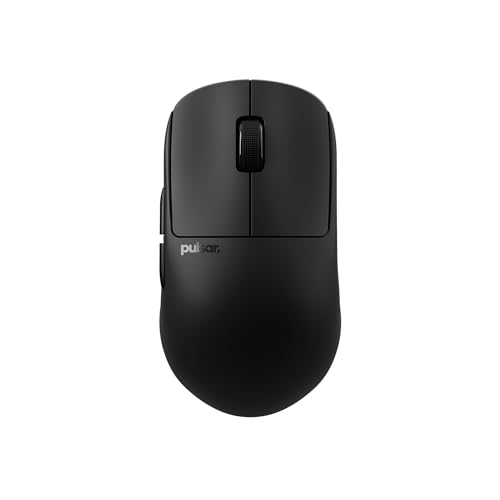
Pulsar Gaming Gears X2H Crazylight Wireless Gaming Mouse Medium
V8 Gaming Mouse Ultra-Lightweight 36g±3g Symmetrical Shape
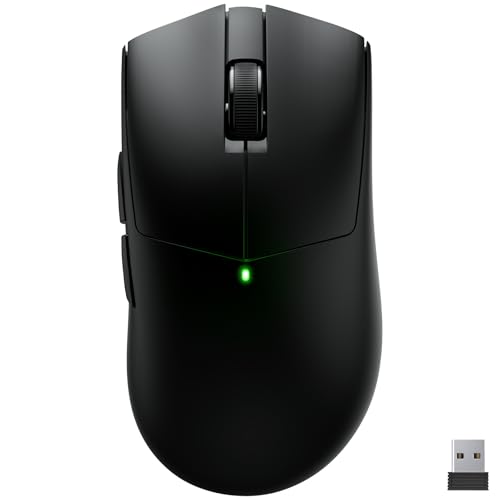
Claw Wireless Gaming Mouse Ergonomic Mouse 55g 26000 DPI

Keychron G3 8K Carbon Fiber Wireless Gaming Mouse 30000 DPI
More Details On Our Top Picks
Large-hand claw grip users usually notice the IRONCLAW shape first, because it gives your palm more room than the slimmer models later in this list. Ten programmable buttons also make it friendly for MMO hotkeys or productivity shortcuts, though that same button count can feel busy during a very simple desktop routine.
The 26,000 DPI ceiling is more than enough headroom for fast pointer movement, but the real value is how the ergonomic shell supports steadier hand placement. You may prefer a lighter shell like the MCHOSE L7 Ultra+ or V8 for pure speed, yet this Corsair feels better suited to people who want control before all else.
Strong Points
- Ergonomic body gives larger hands a calmer grip position.
- Ten buttons suit games with dense key bindings.
- Wireless use keeps the desk clear of cable drag.
- High DPI range leaves room for fast cursor tuning.
Things To Consider
- The fuller shape can feel bulky beside lower-profile claw mice.
- Ten controls take a little time to memorize.
- Cleaning around extra buttons needs a bit more attention.
Core Details
Who It Suits Best
Players with larger hands who split time between MMO layouts and general desktop work fit this mouse especially well.
A Better Fit Elsewhere
MCHOSE L7 Ultra+ Wireless Gaming Mouse Lightweight 48g suits you better when you want a much lighter shell for faster flicks.
The Bloody V7 keeps things straightforward, which suits desk-heavy users who want macros without a lot of fuss. Its rubberized coating should help with grip during longer sessions, and the classic wired shape makes it feel familiar rather than experimental, a little like a dependable workhorse.
Compared with the more modern ultra-light picks here, this one leans into button access and software tuning instead of weight savings. You may appreciate that balance for browsing, office work, or older game libraries, though the 3200 DPI ceiling is modest next to the higher-resolution mice in this roundup.
What We Like
- Rubberized finish helps your fingers hold steady.
- Eight programmable buttons support macros and shortcuts.
- Report rate settings let you tune responsiveness.
- Next and previous buttons help in browsers and document work.
Room For Improvement
- The sensor range sits well below the most advanced picks here.
- Wired use keeps cable management in the picture.
- Software tuning adds a little setup time.
Feature Rundown
Who Will Love This
Macrobased desk users and casual gamers who value control over flash should feel at home here.
Another Choice May Suit
Keychron G3 8K Carbon Fiber Wireless Gaming Mouse 30000 DPI fits you better when a newer wireless feature set matters more than a classic wired shape.
At 48 grams, the L7 Ultra+ lands in the kind of weight class that helps quick aim adjustments feel less effortful. The PAW3950 sensor, optical switch, and dual 8K polling support speak to a very modern spec sheet, so this pick makes the most sense for players who care about response feel first.
Compared with the Corsair IRONCLAW, it gives up bulk and hand-filling comfort in exchange for speed and a more agile lift. The honest read is that this suits competitive sessions better than relaxed all-day office work, especially for people who already know they like a lighter mouse.
Highlights
- 48-gram body keeps the mouse extremely easy to move.
- 42K DPI gives you wide sensitivity range.
- Dual 8K polling targets very fast signal updates.
- Seven programmable buttons help with game-specific setups.
- Three connection modes add flexibility across devices.
Softer Spots
- Very light shells can feel twitchy in slower, spreadsheet-heavy work.
- The smaller weight class may not suit larger hands as well as the IRONCLAW.
- Extra tuning options can take time to sort out.
Quick Facts
Best Suited To
Competitive players and aim-trainers who want a very light wireless mouse fit this model well.
Look Elsewhere When
Pulsar Gaming Gears X2H Crazylight Wireless Gaming Mouse Medium suits you better when you want a similar lightweight feel with a more relaxed claw profile.
The OP1w 4k v2 is built around claw grip behavior rather than trying to be all things to all hands. Its 30K DPI sensor, 4000Hz polling, and hot-swap switches point toward a serious esports tilt, while the Dark Frost finish gives it a restrained look that feels more mature than flashy.
That sharper focus comes with a trade-off, because the shape and feature set are less about comfort padding and more about precision. Compared with the Pulsar X2H, this one feels more tuned for players who want a crisp, responsive shell and do not mind spending time dialing in switch feel.
Upsides
- Claw-specific shape should feel natural to dedicated grip users.
- Hot-swap switches let you change feel without replacing the whole mouse.
- 4000Hz polling supports very responsive cursor updates.
- Wireless design keeps movement clean on crowded desks.
Points To Note
- The shape is specialized, so it may feel narrow for broader grips.
- Hot-swap hardware adds a bit of setup curiosity.
- Fine sensor tuning matters more here than on simple plug-and-play mice.
At A Glance
Right Fit For
Claw grip players who like a focused esports shape and enjoy tailoring click feel should like this one.
Where A Sibling Pick Shines
MCHOSE L7 Ultra+ Wireless Gaming Mouse Lightweight 48g suits you better if you want a lighter shell and broader wireless feature spread.
The X2H Crazylight leans into a relaxed claw shape, which is exactly why it stands apart from the more aggressive feel of the ENDGAME GEAR model. The inward sides and back-aggressive hump help your hand settle into place, and that medium size should suit many people who want control without a bulky body.
At 43 grams, it sits in the very light category without sounding fragile on paper, though the trade-off is that some hands will want a little more width. For most desk setups, this is the sort of mouse that disappears under your fingers in a good way, as long as you already prefer claw over palm.
Reasons To Buy
- 43-gram weight makes fast movement feel easy.
- Relaxed claw shape supports a natural hover grip.
- Inward sides help with steadier finger placement.
- Medium sizing gives it a broad comfort zone.
Minor Gripes
- The light body may feel a little too airy for some users.
- Dedicated palm grip users will probably want a fuller shell.
- Lightweight finishes often need regular wiping to stay clean.
Details At A Glance
Whose Shelf It Belongs On
Claw grip users with medium hands who want a very light mouse fit this model especially well.
Swap It Out When
ENDGAME GEAR OP1w 4k v2 Wireless Gaming Mouse Lightweight makes more sense when you want a tighter esports focus and hot-swap switch tuning.
The V8 goes even lighter than the Pulsar, and that 36g±3g figure is the kind of thing that can change how quickly the mouse rises and resets between shots. Kailh optical switches, the Nordic 52840 MCU, and the PAW3950 chip show a focus on signal handling rather than decorative extras, which is refreshing.
This mouse makes a strong case for claw and fingertip users who want a stripped-back shape with serious internals. The trade-off is obvious enough, because very light shells ask you to bring your own steadiness, and the web-based driver setup sounds convenient but still means a little configuration time.
Positives
- 36g class weight gives a barely-there feel.
- Symmetrical shape works across claw and fingertip grips.
- Kailh optical switches point toward crisp click response.
- PAW3950 and Nordic controller suggest a modern internal layout.
- Eight kilohertz dongle support suits users chasing very quick response.
Areas To Watch
- Ultra-light shells can feel jumpy until your hand adapts.
- The minimal shape may not comfort larger palms for long sessions.
- Web-based setup can mean another browser tab before you start.
Feature Card
Made For
Claw and fingertip players who want a featherweight mouse with modern internals fit this pick best.
Reach For A Different Pick When
Corsair IRONCLAW Wireless SE Gaming Mouse Black 26,000 DPI suits you better when comfort for larger hands matters more than ultra-low weight.
The Burstiger model keeps the formula direct, which works nicely for desk setups where you want a claw-ready shape without a lot of extra bulk. At 55 grams, it sits between the heavier ergonomic picks and the ultra-light featherweights, so the feel should be familiar to many people.
The PAW3395 sensor, 26000 DPI ceiling, and 300 mAh battery give it a balanced spec set for laptop, PC, or Mac use. The honest read is that it looks like the safest middle-ground mouse in this group, especially for people who want a simple wireless shape and do not need a deep pile of extras.
Best Bits
- 55g weight keeps the feel light without going extreme.
- Five programmable buttons cover the basics cleanly.
- PAW3395 sensor brings a well-known high-performance track record.
- Works across laptop, PC, and Mac setups.
Small Caveats
- Five buttons leave less macro space than some rivals.
- The battery spec is modest beside the more endurance-focused Keychron.
- Rubberless surfaces usually need regular wiping to stay grippy.
Feature Snapshot
The Right Fit
Multi-device desk users who want a simple wireless claw grip mouse should feel comfortable here.
Skip It When
Pulsar Gaming Gears X2H Crazylight Wireless Gaming Mouse Medium is the better call when you want a lighter shell with a more specialized claw posture.
The G3 8K has the kind of feature stack that tends to appeal to people who want one mouse for several setups. Carbon fiber in the shell, wired and wireless options, Bluetooth 2.4GHz support, and Windows, Mac, and Linux compatibility make it feel broad rather than narrow.
Compared with the simpler Burstiger mouse, this one asks more of your budget but gives back more versatility, especially for mixed-device desks or people who like to tinker. You may find the 47g±3g weight light enough for claw grip control without feeling as stripped down as the V8, which gives it a nice middle lane.
Positives
- Carbon fiber shell adds a premium material note.
- Three connection modes help across desktop and travel use.
- 160-hour battery rating is strong for long stretches away from a charger.
- Five programmable buttons cover common gaming and work binds.
- 47g±3g weight stays friendly for quick hand movement.
Worth Noting
- The broader feature set brings more setup choices than a basic mouse.
- Five buttons may feel modest beside heavier macro-focused models.
- Multi-mode mice often need a little profile management to stay organized.
Core Details
Built With In Mind
Power users who bounce between systems and want a lighter, more versatile mouse will get the most from this one.
Where Another Pick Suits Better
Bloody V7 Ergonomic Claw Grip Gaming Mouse Rubberized Black Coating makes more sense if you want a simpler wired setup with more direct macro control.
How To Choose The Right Claw Grip Mices
Shape Comes First
Claw grip mice reward a shell that lets your fingers arch without forcing your palm flat against the back. A hump that sits too far forward or a body that runs too long can push your hand out of the posture you want, especially during quick aim resets.
The safe rule is simple: shorter, more controlled shells usually suit claw better than wide ergonomic bodies. The Corsair IRONCLAW bends that rule for larger hands, while the V8 and ENDGAME GEAR OP1w 4k v2 lean harder into shape precision.
Weight Changes The Feel More Than Specs Suggest
Weight matters because claw grip usually depends on frequent lift-offs and small wrist corrections. A 43g or 48g mouse feels very different from a 55g or full-size ergonomic model once your session runs long.
Ultra-light designs help speed and reduce fatigue, but they can feel twitchier on a crowded desk or in slower productivity work. Heavier picks like the Bloody V7 stay calmer and may suit mixed use better.
Buttons And Sensor Tuning Should Match Your Habit
Programmable buttons matter most when your games or work habits lean on macros, weapon swaps, or browser shortcuts. More buttons can help, yet they also add learning time and extra cleaning around the shell.
Sensor ceiling matters too, but high DPI numbers only help when the shape and weight already feel right. The better question is whether you want a simple, stable cursor or a more adjustable setup with polling control and software options.
Connection Style And Battery Life Shape Daily Use
Wireless freedom is great for a clean desk, while wired mice remove charging anxiety. Multi-mode models like the Keychron G3 8K help the most when you switch between a laptop, a desktop, and travel work.
Battery life matters most for people who dislike thinking about charging habits. For a dedicated gaming desk, a lighter wireless shell often makes more sense than a long-endurance design with extra connection modes.
What To Weigh Before You Commit
Common Shopping Slip Ups
A lot of people chase DPI first and shape second, which usually leads to a mouse that sounds impressive but feels awkward in hand. Claw grip rewards geometry, hump placement, and button reach more than raw number chasing.
Another common miss is picking a shell that matches a favorite game but not your actual desk life. A competitive mouse can feel tiring during office work, and a macro-heavy shape can feel cluttered in fast aim play.
The Case For Spending Up
Higher-tier mice usually spend more on sensors, switches, lighter shells, and more advanced wireless support. Those changes matter most when you notice small differences in click feel, tracking smoothness, or hand fatigue.
That extra cost makes sense for regular players, streamers, and anyone who uses the same mouse for games and long desktop sessions. For casual use, a midrange model like the Burstiger or Bloody V7 often covers the basics without asking for the premium jump.
Closing Thoughts
Your best claw grip mouse depends less on brand polish and more on how your hand meets the shell. Larger hands usually lean toward the Corsair IRONCLAW, speed-focused players may prefer the MCHOSE L7 Ultra+ or V8, and balanced everyday setups fit nicely with the Burstiger or Keychron G3 8K. The right choice should feel like a natural extension of your grip, not a gadget you keep adjusting every hour.
