
Compact PC cases ask for a little more planning, but they pay you back with a cleaner desk and a setup that feels less bulky in a home office or gaming corner. This roundup focuses on ATX and Micro-ATX cases that balance airflow, GPU room, radiator support, and everyday cable routing without turning your build into a puzzle. You’ll also see where a case keeps things simple and where the trade-offs start to show, especially for glass-heavy designs and smaller internal layouts.
Some picks suit builders who want maximum fan room, while others make sense for smaller rooms, cleaner-looking towers, or easy-access interiors. That mix matters, because the right case for a high-watt graphics card is not always the same one that works best for a neat, low-maintenance build.
Quick Look At The Shortlist

Montech XR Panoramic ATX Case

DARKROCK EC2 ATX Mid Tower
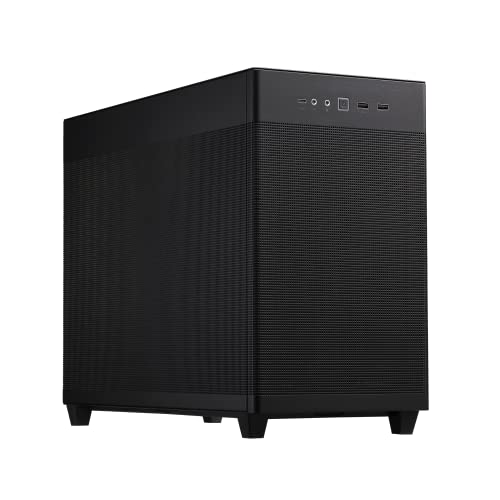
ASUS Prime AP201 Micro ATX Case

LIAN LI LANCOOL 207 Compact ATX Case

Thermaltake View 170 TG ARGB Black Micro-ATX Case
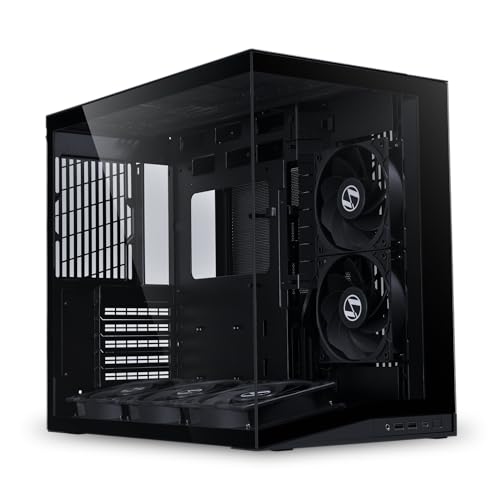
Lian Li O11D MINI V2 Flow ATX Mid-Tower Case
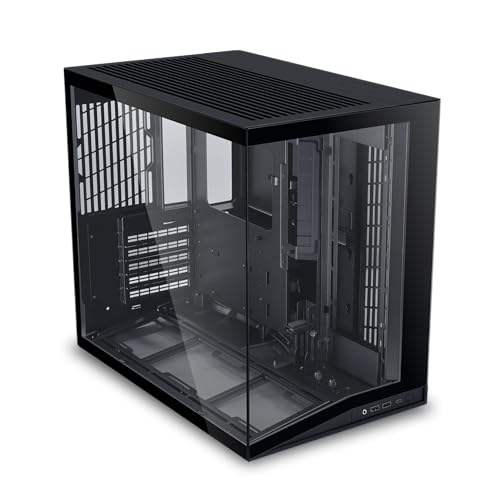
LIAN LI O11D MINI V2 ATX Mid-Tower Case
Lian Li A3-mATX 26.3L Micro Form Factor Case
More Details On Our Top Picks
Montech gives you the kind of roomy ATX shell that makes a high-airflow build feel straightforward, not cramped. The panoramic tempered-glass layout suits someone who wants to see the components, while the magnetic dust filters and reverse-blade fans point to a case built for a lived-in desk, not just a photoshoot.
In a gaming room or shared office, the 420mm graphics-card allowance and 360mm radiator support give you breathing room for larger parts. The trade-off is the glass-forward style, which asks a bit more of your cable routing and regular dust care, so tidy builders usually get the best result.
What We Like
- Three included ARGB PWM fans help you start with a usable airflow setup.
- 420mm graphics-card clearance leaves space for many large modern cards.
- 360mm radiator support suits larger liquid-cooling layouts.
- Dual tempered-glass panels give the build a clean showcase look.
- Magnetic dust filters make routine cleaning less fussy.
Small Caveats
- The glass-heavy style shows cable mess more clearly than a steel-front case.
- Fan-heavy layouts can ask for more planning than simpler mid-towers.
- Owners who move hardware often may prefer something lighter.
Feature Snapshot
Who It Suits Best
You’ll get the most from this case if you want a showpiece ATX build with strong cooling headroom and you don’t mind spending a little extra time on cable cleanup.
A Better Fit Elsewhere
DARKROCK EC2 ATX Mid Tower is the simpler match for a first gaming tower, since it keeps the feature set lighter and easier to sort out.
Compared with the Montech XR, the DARKROCK EC2 keeps the idea more straightforward, which is often exactly what a first-time builder wants. Type-C readiness and the tempered-glass side panel give it a modern feel without piling on too many moving parts.
The one pre-installed fan means you can get moving without an empty shell, and the support for up to eight 120mm fans gives you room to scale later. For a daily gaming PC in a bedroom or small den, that mix makes sense, though you’ll want to plan your final fan layout instead of assuming the cooling picture is done for you.
Highlights
- One included fan helps you start from a workable baseline.
- Support for up to eight 120mm fans allows a layered cooling plan.
- 360mm radiator support fits larger cooling hardware.
- Type-C readiness suits newer peripherals and front-panel use.
- Tempered-glass side viewing keeps the look clean and current.
Points To Note
- One included fan leaves more setup work than fan-rich cases.
- Glass side panels usually reward careful cable routing.
- Large fan counts can add noise and wiring complexity.
Core Details
Who Will Love This
It suits a gaming setup where you want modern front-panel support and the freedom to add cooling later without jumping into a more complex showcase case.
Another Choice May Suit
ASUS Prime AP201 Micro ATX PC Case works better for someone who wants a smaller footprint and easier access through tool-free side panels.
The AP201 feels built for someone who wants a smaller tower without giving up sensible hardware room. Mesh side panels help the case breathe, and the tool-free sides are a real convenience during upgrades, especially in a setup you open often.
Because it supports a 360mm radiator, a 338mm graphics card, and an ATX power supply, the size stays compact without turning restrictive too early. That balance is the appeal, though the Micro-ATX shape means you’ll want to plan the board choice carefully rather than assuming every full-size part belongs here.
Positives
- Compact SFF-ready shape works well on tighter desks.
- Mesh panels support a more breathable airflow path.
- Tool-free side access makes upgrades less tedious.
- 360mm radiator support broadens cooling options.
- ATX PSU compatibility helps reuse parts from older builds.
Areas To Watch
- Micro-ATX sizing asks for more careful part selection.
- The smaller frame can feel less forgiving than full ATX towers during cable routing.
- Owners with oversized expansion plans may outgrow it faster.
Details At A Glance
Built With In Mind
It fits compact workstation or gaming builds where space is tight, but you still want a clean interior and enough room for sensible cooling.
Where A Sibling Pick Shines
Lian Li A3-mATX Computer Case suits the builder who wants an even smaller 26.3L footprint and is comfortable doing more of the cooling planning from scratch.
After the tighter AP201, the LANCOOL 207 opens things up again with a more familiar ATX layout and RGB styling. It feels aimed at someone who wants a practical gaming tower that still looks deliberate on a desk or shelf.
The black finish keeps the look simple, and the case style should suit builders who want airflow-friendly design without piling on extra complexity. The honest trade-off is that you’re paying for polish and layout refinement more than a bare-bones shell, so it makes the most sense for a build that’s meant to stay put and look finished.
Best Bits
- Compact ATX sizing keeps the footprint manageable.
- RGB styling gives you a cleaner showcase feel.
- The layout suits a gaming build that stays put.
- Black finish pairs easily with most component colors.
Worth Noting
- RGB styling adds visual interest, but not every desk needs it.
- The case focuses more on presentation than minimalism.
- Owners wanting a simpler look may prefer a plainer tower.
Quick Facts
Who Should Grab It
It fits gamers who want a cleaner-looking ATX build with a compact footprint and a bit of visual flair.
Look Elsewhere When
Thermaltake View 170 TG ARGB makes more sense for someone who wants a glass-forward Micro-ATX frame with three included fans.
Thermaltake pushes harder on presentation than the darker, simpler cases above, and that suits a visible build in a bedroom or studio. Front and side tempered-glass panels give you a lot of viewing space, while the three included 120mm ARGB fans make the case feel ready from day one.
The 280mm radiator support keeps it flexible for many cooling layouts, though it stops short of the larger 360mm class seen in the Montech XR and DARKROCK EC2. For someone building a compact Micro-ATX showcase, that’s a fair trade, especially since the three-year warranty is a useful ownership detail.
Standout Traits
- Three included ARGB fans give you a strong starting point.
- Front and side glass make the build easy to show off.
- 280mm radiator support covers many mainstream liquid-cooling setups.
- Micro-ATX sizing keeps the case from feeling oversized.
- Three-year warranty adds useful long-range reassurance.
Softer Spots
- 280mm radiator support is smaller than the 360mm space found on several larger cases here.
- Glass panels usually call for more frequent dust attention.
- Micro-ATX layout gives you less expansion room than ATX towers.
Core Details
Whose Shelf It Belongs On
It suits a compact showcase build where you want strong visual presence and enough cooling room for a normal gaming or creative setup.
Swap It Out When
Montech XR Panoramic High Airflow ATX PC Case is the better call for someone who wants a larger ATX chassis with more radiator room and bigger GPU clearance.
The O11D MINI V2 Flow takes the showpiece idea from the Lian Li lineup and leans harder into airflow, which is useful for warm-running gaming parts or a dense workstation load. Five included 120mm reverse-blade fans give you a strong starting point, and the cable management focus helps the panoramic design look intentional instead of busy.
That extra fan package is the main reason this case stands apart from the simpler Lian Li O11D MINI V2 ATX version below. You give up a little minimalism, but the payoff is easier cooling planning for a high-output build that stays under one roof all day.
Strong Points
- Five included 120mm reverse-blade fans create a strong airflow foundation.
- Panoramic styling works well for visible component layouts.
- Cable management support helps the build look cleaner.
- ATX mid-tower size gives you familiar building space.
- Airflow focus suits hotter hardware loads.
Trade Offs
- More included fans can mean more wiring to sort out.
- The panoramic layout rewards tidy component placement.
- Showcase styling usually asks for more dust care than a plain steel box.
Feature Rundown
Best Suited To
You’ll appreciate this case most if you want a display-friendly ATX build that still puts airflow at the center of the plan.
Reach For A Different Pick When
LIAN LI O11D MINI V2 ATX Mid-Tower PC Case suits someone who wants the same general family look but without the preinstalled fan bundle.
This version trims back the bundle feel and focuses on layout clarity, which many tidy builders will prefer. Panoramic viewing, fully ventilated airflow, and a pillar-less design make it easier to show off hardware without fighting a visual obstruction in the middle of the case.
The adjustable I/O also helps the case adapt to different desk setups, and the cable management emphasis should suit someone who likes a clean finish. Compared with the Flow model just above, this one is the calmer choice, especially for builders who already have their own fan plan.
Upsides
- Pillar-less viewing keeps the interior open and easy to see.
- Fully ventilated airflow supports practical cooling planning.
- Adjustable I/O helps the case fit different desk positions.
- Cable management support keeps visible clutter under control.
Minor Gripes
- Less bundled hardware means you’ll source more parts on your own.
- The open viewing style rewards neat assembly.
- Shoppers wanting an all-in cooling start may prefer the Flow version.
Feature Card
The Right Fit
It suits a builder who already knows the fan and cooling plan and wants a clean-looking ATX chassis with flexible front access.
Where A Sibling Pick Shines
Lian Li O11D MINI V2 Flow ATX Mid-Tower Case works better for someone who wants the fan bundle included rather than sourcing it separately.
The A3-mATX takes the compact idea farther than the AP201, with a 26.3L micro form factor that rewards careful part planning. No fans are included, so the case works best for someone who wants to choose every cooling part personally and keep the interior as intentional as possible.
Support for 360mm AIO layouts and both M-ATX and ITX motherboards gives you a lot of flexibility for a tiny enclosure. The DAN collaboration also hints at a design-first approach, though that means the final result depends more on your part selection than on what arrives in the box.
What We Like
- 26.3L size keeps the footprint very small.
- 360mm AIO support gives you strong cooling flexibility for the class.
- M-ATX and ITX support broadens motherboard choice.
- Modular design suits builders who like to plan each part carefully.
Room For Improvement
- No included fans means you need to budget for the cooling setup separately.
- The compact shell asks for more patience during assembly.
- Small-form-factor layouts are less forgiving with cable length and component size.
Technical Sheet
Made For
It fits compact-build hobbyists who want a very small case and don’t mind planning airflow and parts with more care.
Skip It When
ASUS Prime AP201 Micro ATX Case is the easier route for someone who wants a compact build with a more forgiving interior and a preinstalled fan.
How To Choose The Right Compact Atx Cases
Size Versus Hardware Headroom
Compact ATX cases still need enough room for your graphics card, CPU cooler, and power supply, so the first check is physical fit, not style. A case like the Montech XR gives you much more GPU breathing room than the Lian Li A3-mATX, while the AP201 sits in the middle with a smaller footprint and real cooling support.
You should think in terms of the parts already on your shortlist, not the parts you hope to buy later. That keeps you from ending up with a pretty case that makes cable routing and radiator placement harder than they should be.
Airflow, Fans, And Cooling Layout
Fan support matters because compact cases have less empty space to recover from weak airflow. A model that includes multiple fans, such as the Montech XR or Lian Li O11D MINI V2 Flow, gives you a stronger starting point than a bare shell, especially in warm rooms or gaming setups that run for hours.
Radiator support matters too, and 360mm support gives you more flexibility than 280mm when you want a larger liquid-cooling loop. The trade-off is usually price, noise potential, and more installation time, so extra cooling hardware only makes sense when your components truly need it.
Access, Cable Routing, And Daily Use
Tool-free panels, pillar-less interiors, and adjustable I/O make a case easier to live with after the first build is done. That matters more than many people expect, because a clean-looking tower can turn irritating fast if every dust clean or SSD swap takes too long.
For a desk-side system, simple access often matters more than flashy lighting. The ASUS Prime AP201 and the LIAN LI O11D MINI V2 ATX case both lean toward easier handling, while the glass-heavy Thermaltake View 170 asks for a neater finish and a bit more maintenance.
Things Worth Knowing First
Common Shopping Slip Ups
One common mistake is focusing on exterior size and forgetting internal clearance. A compact tower can still reject a long graphics card or a tall radiator, so the dimensions around the board area matter more than the marketing label.
Another slip-up is overbuying glass and lighting for a build that sits under a desk. Clean lines help, but practical access and airflow usually matter more once the PC is in daily use.
What The Higher Tier Buys
More expensive cases in this group usually bring stronger materials, more included fans, better airflow paths, and easier assembly details. You also tend to get cleaner cable management options, which is handy in a showcase-style case where clutter shows quickly.
The upgrade makes sense for a high-end graphics card, a hotter workstation, or a setup you plan to keep for years. A simpler case can still work well, though the more polished models reduce the little annoyances that show up after the first month.
Frequently Asked Questions
What makes a case “compact” without going too small?
Compact cases reduce wasted space, but they still need room for the board, cooler, and cable bends. A good compact ATX case keeps the footprint reasonable without forcing awkward part choices.
Do you need included fans?
Included fans save you from starting with an empty shell, which helps in hotter rooms or first builds. They are not mandatory, but they do make the first setup easier.
Is Micro-ATX enough for gaming?
Yes, Micro-ATX can handle a strong gaming build when the case supports the graphics card and cooling you need. The main compromise is expansion space, not basic performance.
Why do some compact cases cost more?
More refined layouts, sturdier panels, and bundled cooling usually push the price upward. Those extras matter most when you want a polished interior and less assembly hassle.
What should you check before ordering?
Check GPU length, radiator size, motherboard format, and the power-supply fit listed for the case. Those four points prevent the most common mismatch problems.
Closing Thoughts
The best compact ATX case for you depends on the kind of build you want to live with every day. The Montech XR and Lian Li O11D MINI V2 Flow lean hard into cooling, the ASUS AP201 keeps things small and practical, and the Lian Li A3-mATX goes even further for tiny setups. For a cleaner middle ground, the LANCOOL 207 and DARKROCK EC2 make sense. Choose the case that matches your parts, your desk space, and how much assembly work you want to take on.
