
Compact Mini-ITX cases reward careful planning. You care about airflow, cable room, power-supply fit, and whether the frame can handle a daily desk setup without becoming a puzzle every time you open it. The right case can feel like a well-cut jacket, tidy where it needs to be and roomy enough where it counts. This roundup focuses on options that make sense for gaming rigs, home offices, and small-space builds.
Quick Look At The Shortlist
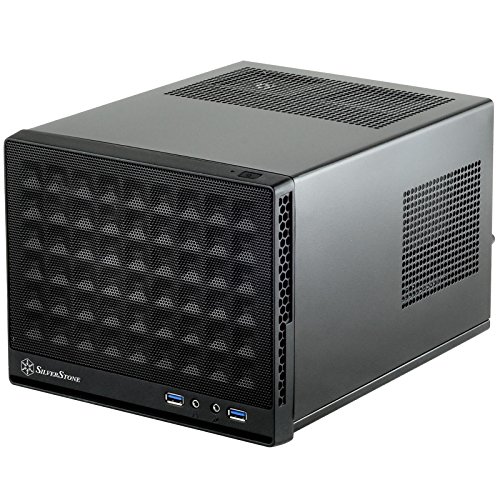
SilverStone SG13B-USA Mesh Front Panel

JONSBO/JONSPLUS Z20 Black Micro-ATX Mini Tower PC Case
TGDGAMER MATX Micro ATX Slim Case
KXRORS S300 Mini-ITX PC Gaming Case
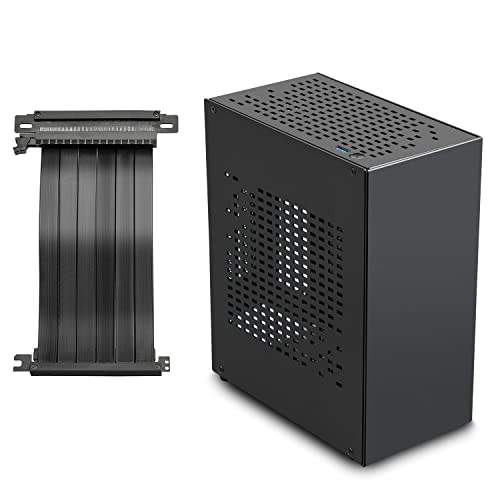
JOYJOM Aluminum Mini ITX Case PCIe 3.0 Riser

NZXT H2 Flow Mini-ITX 20.7L Airflow PC Case

SGPC K39 5L Mini ITX Case White Standard Edition

Vetroo M06 Pink Micro-ATX/Mini-ITX Mid Tower Gaming PC Case
More Details On Our Top Picks
SilverStone keeps this one focused on size and airflow, which matters in a cramped desk setup or a living-room PC that needs to stay out of the way. The mesh front helps the case breathe better than a closed face, though that usually means you’ll want to think a little harder about dust care and fan choice.
Compared with the more spacious JONSBO Z20 later in this list, the SG13B-USA asks more of your parts selection but gives back a smaller footprint. It suits compact gaming builds, simple office systems, and anyone who wants a no-nonsense shell instead of extra styling.
Strong Points
- Mesh front panel supports front-to-back airflow.
- Very small footprint helps on crowded desks.
- Simple layout keeps the build approach straightforward.
- Works well for a low-profile everyday setup.
Things To Consider
- Tighter interiors leave less room for bulky parts.
- Mesh surfaces can ask for more regular dust care.
- Part choice matters more than in larger cases.
Feature Snapshot
Who It Suits Best
Compact system builders who want a very small footprint with straightforward airflow planning fit this case well.
Where A Sibling Pick Shines
JONSBO/JONSPLUS Z20 is the better match for you if a carrying handle and extra interior breathing room matter more than going as small as possible.
The Z20 leans into portability without looking bare-bones, and the detachable handle is the detail that makes it feel thought through for move-around builds. In a home office that doubles as a gaming corner, that kind of carry-friendly hardware can save you a lot of awkward lifting.
It differs from the SilverStone SG13B-USA by giving you a little more breathing room and a broader hardware target, including support for a 240 AIO and a 160 mm cooler. That makes it a smart step up for hobbyists who want a compact tower that still feels closer to a full desktop experience.
What We Like
- Detachable handle makes transport less awkward.
- Supports a 240 mm AIO for broader cooling setups.
- Fits a 160 mm cooler, which opens up more air-cooling options.
- Mini tower shape still stays manageable on a desk.
- Useful for builders who move their system around often.
Room For Improvement
- Mini tower sizing is larger than the smallest ITX shells here.
- Handle hardware may matter less for stationary setups.
- More interior room usually means a slightly bigger desk presence.
Core Details
Built With In Mind
Desk users who want a portable tower that still leaves room for more capable cooling will get the most from this design.
A Better Fit Elsewhere
SGPC K39 5L is a better match for you if true ultra-compact carry size matters more than cooling flexibility.
This slim TGDGAMER case is built around airflow first, and the included 80 mm fan helps it feel ready for a modest gaming or office machine right away. The trade-off is obvious, though, because a slim chassis tends to ask more from component selection and cable discipline.
Compared with the JONSBO Z20, it is less about carrying convenience and more about keeping a narrow profile while still accepting mini-ITX and ATX power support. That mix suits a desk where depth is tight, yet you still want a system that doesn’t feel stripped down.
Upsides
- Airflow-forward layout suits warmer desktop builds.
- Included 80 mm fan gives you a starting point.
- Supports mini-ITX and ATX power supply pairing.
- USB 3.0 front port adds useful everyday access.
Softer Spots
- Slim cases can make internal routing more careful.
- Cooling headroom depends heavily on part choices.
- Less spacious than the fuller towers in this roundup.
Technical Sheet
Right Fit For
Practical desk builders who want a slim case with simple front access and broad power-supply compatibility will appreciate it.
Look Elsewhere When
KXRORS S300 makes more sense for you if Type-C front access and a more enclosure-like gaming layout matter more than a slim chassis.
KXRORS shapes the S300 around a front panel that feels more modern for daily use, especially thanks to the Type-C port and USB 3.0 connection. The cable-management system is the part that stands out for anyone who has lived with a cramped build and knows how fast a small case can turn messy.
Against the slimmer TGDGAMER case, the S300 reads as a more polished choice for compact gaming builds that still need decent front access. The catch is that it works best with an SFX power supply sized around 100 to 130 mm, so the parts list needs a bit of planning.
Highlights
- Front Type-C port adds convenient modern connectivity.
- Cable-management system helps the interior stay tidier.
- Built for a portable mini-ITX gaming setup.
- SFX power supply support fits compact hardware planning.
Areas To Watch
- SFX power supply sizing narrows your options.
- Mini-ITX layouts still demand careful component selection.
- Small-case cleaning can take a little extra patience.
Details At A Glance
The Right Fit
Compact gaming builders who want front-panel convenience and cleaner cable routing will find the S300 easy to appreciate.
Another Choice May Suit
SilverStone SG13B-USA is the better fit for you if a smaller shell matters more than Type-C and cable-management extras.
The JOYJOM case leans into aluminum construction, which usually gives a build a cleaner, more refined feel on a desk. Its PCIe 3.0 riser is the key piece here, because a riser cable relocates the graphics card connection and helps compact layouts work in a flatter or tighter arrangement.
That sets it apart from the KXRORS S300, which is more about front-panel practicality than presentation. You may find this JOYJOM option especially appealing for a showcase-style small form factor system where finish and internal layout matter as much as sheer size.
Best Bits
- Aluminum body gives the case a more premium material feel.
- PCIe 3.0 riser supports a compact internal layout.
- Well suited to small showpiece builds on a desk.
- Small form factor design keeps the footprint controlled.
Minor Gripes
- Riser-based layouts can take extra planning during assembly.
- Metal surfaces can show handling marks more easily.
- Compact SFF builds leave less room for casual upgrades.
Core Details
Whose Shelf It Belongs On
Style-conscious SFF builders who want an aluminum case with a cleaner internal layout will get the most value from it.
Swap It Out When
NZXT H2 Flow is the better match for you if airflow tuning and a more open cooling setup matter more than aluminum styling.
NZXT gives the H2 Flow a 20.7 L volume, which places it in the sweet spot for compact builds that still need a little breathing room. Two included 120 mm top fans help the case start with a serious cooling foundation, and the PCIe 5.0 riser makes it feel ready for a more modern graphics-card layout.
Compared with JOYJOM’s aluminum case, this one is less about materials and more about thermal planning. For a long-term gaming setup or a small workstation that runs warm, that balance can be more useful than shaving off a few extra centimeters.
Standout Traits
- 20.7 L size stays compact without feeling tiny.
- Two included 120 mm top fans support airflow from the start.
- PCIe 5.0 riser suits newer GPU layout planning.
- Useful for compact systems that still need cooling headroom.
Points To Note
- Airflow-focused layouts can still need careful cable handling.
- Not as physically small as the tiniest cases in this list.
- Top-fan placement may shape your component planning.
Quick Facts
Who Should Grab It
Compact builders who still want fan support and a current GPU layout will get a lot out of this case.
Reach For A Different Pick When
SilverStone SG13B-USA is the better fit for you if the smallest possible footprint matters more than extra airflow room.
The K39 is the tiny one in the group, and that 5 L volume tells you exactly where its strengths live. For LAN setups, carry-along gaming, or a very tight shelf, the small footprint is the point, though it also means your parts selection has to stay disciplined.
It feels more specialized than the NZXT H2 Flow or the JONSBO Z20 because it trades comfort room for easy transport and a very compact shell. In most apartment setups, that trade makes sense only when portability matters more than build freedom.
Bright Spots
- 5 L size is extremely easy to carry and store.
- Portable SFF shape suits transport-friendly builds.
- White finish gives the case a clean look.
- Good match for very small desk or shelf spaces.
Small Caveats
- Tiny cases leave little slack during assembly.
- Hardware compatibility planning matters a great deal here.
- Cleaning and cable handling can take more patience.
Feature Rundown
Made For
Gamers who move their system between rooms or bring it to events will appreciate the tiny footprint most.
Where Another Pick Fits Better
JONSBO/JONSPLUS Z20 is a better match for you if portability matters, but you still want a less restrictive interior.
Vetroo takes a more open approach here, with mesh front airflow, support for five 120 mm fans, and room for a 240 mm radiator. That makes the M06 feel closer to a compact mid tower than a bare-minimum ITX shell, which is useful for builders who want thermal breathing room and a more flexible layout.
Against the SGPC K39, this is the easy-going choice, because you give up tiny transport size and get a much friendlier build process in return. The pink finish also gives it a distinct look for a room where the case needs to be part of the setup, not hidden under it.
Reasons To Buy
- Mesh front panel supports stronger intake airflow.
- Fits up to five 120 mm fans for broader cooling planning.
- 240 mm radiator support opens up liquid-cooling options.
- GPU clearance up to 355 mm suits longer graphics cards.
- USB Type-C front I/O adds modern everyday convenience.
Honest Caveats
- Larger than the smallest ITX cases in this roundup.
- More open airflow layouts can collect dust more visibly.
- Adjustable PSU placement still needs careful layout planning.
Feature Card
Who Will Love This
Builders who want more cooling flexibility than a strict mini-ITX shell usually provides will get the most from this case.
Skip It When
SGPC K39 5L is the better fit for you if portability and ultra-small size matter more than room for fans and a radiator.
How To Choose The Right Compact Mini-Itx Cases
Size, Layout, And What Your Desk Can Actually Handle
Compact cases solve different problems, so size alone does not tell the whole story. A 5 L shell like the SGPC K39 suits transport and ultra-tight spaces, while a 20.7 L design like the NZXT H2 Flow gives you more room for cooling and cleaner assembly. The honest read is that your desk, shelf, and travel habits should decide the direction before aesthetics do.
Cooling Paths Matter More Than Fancy Shapes
Airflow is the quiet deal-maker in this category. Mesh panels, included fans, radiator support, and cooler height all shape how easy the build will be to live with in a warm apartment, a gaming corner, or a small office. A case with better cooling room often saves you from pushing parts too hard into a cramped box.
Power Supply Fit Can Narrow Your Search Fast
Power supply format changes everything in small cases. SFX units are shorter and more appropriate for tighter layouts, while ATX support can make some slim cases more flexible, depending on the frame. For a compact build, that single choice can affect cable routing, upgrade room, and even how calm the interior looks after assembly.
Features That Matter After The Build
Front USB layout, removable handles, and cable-management space sound minor until you use the machine every day. A Type-C port on the front, like the one on KXRORS S300, is handy for quick drive swaps, and a carry handle on the JONSBO Z20 matters a lot for moveable setups. The best case is the one that still feels easy two months later, not just on assembly day.
A Quick Reality Check
Common Shopping Slip Ups
Mini cases punish vague part planning. A shopper who ignores cooler height, power-supply type, or graphics-card length can end up with a build that looks fine on paper and turns awkward in the box. Read the layout first, then match the parts around it.
What The Higher Tier Buys
More expensive compact cases usually give you thicker materials, better fan support, smarter internal routing, or features like a PCIe riser and carry handle. That extra spend makes sense for a long-term gaming desk, a portable LAN setup, or a cleaner-looking machine you plan to keep visible. The upgrade is worth it when the case reduces friction every time you open it.
Frequently Asked Questions
What makes a compact Mini-ITX case different from a regular tower?
A compact Mini-ITX case is built for a smaller motherboard format and a tighter internal layout. You give up room, but you gain a much smaller footprint.
Do compact cases run hotter than larger cases?
They can, especially when airflow is limited or parts are packed closely together. Mesh panels, fan support, and smart cable routing help a lot here.
Is a riser cable necessary in small cases?
Not always, but it helps in layouts where the graphics card sits differently from the motherboard. Cases like the JOYJOM model use one to make compact positioning work.
Are portable handles useful on a PC case?
They are useful for systems you move often, such as LAN rigs or a machine shared between rooms. A handle matters much less for a stationary desk build.
What should you measure before ordering a compact case?
Check motherboard size, cooler height, graphics-card length, and power-supply format. Those four measurements prevent most size-related surprises.
Closing Thoughts
Compact Mini-Itx Cases work best when you match them to how you actually live with the PC. The SilverStone and SGPC options suit the smallest setups, the JONSBO and Vetroo cases make more sense for flexible builds, and NZXT lands in a very balanced middle. Once you narrow the list by airflow, power supply fit, and how often you move the machine, the choice gets much easier. Pick the case that makes your build feel calm, tidy, and practical from day one.
