
Compact towers can save desk space, but the real challenge is finding one that still leaves room for a modern graphics card, sensible cooling, and workable cable routing. That matters a lot for your living room setup, a shared office desk, or a gaming rig that needs to look tidy without feeling cramped.
The eight picks below lean in different directions, from panoramic glass styles to wood-accent cases and carry-friendly mini towers. You’ll see which designs suit first-time builders, which ones make more sense for airflow-heavy setups, and which compact ATX cases ask for a little more planning.
Quick Look At The Shortlist

MONTECH XR Panoramic High Airflow ATX PC Case

DARKROCK EC2 ATX Mid Tower Gaming PC Case

JONSBO/JONSPLUS Z20 Black Micro-ATX Mini Tower PC Case

LIAN LI LANCOOL 207 Compact ATX RGB Gaming Computer Case
FOIFKIN M1 PC Case – Walnut Front Pane

Okinos Genuine Walnut Wood Micro ATX Case
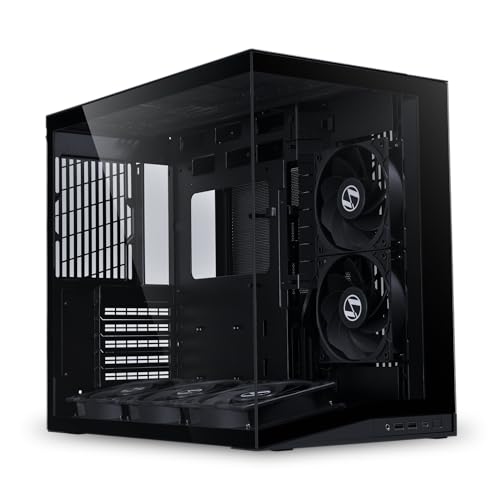
Lian Li O11D MINI V2 Flow-ATX Mid-Tower PC Case
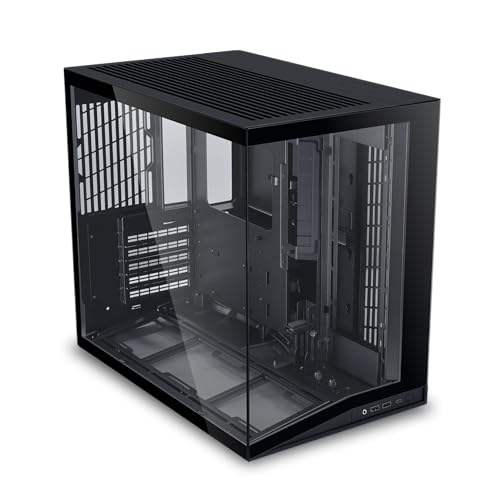
LIAN LI O11D MINI V2 ATX Mid-Tower PC Case
More Details On Our Top Picks
Montech gives you a roomy ATX shell with dual tempered glass, so the build can look clean without giving up component space. The 420mm graphics card allowance and 360mm radiator support make it feel aimed at serious gaming parts, not just entry-level hardware.
The three pre-installed ARGB PWM fans help right away, and the reverse-blade fan layout points to a setup that cares about both airflow and presentation. You may find the glass-heavy design a little less forgiving for dust and fingerprints, but the magnetic filters soften that trade-off for everyday desk use.
Strong Points
- Large GPU and radiator room suits hotter gaming builds.
- Pre-installed fans reduce the number of parts you need to source.
- Dual glass panels make a neat showcase rig easier to pull off.
- Magnetic dust filters simplify routine cleaning.
- USB-C support adds a current front-panel connection for newer gear.
Things To Consider
- Glass panels need more frequent wiping than plain steel.
- The showpiece style can feel less understated on a work desk.
- A fully loaded airflow layout may ask for careful cable planning.
Feature Snapshot
Who It Suits Best
You’ll like this most for a gaming PC that needs both cooling headroom and a clean display look.
A Better Fit Elsewhere
Lian Li O11D MINI V2 Flow-ATX Mid-Tower PC Case suits you better for a more premium panoramic layout with a stronger focus on fan placement and cable tidiness.
DARKROCK keeps the formula straightforward, which is useful for a first gaming tower or a budget-conscious upgrade path. The tempered glass side panel gives you a better view of the internals, while the Type-C ready front connection helps the case feel current without adding clutter.
One pre-installed fan is enough to get you started, though you’ll likely add more cooling for a hotter graphics card and a fuller parts list. Compared with the MONTECH XR, this one is less showy and less furnished out of the box, but that makes it easier to tailor to your own parts mix.
What We Like
- Type-C front support fits newer peripherals nicely.
- Tempered glass side panel shows off a clean build.
- Room for 360mm cooling suits mainstream performance systems.
- Support for large graphics cards helps future planning.
Minor Gripes
- Only one fan is included, so cooling may need expansion.
- The simpler stock setup leaves more of the finishing work to you.
- A glass side means dust and smudges stay visible.
Core Details
Made For
You’ll get the most from this as a straightforward ATX case for a gaming build that you plan to customize over time.
Look Elsewhere When
MONTECH XR Panoramic High Airflow ATX PC Case is the better fit for you if you want more cooling hardware included from the start.
The Z20 turns the compact idea into something you can actually carry, thanks to the detachable handle and mini-tower footprint. That matters for LAN events, desk setups with tight legroom, or a secondary machine that needs to move without feeling fragile.
Support for a 240AIO, which is short for a 240mm all-in-one liquid cooler, gives you a realistic cooling path for a small case. The honest trade-off is that micro-ATX builds always reward careful part selection, so you’ll want to plan storage, cables, and motherboard size with more care than you would in the LANCOOL 207.
Upsides
- Carry handle makes transport far easier than a standard tower.
- Small body helps a desk stay open and uncluttered.
- 240AIO support broadens cooling options for a compact build.
- H160mm cooler compatibility gives you room for selected air coolers.
Areas To Watch
- Micro-ATX sizing narrows component choices compared with ATX towers.
- Small cases usually take more time for cable management.
- Portable designs benefit from a careful, secure parts layout.
Feature Rundown
Built With In Mind
You’ll appreciate this most for a small-format gaming or work build that needs to travel or fit into a tight nook.
Reach For A Different Pick When
FOIFKIN M1 PC Case – Walnut Front Pane suits you better if you want a roomier ATX mid-tower with a more decorative front finish.
The LANCOOL 207 sits in the sweet spot between compact sizing and a more polished gaming layout. It feels like the sort of case that suits a desk where you want RGB presence without surrendering every inch of space.
Compared with the smaller JONSBO Z20, this ATX form factor gives you a more familiar path for standard builds and fewer compromises around motherboard choice. The trade-off is simply size, so you gain breathing room and lose some portability, which is a fair exchange for most home setups.
Highlights
- Compact ATX sizing works well for mainstream gaming builds.
- RGB styling gives the case a lively but still controlled look.
- Black finish keeps it easy to match with common parts.
- The format should feel familiar to builders who want fewer layout surprises.
Softer Spots
- Less portable than the micro-ATX options in this list.
- RGB styling may feel busier than a plain workroom case.
Details At A Glance
Right Fit For
You’ll suit this best if you want a cleaner ATX gaming tower that still keeps the footprint under control.
Where A Sibling Pick Shines
JONSBO/JONSPLUS Z20 Black Micro-ATX Mini Tower PC Case works better for you if portability and a smaller desk footprint matter more than ATX-size flexibility.
FOIFKIN leans into furniture-like styling with a walnut front pane, so it feels less like plain hardware and more like part of the room. That makes it a smart fit for a home office or living area where you want the PC to look intentional rather than purely technical.
The four pre-installed PWM ARGB fans give it a stronger out-of-box cooling setup than the DARKROCK EC2, and the 240mm radiator support keeps liquid-cooling options open. The trade-off is that the decorative front will appeal more to style-focused setups than to anyone chasing a bare-bones industrial look.
Reasons To Buy
- Walnut front pane brings a warmer visual character to the desk.
- Four included fans help reduce early setup hassle.
- Type-C support suits newer accessories and front-panel use.
- 240mm radiator support gives you a sensible cooling path.
Points To Note
- Decorative styling won’t suit every desk or room theme.
- Wood-look surfaces may need a gentler cleaning routine.
Feature Card
Whose Shelf It Belongs On
You’ll get the best fit here for a style-conscious ATX build in a room where the PC stays visible.
Another Choice May Suit
LIAN LI LANCOOL 207 Compact ATX RGB Gaming Computer Case makes more sense for you if you want a plainer gaming tower with less decorative emphasis.
Okinos takes the same warm-wood idea and pairs it with a smaller micro-ATX footprint, which works nicely on a compact desk or in a shared room. The four pre-installed 120mm fans mean you start with a fuller cooling setup than many minimal cases, though non-PWM fans give you less precise speed control than PWM units like the FOIFKIN’s.
The tempered glass side panel keeps the build visible, so the result feels like a mix of natural texture and conventional PC styling. That combination is appealing for a home setup, but the smaller format still asks for thoughtful part selection and tidy cable work.
Best Bits
- Walnut finish softens the look of a typical micro-ATX tower.
- Four included fans help the case start with useful airflow.
- Type-C support brings a modern front connection to a smaller box.
- Glass side panel suits a display-oriented build.
Small Caveats
- Non-PWM fans give you less granular fan-speed control.
- Micro-ATX size naturally narrows expansion choices.
- Wood and glass surfaces usually need more careful cleaning.
Core Details
The Right Fit
You’ll find this appealing for a compact home PC where appearance matters as much as the hardware inside.
Skip It When
JONSBO/JONSPLUS Z20 Black Micro-ATX Mini Tower PC Case makes more sense if you want portability and a handle for moving the system.
This O11D MINI V2 Flow leans hard into the panoramic look, but the interesting part is how much attention it gives to airflow and included fan layout. The five reverse-blade 120mm fans help the case feel ready for a more ambitious build, which is useful for your higher-heat gaming parts or a showcase system that still needs practical cooling.
Compared with the LANCOOL 207, this one feels more enthusiast-focused and more deliberate about interior presentation. The cable management angle matters too, because a case with this much glass and open viewing area rewards tidy wiring like a clean frame rewards a good picture.
Bright Spots
- Five included fans create a strong starting point for airflow.
- Reverse-blade fan layout suits visual builds with cleaner front exposure.
- Panoramic view design gives your hardware room to show.
- Cable management focus helps the interior look more finished.
Trade Offs
- The open-view style asks for neater cable work than a closed box.
- Showcase layouts usually reward a more planned parts list.
Technical Sheet
Perfect Match For
You’ll get the most out of this for a showcase gaming build where airflow and appearance both matter.
Swap It Out When
LIAN LI O11D MINI V2 ATX Mid-Tower PC Case suits you better if you want the same family look but prefer the fully ventilated version with adjustable I/O.
This version of the O11D MINI V2 keeps the panoramic identity but shifts the emphasis toward fully ventilated airflow and more adjustable front-panel control. That makes it a sensible match for builders who want a custom look without giving up everyday usability.
Compared with the Flow model just above, this one sounds better suited to people who value flexibility over the extra pre-installed fan package. The pillar-less presentation keeps the interior open, and the cable management focus helps the build stay neat in a glass-heavy case.
Standout Traits
- Fully ventilated layout supports cooler-running builds.
- Adjustable I/O gives you more front-panel flexibility.
- Pillar-less view makes hardware easier to see.
- Cable management support helps with polished routing.
Room For Improvement
- The highly visible design still asks for careful cable work.
- Builders wanting a ready-made fan-heavy package may prefer the Flow version.
Feature Rundown
Who Should Grab It
You’ll be happiest with this for a clean ATX build where airflow tuning and front-panel flexibility matter.
Where Shoppers Go Wrong
Lian Li O11D MINI V2 Flow-ATX Mid-Tower PC Case is the better route if you want the same family styling plus the included five-fan setup.
How To Choose The Right Compact Pc Case Atxes
Form Factor Comes First
ATX and micro-ATX are not interchangeable, and that matters before style enters the picture. ATX cases usually give you more room for larger boards, longer cards, and easier cable routing, while micro-ATX cases trim the footprint and ask for tighter planning. For a desk in a small apartment or a dorm, that difference can be the line between a system that feels comfortable and one that feels crowded.
Mini-tower cases also change how you think about storage, fan placement, and cooler height. A compact case can still be capable, but the internal space needs to match your parts list instead of fighting it. That’s why the JONSBO Z20 and Okinos case speak to smaller builds, while the MONTECH XR and LANCOOL 207 give you more standard ATX breathing room.
Cooling Choices Shape Daily Use
Fan count, radiator support, and front-panel ventilation decide how hard your case has to work during a long gaming session or a warm afternoon. A radiator is the mounting space for liquid cooling, and fan size usually affects how much air moves without sounding busy. You do not need the biggest cooling layout on the list, but you do need enough headroom for your CPU and graphics card.
Cases like the MONTECH XR and Lian Li O11D MINI V2 Flow lean toward stronger airflow packages, while the DARKROCK EC2 starts simpler and leaves room for you to add more later. That trade-off helps different kinds of setups, so your choice depends on whether you want a ready-made path or a more gradual build-out.
Look Beyond The Glass
Tempered glass, wood accents, and panoramic panels change maintenance as much as they change appearance. Glass shows fingerprints and internal cable mess more clearly, which is fine for showcase systems and less pleasant for a machine that sits beside your work monitor all day. Wood-style panels, like on the FOIFKIN and Okinos cases, soften the look, though they also reward a lighter touch during cleaning.
Front-panel ports matter too, especially Type-C. A current USB-C connection is handy for newer drives, headphones, and phones, so it’s worth paying attention to whether the case includes it. The O11D MINI V2 variants also show how a good front layout can matter just as much as the exterior style.
Check Fit For Your Parts, Not Just The Shell
A compact tower should fit the hardware you already plan to use, not just the hardware you hope to buy later. Graphics card length, cooler height, and radiator space are the measurements that keep a build from turning into a parts-puzzle on your desk. That is why a case like the MONTECH XR feels welcoming to bigger gaming components, while the Z20 works better for smaller, more curated builds.
Think about where the system will live too. A machine that moves to LAN events benefits from the Z20’s handle, while a visible home office setup may suit the FOIFKIN or Okinos wood-accent designs. The right choice is the one that matches your space, your parts, and how often you expect to touch the case after the build is done.
A Quick Reality Check
Wrong Turns To Avoid
A common mistake is choosing a compact case by exterior style alone and discovering later that the graphics card or cooler barely fits. Another is overlooking the included fan setup, which can leave you adding parts right away instead of building on a solid base. The cleaner route is to match the case format to the parts you already know you want.
Cleaning is worth thinking about too. Glass and wood-look panels look polished, but they also make smudges and dust more obvious than a plain steel side. For a machine that sits in a busy office or near a window, that detail matters more than many people expect.
What The Higher Tier Buys
More expensive cases usually pay for better airflow design, nicer materials, smarter cable routing, and more refined panel fit. You often see that in panoramic layouts, pre-installed fan packages, and front I/O that feels less basic. Those touches matter most when the PC stays visible and you care about the build looking finished, not just running.
That upgrade makes sense for gaming systems, showcase desktops, and anyone who wants a smoother assembly process. A simpler case can still work well, but spending more often buys convenience and a neater result, not magic.
Frequently Asked Questions
What makes a compact ATX case different from a micro-ATX case?
ATX cases generally give you more room for larger motherboards, longer graphics cards, and easier cable work. Micro-ATX cases shrink the footprint and work best when you want a smaller system with fewer expansion needs.
Do panoramic glass cases suit everyday use?
They can, especially when your desk is part of a living space or home office. The trade-off is that dust and fingerprints stay visible, so regular cleaning matters more.
Why does Type-C matter on a case front panel?
Type-C gives you a modern connection for newer phones, drives, and accessories. It also helps the case feel current without taking up extra space on your desk.
Are pre-installed fans worth paying attention to?
Yes, because they reduce the number of extra parts you need right away. They also help the case start with a more usable airflow setup before you add anything else.
What should you check before choosing a compact gaming case?
Check graphics card length, cooler height, and radiator support first. Then make sure the case format matches your motherboard size and the way you plan to use the PC.
Closing Thoughts
Your best compact PC case comes down to how you balance space, airflow, and the look you want on the desk. The MONTECH XR and Lian Li O11D MINI V2 Flow suit more ambitious builds, while the JONSBO Z20 is the clear space-saver for portable micro-ATX setups. Wood-accent models like the FOIFKIN and Okinos bring a calmer, room-friendly feel, which works well in shared spaces. Choose the one that fits your parts and your room, and the build process feels much smoother.
