
Computer case accessories can tidy a messy build, make maintenance easier, and help your setup feel more intentional. You may be building a gaming tower, refreshing a home office PC, or trying to keep a dusty room under control, and the right add-ons solve different headaches without changing the whole machine.
Some picks are visual, some are purely functional, and a few sit in the middle. That mix matters, because a clean-looking rig can still be frustrating to use if airflow, cable access, or power controls were an afterthought.
Quick Look At The Shortlist

Vetroo LED Strip for PC 21.7-inch ARGB Light Bar
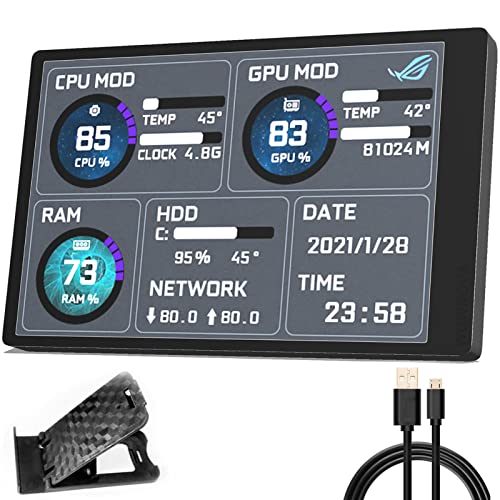
WOWNOVA English Version Computer Temp Monitor ARGB PC Case Display

Open Frame DIY PC Test Bench for ATX M-ATX ITX Motherboard

Bfttlity Computer Tower Stand 2-Tier Metal PC Stand Black

PC Power Button Desktop Power Button External Switch

upHere PWM & 5V Addressable ARGB Magnetic Fan Hub P10PARGB BK

Woanger 2 Pcs 1000 x 300 mm DIY PC Case Dust Filter Black
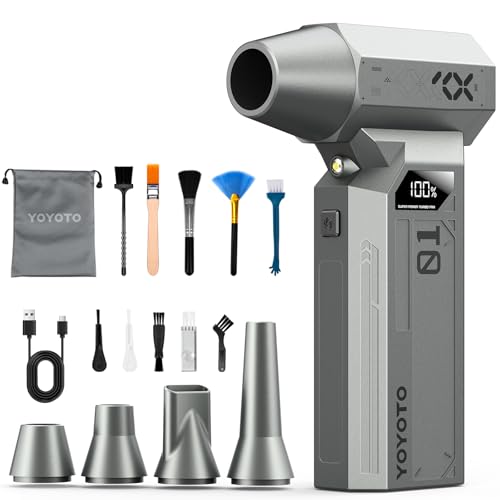
yoyoto Compressed Air Duster 150000RPM 4-Gear Electric Air Blower with LED Display
More Details On Our Top Picks
Lighting changes the feel of a case faster than almost any other add-on, and this 21.7-inch ARGB strip is built for that kind of quick refresh. The 5V 3-pin layout points it toward modern sync headers, so a clean software-matched glow is the main appeal rather than raw brightness alone.
The honest trade-off is that this is a visual upgrade, not a utility part. Builders who already like Aura Sync, Gigabyte RGB Fusion, or MSI Mystic Light will get the most out of it, while plain utility-focused setups may see it as optional flair.
Strong Points
- Long strip length helps spread light across a larger case interior.
- 5V 3-pin ARGB support fits common motherboard lighting ecosystems.
- Eight mounting brackets give you more placement flexibility around a chassis.
- Works well for showcasing tempered-glass side panels and tidy cable runs.
Things To Consider
- It adds visual polish, so the payoff depends on your case window and lighting taste.
- ARGB setups need compatible headers, which matters more than the strip itself.
- Bracket placement can take a little patience during first installation.
Feature Snapshot
Who It Suits Best
RGB-focused builders and tempered-glass case owners will get the most value here, especially in a room where the PC is part of the desk setup.
A Better Fit Elsewhere
yoyoto Compressed Air Duster 150000RPM 4-Gear Electric Air Blower with LED Display suits practical maintenance-first setups much better, especially for anyone who cares more about clean internals than lighting.
After lighting, a compact monitor is the sort of add-on that makes a case feel more purpose-built. This WOWNOVA unit uses a 3.5-inch IPS panel, which means wide viewing angles, and the English software matters because you can glance at CPU, GPU, RAM, and HDD data without guessing at labels.
The single USB-C connection is the practical part that stands out. No HDMI cable and no separate power lead keeps routing simple, though the 320 x 480 resolution and small display area mean this works best as an at-a-glance panel rather than a big dashboard.
Upsides
- Shows multiple system stats in one compact location.
- Single-cable USB-C setup keeps internal routing cleaner.
- IPS panel helps the display stay readable from more angles.
- Small shell size suits tight interiors and minimalist builds.
- Metal shell adds a more solid feel than bare plastic trim.
Room For Improvement
- The small screen suits quick checks better than detailed monitoring.
- English software helps a lot, but setup still asks for some patience.
- In cramped cases, the fixed screen size may feel modest.
Technical Sheet
Made For
Modders and status-conscious builders who want a tidy internal display will appreciate this most, especially in a glass-panel tower.
Swap It Out When
Vetroo LED Strip for PC 21.7-inch ARGB Light Bar suits cosmetic-first setups better, particularly for builders who want ambiance instead of data on screen.
Open-frame benches have a very specific job, and this one is aimed at the builder who swaps parts often or needs easy access during troubleshooting. The 0.8 mm SPCC steel plate gives it a more serious feel than a light accessory stand, and the black sand-grain finish should fit a workshop-style desk without looking out of place.
That openness is the point, but it also means dust and exposed components are part of the trade-off. For hardware checks, motherboard installs, and frequent part changes, the convenience is hard to ignore, though a closed case still makes more sense for everyday living-room placement.
Best Bits
- Open design makes swaps, troubleshooting, and rebuilds much easier.
- SPCC steel construction supports a more workbench-like feel.
- Compatible with ATX, Micro-ATX, and Mini-ITX boards.
- Fits bench-testing habits where access matters more than aesthetics.
Softer Spots
- Open-air layouts leave parts exposed, so dust control becomes your responsibility.
- The bench style suits a work area better than a finished-room setup.
- Assembly and cable planning matter more than with a standard tower case.
Core Details
Whose Shelf It Belongs On
DIY builders, repair hobbyists, and anyone who keeps changing components will get the most from this bench.
Where A Sibling Pick Shines
Bfttlity Computer Tower Stand 2-Tier Metal PC Stand Black suits everyday desktop owners better, since it keeps a full tower raised and mobile without exposing the hardware.
A floor stand sounds simple, yet it solves a bunch of everyday annoyances in one move. This Bfttlity stand gives your tower a raised home under a desk, which helps keep the case off carpet and makes rolling it around the room less awkward than dragging a heavy chassis by hand.
The 2-tier metal layout also hints at practical storage use, which suits desks that collect peripherals, tools, or spare cables. The trade-off is obvious: it takes up some footprint, so very tight office corners may need a slimmer option.
Reasons To Buy
- Lifts the case off the floor for a tidier setup.
- Metal build feels more stable than lightweight plastic stands.
- Mobile design helps with cleaning around a workstation.
- Two-tier format can add useful lower-space organization.
Areas To Watch
- Two tiers use more floor space than a basic riser.
- Carpeted rooms may still call for careful placement and leveling.
- Weight and tower size should be matched before ordering.
Details At A Glance
Built With In Mind
Desktop PC owners who want better floor clearance and easier movement around the workstation will appreciate this most.
Look Elsewhere When
Woanger 2 Pcs 1000 x 300 mm DIY PC Case Dust Filter Black suits users who are solving airflow and dust-control problems, not tower placement.
A remote power switch sounds tiny, but it becomes very useful once your case sits under a desk or lives on a test bench. This OwlTree-style accessory is aimed at the moment when you want the machine powered on without crouching for the front panel, and that convenience is easy to appreciate during repeated builds or troubleshooting sessions.
The LED detail gives it a little more presence than a bare button lead, though the real value is practical rather than decorative. This is the sort of part that makes sense for modders, bench rigs, or replacement front-panel setups, while a normal tower user with easy front access may not feel the need.
Positives
- Simplifies power access for tucked-away towers and bench setups.
- Helps during repeated restarts, part swaps, or desk-side diagnostics.
- LED element gives the switch a clearer presence on the desk.
Points To Note
- Mounting and routing take some care, especially on compact cases.
- It solves a narrow problem, so everyday tower users may not need it.
Feature Rundown
Best Suited To
Custom builders, repair benches, and anyone who keeps a tower out of easy reach will get the most practical value here.
Reach For A Different Pick When
Bfttlity Computer Tower Stand 2-Tier Metal PC Stand Black suits a standard desk setup better, because it improves placement without changing the way you power the system.
Once a build moves past a couple of fans, cable management starts to matter in a very real way. This hub handles both PWM, which means pulse-width modulation for fan speed control, and 5V addressable ARGB, so it can help organize a more complex lighting-and-cooling layout without filling the case with extra leads.
The magnetic mounting and SATA power approach make it a tidy fit for custom towers, especially where you want a hub fixed in place without more drilling or awkward brackets. The trade-off is straightforward, though, since the cleaner the build gets, the more you still need to plan cable paths carefully.
Highlights
- Combines fan control and ARGB distribution in one hub.
- Supports up to nine ports, which helps larger builds stay organized.
- Magnetic mounting makes placement simpler inside a case.
- SATA power suits builds that already use that cable standard.
Minor Gripes
- Large builds still need thoughtful cable routing to stay neat.
- It helps with organization, but it does not remove planning work.
- RGB-heavy systems benefit most, so basic towers may not need it.
Core Details
Who Should Grab It
Custom PC builders with several fans or a mixed lighting setup will benefit most, particularly in mid-tower and larger cases.
Where Another Pick Fits Better
WOWNOVA English Version Computer Temp Monitor ARGB PC Case Display suits status-focused builds more cleanly, since it shows system information rather than distributing fan control.
Dust filters are rarely glamorous, but they can save a lot of routine cleaning in a room that collects lint or pet hair. This Woanger sheet comes in a large 1000 x 300 mm format, and the 0.5 mm high-airflow hole pattern is meant to let air through while giving you material you can cut to fit a case opening.
The magnetic strips make it easier to place on an iron case, which is useful for DIY airflow projects or odd-shaped vent areas. You may find the trimming step a little fiddly at first, but that same flexibility is exactly why this style works for custom chassis work.
Bright Spots
- Large sheet size supports custom cutting for different openings.
- Magnetic strips help simplify installation on compatible metal cases.
- Fine mesh style fits dust-control projects without changing the case itself.
- Two-piece pack gives you material for more than one area.
Small Caveats
- Cutting and fitting require patience and a careful measuring step.
- Magnetic attachment depends on the case material being suitable.
- Mesh filters need periodic cleaning to stay useful over time.
Core Details
Who Will Love This
DIY case modders and owners dealing with dusty rooms will get the most out of this, especially where a made-to-fit solution matters.
Skip It When
yoyoto Compressed Air Duster 150000RPM 4-Gear Electric Air Blower with LED Display suits people who want a cleaning tool instead of a filter you have to trim and place.
Cleaning a PC case, keyboard, or desk nook gets old fast with disposable cans, so an electric blower makes more sense for repeat use. This yoyoto model pairs a brushless motor with a four-level control setup and an LED display, which makes it feel more like a reusable tool than a one-off cleaning accessory.
The LED light is handy in darker corners, and the cordless design makes it practical for case vents, car interiors, or shelves where a hose would be annoying. The honest trade-off is that a stronger blower still asks for careful use around loose cables and small parts, so steady handling matters more than speed alone.
Best Bits
- Four speed levels let you match airflow to the job.
- Brushless motor design tends to suit repeated use better than simple motors.
- LED display gives you quick visibility on the selected setting.
- Cordless format helps with cleaning around a desk, car, or shelf.
- LED light is useful in dim case interiors and corners.
Worth Noting
- Higher airflow calls for careful handling around loose cables and small parts.
- Battery-based tools need recharging planning before longer cleaning sessions.
Feature Card
The Right Fit
Anyone who cleans a desktop setup regularly, especially in a dusty room or shared workspace, will get the most practical value from this blower.
Another Choice May Suit
Woanger 2 Pcs 1000 x 300 mm DIY PC Case Dust Filter Black suits prevention-first setups more, since it helps keep dust out before cleaning becomes a chore.
How To Choose The Right Computer Case Accessories
Start With The Problem You Want To Solve
Computer case accessories work best when they answer a specific pain point. Lighting changes the look, a monitor adds live status, a hub simplifies fan wiring, and a dust filter or blower helps with upkeep.
That’s the easy way to avoid overbuying. A flashy add-on can look great on a shelf, but a cramped build with messy cables usually needs airflow planning or better access first.
Match The Part To The Case Layout
Case size and panel style matter more than many people expect. Open-frame benches, tower stands, and external power buttons all fit different room setups, while a 3.5-inch display or a 21.7-inch light strip needs enough internal space to make sense.
Measure the route, not just the product. A tidy installation depends on header access, available mounting room, and whether the case has glass, steel, or a compact front bay arrangement.
Pay Attention To Compatibility Details
ARGB, PWM, USB-C, and motherboard headers are small terms with big consequences. ARGB means addressable RGB lighting, so individual LEDs can be controlled; PWM means fan speed can be managed more precisely through the board.
USB-C monitor accessories are attractive because they reduce cable clutter, but they still need the right software and internal routing. The safest approach is to line up the connection type with the board and case you already own.
Think About Maintenance As Part Of Ownership
Some accessories are set-and-forget, while others need regular attention. Dust filters need cleaning, stands need floor-space checks, and open benches expose hardware that calls for a little more care.
That maintenance angle matters most in dusty rooms, on carpet, or in setups that move around often. A part that looks simple on the product page can save time later, or create it, depending on how much upkeep it asks for.
What To Weigh Before You Order
Common Shopping Slip Ups
Many people chase appearance first and forget compatibility. A lighting strip without the right header, or a fan hub without enough ports, becomes extra clutter instead of a clean upgrade.
Another common miss is size. A dust filter sheet that looks convenient may need trimming, and a tower stand or open bench has to fit the footprint of your desk or floor space.
What The Higher Tier Buys
More expensive case accessories usually bring better materials, more flexible mounting, or smarter control. Metal construction, magnetic mounting, brushless motors, and compact displays tend to cost more because they solve more than one annoyance at once.
The upgrade makes sense when the part gets used every day. A cleaner cable hub, a reusable blower, or a sturdier stand pays back through easier upkeep and less fiddling.
Frequently Asked Questions
What Makes A Case Accessory Worth Adding?
The best additions solve a concrete issue, like cable clutter, dust buildup, awkward power access, or weak visual presentation. Cosmetic upgrades are fine, but utility usually matters more over time.
Do You Need RGB Accessories For A Good Build?
No, RGB is optional and mainly changes the look of the system. A clean airflow setup or a reliable power switch can matter far more than lighting.
Are Open-Frame Test Benches Only For Experts?
No, but they do suit hands-on builders better than people who want a finished desktop tower. Frequent part changes and troubleshooting make them easier to justify.
How Do You Keep Dust Under Control?
Use a filter where air enters, then clean it regularly. A blower helps with the areas a filter cannot catch, like heatsinks and case corners.
What Should You Check Before Buying A Fan Hub Or Monitor?
Check header type, power needs, and available space inside the case. The right accessory should fit your board and your chassis without forcing awkward cable routing.
Final Thoughts
The strongest computer case accessories do a job you notice every week, not just the day they arrive. A lighting strip can finish a build, a monitor can make system checks easier, and a dust filter or blower can keep the whole setup calmer over time. The best choice for you depends on whether your real problem is style, access, cooling, or upkeep. Pick the part that fixes the annoyance you already have, and the rest of the build starts to feel easier.
