
Front-bay upgrades can make a desktop feel far more practical, especially when you plug in flash drives, memory cards, headsets, or a phone cable every day. A good panel keeps those connections on the front of the case, so you stop reaching around the back like you’re untangling a drawer. The choices below focus on fit, port mix, and header compatibility, which is what usually matters most in a real build.
Quick Look At The Shortlist

GRAUGEAR 3.5 Inch Front Panel Hub G-MP02
GRAUGEAR 5.25″ PC Front Panel USB Hub

USB2.0 + 3.0 Metal Front 5.25 Inch Panel Adapter

GRAUGEAR 3.5 Inch Front Panel USB Hub G-MP01

2 Ports USB 3.0 Front Panel Floppy Disk Bay Hub Bracket
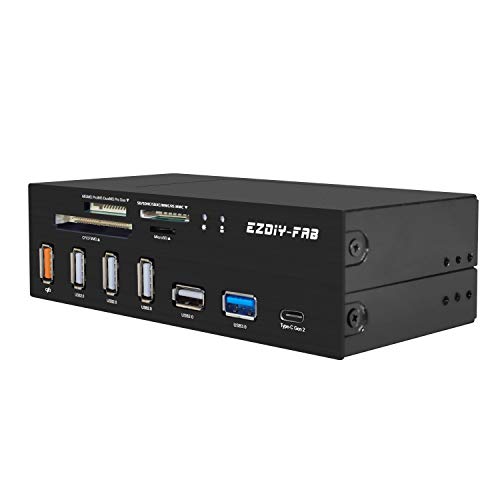
EZDIY-FAB PC Front Panel Internal Card Reader USB HUB

TCC-QL5E 5.25 Inch PC Multifunction Dashboard Media Front Panel

Generic T-SIDAKE 5.25 Inch PC Multifunctional Dashboard Media Front Panel
More Details On Our Top Picks
The G-MP02 makes sense for a desktop that needs more front access without giving up a clean case face. You get two USB-C ports and two USB-A ports, all tied to the 10Gbps USB 3.2 Gen 2 class, so large file transfers stay brisk on paper rather than feeling like a bottleneck. The trade-off is straightforward, it only fits a build that can supply the listed Type-E Key-A 20-pin header and SATA power.
Compared with the more mixed-function picks later in this list, this one stays focused on fast data ports instead of card slots or audio. That keeps the layout tidy, and the 3.5-inch bay format works well in a case that still has a floppy-style front opening. For daily desk use, that usually means fewer rear-panel contortions and a more convenient spot for external drives.
Strong Points
- Two USB-C and two USB-A ports keep common cable types within easy reach.
- 10Gbps-class transfer support suits large photo libraries, project folders, and external SSDs.
- The 3.5-inch format makes smart use of older front-bay space.
- Backward support for older USB generations helps mixed-device setups stay usable.
Points To Note
- You need the right internal headers, so a quick motherboard check matters before you start.
- It skips memory-card and audio functions, which keeps the layout lean but less versatile.
- The front-bay install is neat once in place, although the case opening needs to be available.
Feature Snapshot
Who It Suits Best
Desktop owners who want a fast, front-facing USB hub in an older 3.5-inch bay will get the most from this layout.
A Better Fit Elsewhere
GRAUGEAR 5.25″ PC Front Panel USB Hub suits you better if you want card reading and audio in the same front-bay unit.
This GRAUGEAR panel stretches a 5.25-inch bay into a front desk control point, which is handy in a tower that still has room for full-size drive bay hardware. USB-C at 10Gbps sits beside dual USB 3.0 ports, plus SD and microSD card readers and audio jacks, so it covers more day-to-day chores than the slimmer G-MP02. The catch is that the extra functions only pay off in a build that can provide the listed Type-E and 19-pin headers.
For photo transfer, headset hookup, and quick thumb-drive work, the layout saves time because you stop hunting around the rear I/O panel. The honest read is that it’s most useful on a desktop used like a workstation or media machine, not a tiny case with no spare bay room. Compared with the simpler Excelity option below, this one gives you far more front-panel convenience in exchange for a more demanding install.
What We Like
- USB-C, USB-A, card readers, and audio all land in one front location.
- The 5.25-inch bay format suits larger desktops with open drive space.
- 10Gbps USB-C support is a solid match for fast external storage.
- SD and microSD access helps photographers and content archivists move files quickly.
- Having audio ports up front is convenient for headsets used at a desk.
Small Caveats
- The install depends on the correct internal headers, so compatibility checks matter.
- It needs room in a 5.25-inch bay, which rules out many compact cases.
- More functions also mean more surfaces to keep clean around the front panel.
Feature Rundown
Made For
You get the most from this panel in a full-size desktop where fast USB access, card reading, and audio all belong within arm’s reach.
Another Choice May Suit
EZDIY-FAB PC Front Panel Internal Card Reader USB HUB suits you better if memory-card handling matters more than audio ports.
The MZHOU panel leans into everyday utility rather than a single flashy feature. Four USB ports, including a mix of USB 3.0 and USB 2.0 support, sit alongside an HD audio jack, a Type-C port, and a microphone input, so a family PC or shared workstation gets a lot of front-panel reach. The metal front gives it a sturdier feel on paper, though the trade-off is the usual one: more connections mean more header planning during install.
Compared with the GRAUGEAR options above, this one spreads its value across more device types instead of pushing only speed or only storage access. That makes sense for a desktop used by several people, where headset plugs and extra ports matter as much as raw transfer pace. It also works well for anyone who wants a front panel that stays useful long after the novelty of USB-C fades.
Highlights
- Four USB ports give you room for several accessories at once.
- The audio and mic connections help keep headset use simple at the desk.
- Type-C adds newer-device support without dropping older USB options.
- Metal construction is a sensible fit for a frequently used front bay.
Areas To Watch
- The wider feature set can make cable management inside the case a little busier.
- Because the port mix is broad, it may be more panel than some minimal builds need.
- The product page does not spell out the same speed focus you get on the faster GRAUGEAR units.
Core Details
Whose Shelf It Belongs On
You should look at this one for a shared desktop, a hobby station, or any case where front access to both USB and audio is useful every day.
Swap It Out When
GRAUGEAR 3.5 Inch Front Panel Hub G-MP01 fits better for you if the case only has a 3.5-inch opening and you want a faster USB-C focus.
This GRAUGEAR unit is the speed-minded sibling to the G-MP02, and it narrows the port mix down to 2 USB 3.0 ports plus one USB 3.2 Gen 2 USB-C port. That 20Gbps USB-C rating is the headline here, though real-world value still depends on a system that can supply the required Type-E Key-A 20-pin header and USB 3.0 header. The honest read is that it suits people who care more about quick front access than about stuffing the bay with extra features.
Because it’s a 3.5-inch model, it works especially well in compact desktops that still keep a front opening in that format. The included six screws and the listed over-current, over-voltage, and short-circuit protections point to a more careful hardware design than the bare-minimum bracket style. Compared with the Excelity two-port option, this one just offers a much stronger case for a modern USB-C-heavy workflow.
Reasons To Buy
- 20Gbps USB-C support gives it a clear speed focus.
- Three front ports keep the panel simple while still useful.
- The 3.5-inch size suits cases with spare small-bay space.
- Six included screws help the install feel more secure once mounted.
- Built-in protection features add reassurance for everyday desktop use.
Trade Offs
- It has fewer total ports than the more feature-heavy 5.25-inch panels.
- You need the right internal headers, so this is not a universal fit.
- No card reading or audio jacks are included, which keeps the unit focused but less broad.
Details At A Glance
Built With In Mind
You suit this panel best when you want a clean 3.5-inch USB-C upgrade in a desktop that already has the proper headers available.
Where A Sibling Pick Shines
GRAUGEAR 5.25″ PC Front Panel USB Hub is the better fit for a workstation that also needs card reading and audio jacks.
Excelity keeps things plain, and that is exactly the point. Two USB 3.0 front ports and a 20-pin connector make it a simple way to bring everyday USB access to the front of a desktop case, especially one with a 3.5-inch bay that would otherwise sit empty. The included 2-foot adapter cable adds a little install flexibility, though the setup still depends on your motherboard header layout.
Compared with the more feature-packed GRAUGEAR and TCC-QL5E units, this one is for people who only want a clean pair of front USB ports. That restraint helps in a basic office tower or family PC where memory cards, audio, and multiple port types are not needed. It also keeps the panel easy to understand, which is nice when a machine changes hands in a shared home.
Best Bits
- Two front USB 3.0 ports cover the most common plug-in needs.
- The 2-foot adapter cable can ease routing inside a case.
- It fills a 3.5-inch bay neatly in older desktop layouts.
- The narrow feature set keeps the panel straightforward to use.
Worth Noting
- Port count is modest, so larger accessory setups will outgrow it quickly.
- The panel is basic, with no card reader or audio functions added.
- Header compatibility still matters, so the motherboard should be checked first.
Key Specs
Right Fit For
You fit this panel best when you want a no-fuss USB upgrade for a desktop that only needs two easy-to-reach ports.
Look Elsewhere When
EZDIY-FAB PC Front Panel Internal Card Reader USB HUB makes more sense for you if card slots matter along with USB access.
EZDIY-FAB aims squarely at people who move memory cards as part of the normal workday. The card reader covers SD, MS, XD, CF, and TF formats, while the front also carries a USB 3.1 Gen2 Type-C port and USB 3.0 support, so camera owners and content workstations get a handy front desk lane. The 5.25-inch bay fit gives it room to be useful, though you do need a case with that opening available.
That makes it a different kind of pick from the GRAUGEAR USB hubs above, which lean more toward straight port expansion. Here, the card-reader role is the main event, and the USB ports are the support act. For anyone who regularly copies files from older memory cards, that balance is easy to appreciate, even if the panel takes up more bay space than a small hub.
Positives
- Multiple card formats are covered in one front-mounted location.
- USB-C and USB 3.0 support keep the panel useful for modern and older devices.
- The 5.25-inch format suits larger cases and workstations.
- It reduces the need to keep a separate card reader on the desk.
Minor Gripes
- You need a full-size 5.25-inch bay, so smaller cases are out.
- The multi-format card focus may be more than casual home use needs.
- Front slots that see daily card swaps usually deserve regular dusting.
Feature Card
The Right Fit
You suit this panel best if card transfer is part of your routine and you want those slots on the front of the case.
Where A Sibling Pick Shines
GRAUGEAR 3.5 Inch Front Panel USB Hub G-MP02 fits you better when USB-C speed matters more than memory-card reading.
TCC-QL5E feels like the most old-school control center in this roundup, and that is its appeal. You get SATA and e-SATA, dual USB 3.0, six USB 2.0 ports, audio ports, and a five-in-one card reader, so a legacy-heavy desktop can keep a lot of gear plugged in at once. The flip side is size and complexity, because a panel this busy works best in a case that can truly absorb all those connections.
Compared with the cleaner GRAUGEAR models, this one is less about speed purity and more about breadth. That makes it useful for a machine that juggles older accessories, occasional external drives, and memory cards without asking you to keep a drawer full of adapters. It’s the kind of panel that rewards a desktop used as a utility hub, not just a tower with a front USB jack.
Upsides
- Many front connections reduce the need to reach around the case.
- SATA and e-SATA support help it fit older desktop workflows.
- The five-in-one card reader adds flexibility for mixed media use.
- Separate USB 2.0 and USB 3.0 access makes it easy to sort devices by need.
Room For Improvement
- The feature count can feel busy in a compact or minimal build.
- Older connection types matter less for a newer, simplified workstation.
- A crowded front panel usually asks for a little more cable tidying behind the scenes.
Core Details
Best Suited To
You suit this panel best if your desktop still handles several older peripherals and you want them all within front-panel reach.
Reach For A Different Pick When
GRAUGEAR 5.25″ PC Front Panel USB Hub makes more sense if you want fewer legacy connections and a stronger focus on USB-C plus card reading.
The T-SIDAKE panel covers the same broad ground as the TCC-QL5E, which makes it useful as a second look for a desktop that needs a lot of front access. SATA, e-SATA, dual USB 3.0, six USB 2.0 ports, and a five-in-one card reader give it a wide mix of connections, so a mixed-use tower can keep several device types handy. The honest read is that this kind of panel fits best where function matters more than a minimalist faceplate.
Compared with the GRAUGEAR hubs, this is far less about speed-first simplicity and more about legacy versatility. That’s a sensible trade for home offices, media PCs, or older systems that still see regular use from different peripherals. It doesn’t chase flash, and that restraint is part of the appeal.
Positives
- Wide port variety helps one desktop handle several different tasks.
- The five-in-one card reader supports flexible media handling.
- Dual USB 3.0 and six USB 2.0 ports make the front panel busy in a useful way.
- Older interface support gives legacy desktops a practical upgrade path.
Areas To Watch
- So many ports make sense only in a case that has room to spare.
- Newer, speed-focused builds may not need the legacy-oriented layout.
- Front ports that see lots of use can benefit from the occasional dust wipe.
At A Glance
Perfect Match For
You fit this panel best when you want broad front-panel connectivity in a desktop that still leans on older ports and memory cards.
Where A Sibling Pick Shines
GRAUGEAR 3.5 Inch Front Panel Hub G-MP01 is the better fit for you if your case only has a smaller bay and you want a faster USB-C focus.
How To Choose The Right Computer Front Panels
Match The Bay To The Case
Start with the bay size, because that decides whether the panel can physically fit your desktop. A 3.5-inch opening usually suits slimmer USB hub styles, while a 5.25-inch bay leaves room for card readers, audio jacks, and broader port mixes.
That difference matters in real use. A full-size tower with unused front drive space can handle a more capable panel, while a smaller case needs a leaner unit that does one job well.
Check The Internal Headers First
Headers are the internal connectors on the motherboard that feed the front panel. Common examples here include Type-E Key-A 20-pin, 19-pin USB, USB 3.0 headers, and SATA power, and each one has to line up with the part you choose.
Skip that check and the install turns into a headache. A high-speed panel can look right on paper yet sit unused inside the case because the motherboard cannot support it.
Choose Ports For Your Daily Routine
USB-C helps with newer devices, while USB-A still covers a huge share of cables, drives, and accessories. Card slots matter more for photographers, drone owners, and anyone moving media from older formats, while audio ports are useful for desk-level headsets and speakers.
The best match is the panel that removes the most friction from your own setup. A gaming tower, a home office PC, and a media machine all ask for different front access, so the right layout depends on what lives on your desk.
Think About Speed, Not Just Count
More ports are not always better. A smaller panel with 10Gbps or 20Gbps USB-C can be more useful than a busier one if you move large folders, work with external SSDs, or copy camera footage often.
At the same time, a broad legacy panel still makes sense for mixed hardware. In practice, the smartest choice is the one that matches both the speed you need and the device mix you actually use.
What To Weigh Before You Click
Common Shopping Slip Ups
Many people focus on port count and miss the header requirement, which is the fastest way to end up with a panel that cannot connect properly. You also want to avoid picking a 5.25-inch unit for a case that only has a smaller bay.
A second common miss is choosing a feature-heavy panel for a simple task. A basic desktop that only needs two front USB ports does not benefit much from a large card reader stack.
When Paying More Pays Off
Higher-tier panels usually cost more because they pack in faster USB-C, more connection types, or a broader card reader set. They may also use sturdier housings, include more mounting hardware, or require more complex internal wiring.
That extra spend makes sense for workstations, media rigs, and desktops that handle lots of plugs every day. For a light-use office tower, a simpler bracket can be the calmer choice.
Frequently Asked Questions
What is a computer front panel used for?
You use it to bring USB, audio, card-reading, or drive connections to the front of the case. That makes routine plug-ins quicker and keeps the back of the desktop less cluttered.
Do all front panels fit every case?
No, bay size has to match the case opening, usually 3.5-inch or 5.25-inch in this roundup. Internal header support matters just as much as physical fit.
Why do some models need SATA power?
SATA power gives the panel the electricity it needs from the power supply. Without that connection, many multi-port units cannot function as intended.
Is USB-C enough on its own?
Not always, because many accessories still use USB-A. A mixed panel gives you more flexibility across older and newer devices.
Who should choose a card-reader panel?
You should consider one if you move photos, video, or other files from memory cards often. It saves you from keeping a separate reader on the desk.
Closing Thoughts
The best front panel is the one that fits your case, your motherboard headers, and your daily habits without forcing compromises you do not need. A speed-focused USB hub suits one desktop, while a fuller 5.25-inch media panel suits another, and both can be sensible choices. Once you match the bay size and the port mix to your setup, the whole computer feels easier to use. That kind of small convenience adds up quickly.
