
Shopping for a 32-inch monitor usually means you want more room without turning your desk into a command center. You may be splitting windows for work, watching long videos, or chasing smoother motion in games, and the right panel choice makes that daily routine feel less cramped. The eight picks below cover 4K sharpness, QHD balance, fast refresh rates, and a few extra features like speakers, USB-C, and curved screens.
The Shortlist At A Glance

Samsung 32″ Flat Computer Monitor LS32B304NWNXGO

Dell 32 Monitor S3225QS 4K UHD VA

LG 32UR500K-B Ultrafine 32-inch 4K UHD Monitor

ViewSonic VS3225-2K 32 Inch QHD Monitor

Acer SH322Q Hbih 31.5″ Full HD Monitor

Dell 24 Monitor SE2426H 23.8-inch FHD Display
Samsung 32″ S3 (S39GD) Series FHD Curved Monitor
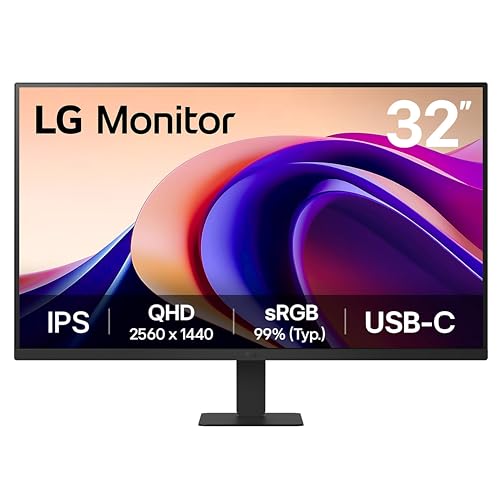
LG 32U631A-B 32-inch QHD IPS Monitor
More Details On Our Top Picks
This Samsung keeps the formula straightforward, and that suits a lot of desks. The three-sided borderless frame helps a dual-monitor setup feel less chopped up, while the 75Hz refresh rate gives motion a little more breathing room than a basic 60Hz panel.
AMD FreeSync helps the screen stay in step with a compatible graphics card, which matters most during casual gaming or video playback with fast movement. Advanced eye care features also make this a steadier long-session option for workdays that stretch past lunch.
Strong Points
- Borderless edges keep a multi-monitor desk looking tidy and open.
- 75Hz is a comfortable step up for scrolling and casual motion.
- FreeSync can reduce visible tearing in supported games.
- HDMI and DisplayPort make it easier to match older and newer gear.
Things To Consider
- It stays in everyday-monitor territory, so serious creators may want a sharper panel.
- The listed feature set is practical rather than flashy.
- Owners who change setups often may want to confirm their cable mix before mounting.
Feature Snapshot
Who It Suits Best
You want a no-drama 32-inch monitor for general work, streaming, and light gaming on a simple desk.
A Better Fit Elsewhere
Dell 32 Monitor S3225QS suits you better if 4K detail and a faster 120Hz panel matter more than a simple full-HD setup.
This Dell leans into detail, and the 4K resolution is the headline reason. On a 31.5-inch panel, that means text and UI elements can look very crisp for spreadsheet work, photo browsing, and long stretches of mixed use.
The VA panel type usually favors deeper contrast than many basic office screens, so films and darker game scenes can feel richer. You also get 120Hz refresh support and FreeSync Premium, which makes it a stronger hybrid choice than the Samsung above for people who split time between work and fast motion.
What We Like
- 4K resolution gives you a lot of usable detail on a large screen.
- 120Hz refresh support helps motion feel more relaxed and responsive.
- 3000:1 contrast is useful for darker scenes and deeper-looking images.
- Eye Comfort features suit long days at a desk.
- HDMI and DisplayPort keep connection options sensible.
Small Caveats
- 4K on 32 inches can tempt you into scaling tweaks, especially on smaller desktop layouts.
- VA panels can look a little different from IPS screens at off angles.
- The more detailed panel means your system needs enough graphics headroom for smooth 4K use.
Core Details
Right Fit For
You work with dense windows, stream often, and want one screen that handles both detail and motion without feeling basic.
Swap It Out When
LG 32U631A-B suits you better if you want a similar 32-inch footprint but prefer IPS color behavior and USB-C on the desk.
LG’s 32UR500K-B feels like the practical 4K option for a mixed desk. The screen size gives you breathing room for work windows, and the built-in speakers trim one more accessory off the setup list.
That matters for dorm rooms, spare bedrooms, and home offices where you want fewer cables hanging around. HDR10 support and the wider 4K canvas also make streaming and casual gaming feel more polished than a plain budget screen, though speaker quality on monitors rarely replaces a dedicated audio setup.
Upsides
- 4K resolution gives you clean detail for text-heavy work.
- Built-in speakers simplify a desk that needs to stay uncluttered.
- OnScreen Control can make quick adjustments easier once installed.
- Reader Mode and Flicker Safe suit longer writing or browsing sessions.
- Dual HDMI plus DisplayPort help with mixed devices.
Worth Noting
- Built-in speakers are handy, but they usually serve as a convenience layer.
- OnScreen Control requires software installation, which adds a small setup step.
- The feature set favors versatility more than gaming speed.
Details At A Glance
Best Suited To
You want a 32-inch 4K screen for everyday work and streaming, and you prefer fewer extra accessories on the desk.
Another Choice May Suit
Dell 32 Monitor S3225QS fits better for shoppers who want 120Hz motion and a more gaming-forward panel.
ViewSonic lands in a very sensible middle zone: 32 inches, QHD resolution, and an IPS panel. QHD means 2560 x 1440, so you get a sharper image than full HD without the heavier system demands of 4K.
That balance helps in home offices where spreadsheets, browser tabs, and video calls live side by side. The frameless look also works well in a two-monitor layout, and the 75Hz refresh rate gives it a bit of extra smoothness over basic office screens without pushing into gaming-first territory.
Bright Spots
- QHD gives you a useful middle ground between plain FHD and demanding 4K.
- IPS viewing angles suit shared desks and side-by-side monitor setups.
- HDMI and DisplayPort keep it easy to plug into a laptop or desktop.
- Variable refresh rate can help supported content feel steadier.
- Speakers are built in, which helps keep the setup compact.
Areas To Watch
- 75Hz is fine for work and light motion, but not the fastest option here.
- Built-in speakers are convenient, though many desks will still benefit from separate audio.
- The frameless design looks clean, but cable placement still matters on a crowded desk.
Quick Facts
The Right Fit
You want a large work monitor that stays easy to drive and looks clean in a shared or dual-screen setup.
Look Elsewhere When
Dell 32 Monitor S3225QS is the stronger fit for you if 4K sharpness and 120Hz motion sit near the top of your list.
Acer keeps this one large and simple, and that can be exactly what you want for basic work plus relaxed gaming. The 31.5-inch full HD panel gives you a lot of physical space, though the pixel density will feel less crisp than the QHD and 4K models above.
The adjustable stand is the real comfort perk here, especially for desks with a chair that sits a little low or a little high. HDMI and VGA also help in mixed older-and-newer setups, which makes this a practical choice for home offices, school corners, and casual console use.
Reasons To Buy
- Large 31.5-inch size gives you room without a premium-panel price tier.
- Up to 100Hz helps everyday motion feel smoother than standard office screens.
- Adaptive-Sync support is useful for compatible games and graphics cards.
- Adjustable stand improves comfort during long sessions.
- HDMI plus VGA make older equipment easier to keep in service.
Points To Note
- Full HD at this size can look less sharp than the QHD and 4K options here.
- The screen is aimed at value and flexibility, not premium image density.
- Owners who sit close to the panel may notice the softer text before anyone else.
Feature Card
Who Should Grab It
You want a big, uncomplicated display for schoolwork, office use, or light gaming, and you care more about comfort than pixel density.
Where A Sibling Pick Shines
LG 32U631A-B is the better fit for you if you want a similar-size panel with sharper QHD detail and USB-C.
This Dell shrinks the footprint but keeps the motion spec serious. A 23.8-inch panel suits tighter desks, and the 144Hz refresh rate is a meaningful step up for gaming or fast scrolling compared with the 75Hz and 100Hz models above.
1ms MPRT, which means moving-picture response time, is aimed at reducing blur in quick scenes. That makes this one a natural fit for dorm setups, smaller home offices, or a desk where you still want some gaming speed without moving to a larger screen.
Highlights
- 144Hz gives you a noticeably quicker-feeling screen for compatible content.
- 1ms MPRT supports cleaner motion in fast-paced use.
- IPS panel behavior helps the display stay readable from everyday viewing angles.
- Two HDMI ports simplify swapping between a laptop, console, or desktop.
- Tilt adjustment helps the smaller screen sit comfortably on a compact desk.
Room For Improvement
- The smaller size is easier to place, but it also gives you less workspace than the 32-inch picks.
- Full HD on 23.8 inches is fine, though it won’t satisfy everyone chasing very dense text.
- Those who split many windows may outgrow it sooner than a 32-inch option.
At A Glance
Built With In Mind
You want a smaller monitor for a tight desk, but you still care about gaming motion and easy day-to-day comfort.
Reach For A Different Pick When
Samsung 32″ Flat Computer Monitor LS32B304NWNXGO suits you better if a larger 32-inch workspace matters more than speed.
This Samsung goes in a different direction from the simpler flat models, because it mixes a curved screen with smart features. The curved shape can feel more enveloping for solo viewing, and the built-in app support gives it more of a desk-TV personality than a plain monitor profile.
That makes it interesting for apartments, studio rooms, and shared spaces where one screen has to handle work, streaming, and casual use. The trade-off is straightforward: the feature mix is broad, but people who only want pure monitor basics may not need the extra software layer.
Best Bits
- Curved format creates a more wrapped-around viewing feel.
- 100Hz refresh rate is handy for smoother motion in daily use.
- USB-C, HDMI, and USB-A give you a flexible connection mix.
- Smart TV apps and Gaming Hub expand what the screen can do without adding another box.
- White finish can suit lighter rooms and modern desks.
Minor Gripes
- The curved shape suits some setups better than others, especially on a shared desk.
- Smart features add convenience, but they also add menu layers.
- FHD at 32 inches will feel less sharp than the QHD and 4K choices above.
Technical Sheet
Whose Shelf It Belongs On
You want a curved 32-inch screen that can pull double duty as a monitor and a media hub in a relaxed room.
Skip It When
ViewSonic VS3225-2K suits you better if you want a more conventional office-style monitor without the smart-TV extras.
LG closes the list with a very clean all-rounder. QHD on a 32-inch IPS panel gives you a sharp enough canvas for work without making the system demands feel heavy, and HDR10 support adds a bit more life to compatible video.
The USB-C port with 15W power delivery is especially useful for lighter laptop setups, because one cable can handle a simpler desk routine. Reader Mode and Flicker Safe also make this a sensible fit for long writing sessions, though people chasing serious gaming speed will still look higher up the list.
Positives
- QHD resolution keeps text and windows nicely defined.
- IPS panel behavior suits long workdays and shared viewing angles.
- USB-C with 15W power delivery helps streamline lighter laptop setups.
- 100Hz refresh gives everyday motion a smoother feel.
- Reader Mode and Flicker Safe are practical for extended desk time.
Softer Spots
- 15W USB-C power delivery is useful for simplicity, but not for powering every laptop setup.
- It stays more office-friendly than motion-heavy.
- Dedicated gamers may prefer the faster Dell S3225QS or Dell SE2426H.
Feature Rundown
Made For
You want a polished 32-inch monitor that fits work, streaming, and light gaming without pushing you into a more demanding setup.
Where A Sibling Pick Shines
Dell 32 Monitor S3225QS suits you better if 4K detail and stronger gaming motion matter more than USB-C simplicity.
How To Choose The Right Computer Monitor 32 Inches
Resolution Sets The Feel Of The Desk
At 32 inches, resolution is the first decision that changes daily comfort. Full HD gives you a larger-looking image without much strain on older hardware, QHD gives you a sharper middle ground, and 4K is the cleanest option for dense text, photo work, and side-by-side windows.
That extra detail is nice, but it has a trade-off: higher resolutions need more graphics power and may push you toward scaling adjustments. For a laptop that spends most of its time on documents and streaming, QHD often lands in the sweet spot.
Refresh Rate Matters More Than Many Shoppers Expect
Refresh rate tells you how many times per second the image updates. 75Hz already feels calmer than 60Hz, 100Hz gives motion a smoother rhythm, and 120Hz or 144Hz becomes more appealing for games and fast scrolling.
People who edit timelines, play action games, or keep a lot of browser tabs moving around will notice the difference fast. For standard office tasks, a higher refresh rate is a comfort upgrade, not a must-have, so you can spend with a clear reason.
Panel Type Shapes Color And Viewing Angles
IPS panels usually hold up well when you view them from the side, which helps in shared spaces and dual-monitor setups. VA panels often bring stronger contrast, so dark scenes can look richer, while TN is not part of this list because it has mostly fallen out of favor for general desktop use.
That trade-off matters more than brand names or marketing copy. If your desk is for mixed work and media, IPS is the safer all-around choice, while VA makes sense when contrast and movie viewing feel more important than side-angle consistency.
Connections And Extra Features Should Match Your Routine
HDMI covers most desktops and consoles, DisplayPort is useful for many PCs, and USB-C can tidy up a laptop desk by carrying video over a single cable. Built-in speakers, curved screens, and smart apps all help in specific situations, but each one adds something only when your space or habits really need it.
Think about the stuff around the monitor, not just the screen itself. A compact room, an older tower, a gaming laptop, or a desk that doubles as a media station can each point you toward a different feature mix.
Things Worth Knowing First
Common Shopping Slip Ups
Many shoppers fixate on size and forget sharpness. A 32-inch full HD screen can feel perfectly usable from a normal sitting distance, but it will not look as crisp as QHD or 4K when you sit close or read fine text all day.
Another easy miss is ignoring the refresh rate. A work-first screen is fine at 75Hz, but a gaming setup benefits from 100Hz or better, especially during fast motion and fast scrolling.
When Paying More Pays Off
Higher-tier models usually spend more on panel quality, refresh rate, and input flexibility. You also pay for extras such as USB-C, better contrast, or smart features that let the monitor do more than one job.
That upgrade makes sense when the screen is the center of your day. Long work sessions, mixed media use, and a need for cleaner desk wiring are all good reasons to stretch upward instead of settling for the least expensive layout.
Final Thoughts
Your best 32-inch monitor depends on how you use the desk, not just how big you want the screen to look. Dell’s S3225QS stands out for sharper 4K detail and smooth motion, while LG’s 32U631A-B feels especially well judged for work, streaming, and lighter laptop use. The Samsung and ViewSonic options keep things simpler for everyday setups, and the Acer or Dell 24 make more sense for tighter spaces. Pick the panel that matches your habits, and the whole desk feels easier to live with.
