
Small hands deserve a mouse that doesn’t feel like a borrowed tool from a bigger desk. The right shape can make long work sessions, travel days, and cramped laptop setups feel far less awkward, especially when the shell fits your palm instead of stretching it.
You’ll see a mix here, from tiny travel mice to vertical ergonomic designs that keep your wrist in a more natural position. A few are plain and portable, others lean into comfort or multi-device convenience, so you can match the shape to how you actually work.
Quick Look At The Shortlist
Logitech M187 Wireless Mini Mouse

PHILIPS SPK7628 Ergonomic Mouse

SABLUTE Wireless Mouse for Laptop M41

SANWA 2.4G Wireless Ergonomic Mouse

SABLUTE MAM3 Ergonomic Mouse

SHARE SUNSHINE Wireless Mouse Mini Small Silent
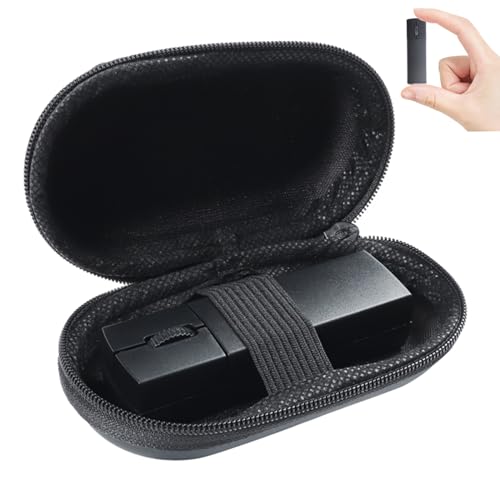
elec Space Wireless Mini Finger Mouse

TECKNET Wireless Mouse, 2.4G Ergonomic
More Details On Our Top Picks
The M187 keeps things simple in a way that makes sense for small hands and small bags. Its mini shape works well beside a laptop on a train tray, a café table, or a packed desk where anything larger starts to feel clumsy.
Compared with the vertical models later in this list, this one stays flatter and more traditional, so the learning curve is almost nonexistent. The honest trade-off is comfort: you get portability first, hand support second, which suits commuters and casual laptop users more than long desk sessions.
Strong Points
- Mini body slips easily into travel cases and tight sleeves.
- Traditional shape feels familiar right away for everyday laptop work.
- Light weight helps keep a small setup tidy and easy to carry.
- Simple layout suits quick tasks, browsing, and note taking.
Things To Consider
- Flat styling gives less hand support than a vertical mouse.
- Tiny size may feel too compact for larger palms.
- Battery access and storage matter more in a travel routine.
Feature Snapshot
Who It Suits Best
Frequent commuters and students who want a familiar mouse shape in a very small shell will get the most from it.
Where A Sibling Pick Shines
SANWA 2.4G Wireless Ergonomic Mouse suits you better for desk work that needs a more wrist-friendly vertical shape.
This vertical PHILIPS design is aimed at hands that want a more natural grip than a flat travel mouse can offer. The 2.4 GHz wireless connection keeps the desk clear, while the three DPI levels let you slow things down for detail work or speed them up for routine navigation.
Six silent buttons make this feel more suited to shared rooms than the noisier clicky mice you sometimes find in compact form factors. Because it’s described for small and medium right hands, you may find the fit especially sensible for right-handed home offices, though the shape does ask for an adjustment period.
What We Like
- Vertical angle supports a more relaxed hand posture for desk sessions.
- Three DPI settings help you match pointer speed to the task.
- Silent-button design keeps sound lower in shared workspaces.
- Lightweight build is easier to move around a laptop station.
- Auto-sleep behavior helps reduce needless battery drain between uses.
Softer Spots
- Vertical shape takes time before it feels natural.
- Right-hand focus leaves left-handed shoppers out of the fit.
- The taller profile is less pocket-friendly than a mini mouse.
Core Details
Who Will Love This
Right-handed professionals and students who spend steady hours at a laptop or desktop are the clearest fit here.
Another Choice May Suit
Logitech M187 Wireless Mini Mouse is easier to live with for commuters who want the smallest, most straightforward carry option.
The SABLUTE M41 leans into portability without feeling toy-like. Its slim body, USB-C adapter, and sleep mode make it a neat companion for work, study, and airline tray-table sessions where space gets tight fast.
That narrower shape puts it closer to the Logitech M187 than to the vertical picks, but the quieter operation gives it a calmer feel in shared spaces. The trade-off is simple: you get easy carry and clean desk manners, not the fuller hand support that taller ergonomic mice provide.
Upsides
- Slim profile stores easily beside chargers and cables.
- USB-C adapter broadens its usefulness with newer devices.
- Quiet click behavior suits classrooms, libraries, and shared offices.
- Three DPI levels help with casual navigation and finer pointing.
Room For Improvement
- Compact build leaves less room for a full palm grip.
- Sleep-mode behavior may mean a brief wake-up pause.
- Smaller mice can feel cramped during longer editing sessions.
Details At A Glance
Made For
Students, commuters, and remote workers who carry their setup from place to place will appreciate the compact footprint.
Look Elsewhere When
SANWA 2.4G Wireless Ergonomic Mouse suits you better for a more angled grip during longer desk sessions.
The SANWA stands out because it leans hard into the handshake-style grip that vertical mice are known for. That shape can feel surprisingly natural in a small palm, especially during long spreadsheet sessions or long stretches of browser work at a desk.
Its 800, 1200, and 1600 DPI options give you a sensible spread for slower detail work and faster general use. Compared with the flatter Logitech M187 and SABLUTE M41, this one asks for a short adjustment period, but the upside is a calmer wrist angle for people who want that kind of setup.
Best Bits
- Vertical profile places the hand in a more natural hold.
- Three DPI levels cover both precise and faster movement.
- Five-button layout supports everyday desktop shortcuts.
- Small-hand fit makes the shape less bulky than many ergonomic mice.
Areas To Watch
- Vertical styling can feel unusual for first-time users.
- Smaller hands may still need a short break-in period.
- Ergonomic shells tend to take more desk space than mini travel mice.
Technical Sheet
Best Suited To
Desk-based small-handed users who want a vertical mouse without jumping to a large, bulky shell will get the most out of it.
Swap It Out When
Logitech M187 Wireless Mini Mouse makes more sense for frequent travelers who value the tiniest possible carry profile.
The MAM3 pushes further into desk-friendly ergonomics and cross-device convenience than the simpler picks above it. Three-device Bluetooth support gives you more flexibility than a single-dongle mouse, which is handy for anyone moving between a laptop, a tablet-style setup, and a desktop during the day.
Its rechargeable battery and four DPI settings make it feel more complete than the bare essentials without becoming oversized. The trade-off is that more features usually mean more settings to keep track of, so it suits organized multi-device desks better than people who want a toss-in-the-bag spare.
Reasons To Buy
- Vertical shape gives small and medium hands a more relaxed hold.
- Three-device Bluetooth support cuts down on device switching hassles.
- Rechargeable power removes the need to keep a drawer full of cells.
- Four DPI levels give you finer control over cursor speed.
Minor Gripes
- Extra features add setup decisions that simpler mice skip.
- Vertical form can feel tall beside a flatter travel mouse.
- Multi-device convenience matters less for a single-laptop routine.
Feature Rundown
Right Fit For
People juggling multiple devices at a desk will get the most value from this one.
Reach For A Different Pick When
SHARE SUNSHINE Wireless Mouse Mini Small Silent is the easier choice for a simple pocket carry routine.
This SHARE SUNSHINE mouse keeps the formula stripped down: tiny body, three buttons, 1000 DPI, and a cordless layout that suits basic laptop use. For a school bag, a guest workstation, or a simple backup mouse, that no-frills setup can be exactly enough.
It reads as more playful than the black utility pieces above, but the usefulness is in the size, not the styling. The compromise is plain, though, because a very small shell and three-button layout won’t suit every hand shape or heavier workflow.
Positives
- Pocket-size body is easy to stash beside a charger or notebook.
- Three-button layout keeps operation straightforward.
- 1000 DPI is adequate for basic browsing and document work.
- Light, compact build works well as a spare travel mouse.
Points To Note
- Very small size may feel cramped for longer work sessions.
- Simple control set leaves out extras some desks may want.
- Bright styling is more about personality than desktop blending.
Core Details
The Right Fit
Casual laptop users, students, and anyone who wants a very small backup mouse will feel at home with it.
Where A Sibling Pick Shines
TECKNET Wireless Mouse, 2.4G Ergonomic is the better step up for more palm support and a broader feature set at a desk.
The elec Space finger mouse takes a different path from the other compact picks here, because the shape is meant to sit and move with your fingers rather than your whole palm. That makes it interesting for travelers who carry a case and move between a Chromebook, a MacBook, or another compact workstation.
Dual-mode connectivity, meaning Bluetooth and 2.4 GHz support, gives it more flexibility than a single-connection travel mouse. The trade-off is fit, since this style can feel unfamiliar at first and works best for people willing to adapt to a smaller, more specialized grip.
Highlights
- Finger-style shape saves space and keeps the profile unusual in a useful way.
- Bluetooth and 2.4 GHz support widen device compatibility.
- Silent operation suits shared spaces and low-noise setups.
- Included case helps protect the mouse in a travel bag.
Small Caveats
- Finger-style ergonomics are not as instantly familiar as a standard mouse.
- Compact shape may need a short learning period.
- Travel case helps with storage, but it adds another item to keep track of.
Feature Card
Whose Shelf It Belongs On
Travel-heavy setup users who like compact gear with a slightly unusual shape will get the most from it.
Where A Sibling Pick Shines
Logitech M187 Wireless Mini Mouse is the easier all-around choice for anyone who wants a more familiar shape.
The TECKNET has the most straightforward “everyday desk mouse” personality in this list. Side grips, adjustable DPI, a compact body, and broad operating-system compatibility make it easy to place beside a home PC, a laptop, or a shared family setup.
The 2600 DPI ceiling gives you plenty of pointer speed on paper, while the USB-A plug-and-play receiver keeps setup plain. Compared with the more specialized vertical picks, this one is less about posture correction and more about a familiar shape that gets the work done without much fuss.
What We Like
- Side grips add a steadier hold for small hands.
- Adjustable DPI gives you room to tune cursor response.
- Compact shell suits general home and office use.
- USB-A plug-and-play receiver keeps setup simple.
- Wide operating-system support broadens its usefulness across devices.
Honest Caveats
- Flat ergonomic styling is milder than a true vertical shape.
- USB-A focus means newer port-only setups may need an adapter.
- It feels more like an everyday all-rounder than a specialist comfort pick.
Feature Rundown
Built With In Mind
Home users who want a familiar wireless mouse with a little extra grip and a compact footprint are the clear match.
Skip It When
SANWA 2.4G Wireless Ergonomic Mouse is the stronger choice for anyone who wants a more pronounced vertical hand angle.
How To Choose The Right Computer Mouses For Small Hands
Shape Comes First
Small hands usually do better with mice that shorten the reach to the buttons and let the palm rest without stretching. Mini shells help with portability, while vertical shells shift the wrist into a more neutral position, and finger mice compress the design even further for travel setups. The trade-off is always familiar use versus support, so your best match depends on whether you want the easiest carry or the calmest grip.
Connection And Controls Matter Too
Wireless mice keep desks cleaner, but the type of connection changes the experience. A 2.4 GHz receiver usually feels straightforward on laptops and desktops, while Bluetooth can help when you move across multiple devices and want to leave ports open. DPI, or dots per inch, is the pointer sensitivity setting, and lower numbers feel slower while higher numbers move the cursor faster across the screen.
Think About The Work You Actually Do
A student who writes notes, browses course sites, and moves between classrooms has different needs from someone editing spreadsheets for hours. Quiet buttons matter in shared spaces, side grips help during long sessions, and sleep modes reduce idle drain between bursts of use. A compact travel mouse may feel like a pebble on the road, but a vertical mouse usually earns its keep at a desk.
Comfort Is Personal, But Patterns Are Clear
People with smaller palms often do better with reduced body width, lower button reach, and a shape that does not force the wrist outward. Right-handed ergonomic models can feel excellent for office work, yet they are less flexible for left-handed use or fast bag-and-go routines. The cleanest choice is the one that fits your desk time, travel habits, and hand size without asking for constant adjustment.
What To Weigh Before You Choose
Common Shopping Slip Ups
A common mistake is chasing a tiny body and forgetting how the mouse will feel after an hour of work. Another is choosing a style that looks ergonomic but does not match your hand shape or your dominant hand. Pay attention to the form, the connection method, and the button layout before anything else.
Short battery claims and quiet-click notes also matter in real use, especially in classrooms, shared rooms, and work-from-home corners. A mouse that seems fine for quick browsing can feel cramped during longer document work, so comfort deserves the same attention as portability.
Where The Extra Money Goes
Higher-priced mice usually spend that money on more connection options, better ergonomics, or rechargeable power. You also tend to see more adjustable DPI steps, extra buttons, side grips, or bundled storage cases, all of which can make daily use smoother. That upgrade makes sense when you switch devices often, work at a desk for long stretches, or want a more tailored fit.
A basic travel mouse is fine for light laptop work, and a more expensive ergonomic model is worth it when your hand starts to care about shape as much as size. The sweet spot is the one that solves a real problem in your routine, not the one that simply lists the most features.
Final Thoughts
A good mouse for small hands should feel like it belongs in your grip, not like you’re making do with whatever was nearby. The Logitech M187, SANWA vertical model, and TECKNET all make sense for different kinds of desk time, while the SABLUTE and elec Space options suit more portable or multi-device routines. Pick the shape that matches your day, and the rest becomes much easier.
