
Travel mice earn their keep in cramped hotel desks, airplane tray tables, and crowded coffee shop corners. The right one slips beside a charger without hogging space, still tracks cleanly on a variety of surfaces, and stays comfortable after a long stretch of email, edits, or spreadsheet work. You also want a setup that matches your devices, because the wrong connection style can turn a quick trip into a small hassle.
That’s why this shortlist leans toward portable shapes, quiet clicks, foldable frames, and flexible wireless options. Some choices suit light packers, while others make more sense for heavy laptop use or business travel. A few trade a little comfort for pocketability, and that’s often the right call on the road.
Quick Look At The Travel Shortlist

wegear USB Wireless Mouse Black
Targus Compact Mouse Blue Trace AMU75US
Uiosmuph Mini Wireless Bluetooth Mouse Black

Logitech Mobi Fold Wireless Mouse Graphite

DELUX Wireless Bluetooth Pocket Mouse MF20 Black

Logitech Mobi Fold Wireless Mouse Off-White

Logitech Mobi Fold for Business Graphite

Logitech M350s Pebble 2 Bluetooth Mouse Black
More Details On Our Top Picks
The wegear model takes the familiar cordless route, and that suits you well on a work trip where the laptop bag already feels full. Six buttons and five DPI stages, meaning cursor sensitivity settings, give you more control than the usual bare-bones travel mouse, while the black finish keeps the look plain and office-friendly.
The 24-month battery claim stands out for long stretches between swaps, though real use still depends on how much you rely on it. Compared with the slimmer Logitech Pebble 2 later in this list, this one sounds a bit more traditional in the hand, so it’s a better fit for you when comfort matters more than the tiniest footprint.
What We Like
- Six-button layout gives you extra shortcuts for browsing or file work.
- Five DPI stages let you tune pointer speed to the desk surface.
- Wireless 2.4GHz setup keeps the cable out of the way in transit.
- Battery life spec is useful for longer trips with less charging fuss.
- The shape looks more familiar than ultra-flat travel designs, which can feel easier in longer sessions.
Things To Consider
- It does not fold or collapse, so it takes up more bag space than the foldable picks.
- 2.4GHz wireless usually means you’ll want to keep track of the receiver dongle.
- The stronger feature set may feel like more mouse than you need for occasional use.
Feature Rundown
Who It Suits Best
You fit this pick best when you travel with a laptop for regular work and want a wireless mouse that still feels fairly full-featured.
A Better Fit Elsewhere
The Logitech M350s Pebble 2 Bluetooth Mouse Black suits lighter packers better, especially you if you want a smaller, flatter mouse with less bulk.
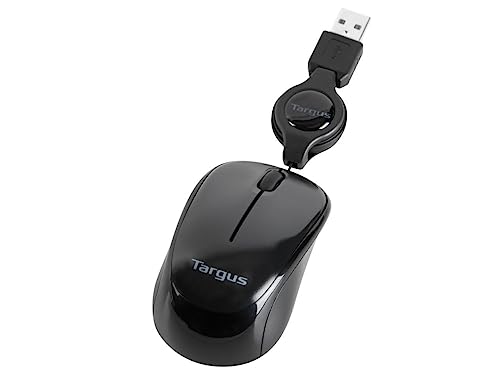
Compared with the cordless wegear above, this Targus mouse keeps things simpler by staying wired, which some travelers still prefer for predictable plug-and-go use. The retractable USB cord is the big convenience here, because a short lead is easier to pack neatly than a loose cable.
Blue Trace technology, a tracking system designed to read more surfaces than a basic optical sensor, makes sense for hotel desks or café tables that are not always ideal. The honest read is that a wired travel mouse can feel old-school, but for you it can also mean one less battery to manage.
Positives
- Retractable cable helps keep your bag from turning into a knot of cords.
- Wired connection avoids pairing steps on quick stopover work sessions.
- Blue Trace tracking is helpful on desks that are less than perfect.
- Compact body is easy to stow beside a charger or notebook.
Softer Spots
- The corded setup keeps you tethered to the laptop.
- It lacks the extra button count of the wegear pick.
- Old-school styling may feel plain beside the more modern foldable models.
Core Details
Who Should Grab It
You fit this mouse best when you want a dependable wired setup that packs neatly and skips charging concerns.
Swap It Out When
The Logitech Mobi Fold for Business Graphite suits heavier business travel better, especially you if fold-flat storage matters more than a cord.
This Uiosmuph model leans hard into pocketable size, and the listed 3.07 by 1.89 by 1.06 inch footprint tells you exactly where it belongs, inside a slim laptop sleeve or jacket pocket. Its tri-mode setup, meaning it can use Bluetooth 5.1, Bluetooth 5.0, or 2.4GHz, gives you flexible pairing across a laptop, Mac, or iPad without much fuss.
It’s also aimed at smaller hands, which matters because ultra-compact mice can feel cramped on longer work days. Compared with the Targus wired pick, this one gives you more connection flexibility, but the tiny shell asks for a bit more patience during extended use.
Bright Spots
- Very small footprint keeps carry space open for chargers and cables.
- Tri-mode connectivity makes it useful across several devices.
- USB-C charging fits a modern travel kit and cuts one more cable type from the bag.
- Low-key silent-click design suits shared spaces like trains, lounges, and library tables.
Room For Improvement
- The tiny body may feel cramped during long editing sessions.
- Small mice can be easier to misplace in a crowded tote.
- At this size, palm support is naturally limited.
Feature Snapshot
Made For
You fit this pick best when your main goal is shaving bulk from your travel setup without giving up wireless use.
Another Choice May Suit
The Logitech M350s Pebble 2 Bluetooth Mouse Black suits you better if you want a slightly more mainstream slim shape with broad device compatibility.
The fold-flat design is the headline here, and that makes this Logitech an easy fit for the kind of bag where every inch counts. Quiet clicks and Bluetooth pairing suit shared spaces, while 4K DPI, meaning a very fine pointer sensitivity setting, adds a more precise feel than basic travel mice usually offer.
Fast Pair support is useful in real travel life because you want less setup time and fewer little annoyances between meetings. Compared with the Uiosmuph mini mouse, this one should feel more refined in daily work, though the folding mechanism adds a bit of moving hardware that you’ll want to keep clean and dry.
Highlights
- Foldable body is easy to tuck into a sleeve or pocketed pouch.
- Quiet clicks are well suited to hotel lobbies, libraries, and shared offices.
- 4K DPI gives you finer control for spreadsheet work or quick editing.
- Bluetooth support helps keep your setup lighter without a receiver dongle.
Minor Gripes
- Foldable hardware needs a little extra care during packing.
- Bluetooth-only use may not suit every old laptop configuration.
- The slim travel form can feel less filling in the hand than a conventional mouse.
At A Glance
Best Suited To
You fit this pick best when you want a slim mouse that still feels polished enough for frequent business travel.
Where A Sibling Pick Shines
The DELUX Wireless Bluetooth Pocket Mouse MF20 Black makes more sense for you if you want a broader connection mix and a more compact sliding design.
DELUX goes after travelers who want a pocket mouse with a little more flexibility than the smallest slab-shaped designs. The sliding body, foldable format, and dual-mode connection support give you options, and the black finish stays understated in a business bag.
The USB-C charging port on the front is a handy touch because it keeps top-ups simple even while you’re on the move. Compared with the Logitech Mobi Fold above, this one sounds more adjustable and a touch more gadget-like, which some travelers will enjoy and others may find slightly fussy.
Upsides
- Sliding, foldable shell saves room without feeling like a bare-minimum mini mouse.
- Bluetooth 5.2 and 2.4GHz support give you multiple connection paths.
- Quiet clicks help keep noise down on flights or in shared rooms.
- Up to 4000 DPI gives you room for faster pointer movement when needed.
- USB-C charging is practical for a modern travel kit.
Points To Note
- The more complex shape may need a moment of getting used to.
- Foldable parts add moving surfaces that you’ll want to keep clean.
- Very small travel mice can be less comfortable for long, desk-heavy workdays.
Details At A Glance
Who Will Love This
You fit this model best when you want a highly portable mouse with more connection flexibility than a basic travel spare.
Look Elsewhere When
The wegear USB Wireless Mouse Black makes more sense for you if battery longevity and a more traditional grip matter more than a folding shell.
This off-white version carries the same foldable travel logic as the graphite Mobi Fold, but the lighter color shifts the look toward something a bit softer and cleaner. Quiet clicks and Bluetooth connectivity make sense for coworking tables, airport lounges, or any place where a louder mouse would feel out of place.
Fast Pair support again matters because travel gear should reduce friction, not add it. Compared with the graphite Mobi Fold, the functional story is nearly the same, so this choice really comes down to color preference and how the finish fits the rest of your kit.
Best Bits
- Foldable body packs down neatly beside cables and adapters.
- Quiet clicks are useful in shared or low-noise settings.
- Bluetooth keeps your carry simple.
- Fast Pair can speed up setup on supported devices.
Areas To Watch
- The light finish may show grime faster than darker colors.
- Like the graphite model, the fold mechanism asks for careful handling.
- It is not the most cushioned option for long desktop work sessions.
Feature Card
The Right Fit
You fit this pick best when you want the same foldable Logitech travel experience but prefer a lighter-looking finish.
Skip It When
The Logitech Mobi Fold for Business Graphite suits you better if you want a darker, more work-focused finish with touch-scroll support.
This is the most business-minded mouse in the group, and the addition of a Logi Bolt receiver plus Bluetooth gives you more connection flexibility than the simpler Logitech foldables. Touch scroll also matters in real travel use, because it can make long documents, dashboards, and message threads easier to handle on the go.
The foldable body still keeps it travel-friendly, but the whole package feels aimed at people who carry a laptop for real work rather than occasional browsing. Compared with the standard Mobi Fold versions, this one is the clear step-up choice for commuters and road warriors who want a more polished desktop feel.
What We Like
- Touch scroll adds a more fluid way to move through long pages.
- Logi Bolt receiver support broadens connection options.
- Bluetooth and Fast Pair keep setup flexible.
- Quiet clicks suit shared office or hotel-room work.
- Foldable shape still packs down for travel.
Small Caveats
- The business features are useful, but they may be more than a casual traveler needs.
- Any foldable mouse benefits from careful packing to keep the hinges clean.
- Touch controls can feel different at first, depending on your usual mouse style.
Technical Sheet
Built With In Mind
You fit this mouse best when your travel routine centers on laptop work, meetings, and document-heavy days.
Reach For A Different Pick When
The Logitech M350s Pebble 2 Bluetooth Mouse Black suits you better if you want a slimmer, simpler option for lighter travel use.
The Pebble 2 is the cleanest fit for many travel kits because it stays slim, light, and visually simple. A customizable button and Easy-Switch support, which lets you move between devices, make it more versatile than its minimalist shape first suggests.
Quiet clicks are a real plus in hotel rooms, planes, or shared workspaces, and that matters more than flashy extras for many travelers. Compared with the more feature-packed Logitech Mobi Fold for Business, this one is for you when portability and calm, discreet use matter more than advanced scrolling hardware.
Positives
- Very slim profile slips easily into a laptop sleeve or small pouch.
- Lightweight build helps keep your bag from feeling overpacked.
- Quiet clicks suit shared spaces and late-night work sessions.
- Easy-Switch support makes it useful across multiple devices.
- Customizable button adds a practical shortcut for everyday work.
Honest Caveats
- The minimalist shell may feel too small for hands that prefer more palm support.
- It focuses on portability, so it gives up the richer feature set of the business-oriented Logitech option.
- A slim mouse is easy to carry, but also easier to overlook in a crowded bag.
Core Details
Whose Shelf It Belongs On
You fit this mouse best when you want a tidy, quiet travel companion for laptop, tablet, and general on-the-go use.
Where Another Pick Suits Better
The wegear USB Wireless Mouse Black suits you better if you want more buttons and a stronger focus on conventional laptop work.
How To Choose The Right Computer Mouses For Travel
Connection Style Matters More Than You Think
Travel mice split into two camps: wireless models that keep your bag cleaner, and wired models that skip pairing and charging. Bluetooth suits you well when your laptop is already short on ports, while 2.4GHz wireless usually brings a tiny receiver dongle into the mix, which can be easy to lose in a crowded case.
A wired mouse still has a place for travelers who want simple plug-and-use behavior. Retractable cords, like the one on the Targus pick, solve part of the tangle problem without asking you to think about batteries.
Size Should Match Your Packing Style
Mini mice save space, but they can feel cramped during long work sessions. Foldable designs, such as the Logitech Mobi Fold options, keep the footprint small without going fully tiny, which is useful when you move between airports, hotel desks, and meetings.
Think about your hand size and the kind of work you do. Spreadsheet-heavy travel days benefit from a mouse that still gives your fingers some room, while light email and browsing can live comfortably with a pocket-size model.
Quiet Clicks And Surface Tracking Can Save Your Sanity
Quiet clicks matter more than many people expect in shared spaces, especially late at night in a hotel or during a conference break. A softer click helps your setup feel less intrusive, and that can make a plain mouse feel surprisingly considerate, like the kind of small detail that quietly improves the trip.
Tracking also deserves attention. Features such as Blue Trace or higher DPI settings help the cursor behave more predictably on imperfect surfaces, which is exactly the sort of thing that becomes obvious when your only desk is a café table or a tray table.
Battery And Charging Habits Need To Fit Your Routine
Rechargeable mice work best for travelers who already keep a USB-C cable in the bag. Long battery claims can be useful, but the real question is whether you prefer to charge occasionally or avoid charging altogether with a wired model.
For business travel, a mouse that charges through the same cable as your phone or headset can simplify packing. For lighter trips, a basic wireless mouse with a long battery claim may be enough and can feel easier to trust over a weekend away.
A Quick Reality Check
Common Shopping Slip Ups
Many travelers focus only on size and forget about comfort. A mouse that disappears into a pocket can still feel awkward after an hour of document edits, so you want to balance compactness with hand support.
Another easy miss is connection fit. Bluetooth, USB receiver, and wired styles all work differently in practice, and the wrong choice can leave you hunting for an adapter in the middle of a trip.
The Case For Spending Up
More expensive travel mice usually buy you better materials, foldable hinges, extra connection options, or smarter button layouts. Those details matter most when the mouse lives in your bag every day and sees hotel desks, conference tables, and airport gates.
The upgrade is worth it for frequent flyers and mobile professionals who use a mouse for real work, not just occasional clicks. For lighter travel use, a simpler model often gets the job done without adding clutter.
Wrapping Up
The right travel mouse depends on how much space you can spare and how long you plan to use it each day. The Logitech M350s Pebble 2 Bluetooth Mouse Black feels like the easiest all-around fit for many people, while the foldable Logitech Mobi Fold for Business Graphite makes more sense for heavier work travel. You also have solid choices here for wired simplicity and ultra-compact carry, so you can match the mouse to the trip instead of forcing one shape to do everything.
