
Finding a dependable desktop without overspending is harder than it should be. Shoppers juggling remote work, school assignments, or family streaming need a machine that handles multitasking without lagging during a video call. The 500 Computers category covers a practical sweet spot: enough processing power and memory for daily productivity, paired with storage that keeps boot times reasonable. Most people in this tier want a plug-and-play experience, not a build-from-scratch project.
The Shortlist At A Glance
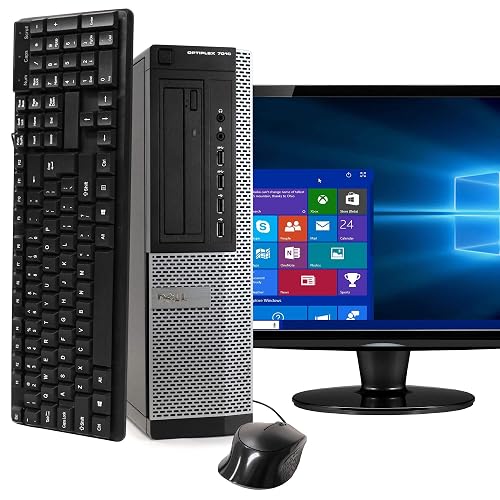
Dell Optiplex 7010 Desktop Package (Renewed)
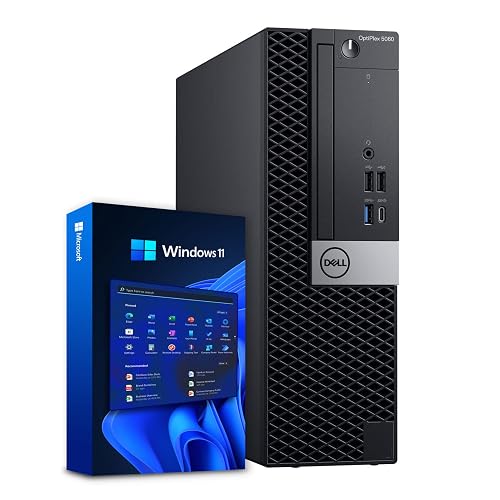
Dell OptiPlex 5060 Desktop (Renewed)
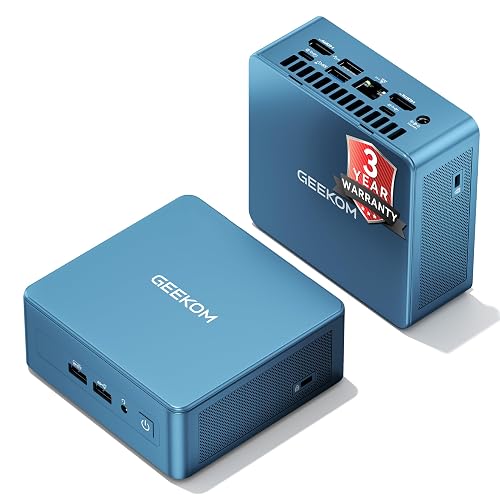
GEEKOM IT12 Mini PC
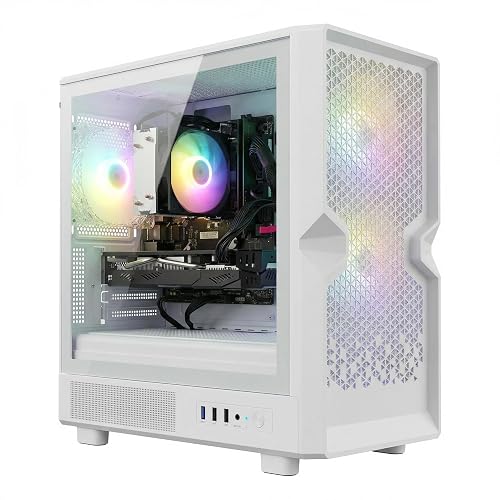
STGAubron Gaming PC Desktop

Dell Optiplex 3060 Desktop (Renewed)
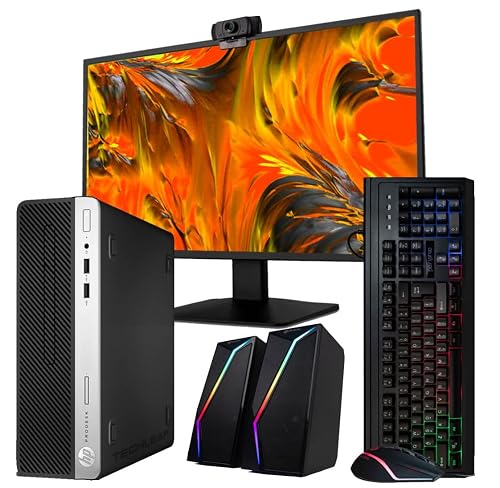
HP Desktop Computer 24-inch LCD Bundle (Renewed)
More Details On Our Top Picks
Opening the box reveals a genuinely complete kit, which immediately sets this apart from bare-tower alternatives. The included 19-inch LCD, keyboard, and mouse mean you plug in once and start working, rather than hunting for compatible peripherals. For a home office or a student desk, that convenience genuinely matters. The Optiplex 7010 chassis carries a business-grade build quality that feels sturdier than typical consumer plastic shells.
The trade-off reveals itself in the storage type, since this unit pairs its 8GB of RAM with a 500GB HDD (mechanical hard drive) rather than a solid-state drive. Boot times and app launches will feel noticeably slower than SSD-equipped rivals on this list. In a busy household where multiple tabs stay open across Chrome and Word, you may notice the lag during heavy multitasking.
Strong Points
- Complete bundle with monitor, keyboard, mouse, and WiFi eliminates separate purchases
- Business-class chassis durability survives shared family desk use
- Quad-core i5 processor handles everyday browsing and document editing without strain
- DVD drive still handy for legacy media or software installs
Trade Offs
- 500GB HDD boots slower than SSD options, adding wait time to every session start
- 8GB RAM may bottleneck with heavy multitasking across many browser tabs
Who Will Love This
Shoppers wanting a plug-and-play desktop bundle for basic home or school tasks without buying separate peripherals.
Look Elsewhere When
Speed matters more than completeness, since the Dell OptiPlex 5060 offers an SSD and double the RAM for noticeably snappier daily performance.
Stepping up from the 7010, the OptiPlex 5060 brings two meaningful upgrades: a 500GB SSD (solid-state drive, which uses flash memory instead of spinning disks for dramatically faster boot and load times) and 16GB of DDR4 RAM. The six-core i5-8500 processor also pushes clock speeds up to 4.3GHz under load. Together, these changes make the daily experience feel far more responsive. Opening large spreadsheets or switching between video calls and browser windows stays smooth.
The dual-drive setup adds a 1TB HDD for bulk storage alongside the SSD, giving you fast system performance plus ample room for files. Bluetooth and WiFi come built in, so you skip dongles. The honest read is that the small form factor limits internal expansion down the road. You also supply your own monitor and peripherals here, unlike the 7010 bundle.
Highlights
- SSD boot drive delivers quick startup and fast app loading
- 16GB RAM handles demanding multitasking without stuttering
- Dual-drive config separates fast system storage from bulk file capacity
- Six-core processor sustains performance under sustained workloads
- Built-in WiFi and Bluetooth cut cable clutter on your desk
Worth Noting
- No monitor or peripherals included, adding cost for shoppers starting from scratch
- Compact case restricts future internal component upgrades
Feature Snapshot
Made For
Home office professionals running multiple apps and browser sessions who need responsive speed and ample file storage.
A Better Fit Elsewhere
Shoppers who want every peripheral in one box should grab the HP Desktop bundle instead, since it includes a 24-inch monitor, webcam, and speakers alongside the tower.
Unlike the full-size towers above, the GEEKOM IT12 shrinks everything to a footprint that fits behind a monitor or on a narrow shelf. The full-metal chassis signals durability for shared workspaces, and the included 3-year coverage adds peace of mind for bulk office deployments. USB4 support and 8K display output are uncommon at this size. For a reception desk or a cramped home office, the space savings are immediately noticeable.
The i3-12300HE trades raw clock speed for modern efficiency, meaning it stays cool and quiet during long workdays. You may find it less suited to heavy rendering tasks compared to the Dell 5060’s six-core chip. The 512GB SSD keeps things responsive. RAM and storage are user-upgradable, which extends the useful life considerably.
Reasons To Buy
- Tiny footprint frees up valuable desk real estate
- Full-metal chassis withstands shared-workspace wear
- USB4 port enables fast data transfers and versatile display docking
- User-upgradable RAM and storage extend the lifespan beyond initial specs
Points To Note
- i3 processor is slower under sustained heavy workloads than six-core alternatives
- No included monitor, keyboard, or mouse requires a separate shopping trip
- Fan noise may become audible during extended rendering or compilation tasks
Quick Facts
Right Fit For
Office managers and space-constrained professionals who need a quiet, compact machine for document work and web-based tasks.
Consider Something Else When
Heavy multitasking or gaming is on the agenda, since the STGAubron Gaming PC delivers a dedicated graphics card and a faster i7 processor for demanding applications.
This is the only pick on the list with a discrete graphics card, the AMD Radeon RX 580 16GB. That alone shifts the use case from everyday productivity to entry-level gaming and content creation. The Core i7 processor turbo-boosts to 3.9GHz, and 16GB of RAM keeps streaming and editing workloads moving. ARGB fans add visual flair through the case window. For someone who games after hours and edits video during the day, the dual-purpose appeal is real.
The honest read is that the RX 580 is an aging architecture, so it handles older or mid-tier titles well but struggles with the latest AAA releases at high settings. WiFi 6 and Bluetooth 5.0 bring modern wireless connectivity. Owners commonly report the ARGB fans run slightly louder under gaming load than standard case fans.
Plus Points
- Discrete RX 580 graphics handle entry-level gaming and video rendering
- WiFi 6 delivers fast, reliable wireless connectivity for online gaming
- ARGB lighting adds visual personality to a desk setup
Small Caveats
- RX 580 is an older GPU architecture, limiting performance on newest game titles
- Tower form factor consumes more desk space than the GEEKOM mini PC
- ARGB fans may produce audible noise during intensive gaming sessions
Best Suited To
Casual gamers and hobbyist video editors who want a single desktop for creative work and after-hours play.
Reach For A Different Pick When
Your needs are strictly office productivity, since the Dell Optiplex 3060 covers standard workflows at a lower complexity point with comparable RAM and SSD speed.
Sitting between the 7010 and the 5060 in the Dell lineup, the Optiplex 3060 strikes a practical middle ground. It pairs the same i5-8500 six-core processor as the 5060 with 16GB of DDR4 RAM and a 500GB SSD. The RGB side panel adds a modern touch that the business-gray 5060 lacks. Windows 11 Professional comes pre-installed, which is a genuine plus for anyone needing BitLocker encryption or remote desktop access.
You give up the dual-drive setup of the 5060, settling for SSD-only storage. For most office and home use, 500GB of fast storage is plenty. The RGB lighting is a matter of taste, and you may find it distracting in a professional environment. No monitor or peripherals come in the box.
Bright Spots
- 500GB SSD ensures fast boot times and responsive application launches
- Windows 11 Pro adds business features like BitLocker and Remote Desktop
- Six-core i5 processor matches the 5060’s computing power for daily tasks
- RGB side panel gives the chassis a contemporary look for home setups
Softer Spots
- No secondary HDD means less bulk storage than the dual-drive 5060
- RGB lighting may feel out of place in conservative office settings
Spec Overview
Perfect Match For
Small business owners and home office workers who need professional-grade Windows features and solid-state speed in a standard tower.
Swap It Out When
Large file storage matters more than Pro-level features, since the Dell OptiPlex 5060 adds a 1TB HDD alongside its matching SSD for double the total capacity.
Closing out the list with the most complete kit, this HP bundle includes a 24-inch LCD, RGB keyboard and mouse, speakers, and a webcam. The 24-inch screen is the largest monitor on this list, giving you more visual workspace than the Dell 7010’s 19-inch display. An Intel i5 processor pairs with 16GB of RAM and a 500GB SSD for responsive daily performance. WiFi 6 AX200 brings the latest wireless standard for fast, stable connectivity.
The small form factor case fits neatly on a desk or shelf. For a family setting up a shared homework and streaming station, the included accessories cover nearly every need. The compact case does limit internal expansion. The included speakers are basic, so audiophiles may want to add external ones.
Best Bits
- 24-inch monitor provides the largest display workspace in this roundup
- WiFi 6 AX200 offers the fastest wireless connectivity standard available
- Included webcam handles video calls without a separate purchase
- 500GB SSD keeps boot and load times fast
- Complete accessory kit covers keyboard, mouse, and speakers out of the box
Areas To Watch
- Small form factor case limits future internal upgrades
- Included speakers are basic and may need replacing for media consumption
Built With In Mind
Families and students who want a single-purchase desktop with monitor, webcam, and peripherals ready to go on day one.
Where A Sibling Pick Shines
Shoppers who prioritize raw processing power over accessories should consider the Dell OptiPlex 5060, since its six-core turbo architecture handles heavier workloads despite lacking a bundled monitor.
What Matters Most Before Choosing 500 Computers
Storage Type Drives Everyday Speed
The single biggest performance factor in this category is whether the system uses an SSD (solid-state drive) or an HDD (mechanical hard drive). SSDs boot in seconds and launch apps almost instantly. HDDs cost less per gigabyte but add noticeable wait time to every session. For daily productivity, an SSD is worth the trade-off in total storage capacity.
RAM Capacity Shapes Multitasking
8GB of RAM handles basic browsing and document editing. 16GB lets you keep dozens of browser tabs, a video call, and a spreadsheet open simultaneously without stuttering. Families sharing a computer or professionals running multiple apps benefit from the higher tier.
Processor Cores And Clock Speed
Quad-core processors manage everyday tasks adequately. Six-core chips sustain performance better under concurrent workloads, meaning they hold speed when multiple apps demand attention simultaneously. Turbo boost frequencies above 4GHz help with short bursts of intensive work.
Bundled Accessories Or Bare Tower
Some picks include monitors, keyboards, mice, and webcams. Others ship as towers only. Shoppers starting from scratch save money and effort with a complete bundle, while those upgrading an existing setup avoid paying for redundant peripherals.
Before You Click Buy
Traps First Timers Fall Into
Many shoppers focus on processor speed and overlook storage type, ending up with a fast chip crippled by a slow mechanical drive. Another frequent misstep is buying a bare tower when the household has no spare monitor or peripherals, turning a seemingly good price into a much larger total spend.
When Paying More Pays Off
Higher-tier models in this category typically add SSD storage, doubled RAM, and newer wireless standards like WiFi 6. The upgrade is worth it for anyone who keeps a computer for three or more years, since the daily speed difference compounds over thousands of sessions.
Frequently Asked Questions
What does “Renewed” mean for these desktop computers?
Renewed units are pre-owned devices professionally inspected, cleaned, and tested to function like new. They typically come with a replacement warranty backed by the retailer, covering malfunctions after the original manufacturer’s coverage period ends.
Is 8GB of RAM enough for everyday use?
Basic web browsing, email, and document editing run comfortably on 8GB. Households juggling video streaming, multiple tabs, and school applications simultaneously will notice smoother performance with 16GB.
Can I upgrade the RAM or storage later?
Most desktop towers in this category allow RAM and storage upgrades through accessible internal slots. Mini PCs like the GEEKOM IT12 also support user upgrades, though small form factor cases may have tighter physical constraints.
Do these computers come with a monitor?
Some bundles include a monitor while others ship as towers only. The Dell 7010 package includes a 19-inch LCD, and the HP bundle includes a 24-inch LCD, whereas the OptiPlex 5060 and 3060 towers require you to supply your own display.
Is Windows 11 Pro worth choosing over Home?
Windows 11 Pro adds BitLocker disk encryption and Remote Desktop access, which matter for business users handling sensitive data. Home users doing everyday browsing and streaming generally find the Home edition sufficient.
Bottom Line
The right 500 Computers pick depends on what your desk actually needs. Complete bundles suit anyone starting fresh, while SSD-equipped towers serve power users who already own peripherals. Match the storage type and RAM to your daily workload, and the rest falls into place.
