
CS2 puts a premium on motion clarity, low lag, and a screen that keeps up when a fight turns messy. You also want the right size and resolution for your desk, because a panel that looks great in screenshots can still feel wrong during a long evening of matches. This roundup focuses on monitors that fit real gaming setups, from compact 24-inch options to larger curved displays and 4K picks for players who want extra detail.
Quick Look At The Shortlist

INNOCN 32″ Mini LED 4K 160Hz HDR1000 Monitor
KTC 24.5 Inch 240Hz Gaming Monitor H25T7-3

INNOCN 24.5″ 1440P 240Hz Gaming Monitor 25G2S
ZZA 32 Inch Curved Monitor 1440p VA Screen 165Hz
INNOCN 27″ 2K 1440P 320Hz Mini LED Gaming Monitor GA27T1M

KTC 25M1 400Hz Gaming Monitor 24.1 Inch FHD
Alienware 25 Gaming Monitor AW2523HF 24.5 Inch 360Hz
ZZA 32″ Curved Gaming Monitor FHD 1080p 240Hz 1ms
More Details On Our Top Picks
Big-screen CS2 setups benefit from this INNOCN because it mixes 4K detail with a 160Hz ceiling, so you get a sharper image without giving up the fast feel that matters in movement-heavy rounds. The Mini LED backlight, a lighting system that uses many small LEDs for finer control, should appeal to you if you sit close and want stronger contrast in dark corners and bright HUD moments.
USB Type-C connectivity adds a tidy laptop path, and the height-adjustable stand helps you line up the panel with a low-profile desk or a deeper monitor arm-free setup. The honest trade-off is size, since 32 inches can feel generous for strict tournament-style play, but it makes more sense than smaller screens for mixed gaming and everyday work.
Strong Points
- 4K resolution gives fine image detail for menus, maps, and desktop work between matches.
- 160Hz refresh keeps motion much smoother than standard 60Hz office panels.
- Mini LED backlighting can help shadows and highlights separate more clearly on screen.
- USB Type-C is useful for a cleaner laptop connection at a shared desk.
- The height-adjustable stand helps you set a comfortable eye line without extra accessories.
Things To Consider
- 32 inches takes more desk depth than a 24.5-inch esports panel.
- 4K at high refresh asks more of your graphics hardware than 1440p or FHD.
- The larger size can feel less focused for pure ranked play on a narrow desk.
Feature Snapshot
Who It Suits Best
You benefit most here if you want a premium-feeling 32-inch display for CS2, single-player games, and daily desktop use in one setup.
A Better Fit Elsewhere
KTC 25M1 400Hz Gaming Monitor 24.1 Inch FHD is the cleaner match for desk-tight competitive players who care more about speed and size than 4K detail.
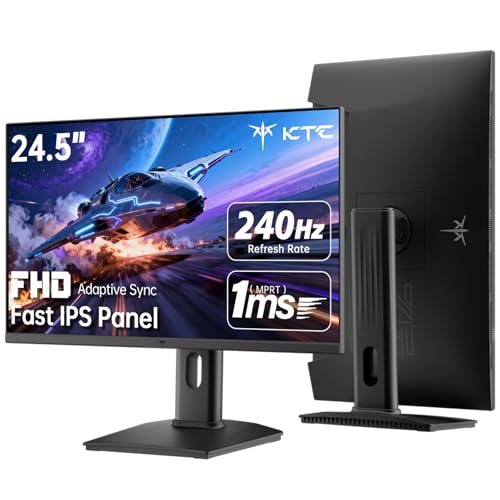
For a straightforward CS2 setup, this KTC keeps the focus on motion first. The 24.5-inch size is a sweet spot for many desks, because your eyes do less wandering than they would on a larger screen, and the Fast IPS panel gives you wide viewing angles without the murky look some budget TN panels bring.
Its 240Hz refresh rate and 1ms MPRT response time suit you well in fast peeks and quick tracking, though the display still lives in Full HD territory rather than higher-resolution 1440p. That trade-off makes sense for players who want speed, easy system demands, and a monitor that can also handle work or general use without feeling oversized.
What We Like
- 240Hz is a strong fit for fast mouse movement and quick target changes.
- 24.5 inches keeps the image compact and easy to scan in matches.
- Fast IPS helps colors and viewing angles stay consistent from a normal desk position.
- HDMI and DisplayPort support make it easy to connect to a desktop or console.
- VESA mounting works well for arm setups and cleaner cable routing.
Points To Note
- Full HD on a 24.5-inch panel is practical, but not as crisp as 1440p or 4K.
- HDR400 is a modest step up, so you should expect a light touch rather than a dramatic image shift.
- The plain design is functional, but it does not feel as premium as Alienware AW2523HF.
Core Details
Made For
You fit this monitor best if you want a clean, compact gaming screen that works well for CS2, school work, or a simple desktop setup.
Another Choice May Suit
INNOCN 24.5″ 1440P 240Hz Gaming Monitor 25G2S is the stronger route for you if sharper 1440p image detail matters more than keeping the setup as light as possible.
This INNOCN sits in a useful middle ground for CS2, because 1440p gives you a clearer image than FHD while still staying in the sweet zone for high-refresh gaming. Fast IPS and 240Hz make it feel more tuned to reaction-heavy play than the 4K INNOCN above, which asks more from your hardware and leans harder into detail than speed.
The broad sync support is handy for mixed setups, especially on gaming laptops or consoles, and the built-in speaker mention gives you a little convenience for desk sessions that do not need a separate audio setup right away. The trade-off is simple, since a 24.5-inch 1440p panel can be a tougher ask on older graphics cards than 1080p, so the fit is best for players with solid output hardware.
Highlights
- 1440p sharpens fine detail without pushing into full 4K demand.
- 240Hz suits fast tracking and quick recoil control in CS2.
- Fast IPS helps the screen stay readable from a normal sitting position.
- HDMI 2.1 and DisplayPort broaden your connection options.
- Sync compatibility helps smooth out frame pacing in supported setups.
Small Caveats
- 1440p at high refresh makes more sense on stronger graphics hardware.
- The built-in speaker note is useful, but most desk setups still lean on separate audio gear.
- At 24.5 inches, it may feel compact for those who want a larger desktop canvas.
Details At A Glance
Right Fit For
You get the most from this monitor if you want a sharper competitive display for CS2 and have hardware that can keep frame delivery strong.
Look Elsewhere When
KTC 24.5 Inch 240Hz Gaming Monitor H25T7-3 makes more sense for a lighter GPU load and a simpler Full HD setup.
This ZZA leans into immersion first, with a 32-inch curved VA panel that gives you more wraparound presence than the flat 24.5-inch KTC models. VA, short for vertical alignment, usually means stronger contrast than typical IPS screens, and that can make darker CS2 scenes look more layered on a roomy desk.
The 165Hz rate is lower than the fastest entries here, but it still covers most of what a serious casual or ranked player needs. You may find the curved shape especially comfortable for mixed gaming and video use, though the larger panel asks for enough viewing distance to avoid feeling too close.
Bright Spots
- 32-inch size gives you a wide, cinematic feel for games and media.
- 1500R curvature helps the screen wrap more naturally around your field of view.
- VA contrast can make dark areas look richer than on many IPS monitors.
- 165Hz still offers smooth motion for everyday competitive play.
- VESA mount compatibility makes arm setups easier to manage.
Softer Spots
- 165Hz trails the 240Hz and 360Hz options in this roundup.
- The large curved panel needs more desk depth than a compact 24.5-inch screen.
- VA panels can feel less snappy than Fast IPS on some fast transitions.
Quick Facts
The Right Fit
You suit this monitor best if you want a larger curved screen for CS2, story games, and general desktop work on a desk with decent depth.
Where A Sibling Pick Shines
INNOCN 24.5″ 1440P 240Hz Gaming Monitor 25G2S is the sharper match for players who care more about faster motion and a smaller footprint.
Among the faster 1440p options, this INNOCN stands out because it pushes to 320Hz while staying at a very usable 27-inch size. That combination feels well suited to CS2, where you want both a clean target picture and extremely quick motion handling, and the Mini LED backlight should help the image carry more depth than a basic edge-lit panel.
HDR1000 support and the adjustable stand make it feel more complete than the stripped-back KTC speed models, though the graphics load rises with a 1440p panel that can run this fast. You may find it especially appealing if you want a monitor that can serve as a serious game screen and a polished daily display without looking bare-bones.
Reasons To Buy
- 320Hz is a strong match for very fast competitive play.
- 27 inches gives you a little more room than 24.5-inch panels without feeling huge.
- Mini LED can improve contrast control compared with ordinary backlighting.
- HDR1000 support points to a more capable high-brightness presentation.
- FreeSync and G-SYNC compatibility help smooth supported frame output.
- The adjustable stand helps you dial in height without extra hardware.
Areas To Watch
- 320Hz is only fully useful with strong frame delivery from your PC.
- 1440p at this speed asks more of your GPU than FHD panels do.
- The premium feature mix makes it more monitor than most casual setups need.
Feature Rundown
Whose Shelf It Belongs On
You fit this monitor best if you play CS2 seriously and want a 27-inch screen that keeps motion speed and image sharpness in the same lane.
Swap It Out When
KTC 24.5 Inch 240Hz Gaming Monitor H25T7-3 makes more sense for a lighter, simpler setup that does not ask as much from your PC.
Speed is the whole point here, and that makes the KTC 25M1 feel especially relevant for CS2. The Fast TN panel, a TN-type screen tuned for faster transitions, pairs with the 0.5ms GTG response claim to keep movement sharp, while the 24.1-inch size stays compact enough for an esports-style desk.
The shielding hood is a practical touch for bright rooms or busy setups because it helps cut stray light around the screen. You give up some image richness compared with the INNOCN Fast IPS models above, but in exchange you get a very focused panel for players who care more about speed than broad color finesse.
Best Bits
- Fast TN tuning suits very quick motion in tactical shooters.
- 24.1 inches keeps the screen tightly framed and easy to track.
- 0.5ms GTG points to very brisk pixel transitions.
- The shielding hood can help in rooms with strong ambient light.
- Height, swivel, pivot, and tilt adjustments make positioning easier.
Room For Improvement
- TN panels usually trade away some color richness compared with IPS choices.
- The 24.1-inch size may feel small for mixed gaming and creative work.
- Fast-focused design suits esports more than all-purpose desktop use.
At A Glance
Built With In Mind
You suit this monitor best if you play CS2 or similar fast shooters on a compact desk and want the screen to stay as focused as possible.
Reach For A Different Pick When
Alienware 25 Gaming Monitor AW2523HF 24.5 Inch 360Hz makes more sense for you if you want a more refined look with IPS color and a premium stand feel.
The Alienware 25 plays in the same speed-focused space as the KTC 25M1, but it swaps the Fast TN approach for an IPS LED panel, which usually gives you more even color and better off-angle viewing. That matters on a desk where you might sit a little off-center, or where the screen also has to handle everyday work without looking harsh.
Its 360Hz refresh rate is aimed squarely at serious competitive play, and the adjustable stand plus redesigned base should help with desk space in tighter rooms. The trade-off is plain enough: you are paying for a polished esports shape, not a big feature stack, so it suits you best when speed and build feel matter more than extra screen size.
Positives
- 360Hz delivers an extremely responsive feel for fast shooters.
- IPS LED panel brings a more balanced image than many TN alternatives.
- The compact 24.5-inch size suits competitive desk setups.
- Height, tilt, swivel, and pivot adjustments make positioning straightforward.
- The redesigned base leaves more room for keyboard and mouse movement.
Minor Gripes
- Full HD is practical, but not as sharp as 1440p or 4K.
- The feature set is focused, so it is less about extras and more about speed.
- You may not need 360Hz unless your hardware and play style can take advantage of it.
Feature Card
Who Should Grab It
You suit this monitor best if you play CS2 at a serious pace and want a premium-feeling 24.5-inch display with very high refresh.
Where A Sibling Pick Shines
ZZA 32″ Curved Gaming Monitor FHD 1080p 240Hz is the better fit for you if a larger curved panel and lower system demand matter more than 360Hz speed.
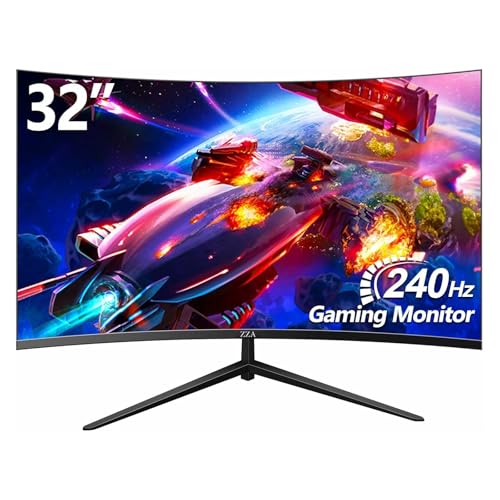
This ZZA takes a different route from the sharper 1440p and 4K screens above, because it keeps resolution at Full HD while pushing 240Hz on a 32-inch curved VA panel. That makes it appealing for CS2 on a mid-range GPU, where lighter resolution can help frame rates stay steadier and the large curved shape makes the image feel more enveloping.
The 4000:1 contrast figure and HDR10 support point to a screen that should handle dark and bright areas with more depth than a plain office monitor. The trade-off is that 1080p on 32 inches is not as crisp as smaller or higher-resolution picks, so you choose this for size, smoothness, and system relief rather than razor-fine detail.
Upsides
- 240Hz gives you smooth motion for fast shooters and console play.
- 32-inch curved format creates a larger, more immersive presence.
- Full HD keeps GPU demands lighter than 1440p or 4K.
- 4000:1 contrast suggests deeper dark scenes than many flat IPS panels.
- PIP and PBP support can help you juggle two sources on one screen.
Honest Caveats
- 1080p spread over 32 inches is not as sharp as smaller displays.
- VA response can feel less immediate than the fastest IPS or TN choices.
- The larger size needs a desk with enough viewing distance.
Core Details
The Right Fit
You fit this monitor best if you want a big curved screen for CS2, console play, and general entertainment without asking a mid-range PC to push 1440p.
Consider Something Else When
INNOCN 24.5″ 1440P 240Hz Gaming Monitor 25G2S is the better match if you care more about sharpness and a smaller competitive footprint.
How To Choose The Right Cs2 Monitors
Refresh Rate Versus Resolution
For CS2, refresh rate matters because it affects how smoothly motion carries across the panel during quick turns, peeks, and tracking. A 240Hz monitor like the KTC H25T7-3 is already a strong baseline for competitive play, while 320Hz and 360Hz models move deeper into serious esports territory. Resolution matters too, since 1440p and 4K show cleaner detail but ask more from your graphics card.
Panel Type And Desk Distance
IPS panels usually give you more even color and better viewing angles, which helps on shared desks or when you sit slightly off-center. TN panels, like the KTC 25M1, lean harder toward speed, while VA panels usually bring deeper contrast and a more cinematic look. A compact 24.5-inch screen feels easier to scan in ranked matches, while a 32-inch curved panel gives you more presence and needs more room.
Connections And Setup Flexibility
HDMI, DisplayPort, and USB Type-C each solve a different setup need, so the right choice depends on what sits under your desk. If you move between a desktop and a laptop, Type-C can keep things tidy, while DisplayPort often makes more sense for pushing high refresh on a gaming PC. VESA mounting, height adjustment, and pivot support also matter more than they first seem, because a monitor that lines up with your posture tends to feel better over long sessions.
What To Match To Your Hardware
A stronger panel is only useful when your system can feed it. A 4K 160Hz screen makes sense for you only when your PC can handle the load, while 1080p models can keep the frame target lighter and more stable. For most CS2 setups, the sweet spot lands somewhere between 24.5 inches and 27 inches, with 1440p or high-refresh FHD giving the most balanced feel.
A Quick Reality Check Before You Choose
Common Shopping Slip Ups
A lot of CS2 shoppers get pulled toward the biggest number on the page, then discover their PC cannot sustain it. Another common miss is buying a 32-inch panel for a cramped desk, where the extra size starts to feel awkward instead of helpful. It also helps to check stand movement and mount support before you commit, because a fixed screen can be harder to place than expected.
What The Higher Tier Buys
Higher-priced monitors in this category usually pay for faster refresh, better backlighting, stronger contrast control, or a more refined stand. The INNOCN 27″ 320Hz and Alienware 25 360Hz models show that pattern clearly, since they trade up for speed and polish rather than just bigger numbers. For you, the upgrade makes sense when your PC, desk space, and play style can actually use those extras.
Final Thoughts
A good CS2 monitor feels like part of your aim rather than a separate piece of furniture. If you want a fast, compact screen, the KTC and Alienware options make the most sense. If you want more room, sharper detail, or a curved setup for mixed use, the INNOCN and ZZA models give you more to work with. Match the panel to your desk, your hardware, and how seriously you play, and the choice gets much easier.
