
Curved 32 inch monitors fit neatly between a standard desk screen and a sprawling ultrawide. You get more presence on the desk, a gentler wrap around your field of view, and enough room for gaming, office work, or streaming without constantly tabbing around.
The right choice depends on how you spend your hours. Fast-paced gaming leans on refresh rate and response time, while mixed use tends to reward sharper resolution, better stand adjustment, and easier input switching.
Quick Look At The Shortlist

Acer Nitro 31.5in FHD Curved 180Hz Gaming Monitor EDA320Q Pbiipx
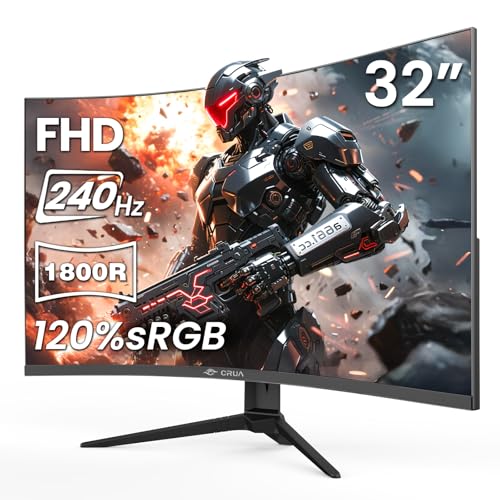
CRUA 32in FHD 240Hz Curved Gaming Monitor 1800R Black
Samsung 32in S3 (S39GD) Series FHD 100Hz Curved Monitor LS32FM803UNXZA

AOC 32 Inch Curved Gaming Monitor CQ32G4VE

LG 32G600A-B 32-inch Ultragear QHD Curved Gaming Monitor
Sceptre Prime Curved 32 inch Gaming Monitor C325B-FW260D Series

Sceptre Curved 32 inch Prime Gaming Monitor C325B-FW260D.A1

LG 32MR50C-B Curved Monitor 32-Inch FHD 100Hz
More Details On Our Top Picks
The Acer Nitro lands in the sweet spot for you if gaming is the main event and desk space still matters. Its 1500R curve, a gentle wrap measured by the curve radius, helps the panel sit naturally in front of you without feeling extreme.
Full HD on a 31.5-inch screen keeps the setup simple, and the 180Hz refresh rate should suit fast mouse movement and console-style action alike. Compared with the Samsung S3 below, this one stays more focused on play than mixed media, so it fits a room where the monitor mostly stays in game mode.
Strong Points
- 180Hz refresh suits fast-paced games and makes motion feel steadier during quick camera pans.
- The 1ms response time is the kind of spec that helps keep fast action looking crisp.
- AMD FreeSync Premium supports smoother frame matching with compatible graphics cards, which can cut visible tearing.
- VESA mounting gives you more freedom on a desk that already feels crowded.
- Blur and flicker reduction features help the monitor feel easier to live with during longer sessions.
Things To Consider
- Full HD on 31.5 inches will look softer than QHD models such as the AOC CQ32G4VE and LG 32G600A-B.
- The feature set is gaming-first, so you do not get the smart-platform extras found on the Samsung S3.
- A curved panel can feel slightly different for spreadsheet-heavy work, especially during long side-by-side windows.
Feature Snapshot
Who It Suits Best
You should look here first for fast-action gamers who want a large curved panel without stepping into higher-resolution pricing territory.
A Better Fit Elsewhere
The AOC CQ32G4VE suits you better for sharper 1440p detail, especially around text-heavy gaming libraries or mixed-use desks.
The CRUA pushes harder on speed than the Acer Nitro, and that matters most if you spend your evenings in twitchy shooters or racing games. Its 1800R curve is a little less aggressive than 1500R designs, so the wrap feels present without taking over your entire line of sight.
The VA panel, meaning vertical alignment, usually brings deeper contrast than basic IPS budget screens, and the 120%sRGB figure points to broader color coverage for a monitor in this class. That said, the 1080p resolution is still the main trade-off, so the panel favors motion over fine detail.
What We Like
- 240Hz is a strong fit for competitive play where every frame of motion matters.
- AMD FreeSync helps the panel work more smoothly with compatible graphics hardware.
- The 3500:1 contrast ratio should give dark scenes more depth than many basic FHD options.
- Low blue light support can make night sessions easier on the eyes in a practical, everyday sense.
- HDMI 2.0 and DisplayPort 1.4 give you workable connection choices for a PC setup.
Worth Noting
- 1080p on 32 inches will not look as crisp as the QHD monitors in this roundup.
- The wall-mount pattern helps with flexibility, but you still need the right arm or bracket for your desk.
- At this speed tier, the display makes most sense for gaming-first use rather than document-heavy work.
Details At A Glance
Who Should Grab It
Fast-paced gamers who want a 32-inch curved screen and place speed above resolution should land here first.
Swap It Out When
The LG 32G600A-B makes more sense for you if you want QHD clarity along with similarly strong motion support.
The Samsung S3 shifts the conversation away from pure gaming and toward a monitor that can also live like a second screen in the home. Smart TV apps and Gaming Hub make it feel more like a hybrid display, which is useful for anyone who streams in the same spot where they work.
USB-C is the standout here because it simplifies laptop hookups, though the 100Hz refresh rate keeps this squarely in everyday territory rather than serious esports territory. Compared with the Acer Nitro and CRUA, it is less about speed and more about tidy desk convenience.
Upsides
- Smart TV apps add flexibility for streaming without a separate device in many setups.
- Gaming Hub gives the panel a broader entertainment role than a plain office monitor.
- USB-C makes laptop connection cleaner, especially on desks that already feel cable-heavy.
- The 100Hz refresh rate is smooth enough for daily work and casual play.
Small Caveats
- 100Hz is fine for mixed use, but it will not match the speed of the CRUA or Sceptre gaming picks.
- The white finish looks clean, though it may show dust more clearly than darker monitors.
- The feature set is broader than the basics, so you are paying for convenience as much as display speed.
Core Details
Made For
You are in the right lane here if your desk doubles as a streaming station, a laptop dock, and a casual gaming spot.
Where A Sibling Pick Shines
The LG 32MR50C-B suits you better if you want a simpler, more straightforward curved screen for office work without the smart-platform layer.
The AOC CQ32G4VE is the first pick here that gives you QHD, meaning 2560 x 1440, and that extra pixel density makes a real difference once you start staring at interface text or detailed game worlds for hours. The 180Hz refresh rate and 0.5ms response time are aimed squarely at responsive play, so this one feels more serious than the Samsung S3 but less desk-friendly than a plain office screen.
HDR support can help bright and dark areas feel more layered, though the real attraction is the way the sharper panel and fast motion work together. In a gaming room with a console or PC, this is a well-rounded middle path that leaves less on the table than the cheaper FHD choices.
Highlights
- QHD resolution gives you sharper text and more detail than 1080p models.
- 180Hz and 0.5ms response combine well for fast, responsive gameplay.
- Adaptive-Sync helps reduce tearing with compatible graphics output.
- HDMI 2.0 and DisplayPort 1.4 make console and PC hookups straightforward.
- VESA mounting gives you more placement options on a tighter desk.
Areas To Watch
- QHD asks more of your graphics hardware than the FHD monitors in the budget tier.
- The 32-inch curved shape can feel large on a shallow desk, especially if your keyboard sits close to the screen.
- Console-ready features help, but the monitor still makes the most sense for a PC-centric setup.
Technical Sheet
Best Suited To
You will get the most from this AOC if you want sharper QHD detail and still care about high-refresh gaming.
Look Elsewhere When
The LG 32MR50C-B is the softer landing if you want a simpler 100Hz monitor for office work and light entertainment.
The LG 32G600A-B sits near the top of this roundup for good reason, because it combines QHD detail with a 1000R curve that pulls the screen in tighter than the Acer or AOC. That deeper bend can feel especially immersive on a centered desk, though it also means you should have enough depth in front of you to keep the screen comfortable.
LG’s 180Hz refresh, 1ms response, AMD FreeSync, HDR10 support, and up to 99% sRGB coverage make this a strong choice for gaming that also spills into content work. In practical terms, it suits you well if you want one monitor that can handle evening matches, weekend streaming, and a fair amount of multitasking without feeling basic.
Best Bits
- QHD resolution keeps text and game art cleaner than the FHD options.
- 1000R curvature gives you a more enveloping feel than milder curved panels.
- HDR10 and up to 99% sRGB help color look fuller and more useful for mixed media.
- The 180Hz refresh rate and 1ms response are a strong pairing for fast motion.
- The tilt, height, and swivel stand gives you useful posture adjustments on the desk.
Softer Spots
- The tighter curve may feel aggressive on a very shallow desk.
- QHD performance asks more from your graphics hardware than 1080p screens.
- The source data does not list extra USB or smart-platform features, so this stays more display-focused than the Samsung S3.
Feature Rundown
The Right Fit
You should lean this way for a gaming desk that also sees streaming, general productivity, and a lot of long sessions.
Another Choice May Suit
The AOC CQ32G4VE is the more practical call if you want similar motion speed with a slightly less immersive curve.
The Sceptre C325B-FW260D is all about raw speed, and the headline number here is the 260Hz refresh ceiling. That puts it in a different lane from the LG 32MR50C-B and Samsung S3, because this one cares far more about motion than about office polish.
The 1500R curve, 1ms response, FreeSync Premium, and built-in speakers round out a very gaming-centered package. You may find the 1080p resolution perfectly acceptable for competitive play, though anyone chasing crisp desktop text will notice the limits faster than they would on the QHD models.
Bright Spots
- Up to 260Hz gives you a very fast refresh ceiling for quick-action games.
- FreeSync Premium helps keep gameplay steadier on compatible systems.
- Built-in speakers can handle basic audio without an immediate external setup.
- The 1500R curve suits centered gaming setups and helps the screen feel wrapped around you.
- Full HD keeps graphics demands lower, which can be useful on midrange PCs.
Room For Improvement
- 1080p on 32 inches is the main compromise, especially for text-heavy work.
- Built-in speakers are convenient, but external audio usually sounds fuller.
- The source data does not mention stand adjustability, so desk ergonomics may depend on your mounting setup.
Feature Card
Whose Shelf It Belongs On
You should consider this Sceptre if your setup is mostly about fast gaming and you want to keep the graphics load modest.
Where Another Pick Suits Better
The AOC CQ32G4VE is the stronger all-rounder if you want sharper 1440p detail and a more balanced mix of work and play.
This newer Sceptre keeps the same speed-first spirit as the previous model, but it adds HDMI x2, DisplayPort x2, and 110% sRGB, so it feels more flexible on the back end. That extra port spread matters if you swap between a PC and another source often, or you simply like fewer cable headaches.
The 240Hz HDMI ceiling and 260Hz DisplayPort ceiling make the monitor easy to place in a gaming room, and the 1ms response keeps the spec sheet aligned with competitive use. Compared with the older Sceptre C325B-FW260D, this one is the more adaptable choice for mixed connection needs.
Reasons To Buy
- Multiple HDMI and DisplayPort inputs make source switching easier.
- 110% sRGB suggests a wider color reach than many basic FHD gaming screens.
- Up to 260Hz over DisplayPort keeps the motion ceiling high.
- FreeSync Premium supports smoother frame delivery with compatible hardware.
- The built-in speakers are there for quick setups and casual use.
Minor Gripes
- 1080p still limits text clarity compared with the QHD picks in this roundup.
- The high-end color and refresh figures mostly matter when your PC or console can keep up.
- Speaker quality is usually the first thing serious gaming rooms outgrow.
Core Details
Built With In Mind
You should look here if you switch between devices and want fast gaming motion without giving up flexible inputs.
Skip It When
The LG 32G600A-B is a better match if you care more about sharper QHD detail than port variety.
The LG 32MR50C-B is the easygoing pick in this lineup, the one that makes sense for a home office that also handles streaming and the occasional game. Its 3-side border-light frame keeps the screen from feeling bulky, and the 100Hz refresh rate is enough to make scrolling feel calmer than on a plain 60Hz display.
Dynamic Action Sync and Black Stabilizer are gaming-friendly tools, but the bigger story is that this monitor stays simple in a useful way. Compared with the Samsung S3, it skips the smart-platform extras and leans into straightforward desk duty, which is exactly the point for many setups.
Positives
- 100Hz gives you a smoother everyday feel than a standard office panel.
- AMD FreeSync helps reduce roughness in compatible games.
- The border-light design keeps the screen visually tidy on a desk.
- Black Stabilizer and Dynamic Action Sync give you a few gaming extras without complicating use.
Points To Note
- FHD is fine for everyday use, but it does not match the detail level of the QHD picks.
- HDMI-only connectivity may feel limiting for setups that need several source options.
- The tilt-only stand keeps things simple, though some desks may benefit from more adjustment range.
Quick Facts
Perfect Match For
You should choose this LG if you want a curved 32-inch monitor that feels calm, simple, and useful for work-first desks.
Reach For A Different Pick When
The Samsung S3 makes more sense for you if smart apps and USB-C matter more than a stripped-back display setup.
How To Choose The Right Curved 32 Inch Monitors
Match Resolution To Desk Distance
At 32 inches, resolution is the first trade-off you feel in daily use. Full HD is easier on the graphics card and works fine for casual gaming or office tasks, but text and interface edges look softer than on QHD screens like the AOC CQ32G4VE and LG 32G600A-B.
QHD, meaning 2560 x 1440, gives you more detail and more room for side-by-side windows. That extra clarity matters most when your desk doubles as a work station, not just a game spot.
Let Refresh Rate Follow Your Routine
Refresh rate is how many times per second the image updates, and it shapes how smooth motion feels. A 100Hz panel is pleasant for work and casual play, 180Hz sits in a strong middle ground, and 240Hz or higher starts making the most sense for fast shooters, racing games, and other speed-heavy genres.
You do not need the fastest panel just because it sounds impressive. The better move is to match the number to the game types you actually play and the graphics power in the machine you already own.
Choose Curve Depth With Your Desk In Mind
Curvature is measured in R values, and a lower number means a tighter bend. A 1000R screen feels more enveloping, 1500R lands in a milder gaming-friendly zone, and 1800R gives you a gentler wrap that can feel easier for mixed use.
On a shallow desk, a very tight curve may feel close. On a deeper desk, it can feel natural, almost like the panel is sitting where your eyes want it anyway.
Look Past Motion Specs
Input options, stand adjustment, and panel type matter more than they first appear. USB-C helps if you dock a laptop often, tilt and height adjustment help during long work sessions, and VA panels usually lean toward stronger contrast than plain budget screens.
Those details do not sound flashy, but they shape ownership every single day. A monitor that fits your desk, your cables, and your chair will feel better long after the headline refresh number stops being exciting.
Things Worth Knowing First
Hidden Buying Traps
Many shoppers fixate on refresh rate and forget the resolution penalty. A 32-inch 1080p screen can be perfectly usable, yet it will not give you the same crispness as QHD when you are reading spreadsheets or browsing dense text.
Another common miss is stand flexibility. A monitor with only tilt may still work well, but a height-adjustable stand or VESA mount support can save your neck over long sessions.
The Case For Spending Up
Higher-tier curved 32-inch monitors usually spend the extra money on sharper panels, faster motion handling, and better ergonomics. QHD resolution, 180Hz-plus refresh rates, stronger color coverage, and more adjustable stands all tend to show up once you move beyond entry-level models.
That upgrade pays off when your desk is a daily workhorse. A better screen can feel calmer to use, easier to read, and less likely to feel like a compromise after a few months.
Closing Thoughts
For your shortlist, the best choice depends on the mix of speed, clarity, and desk flexibility you need. The Acer Nitro and Sceptre options lean hard toward gaming motion, the AOC and LG QHD models bring sharper detail, and the Samsung S3 adds a more lifestyle-friendly angle. The LG 32MR50C-B stays the simplest all-round desk companion. Match the screen to the way you actually use your space, and the choice becomes much easier.
